
0x00 Preface
---
In the previous article 'Penetration Techniques - Exporting Saved Passwords from Chrome Browser', the principles and exploitation methods for exporting Chrome browser passwords were introduced. This article will introduce the principles and exploitation methods for exporting Firefox browser passwords, analyzing the exploitation approach.
0x01 Introduction
---
This article will cover the following topics:
- Password Storage Methods
- Principle Introduction
- Common Export Tools
- Exploitation Approach
0x02 Password Storage Methods
---
When normal users visit websites, they can choose to have the Firefox browser save their login credentials, allowing Firefox to automatically fill in the passwords during subsequent logins.
These can be viewed by selecting Logins and Passwords, as shown in the figure below.
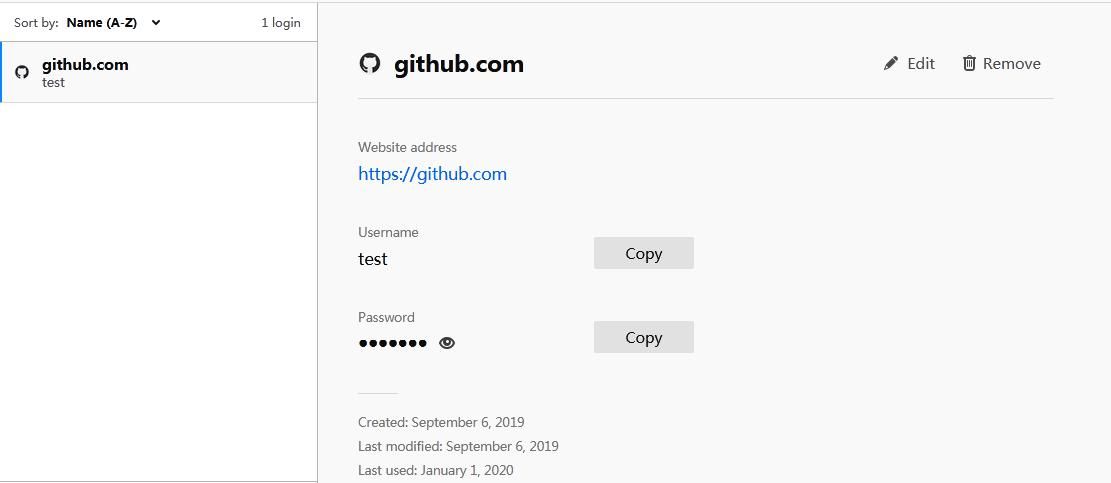
Includes the following information:
- Website address
- Username
- Password
- Created
- Last modified
- Last used
All records are stored in the same file, specifically located at: %APPDATA%\Mozilla\Firefox\Profiles\xxxxxxxx.default\
Note:
xxxxxxxx is an 8-character random combination of letters and numbers
The file name for saving records varies across different versions of Firefox, with specific differences as follows:
- For versions greater than or equal to 32.0, the file for saving records is logins.json
- For versions greater than or equal to 3.5 but less than 32.0, the file for saving records is signons.sqlite
For more detailed file descriptions, refer to:
http://kb.mozillazine.org/Profile_folder_-_Firefox
Download links for different versions of Firefox:
http://ftp.mozilla.org/pub/firefox/releases/
To locate the logins.json file via cmd command, the content is as follows:
dir %APPDATA%\Mozilla\Firefox\Profiles\*logins.json /s /b |
View the content of the logins.json file, as shown in the figure below
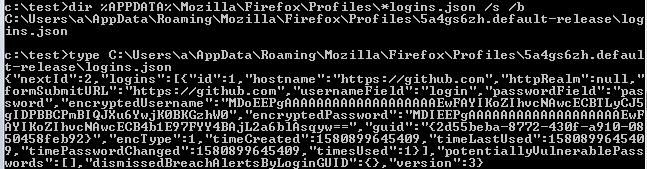
The encryptedUsername and encryptedPassword are encrypted content; decryption requires obtaining the key file (key and iv) and performing 3DES-CBC decryption
The location of the key file varies across different versions of Firefox, with specific differences as follows:
- For versions less than 58.0.2, the key file is key3.db
- For versions greater than or equal to 58.0.2, the key file is key4.db
Note:
The version distinction between key3.db and key4.db originates from https://github.com/lclevy/firepwd/blob/master/firepwd.py#L236
In my test system (Win7x64) with 64-bit Firefox installed, the test results differ, specifically as follows:
- If the Firefox version is below 58.0, the key file is key3.db
- If Firefox is a higher version, the key file is key4.db
By default, the current user's permissions allow viewing all passwords saved in the Firefox browser. To enhance security, Firefox supports adding extra protection for saved passwords: setting a Master Password
The specific location is shown in the figure below
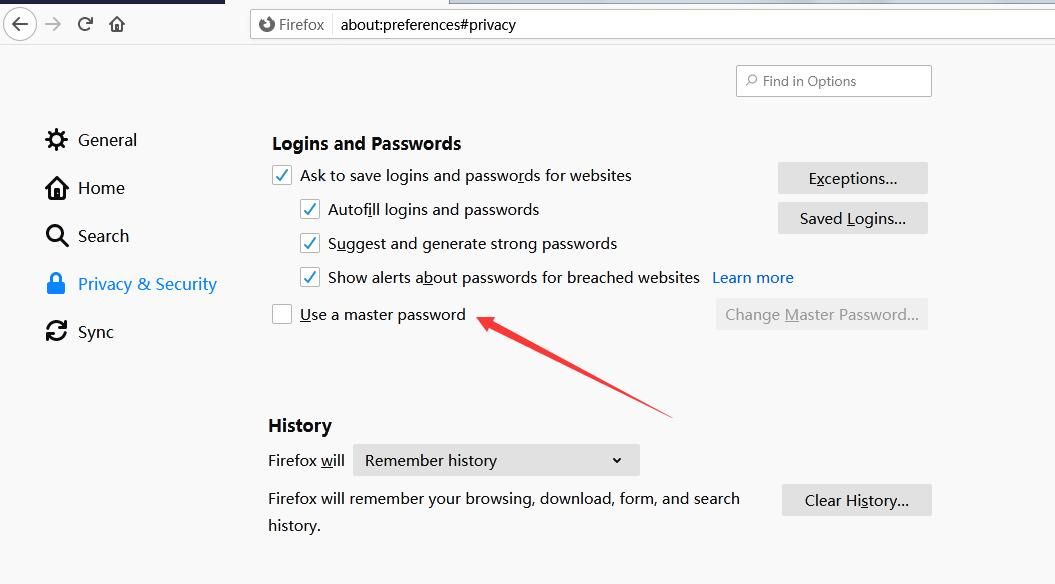
After adding a Master Password, viewing saved passwords requires entering the Master Password
Decryption process:
- Read the key file (key4.db or key3.db) to obtain the key and iv
- Read the contents of the record file (logins.json or signons.sqlite)
- If no Master Password is set, use the key and iv to perform 3DES-CBC decryption on the encrypted content in the record file
If a Master Password is set, the plaintext Master Password must also be obtained to proceed with decryption
0x03 Export Tools
---
1. WebBrowserPassView.exe
Download address:
https://www.nirsoft.net/utils/web_browser_password.html
Note:
This version does not support command-line operations
The command-line version needs to be downloaded from another address:
https://www.nirsoft.net/password_recovery_tools.html
Usage in command line:
WebBrowserPassView.exe /LoadPasswordsFirefox 1 /shtml "c:\test\passwords.html" |
The result is saved in c:\test\passwords.html, with content as shown in the figure below
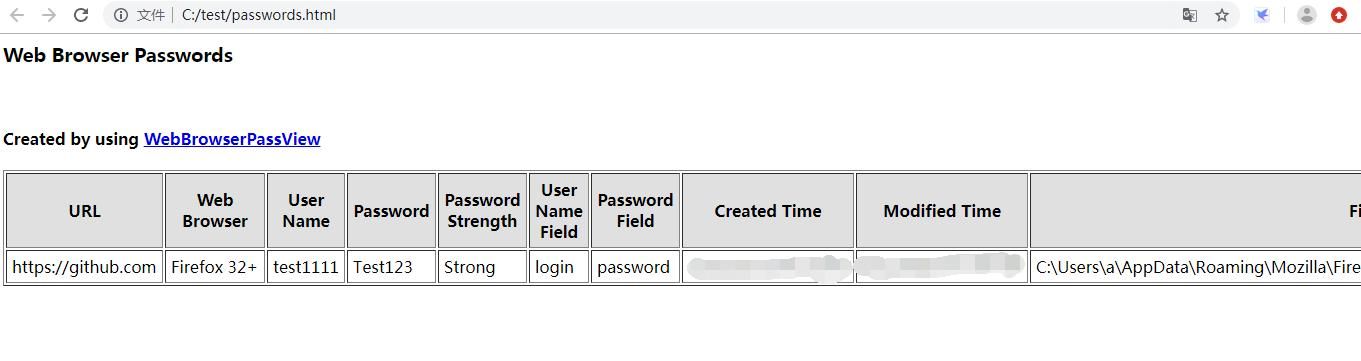
Can obtain complete information, including the following categories:
- Website address
- Username
- Password
- Created
- Last modified
- Last used
Decryption using Master Password is not supported
2. firepwd.py
Address: https://github.com/lclevy/firepwd
Dependencies need to be installed:
pip install pyasn1 |
Can obtain partial information, including the following categories:
- Website address
- Username
- Password
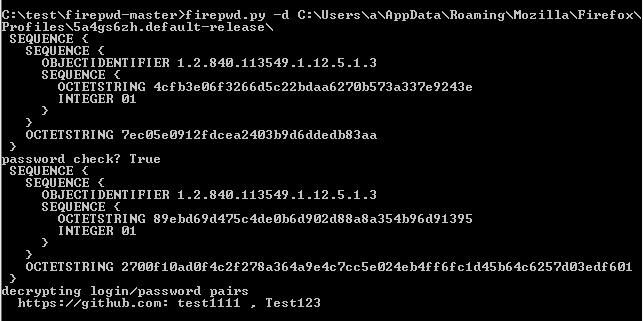
Command example:
firepwd.py -d C:\Users\a\AppData\Roaming\Mozilla\Firefox\Profiles\5a4gs6zh.default-release\ |
Result as shown in the figure below
Decryption using Master Password is supported
Note:
In my own testing environment, firepwd.py only supports Master Password decryption for key3.db; there is a bug in Master Password decryption for key4.db
Command example:
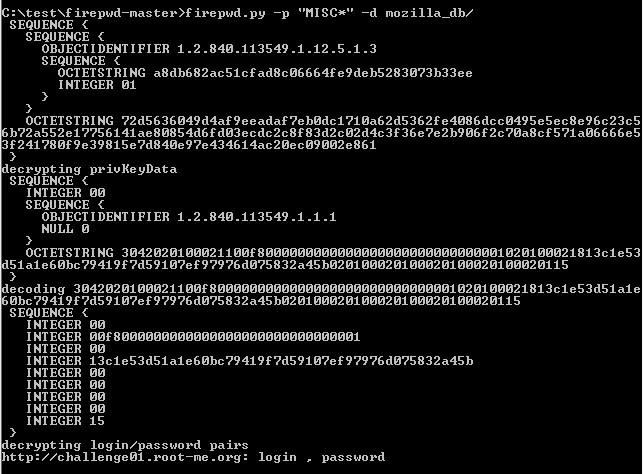
Using the test file mozilla_db (key3.db), with Master Password as MISC*, the command is as follows:
python firepwd.py -p 'MISC*' -d mozilla_db/ |
The result is normal, as shown in the figure below
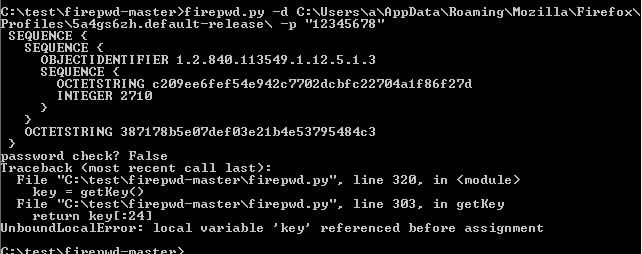
In my testing environment (key4.db), with Master Password as 12345678, the command is as follows:
firepwd.py -d C:\Users\a\AppData\Roaming\Mozilla\Firefox\Profiles\5a4gs6zh.default-release\ -p "12345678" |
There is a bug in decryption, prompting password failure, as shown in the figure below
3.Lazagne
Address:
https://github.com/AlessandroZ/LaZagne/
The code for exporting Firefox browser comes from https://github.com/lclevy/firepwd
Same result as above, as shown in the figure below

4.firefox_decrypt.py
Address: https://github.com/unode/firefox_decrypt
Uses NSS (Network Security Services) for decryption, supports Master Password decryption for key3.db and key4.db
Can obtain partial information, including the following categories:
- Website address
- Username
- Password
Test results as shown in the figure below
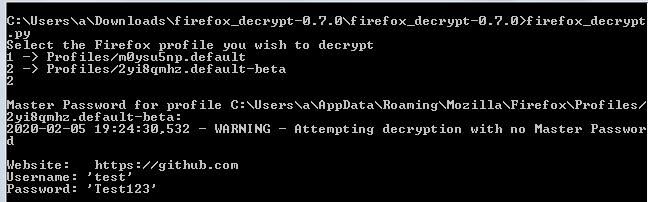
On 64-bit systems, the Python and Firefox versions must match (both 32-bit or both 64-bit), otherwise it will prompt ERROR - Problems opening 'nss3.dll' required for password decryption
Note:
The next article 'Exporting Passwords Saved in Firefox Browser via Network Security Services' will detail the specifics of decryption via NSS
5.Firefox Browser
By exporting configuration files
Need to obtain the record file (logins.json or signons.sqlite) and the key file (key4.db or key3.db), saved in the local folder C:\test\data1
Start Firefox using the -profile parameter:
firefox.exe -profile C:\test\data1 |
Enter the correct Master Password to successfully obtain the information saved by the Firefox browser
0x04 Exploitation Approach
---
If Firefox has a Master Password set, using the above tools to attempt to export passwords will show 0 results, so it is necessary to first read the record file to confirm if records exist
The Firefox version can be obtained by querying the registry, refer to previously open-source code: an open-source project
Different versions of Firefox correspond to different record files, with specific differences as follows:
- Version greater than or equal to 32.0, the record file saved is logins.json
- Version greater than or equal to 3.5, less than 32.0, the record file saved is signons.sqlite
The command to locate the logins.json file is as follows:
dir %APPDATA%\Mozilla\Firefox\Profiles\*logins.json /s /b |
The command to locate the signons.sqlite file is as follows:
dir %APPDATA%\Mozilla\Firefox\Profiles\*signons.sqlite /s /b |
If records exist, you can then use tools to attempt export
The following issues need attention during offline export:
1. No Master Password set
Only need to obtain the record file (logins.json or signons.sqlite) and the key file (key4.db or key3.db)
Use firepwd.py or import the configuration file into the Firefox browser
2. Master Password set
(1) Only obtain the record file (logins.json or signons.sqlite) and the key file (key4.db or key3.db)
Import the configuration file locally into the Firefox browser and enter the Master Password
(2) Need to obtain the complete configuration file
Must include the following files:
- %APPDATA%\Mozilla\Firefox\profiles.ini
- Files in %APPDATA%\Mozilla\Firefox\Profiles\xxxxxxxx.default\
Use firefox_decrypt.py, command example:
firefox_decrypt.py C:\test\data1 |
0x05 Summary
---
This article introduces the principles and exploitation methods for exporting Firefox browser passwords, analyzing the details to note when decrypting with a Master Password.
For regular users, to enhance password security, it is recommended to set a Master Password.


