
0x00 Introduction
---
In the previous article 'Penetration Techniques - Deletion and Bypass of Windows Logs', common methods for clearing and bypassing Windows logs were introduced, but the deletion of single log entries was not mentioned.
This time, building on the recently completed series on Windows XML Event Log (EVTX) single log entry deletion, we will introduce specific usage methods for deleting single Windows XML Event Log (EVTX) entries in penetration testing, along with defensive recommendations based on exploitation ideas.
Addresses for the Windows XML Event Log (EVTX) single log entry deletion series articles:
-
Windows XML Event Log (EVTX) Single Log Entry Deletion (Part 1) - Deletion Approach and Examples
-
Windows XML Event Log (EVTX) Single Log Entry Deletion (Part 2) - Program Implementation for Deleting Single Log Entries in EVTX Files
-
Windows XML Event Log (EVTX) Single Log Entry Deletion (Part 3) - Deleting Single Log Entries in the Current System by Releasing File Handles
-
Windows XML Event Log (EVTX) Single Log Entry Deletion (Part 4) - Deleting Single Log Entries in the Current System by Injecting to Obtain Log File Handles
-
Windows XML Event Log (EVTX) Single Log Deletion (Part 5) – Deleting a Single Log Record from the Current System by Acquiring Log File Handle via DuplicateHandle
0x01 Introduction
---
This article will cover the following:
- Obtaining log information via command line
- Exporting log files via command line
- Overwriting the original system file with the modified log file
- Details and considerations
- Defense recommendations
0x02 Obtaining Log Information via Command Line
---
1. Obtain the last ten logs from Security
wevtutil.exe qe Security /f:text /rd:true /c:10 |
2. Obtain the first ten Security logs:
wevtutil.exe qe Security /f:text /c:10 |
Note:
The text view does not output EventRecordID
You can obtain the EventRecordID corresponding to the log by viewing the XML format
wevtutil.exe qe Security /f:xml /rd:true /c:10 |
Note:
The default view is XML, so the command can be simplified as:
wevtutil.exe qe Security /rd:true /c:10 |
Reference official documentation:
https://docs.microsoft.com/en-us/previous-versions/windows/it-pro/windows-server-2012-R2-and-2012/cc732848(v=ws.11)
0x03 Exporting Log Files via Command Line
---
Exported log files can be downloaded and opened locally, with the file extension .evtx
1. Export all Security logs and save as 1.evtx
wevtutil.exe epl Security 1.evtx |
2. Filter logs and save
(1) Delete a single log entry and save
Delete a single log entry under Security (EventRecordID=1112) and save as 1.evtx
wevtutil epl Security 1.evtx "/q:*[System [(EventRecordID!=1112)]]" |
(2) Delete multiple log entries and save
1. Filter by EventRecordID
Delete multiple log entries under Security (EventRecordID 13030, 13031, and 13032) and save the result as 1.evtx
wevtutil epl Security 1.evtx "/q:*[System [(EventRecordID>13032) or (EventRecordID<13030)]]" |
2. Filter by SystemTime
Note:
SystemTime must consider the impact of time zones
When querying log information via wevtutil with output format as text, time does not account for time zones
When viewing log information via the Windows interface, displayed time also does not account for time zones
When querying log information via wevtutil with output format as xml, system time considers time zones
Example:
Query the time of the most recent log entry via wevtutil with output format as text, as shown in the figure below
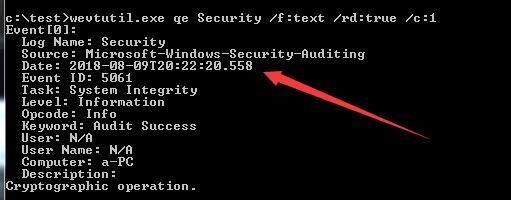
Date: 2018-08-09T20:22:20.558
View the timestamp of the most recent log via the Windows interface, as shown in the figure below

Timestamp: 2018-08-09T20:22:20.558
Query the timestamp of the most recent log using wevtutil, with output in XML format, as shown in the figure below
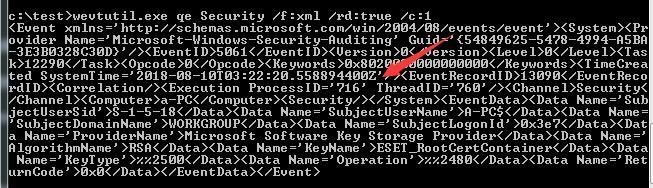
Timestamp: SystemTime='2018-08-10T03:22:20.558894400Z'
Time difference of 7 hours
Therefore, when deleting logs for a specified date, it is necessary to view the XML format to obtain the SystemTime
Delete logs with SystemTime between 2018-08-10T03:20:00 and 2018-08-10T03:21:00, and save the result as 1.evtx
wevtutil epl Security 1.evtx "/q:*[System [TimeCreated[@SystemTime >'2018-08-10T03:21:00' or @SystemTime <'2018-08-10T03:20:00']]]" |
0x04 Overwrite the original system file with the modified log file
---
After deleting one or several log entries, it is necessary to overwrite the original system file with the modified log file
The following three methods can be adopted
1. By releasing file locks
For details, refer to 'Windows XML Event Log (EVTX) Single Log Deletion (Part 3) – Deleting a Single Log Record in the Current System by Releasing File Locks' (单条日志清除-三-通过解除文件占用删除当前系统单条日志记录)
The implementation approach is as follows:
- Terminate the log process
- Release the log file handle
- Replace the log file
- Restart the log service
The code in the article requires minor modifications; the modified code can be referenced in:
An open-source project).cpp
The code implements terminating the log process, releasing the log file handle, replacing the specified log file, and finally restarting the log service
2. By injection
For details, refer to 'Windows XML Event Log (EVTX) Single Log Deletion (Part 4) – Deleting a Single Log Record in the Current System by Injecting to Obtain the Log File Handle' (单条日志清除-四-通过注入获取日志文件句柄删除当前系统单条日志记录)
The implementation approach is as follows:
(1) Loader
- Inject DLL into log process
- Create three memory mappings to pass log file handle, new log file length, and new log file content to DLL
- Release DLL
- Close memory mapping
Reference code:
`An open-source project
(2) DLL
- Read content from memory mapping to obtain log file handle and new log file content
- Call function MapViewOfFile() to map file data to process address space
- Modify memory data, overwriting with new log file content
- Call function FlushViewOfFile() to write memory data to disk
- Close memory mapping of log file
Reference code:
`An open-source project
3. Via DuplicateHandle
For details, please refer to "Windows XML Event Log (EVTX) Single Log Deletion (Part 5) – Deleting a Single Log Record in the Current System by Obtaining Log File Handle via DuplicateHandle" (单条日志清除-五-通过DuplicateHandle获取日志文件句柄删除当前系统单条日志记录).
The implementation approach is as follows:
- Enumerate all processes to obtain the specified file handle.
- Duplicate the handle using DuplicateHandle.
- Call the function MapViewOfFile() to map the file data into the process's address space.
- Modify the memory data, overwriting it with the content of the new log file.
- Call the function FlushViewOfFile() to write the memory data to disk.
- Close the memory mapping of the log file.
Reference code:
`An open-source project
0x05 Complete Implementation Process
---
1. Suspend the log thread to prevent the current system from logging further.
Reference code:
`An open-source project
The code supports three operations: suspend, resume, and kill
2. Filter logs and save them
Two methods
(1) Delete specified logs by filtering conditions
Refer to the content of 0x03 for the method
Advantages:
Simple and efficient
Disadvantages:
After deleting specified logs, the EventRecordID of subsequent logs is not updated. By comparing the EventRecordID of each log one by one, the number and time range of deleted logs can be identified
(2) Implement it yourself
Reference code:
`An open-source project
The advantage is leaving no trace
The disadvantage is that implementation is more complicated, requiring consideration of multiple scenarios and multiple chunks
3. Overwrite the original system log file
Three methods:
(1) By releasing file occupation
In some cases, closing the Eventlog process and restarting the Eventlog service will generate log files located under system, with EventID 7034 and 7036
You can choose to suspend the thread immediately after log restart to avoid log recording. Reference code:
`An open-source project
When the log process does not exist, the program will keep waiting
(2) Through injection
There are cases where injection fails or is intercepted
There are race conditions that cause deletion failure
(3) Through DuplicateHandle
There are race conditions that cause deletion failure
In summary, a total of *23=6** methods for deleting single log entries are introduced
Supplement:
By default, configurations for PowerShell versions below v5.0 generate logs when powershell.exe is launched, located at %SystemRoot%\System32\Winevt\Logs\Windows PowerShell.evtx
The logs do not record specific script content but include the startup time of powershell.exe
Suspending the logging thread does not prevent the generation of this log
It is possible to clear individual entries from this log
For bypassing logging in higher versions of PowerShell, refer to the article:
https://www.mdsec.co.uk/2018/06/exploring-powershell-amsi-and-logging-evasion/
4. Restore the logging thread and resume logging functionality
Reference code available:
`An open-source project
0x06 Defense Recommendations
---
When an attacker gains full system permissions, the system's logging functionality may become ineffective, as it can be disabled or modified
Therefore, for forensic purposes, logs are no longer reliable; consider regularly backing up logs to a remote server
0x07 Summary
---
This article introduces the specific usage of Windows XML Event Log (EVTX) single log deletion in penetration testing, providing defense recommendations based on exploitation strategies.


