
0x00 Preface
---
A backdoor technique previously employed by the notorious malware Poweliks involves creating a special registry key in the startup location, which executes the payload via mshta.
Why is this special registry key inaccessible under normal circumstances? What is the underlying principle? How can it be read, created, and deleted? This article will address each of these questions.
0x01 Introduction
---
This article will cover the following topics:
- The principle behind hidden registry entries
- The implementation of hidden registry entries
- Considerations for programming
0x02 Principle
---
The registry key name is specially constructed: it begins with "\0" followed by any character (which cannot be a digit).
For the Windows system, "\0" (i.e., 0x0000) is recognized as a string terminator. Therefore, during the reading of this string, encountering the leading "\0" causes it to be interpreted as the terminator, resulting in premature truncation and a read error.
When using Native API to set the registry, the OBJECT_ATTRIBUTES structure is required as a parameter to specify the length of the string to be read.
As long as the length is set correctly, the correct string can be read, avoiding this bug.
Therefore, we can create this special registry name through Native API.
More importantly, operations like regedit.exe and other registry manipulations typically call Win32 API, which prevents this registry from being read, thus achieving the so-called 'hidden' effect.
In summary, the creation method is:Create a key value starting with '\0' through Native API.
0x03 Program Implementation
---
For implementing registry operations via Native API, a reference project address is:
https://www.codeproject.com/Articles/14508/Registry-Manipulation-Using-NT-Native-APIs
Author Dan Madden, whose code uses class encapsulation.
Personally, I prefer to use the most basic API implementation, so I redesigned it based on his code.
For Native API, the required structures are as follows:
1. Obtain the address of the Native API.
The relevant Native APIs for registry operations can be obtained from ntdll.dll.
The key code is as follows:
HINSTANCE hinstStub = GetModuleHandle(_T("ntdll.dll")); |
2. Redefinition and declaration of Native API
Native APIs require redefinition and declaration before use
Partial key code is as follows:
typedef NTSTATUS (STDAPICALLTYPE NTOPENKEY) |
3. Usage of special structures
The following structures are used by registry operation-related Native APIs and need to be defined and declared.
- InitializeObjectAttributes
- _STRING
- _UNICODE_STRING
- _OBJECT_ATTRIBUTES
- _KEY_INFORMATION_CLASS
- _KEY_BASIC_INFORMATION
- _KEY_VALUE_PARTIAL_INFORMATION
- _KEY_VALUE_INFORMATION_CLASS
- RtlInitAnsiString
- RtlAnsiStringToUnicodeString
Dan Madden's project implements the creation of hidden registry keys (registry key names starting with \0), where key values under this registry key are created, read, and deleted using normal Native APIs.
The implementation process using the most basic APIs will not be elaborated further; the encapsulated API source code can be referred to via the link provided at the end.
Testing the features included in Dan Madden's project:
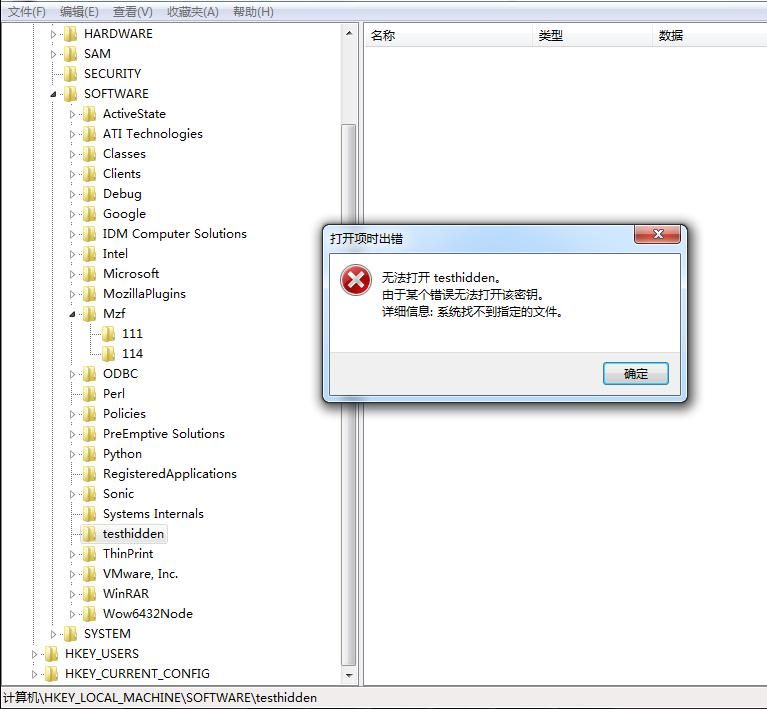
1. Create a hidden registry key.
MyCreateHiddenKey("\\Registry\\Machine\\Software\\testhidden");
The registry key cannot be opened using the registry tool regedit.exe, as shown in the figure below
2. Create a registry key value under this registry
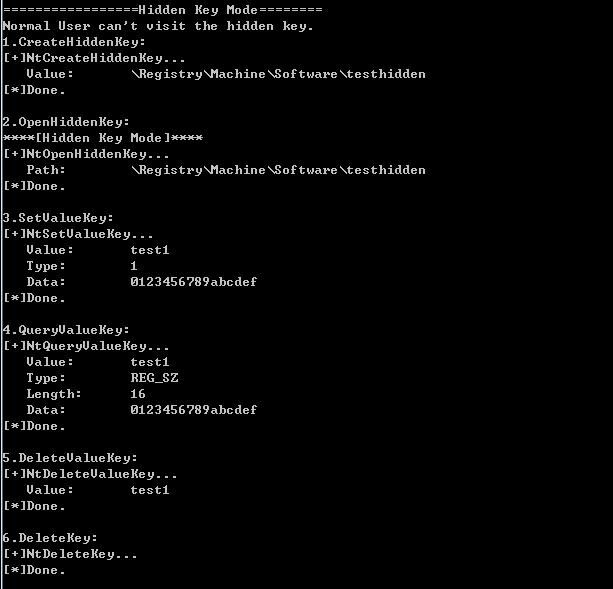
First, obtain the handle to this registry key:
hKey = MyOpenHiddenKey("\\Registry\\Machine\\Software\\testhidden");
Create the key value test1 under the registry key and assign a value:
MySetValueKey(hKey,"test1","0123456789abcdef",REG_SZ);
Read the content of the key value test1 under this registry key:
MyQueryValueKeyString(hKey,"test1");
Delete the key value test1 under this registry key:
MyDeleteValueKey(hKey,"test1");
Delete the registry key:
MyDeleteKey(hKey);
The program output is shown in the figure below, successfully operating on normal key values under the hidden registry key
Next, add new functionality to Dan Madden's project: create, read, and delete hidden registry key values. The approach is as follows:
To hide a registry key, prepend a "\0" to the beginning of the registry key's name.
For hiding registry key values, the principle is also to prepend a "\0" to the beginning of the value name, but more attention is needed regarding parameter passing.
1. Functionality that does not require modification
The functions for creating, opening, and deleting registry keys do not need modification; use normal names.
2. Setting registry key values
Corresponds to MySetHiddenValueKey in the source code.
The input parameter uses a char array to define the registry key value name, with the content being "\0abcd".
Due to the presence of "\0", strlen cannot be used directly to calculate the array length.
Workaround:
Calculate the array length starting from offset 2, then add 2.
That is, len = strlen(buf+2)+2
The Native API NtSetValueKey is used to set the key value, defined as follows:
typedef NTSTATUS (STDAPICALLTYPE NTSETVALUEKEY) |
The second parameter specifies the key value name and requires the UNICODE_STRING structure.
Normally, we need to first use RtlInitAnsiString to convert the passed buf array into the ANSI_STRING structure, then use RtlAnsiStringToUnicodeString to convert it into the UNICODE_STRING structure as a parameter.
Due to the presence of "\0", RtlAnsiStringToUnicodeString cannot be used.
Therefore, we need to implement the conversion from the ANSI_STRING structure to the UNICODE_STRING structure ourselves.
For the conversion from ANSI to UNICODE, in terms of length calculation, simply multiply by 2.
For the array content, assign values to odd positions and fill even positions with 0x00.
Of course, we need a temporary buffer array TempBuff to achieve the conversion of array content.
The key code is as follows:
ValueName.Length = asName.Length*2; |
The fourth parameter specifies the key value content, requiring conversion of the passed char array to WCHAR
Key code:
WCHAR wszValue[1024]; |
3. Read registry key value
Corresponds to MyQueryHiddenValueKeyString in the source code
Refer to 2, note the impact of "\0"
4. Delete registry key value
Corresponds to MyDeleteHiddenValueKey in the source code
Refer to 2, note the impact of "\0"
Actual test:
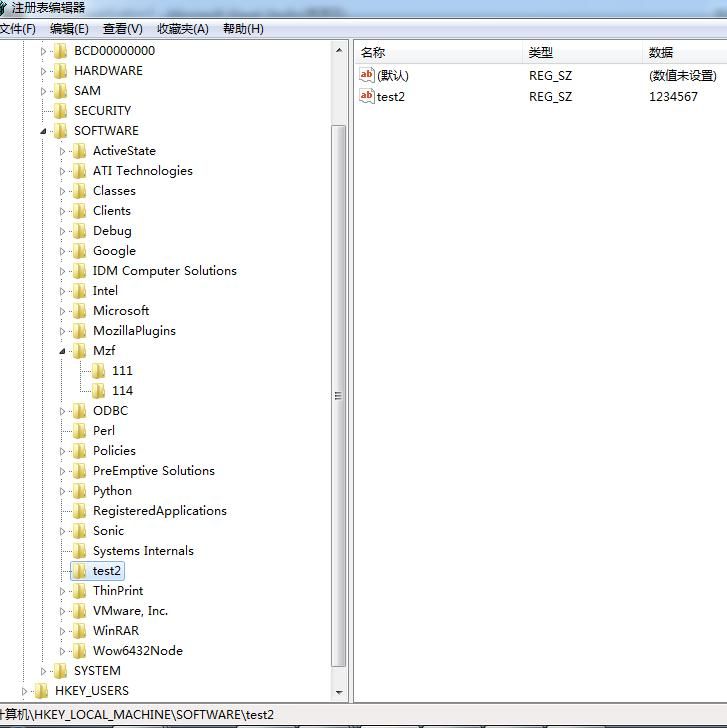
Create registry key test2, create hidden registry key value \0test2, create normal registry key value test2
Open directly, as shown below
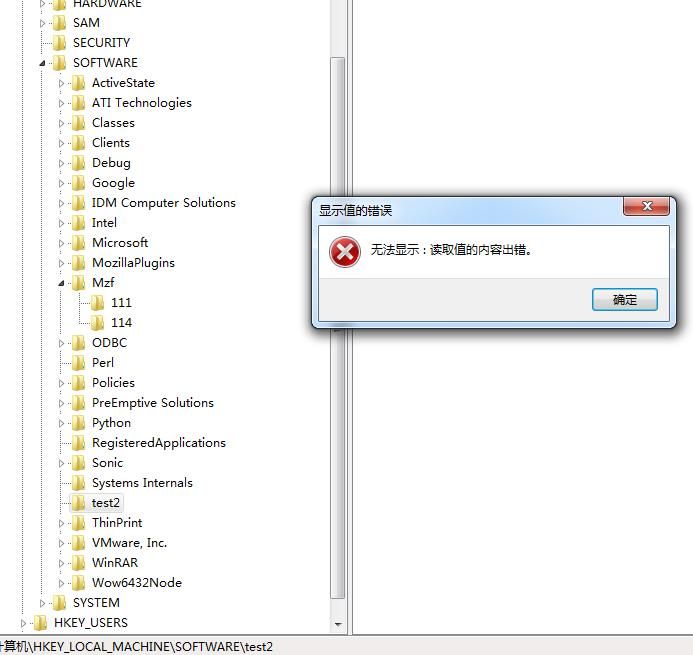
Can normally access registry key value test2, but cannot access registry key value \0test2
As shown in the figure below
However, the program we wrote can read it normally, as shown in the figure below
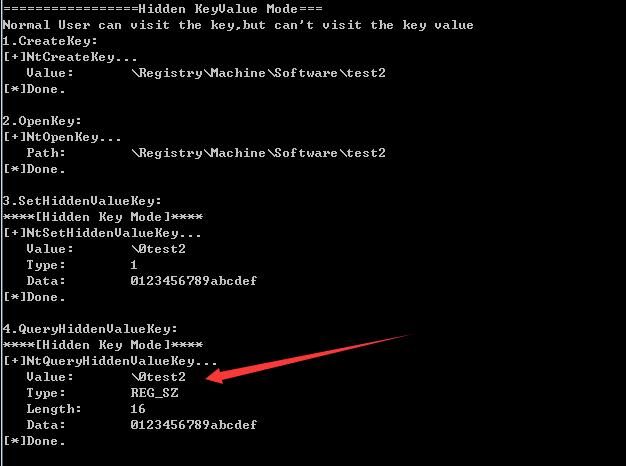
At this point, successful hiding of registry key values has been achieved
The above functional code has been open-sourced, and the address is as follows:
An open-source project
0x04 PowerShell Implementation
---
You can refer to Brian Reitz's project, the address is as follows:
https://gist.github.com/brianreitz/feb4e14bd45dd2e4394c225b17df5741
For specific details, please refer to:
https://posts.specterops.io/hiding-registry-keys-with-psreflect-b18ec5ac8353?source=collection_archive---------2----------------
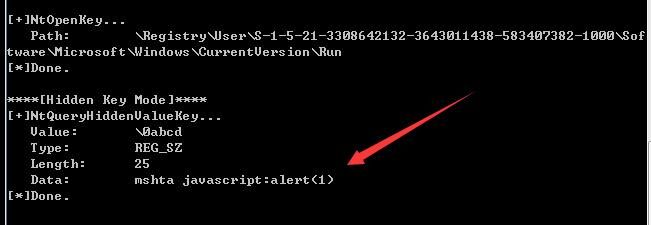
Implemented creating a key value \0abcd under HKEY_CURRENT_USER\Software\Microsoft\Windows\CurrentVersion\Run, with the content mshta javascript:alert(1)
Using the program we wrote successfully read this key value, as shown in the figure below
0x05 Supplement
---
PSReflect-Functions contains multiple example codes for calling APIs via PowerShell, with the address as follows:
https://github.com/jaredcatkinson/PSReflect-Functions
0x06 Summary
---
This article introduces the registry hiding techniques used by Poweliks, analyzes the principles, implements the functionality in C code, and tests the PowerShell implementation code


