
0x00 Introduction
---
In the previous article "Penetration Techniques - Acquisition and Clearing of Windows System File Execution Records", common file execution record locations on Windows hosts (Win7 and above systems) were organized, attempting to acquire and clear single records, analyze exploitation approaches, and summarize defense methods.
As a follow-up, this article details the methods for clearing single records in RecentFileCache.bcf and Amcache.hve
0x01 Overview
---
- RecentFileCache.bcf Format Analysis
- Developing a Program to Clear Single Records in RecentFileCache.bcf
- Amcache.hve Format Analysis
- Developing a Program to Clear Single Records in Amcache.hve
0x02 RecentFileCache.bcf Format Analysis
---
Introduction
Used to track application compatibility issues with different executable files, capable of recording application execution history
Supports Win7 (systems Win8 and above are not supported), location:
C:\Windows\AppCompat\Programs\RecentFileCache.bcf |
Format Analysis
No information was found describing the RecentFileCache.bcf file format, but fortunately the pattern of the format is relatively simple
The first 20 bytes are the file header
The first 16 bytes are in a fixed format, as shown in the figure below
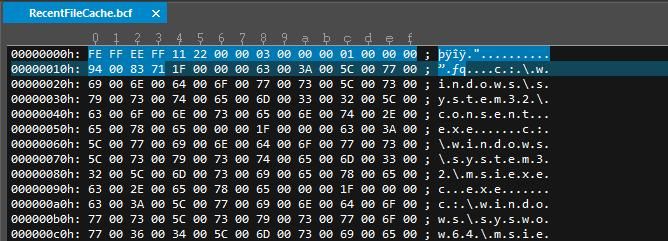
Next is the content of each record, with a fixed format as follows:
- The first 4 bytes indicate the length of the Unicode record
- Record content (in Unicode format)
- End marker, 0x0000
Note:
Each Unicode character occupies 2 bytes
The following uses a C program to implement the parsing of the RecentFileCache.bcf file
Define structure
typedef struct _BCF_HEADER { |
typedef struct _BCF_RECORD { |
Note:
ULONG64 is 8 bytes, ULONG is 4 bytes
Parse each record individually, determine the record length via the fixed variable Size, then read the content of each record
The complete implementation code has been open-sourced, address as follows:
An open-source project
The code implements reading the RecentFileCache.bcf file and displaying all records
0x03 Single record clearing in RecentFileCache.bcf file
---
The simplest method is to overwrite the record to be deleted with the character 0x00, but this disrupts the original file format.
Therefore, it is necessary to delete the content of the record to be removed and fill the gap with subsequent records.
In terms of program implementation, a new array is used to store the modified content.
The complete implementation code has been open-sourced, and the address is as follows:
An open-source project
The code modifies the specified RecentFileCache.bcf file, deletes the specified record, and saves the new file as NewRecentFileCache.bcf.
0x04 Amcache.hve Format Analysis
---
Introduction
Windows systems use Amcache.hve to replace RecentFileCache.bcf, which can record creation time, last modification time, SHA1, and some PE file header information.
Windows 8 and later systems use Amcache.hve instead of RecentFileCache.bcf.
After installing KB2952664 on Windows 7, Amcache.hve is also supported, meaning that both RecentFileCache.bcf and Amcache.hve contain file execution records at this point.
Amcache.hve uses the registry format to store information.
For the format of registry files, refer to:
http://www.sentinelchicken.com/data/TheWindowsNTRegistryFileFormat.pdf
The appendix section includes detailed file format descriptions that can serve as references for program implementation.
To improve development efficiency, we can utilize regedit.exe on Windows systems for parsing records.
By loading Amcache.hve through regedit.exe, you can view and modify its information using the following method:
Select HKEY_LOCAL_MACHINE, choose File -> Load Hive..., specify a name, then load Amcache.hve.
After inspecting the registry, it was found that file execution records are stored in plaintext.
To modify registry information of Amcache.hve in regedit.exe, System privileges are required. After modifications, select Export to save Amcache.hve.
Open-source PowerShell script for viewing Amcache.hve file records, address as follows:
https://github.com/yoda66/GetAmCache/blob/master/Get-Amcache.ps1
Script workflow as follows:
- Load Amcache.hve via reg load.
- Enumerate registry to display record information.
- Unload Amcache.hve via reg unload.
0x05 Single Record Deletion in Amcache.hve File
---
Deletion Approach
To delete information of a specified record, the corresponding registry parent item of that record must be deleted
Deletion Method
1. Manual operation via regedit.exe interface
Open regedit.exe with System privileges, load Amcache.hve, edit the registry, and finally select Export to save the new Amcache.hve
2. Script implementation
Process as follows:
- Load Amcache.hve with system privileges via reg load
- Enumerate the registry to match the record to be deleted
- Obtain the registry parent item of the record and delete the entire registry key
- Export the registry and save Amcache.hve
- Unload Amcache.hve via reg unload
Details of script implementation:
Check if the current privilege is system:
$output = &"whoami" |
Load Registry:
reg load HKLM\amcache c:\Windows\AppCompat\Programs\Amcache.hve |
Export Registry:
reg.exe save HKLM\amcache "new.hve" /y |
Unload Registry:
reg.exe unload HKLM\amcache |
The complete implementation code has been open-sourced at the following address:
An open-source project
The code implements deletion of records with specified names and can automatically delete multiple duplicate records, ultimately generating a new file new.hve
0x06 Summary
---
This article introduces the methods and program implementation details for clearing individual records in RecentFileCache.bcf and Amcache.hve.
From a forensic perspective, one cannot blindly trust the records in RecentFileCache.bcf and Amcache.hve.


