
0x00 Preface
---
Command line process auditing is a Windows feature that, when enabled, logs command-line parameters during process creation in Event ID 4688
This article will introduce methods to bypass logging by modifying process parameters, test the open-source tool SwampThing, share C language code for implementing SwampThing, analyze exploitation approaches, and provide defense recommendations
SwampThing address:
https://github.com/FuzzySecurity/Sharp-Suite/blob/master/SwampThing
0x01 Introduction
---
This article will cover the following:
- Implementation principles
- Methods to enable command line process auditing
- Testing SwampThing
- Implementing SwampThing in C++
- Exploitation approaches
- Defense Recommendations
0x02 Implementation Principle
---
The method is similar to creating a puppet process, with the difference being that this method only modifies the CommandLine parameter of the new process
For technical details on puppet processes, refer to the previous article: 'Implementation and Detection of Puppet Processes'
Implementation Approach:
- Create a process via CreateProcess, passing the lpCommandLine parameter and the CREATE_SUSPENDED flag to suspend the process
- Modify the CommandLine parameter of the new process
- Resume the process via ResumeThread to execute the new CommandLine parameter
- If the new process does not exit, restore the CommandLine parameter
In the specific implementation, the following issues also need to be considered:
1. Process Selection
The launched process must be capable of loading the CommandLine parameter, such as cmd.exe, powershell.exe, wmic.exe, etc.
2. Modifying the CommandLine Parameter of a Remote Process
Locate the base address of the remote process via NtQueryInformationProcess, calculate the offset to find the position of the CommandLine parameter, and then read and write the CommandLine parameter using ReadProcessMemory and WriteProcessMemory respectively
Supplement:
To modify the Commandline parameters of the current process, refer to:
An open-source project
0x03 Enable command line process auditing
---
Official documentation:
https://docs.microsoft.com/en-us/windows-server/identity/ad-ds/manage/component-updates/command-line-process-auditing
This feature is disabled by default and requires manual configuration to enable
1. Run gpedit.msc to open Group Policy
2. Enable process auditing
For English systems:
Computer Configuration > Policies > Windows Settings > Security Settings > Advanced Audit Configuration > Detailed Tracking > Audit Process Creation
For Chinese systems:
Computer Configuration > Policies > Windows Settings > Security Settings > Advanced Audit Configuration > Detailed Tracking > Audit Process Creation
3. Enable additional features in event logging to record command line parameters
English System:
Administrative Template > System > Audit Process Creation > Include command line in process creation events
Chinese System:
Administrative Template > System > Audit Process Creation > Include command line in process creation events
After enabling command line process auditing, process creation information is recorded in Windows Security logs with Event ID 4688
Example as shown below
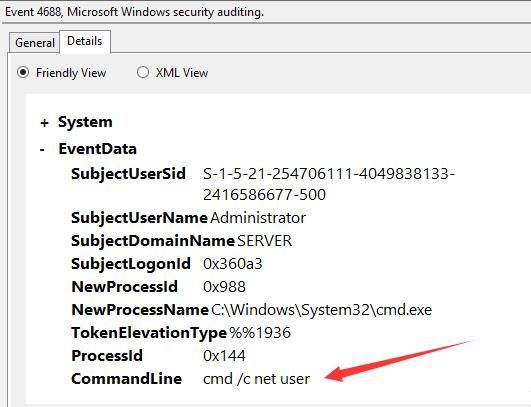
The command to query Event ID 4688 logs via command line is as follows:
wevtutil qe security /f:text /q:*[System[(EventID=4688)]] |
0x04 Testing SwampThing
---
Address:
https://github.com/FuzzySecurity/Sharp-Suite/blob/master/SwampThing
Written in C#
After successful compilation, the following three files are required:
- SwampThing.exe
- CommandlLine.dll
- CommandLine.xml
The command line parameters are as follows:
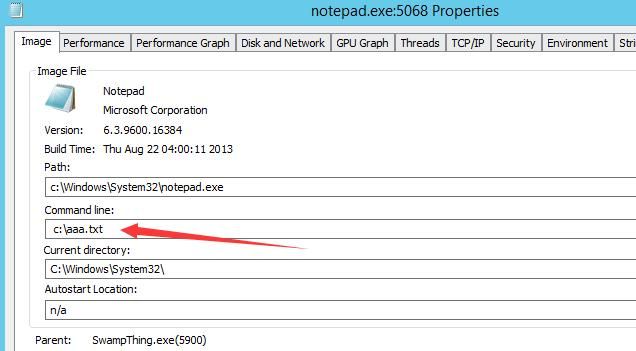
SwampThing.exe -l C:\Windows\System32\notepad.exe -f C:\aaa.txt -r C:\bbb.txt |
The launched notepad.exe will load C:\bbb.txt, but when viewing the notepad.exe process parameters via ProcessExplorer, it shows C:\aaa.txt
As shown in the figure below
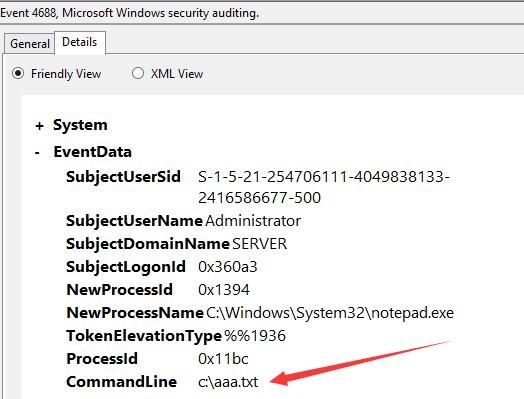
After enabling command line process auditing, log entry ID 4688 records the notepad.exe process parameter as C:\aaa.txt
Successfully bypassed command line process auditing, as shown below
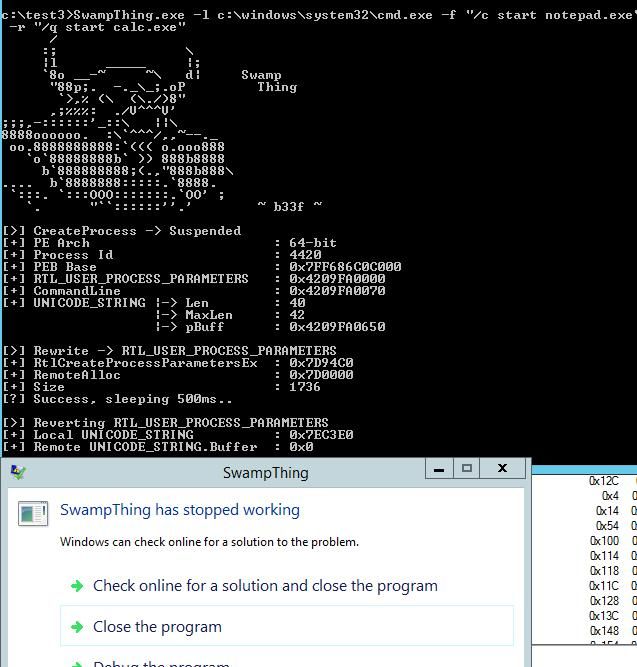
In implementation, SwampThing only targets processes that do not automatically exit after execution (e.g., notepad.exe). That is, after resuming the process with ResumeThread, it modifies the process parameters again to restore them.
Obviously, for processes that exit immediately after execution (e.g., cmd.exe /c), after resuming the process with ResumeThread, it cannot modify the process parameters again and will report an error, as shown below
0x05 Implementing SwampThing via C++
---
I implemented functionality similar to SwampThing using C++, but with the following differences in detail:
- After waking the process via ResumeThread, the process parameters are no longer restored, making it applicable to cmd.exe /c
- Modified the parameters for creating the process with CreateProcess, specifying pStartupInfo->dwFlags and pStartupInfo->wShowWindow to hide the launched process's interface
Code download address:
An open-source project
The code implements the following functionality:
- Executes the command cmd.exe /c start calc.exe
- After enabling command line process auditing, the process parameter recorded in log ID 4688 is cmd.exe /c start notepad.exe
0x06 Exploitation Approach
---
This method can be used to hide the real parameters of a process
For exploitation, wmic.exe can also be chosen, as mentioned by SwampThing—using wmic to load an xsl file
For the method of loading an xsl file via wmic, refer to my two previous articles: 'Use msxsl to bypass AppLocker' and 'Analysis and Exploitation of Using wmic to Call xsl Files'
Of course, both SwampThing's and my open-source C code require modifications to achieve loading xsl via wmic
0x07 Defense Recommendations
---
Compared to creating a puppet process, this method does not require using VirtualAllocEx to allocate new memory or setting the entry point via SetThreadContext
This method cannot be detected by comparing differences between the PE file on disk and in memory
For detection, one can attempt to check if the parent process of a process is suspicious
0x08 Summary
---
This article introduces a method to bypass command line process auditing by modifying process parameters, tests the open-source tool SwampThing, shares the C language code for implementing SwampThing, analyzes the exploitation approach, and finally provides defense recommendations


