
0x00 Preface
---
The CIA Vault 7 documents released by WikiLeaks involve the exploitation of Junction Folders and Library Files in Windows systems
Links are as follows:
https://wikileaks.org/ciav7p1/cms/page_13763381.html
https://wikileaks.org/ciav7p1/cms/page_13763373.html
Jayden Zheng analyzed this, sharing a backdoor exploitation method for Library Files, and detailed how to detect malicious use of Junction Folders and Library Files
Links are as follows:
https://www.countercept.com/blog/hunting-for-junction-folder-persistence/
https://www.countercept.com/blog/abusing-windows-library-files-for-persistence/
Based on the above references, this article will compare Junction Folders and Library Files, further exploit the backdoor method of Library Files (more covert), open-source a POC, and share insights on detection
0x01 Introduction
---
This article will cover the following:
- Methods of Utilizing Junction Folders
- Methods of Utilizing Library Files
- Further Exploitation of Library Files Backdoors
- Detection and Identification
0x02 Methods of Utilizing Junction Folders
---
Junction Folders can be simply understood as folders that can jump to another location
Three common methods of creation:
- Modifying registry entries
- Modifying desktop.ini within the folder
- Using special filenames, such as test.{ED7BA470-8E54-465E-825C-99712043E01C}
For the third method, specific CLSIDs correspond to specific file paths
If we create a CLSID via the registry and specify a DLL path, that DLL will be loaded when opening the folder
1、Practical Testing
Test DLL executes calculator, reference download link:
An open-source project
(1) Modify the registry and add a registry entry
The bat command is as follows:
SET KEY=HKEY_CURRENT_USER\Software\Classes\CLSID\{11111111-1111-1111-1111-111111111111}\InProcServer32 |
(2) Create a new folder test.{11111111-1111-1111-1111-111111111111}
(3) Select this folder to load calc.dll
Note:
It will only load once; restarting the explorer.exe process can trigger it again
2. Implementation method for automatic system startup loading (user permissions)
(1) Rename system folders
Rename %appdata%\Microsoft\Windows\Start Menu\Programs\Accessories to Accessories.{11111111-1111-1111-1111-111111111111}
(2) Create a new folder
Save the folder test.{11111111-1111-1111-1111-111111111111} in any of the following locations:
- %appdata%\Microsoft\Windows\Start Menu\Programs\
- Subdirectories of %appdata%\Microsoft\Windows\Start Menu\Programs\
0x03 Exploitation Methods for Library Files
---
File extension is library-ms, located at %appdata%\Microsoft\Windows\Libraries
Official documentation:
https://docs.microsoft.com/en-us/windows/client-management/windows-libraries
Simple understanding of Library Files:
Can display contents from multiple folders simultaneously
1. Practical testing:
(1) Modify the registry, add registry entries
Batch command as follows:
SET KEY=HKEY_CURRENT_USER\Software\Classes\CLSID\{11111111-1111-1111-1111-111111111111}\ |
Note:
Compared to Junction Folders, Library Files require an additional registry entry to be added.
(2) Modify %appdata%\Microsoft\Windows\Libraries\Documents.library-ms
Add the following content in XML format:
|
(3) Access %appdata%\Microsoft\Windows\Libraries\Documents.library-ms
When opening the file, DLLs will be loaded multiple times; a mutex can be added here to prevent multiple launches. Download link (for demonstration purposes only):
An open-source project
Noteworthy points:
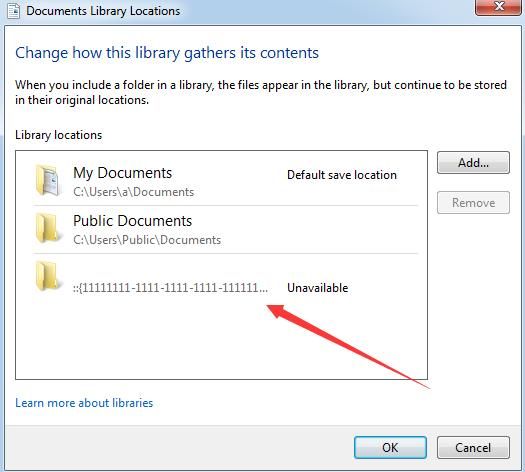
Includes changed from 2 locations to 3 locations
As shown in the figure below

By examining this location, the loaded CLSID can be discovered, as shown below
2. Implementation method for system auto-loading at startup (user permissions)
Place the modified Documents.library-ms in any of the following locations:
- %appdata%\Microsoft\Windows\Start Menu\Programs\
- Subdirectories of %appdata%\Microsoft\Windows\Start Menu\Programs\
Note:
Music.library-ms and Pictures.library-ms can also be modified, or even custom-created (with specified display icons)
0x04 Further exploitation of Library Files backdoor
---
Regarding the exploitation method of Library Files backdoor, the most obvious characteristic is that the loaded CLSID can be discovered directly from Includes
Here is a solution:
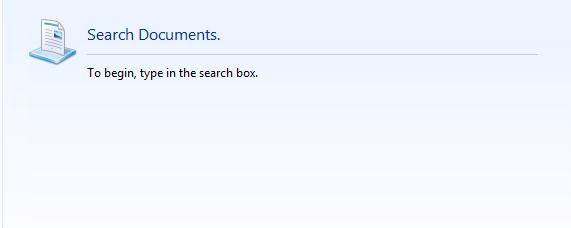
Clear the path and set it to not display
Successfully hide the loaded CLSID, the final effect is as shown in the figure below
1. Implementation method
According to the XML format, clear the original
|
2. POC implemented via PowerShell
After testing, it is not necessary to specify
The process is as follows:
- Modify the registry
- Release Documents.library-ms in the specified directory
Points to note in script writing:
- The output encoding format must be specified as UTF-8; the default UTF-16 (unicode) will cause the library-ms file format to be incorrect.
- To pass the variable $clsid into the string, double quotes " must be used for string definition instead of single quotes '
Complete code can be referenced from:
An open-source project
The code implements adding registry entries and creating the file %appdata%\Microsoft\Windows\Libraries\Documents.library-ms, which loads c:\test\calc.dll when the user logs in.
0x05 Detection and Identification
---
Regarding the exploitation methods for Junction Folders and Library Files, the special aspects are:
- Ordinary user permissions are sufficient
- The file format is uncommon and highly deceptive
By combining exploitation methods, each step can be inspected:
- Check for suspicious DLLs
Payload must be in DLL format
- Check for suspicious DLLs under the registry CLSID
Monitor sensitive registry locations HKEY_LOCAL_MACHINE\SOFTWARE\Classes\CLSID and HKEY_CURRENT_USER\Software\Classes\CLSID
- For Junction Folders, traverse folders to check if file extensions are associated with suspicious CLSIDs
For Library Files, traverse library-ms files to check if they are associated with suspicious CLSIDs
This can be directly referenced from Jayden Zheng's script:
https://gist.github.com/countercept/6890be67e09ba3daed38fa7aa6298fdf
0x06 Summary
---
This article tested exploitation methods for Junction Folders and Library Files, further explored backdoor exploitation methods for Library Files to enhance stealth, open-sourced a POC, discussed considerations for script writing, and finally shared insights on detection


