
0x00 Preface
---
In a domain environment, domain user credentials are crucial information. To enhance security, domain group policies set a maximum validity period for all domain user passwords, forcing users to change their passwords upon expiration.
In practical environments, some domain users need to be configured with passwords that never expire, which can be achieved by adding the password never expires attribute.
In domain penetration testing, we need to enumerate domain users with the password never expires attribute and also be able to set a specific domain user's password to never expire.
Conversely, from a defensive perspective, we need to minimize the number of domain users with the password never expires attribute and be able to monitor this list of domain users in real time.
Therefore, this article will introduce various methods for enumerating, adding, and removing the password never expires attribute under different conditions, analyze the principles, and provide open-source code.
0x01 Introduction
---
This article will cover the following topics:
- Implementation Principles
- Enumerating Users with Passwords Set to Never Expire
- Methods for Adding the Password Never Expires Attribute to a Specified User
- Methods for Removing the Password Never Expires Attribute from a Specified User
0x02 Implementation Principle
---
The password never expires attribute for a domain user is stored in the userAccountControl attribute of the domain user.
The userAccountControl attribute is represented numerically, with the value being the sum of multiple specific attribute values.
Each specific attribute corresponds to a different numerical value. For specific values, refer to: https://support.microsoft.com/en-us/help/305144/how-to-use-useraccountcontrol-to-manipulate-user-account-properties
The following example illustrates:
If the userAccountControl attribute value for user test1 is 514, then the specific attributes for this user are as follows:
- ACCOUNTDISABLE, 2
- NORMAL_ACCOUNT, 512
The calculation method is 2 + 512 = 514.
Method to add the password never expires attribute:
The value corresponding to the password never expires attribute is 65536 (DONT_EXPIRE_PASSWORD). Add 65536 to the userAccountControl attribute value 514, and set it to 66048.
Note:
In programming design, for reusability, the method used is to perform a bitwise OR operation (operator |) with 65536.
Bitwise OR operation rule: For two numbers involved in the operation, perform an OR operation on each binary bit. If at least one corresponding binary bit is 1, the result bit is 1; otherwise, it is 0.
Method to remove the password never expires attribute:
Subtract 65536 from the userAccountControl attribute value
Note:
In programming design, for reusability, the method used is to perform a bitwise XOR operation (operator ^) with 65536
Bitwise XOR operation rule: For two numbers involved in the operation, perform an "XOR" operation on each binary bit. If the corresponding bits are the same, the result is 0; otherwise, it is 1
Method to check the password never expires attribute:
The userAccountControl attribute value is the sum of various numerical values, making it impossible to determine whether it includes the addend 65536 through simple addition or subtraction
This can be achieved using a bitwise AND operation (operator &)
Bitwise AND operation rule: For two numbers involved in the operation, perform an "AND" operation on each binary bit. The result is 1 only if both corresponding bits are 1; otherwise, it is 0
Calculation method to check the password never expires attribute:
Perform a bitwise AND operation between the userAccountControl attribute value and 65536. If the result is 65536, it indicates the password never expires attribute is set
0x03 Enumerate users with passwords set to never expire
---
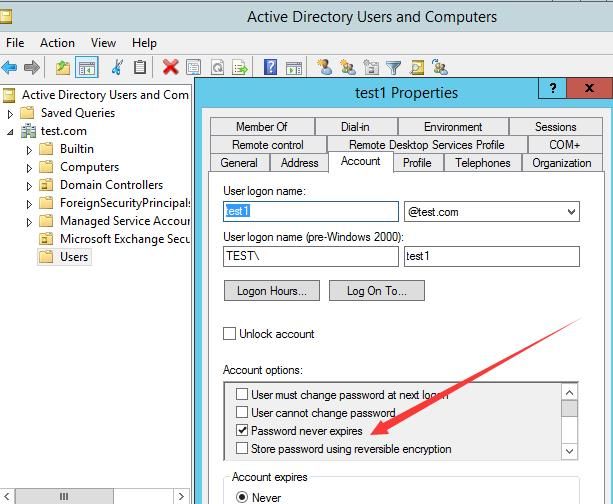
On the domain controller, by using Active Directory Users and Computers to view the Account properties of each domain user, we can see whether the user is set to have a password that never expires, as shown in the figure below
The following introduces enumeration methods in different environments
1. Methods for enumeration from within the domain
(1) Using the PowerShell ActiveDirectory module on Windows systems
Command examples:
Import-Module ActiveDirectory |
Or:
Import-Module ActiveDirectory |
(2) Using PowerView on Windows systems
https://github.com/PowerShellMafia/PowerSploit/blob/master/Recon/PowerView.ps1
Command examples:
Display attributes of a specified user:
import-module .\PowerView.ps1 |
As shown in the figure below

Filter out all users that meet the conditions:
import-module .\PowerView.ps1 |
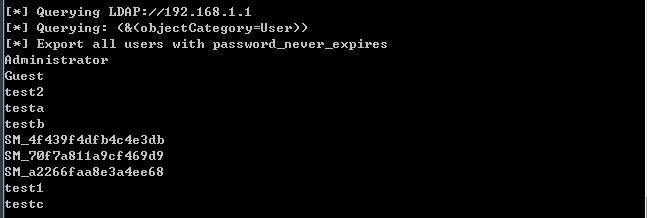
(3) Implementing with C# in Windows systems
Using the namespace System.DirectoryServices, the detailed code has been uploaded to GitHub, with the address as follows:
An open-source project
If using the current user's credentials, replace the code DirectoryEntry de = new DirectoryEntry("LDAP://" + args[0],args[1],args[2]); with DirectoryEntry de = new DirectoryEntry("LDAP://" + args[0]);
Test as shown in the figure below
(4) Enumerating through ldapsearch on Kali system
Command example:
ldapsearch -x -H ldap://192.168.1.1:389 -D "CN=testa,CN=Users,DC=test,DC=com" -w DomainPassword123! -b "DC=test,DC=com" "(&(objectClass=user)(objectCategory=person))" grep userAccountControl |
Test as shown in the figure below
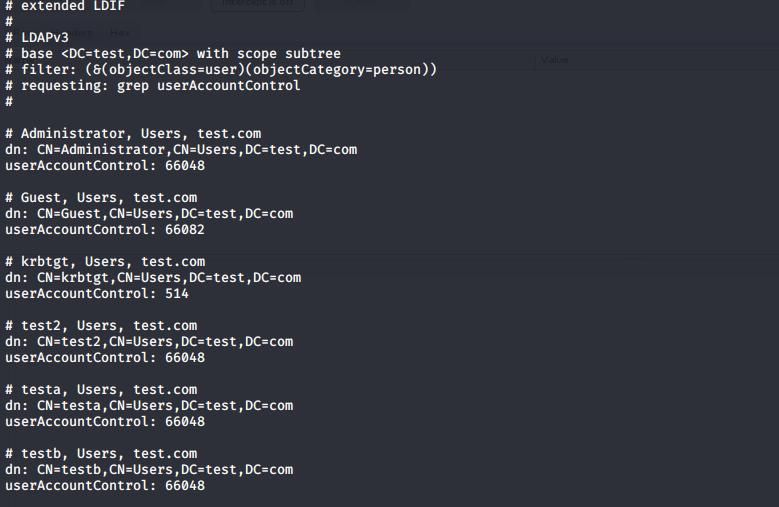
After obtaining the userAccountControl attribute value, perform a bitwise AND operation with 65536 to get the final result
2. Methods for enumeration from outside the domain
(1) Using PowerShell ActiveDirectory module on Windows system
Command example:
import-module .\Microsoft.ActiveDirectory.Management.dll |
Or:
import-module .\Microsoft.ActiveDirectory.Management.dll |
Note:
The ActiveDirectory module is installed by default on domain controllers. Microsoft.ActiveDirectory.Management.dll is generated after installing the PowerShell Active Directory module, which I have extracted and uploaded to GitHub:
An open-source project
For systems without the Active Directory module installed, you can import the Active Directory module using the following command:
import-module .\Microsoft.ActiveDirectory.Management.dll |
(2) Using PowerView on Windows systems
https://github.com/PowerShellMafia/PowerSploit/blob/master/Recon/PowerView.ps1
Command example:
import-module .\PowerView.ps1 |
(3)Windows system implementation using C#
Using the namespace System.DirectoryServices, detailed code has been uploaded to GitHub, address as follows:
An open-source project
0x04 Method for adding password never expires attribute to specified user
---
There are two implementation methods:
1. Perform bitwise OR operation (operator |) between userAccountControl attribute value and 65536
2. Directly add 65536 to userAccountControl attribute value
For reusability, the following methods all use the bitwise OR operation with 65536
1. Implement from within the domain
(1) Using dsmod command
Command example:
dsmod user "CN=testc,CN=Users,DC=test,DC=com" -pwdneverexpires yes |
(2) Using Powershell ActiveDirectory module
Command example:
Set-ADUser -Identity testc -PasswordNeverExpires $true |
(3) Using PowerView
Command example:
Set-ADObject -SamAccountName testc -PropertyName useraccountcontrol -PropertyXorValue 65536 |
(4) C# Implementation
Using the System.DirectoryServices namespace, detailed code has been uploaded to GitHub at the following address:
An open-source project
2. Implementation from outside the domain
(1) Using the PowerShell ActiveDirectory module
Command example:
import-module .\Microsoft.ActiveDirectory.Management.dll |
(2) Using PowerView
Command example:
$uname="administrator" |
(3) C# Implementation
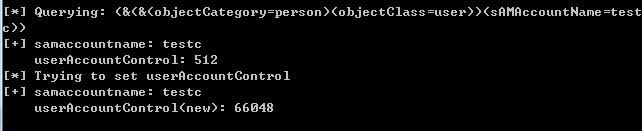
Using the namespace System.DirectoryServices, detailed code has been uploaded to GitHub, address as follows:
An open-source project
Testing as shown in the figure below
0x05 Method to Remove Password Never Expires Attribute for a Specified User
---
There are two implementation methods:
1. Perform a bitwise XOR operation (operator ^) between the userAccountControl attribute value and 65536
2. Directly subtract 65536 from the userAccountControl attribute value
The specific method is similar to 0x04 and will not be repeated here
0x06 Summary
---
This article introduces the characteristics of domain users with the password never expires attribute, analyzes the principles of enumerating, adding, and removing this attribute, presents various implementation methods under different conditions, and provides open-source C# implementation code.


