
0x00 Preface
---
In the previous article 'Penetration Basics - Extracting Credentials from the lsass.exe Process', methods for locally extracting credentials were introduced. However, in penetration testing, it is often necessary to extract credentials remotely. This article will discuss the concepts and methods for remote credential extraction, detailing the specifics.
0x01 Introduction
---
This article will cover the following topics:
- Concepts
- Implementation Methods
- Introduction to lsassy
0x02 Concepts
---
When extracting credentials remotely, the following points need to be considered:
(1) Remote command execution must be achieved. For remote command execution, refer to the previous article 'Techniques for Executing Programs on Remote Systems'.
(2) Due to protective measures, different environments require different extraction methods.
(3) After remotely exporting the dump file of the lsass process, it is common to copy the dump file locally to parse and obtain password hashes. Sometimes, the lsass process dump file is large, so the efficiency of file transfer needs to be considered.
(4) For multiple systems, repetitive tasks are too frequent, resulting in low efficiency.
Considering the above points, we need a convenient and quick method: support multiple export methods, directly parse password hashes, and automate operations to improve efficiency.
The open-source tool Lsassy can be used here, available at: https://github.com/Hackndo/lsassy
0x03 Introduction to Lsassy
---
1. Installation and Usage
Installation command:
pip install lsassy |
Test command:
lsassy -u Administrator -p Password1 192.168.1.1 |
In the output, colors are added using termcolor. By default, Windows cmd cannot display colors properly, leading to unfriendly formatting and some garbled characters.
To solve the formatting issue on Windows, modify
import logging |
2. Package into exe
PyInstaller can be used here, the main program code is at https://github.com/Hackndo/lsassy/blob/master/lsassy/console.py
Command to package into a standalone exe:
pyinstaller -F console.py |
After generating console.exe, an error will be reported during execution indicating missing modules
Modify the packaging command based on the output prompts, adding referenced modules:
pyinstaller -F console.py --hidden-import unicrypto.backends.pure.DES --hidden-import unicrypto.backends.pure.TDES --hidden-import unicrypto.backends.pure.AES --hidden-import unicrypto.backends.pure.RC4 |
At this point, although console.exe can start normally, the export function cannot run
Debugging method: Add the parameter -vv to see that lsassy.dumpmethod.comsvcs cannot be found
Add all dependency packages to get the complete packaging command:
pyinstaller -F console.py --hidden-import unicrypto.backends.pure.DES --hidden-import unicrypto.backends.pure.TDES --hidden-import unicrypto.backends.pure.AES --hidden-import unicrypto.backends.pure.RC4 --hidden-import lsassy.dumpmethod.comsvcs --hidden-import lsassy.dumpmethod.comsvcs_stealth --hidden-import lsassy.dumpmethod.dllinject --hidden-import lsassy.dumpmethod.dumpert --hidden-import lsassy.dumpmethod.dumpertdll --hidden-import lsassy.dumpmethod.edrsandblast --hidden-import lsassy.dumpmethod.mirrordump --hidden-import lsassy.dumpmethod.mirrordump_embedded --hidden-import lsassy.dumpmethod.nanodump --hidden-import lsassy.dumpmethod.ppldump --hidden-import lsassy.dumpmethod.ppldump_embedded --hidden-import lsassy.dumpmethod.procdump --hidden-import lsassy.dumpmethod.procdump_embedded --hidden-import lsassy.dumpmethod.rdrleakdiag --hidden-import lsassy.dumpmethod.wer --hidden-import lsassy.exec.mmc --hidden-import lsassy.exec.smb --hidden-import lsassy.exec.smb_stealth --hidden-import lsassy.exec.task --hidden-import lsassy.exec.wmi --hidden-import lsassy.output.grep_output --hidden-import lsassy.output.json_output --hidden-import lsassy.output.pretty_output --hidden-import lsassy.output.table_output |
The generated console.exe can now be used normally
3. Supported export methods
(1) comsvcs
Use the export function MiniDump() from C:\windows\system32\comsvcs.dll to obtain a dump file of the lsass process
For details, refer to the previous article "MiniDumpWriteDump via COM+ Services DLL" for exploitation testing
Can be used directly
(2) comsvcs_stealth
Similar to comsvcs, the difference is to first copy C:\windows\system32\comsvcs.dll to c:\windows\temp and rename it, then use the new dll to obtain a dump file of the lsass process
Can be used directly
(3) dllinject
Implemented through DLL injection
For the APC injection method, refer to "DLL Injection via APC—Bypassing Sysmon Monitoring"
Required parameter: -O loader_path=loader.exe,dll_path=inject.dll
(4) dumpert
Technical details: https://github.com/outflanknl/Dumpert
Obtain dump file of lsass process via API MiniDumpWriteDump()
Required parameter: -O dumpert_path=dumpert.exe
(5) dumpertdll
Same method as above, difference is using dll file as parameter
Required parameter: -O dumpertdll_path=dumpert.dll
(6) edrsandblast
Technical details: https://github.com/wavestone-cdt/EDRSandblast
Obtain lsass process dump file using signed driver
Required parameter: -O edrsandblast_path=EDRSandBlast.exe,RTCore64_path=RTCore64.sys,ntoskrnl_path=NtoskrnlOffsets.csv
(7) mirrordump
Technical details: https://github.com/CCob/MirrorDump
Implementation process:
- Load an LSA SSP plugin
- Leak the process handle of lsass.exe within the plugin
- Obtain the dump file of the lsass process via the API MiniDumpWriteDump()
Requires adding the parameter: -O mirrordump_path=Mirrordump.exe
(8) mirrordump_embedded
Method is the same as above, Mirrordump.exe is not required as a parameter
Note that mirrordump cannot automatically clear the registered LSA SSP plugin; using this method will leave the following traces:
- The LSA SSP plugin is saved in C:\Windows\System32, with an eight-character random name and a .dll extension
- Residual unloaded dll in the lsass process
Traces are shown in the figure below
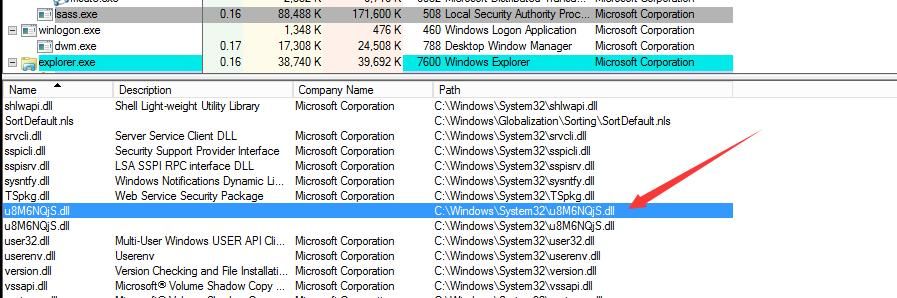
Method to clear traces: first unload the dll loaded in the lsass process, then delete the dll file
For details on enumerating and clearing LSA SSP plugins, refer to the previous article 'Usage of SSP in Mimikatz'
Can be used directly
(9) nanodump
Technical details: https://github.com/helpsystems/nanodump
Advantage: supports multiple methods to leak lsass process handles
Required parameter: -O nanodump_path=nanodump.exe
(10) ppldump
Technical details: https://github.com/itm4n/PPLdump
Supports Windows 10 and Server 2019
Can bypass PPL (Protected Process Light) protection for lsass process
Related details:
https://itm4n.github.io/lsass-runasppl/
https://blog.scrt.ch/2021/04/22/bypassing-lsa-protection-in-userland/
Required parameter: -O ppldump_path=PPLdump.exe
(11) ppldump_embedded
Same method as above, does not require PPLdump.exe as parameter
Can be used directly
(12) procdump
Obtain the dump file of the lsass process via procdump.exe
Requires adding the parameter: -O procdump_path=procdump.exe
(13) procdump_embedded
Same method as above, no need for procdump.exe as a parameter
Can be used directly
(14) rdrleakdiag
The target system must have the file rdrleakdiag.exe under c:\windows\system32\
Systems where it exists by default:
Windows 10, 10.0.15063.0
Windows 8.1, 6.3.9600.17415
Windows 8, 6.2.9200.16384
Windows 7, 6.1.7600.16385
Windows Vista, 6.0.6001.18000
Can only be executed once; a system restart is required to execute again
Can be used directly
(15)wer
Technical details: https://github.com/PowerShellMafia/PowerSploit/blob/master/Exfiltration/Out-Minidump.ps1
Obtain a dump file of the lsass process by calling the API MiniDumpWriteDump() via PowerShell
Can be used directly
0.04 Summary
---
This article introduces the approach to remotely export credentials from the lsass.exe process, detailing each export method used by Lsassy and analyzing the technical specifics.


