
0x00 Preface
---
In penetration testing, when we obtain a user's email credentials and need to analyze the mailbox contents, we can choose to automate the process via the IMAP protocol to improve efficiency.
This article uses Exchange as an example to introduce methods for downloading emails and attachments through the IMAP protocol, open-sourcing the code and sharing script development details.
0x01 Introduction
---
This article will cover the following topics:
- Basic Knowledge
- Enabling IMAP Functionality and Login Logs in Exchange
- Python3 Implementation Details
- Open-Source Code
0x02 Basic Knowledge
---
1. IMAP
Full name is Internet Mail Access Protocol, an interactive mail access protocol
It is a mail retrieval protocol that can fetch mail information from mail servers
Uses port 143
2. IMAP4_SSL
Full name is IMAP over SSL, a variant of the IMAP protocol based on the SSL security protocol
Inherits the high security reliability of asymmetric encryption from the SSL security protocol, prevents mail leakage, and is also used for receiving mail
Uses port 993
3. Python3 imaplib library
Official documentation:
https://docs.python.org/3/library/imaplib.html
This module defines three classes: IMAP4, IMAP4_SSL, and IMAP4_stream
To enhance security, we typically use the subclass IMAP4_SSL for secure connections
4. Python3 email library
Official documentation:
https://docs.python.org/3/library/email.html
When using the imaplib library to read emails, it is necessary to use the email library to convert the received messages into EmailMessage objects, which makes it more convenient to process the email content.
0x03 Enabling IMAP functionality and login logs in Exchange
---
By default, IMAP4 client connections are not enabled in Exchange
Reference materials:
https://docs.microsoft.com/en-us/exchange/clients/pop3-and-imap4/configure-imap4?view=exchserver-2019
The enabling method is as follows:
1. Start the IMAP4 service and configure it to start automatically
Powershell commands are as follows:
Start-Service MSExchangeIMAP4; Start-Service MSExchangeIMAP4BE |
2. Configure IMAP4 settings
The format is as follows:
Set-ImapSettings -ExternalConnectionSettings " |
Powershell command example:
Set-ImapSettings -ExternalConnectionSettings "mail.test.com:993:SSL","mail.test.com:143:TLS" -X509CertificateName mail.test.com |
3. Restart the IMAP4 service
The PowerShell command is as follows:
Restart-Service MSExchangeIMAP4; Restart-Service MSExchangeIMAP4BE |
4. View the configuration:
The PowerShell command is as follows:
Get-Service MSExchangeIMAP4; Get-Service MSExchangeIMAP4BE |
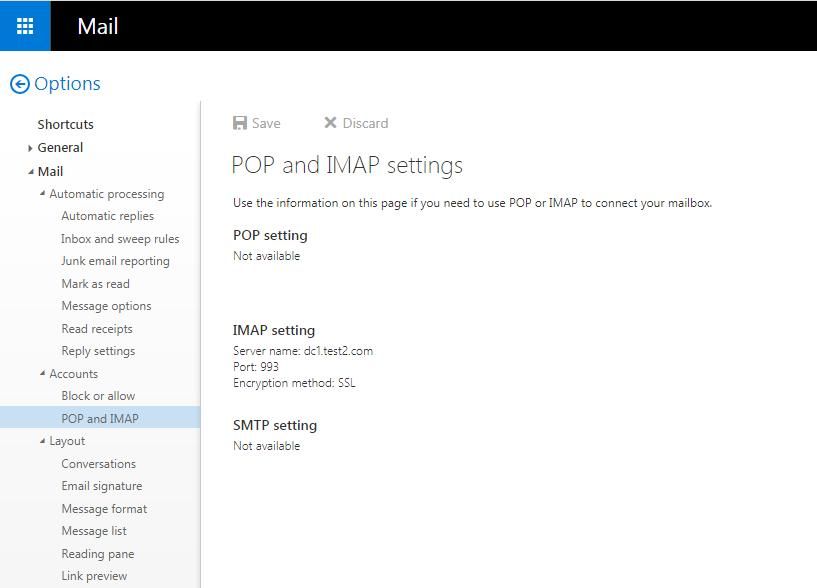
Log in to OWA with a mailbox user, select Settings->Options, and you can see the IMAP configuration, as shown in the figure below
By default, logging is not enabled in Exchange
Reference:
https://docs.microsoft.com/en-us/exchange/configure-protocol-logging-for-pop3-and-imap4-exchange-2013-help
The method to enable it is as follows:
1. Enable logging
The PowerShell command is as follows:
Set-ImapSettings -Server "CAS01" -ProtocolLogEnabled $true |
2. Restart the service
Restart the IMAP4 service. The PowerShell command is as follows:
Restart-Service MSExchangeIMAP4; Restart-Service MSExchangeIMAP4BE |
3. View configuration information:
The PowerShell command is as follows:
Get-ImapSettings | Format-List ProtocolLogEnabled,LogFileLocation,LogPerFileSizeQuota,LogFileRollOverSettings |
The default log save path is: C:\Program Files\Microsoft\Exchange Server\V15\Logging\Imap4
0x04 Python3 Implementation Details
---
Test Code 1
import imaplib |
The above code is used to obtain the names corresponding to all email folders.
(1) M.list() is used to list the names of email folders.
Note:
Different email systems only have the inbox name uniformly defaulted to INBOX; the name of the sent items folder generally varies, for example, Exchange's sent items folder is named "Sent Items".
Test Code 2
import imaplib |
The above code is used to read the content of all emails in the inbox.
(1) M.select('INBOX') indicates selecting the inbox.
If switching to read the Exchange sent items folder, the corresponding code is M.select('"Sent Items"').
If adding parameter 2 as False, it means setting the read-only flag, which does not allow modifying the mailbox. Example: M.select('"Sent Items"', False).
(2) In typ, data = M.search(None, 'ALL'), None indicates using the default ASCII encoding, and ALL indicates the search condition is all emails.
If you want to filter emails sent by user2, the corresponding statement is typ, msgnums = M.search(None, '(FROM "user2")').
The result returned by M.search() is the sequence numbers of the emails. For example, in my test environment, the inbox has 9 emails, and the returned result is:
[b'1 2 3 4 5 6 7 8 9'] |
Note:
Here, it is necessary to distinguish between email sequence numbers and UIDs.
Email sequence numbers are an incremental series starting from 1, while UIDs are unique identifiers that distinguish emails.
To obtain the correspondence between email sequence numbers and UIDs, you can use the following code:
import imaplib |
(3) M.fetch(num, '(RFC822)') is used to extract email messages
Parameter 1 num represents the email sequence number to extract
Parameter 1 supports extracting multiple consecutive email messages simultaneously, for example, to extract emails with sequence numbers 2-5, the command is M.fetch('2:5', '(RFC822)')
Parameter 2 '(RFC822)' represents the data item name, here '(RFC822)' is equivalent to BODY[], returning only summary information about the email body text format and size
If you only want to obtain the content of the email header, you can use the following code:
M.fetch(num, 'BODY[HEADER]')
If you only want to obtain the content of the email body, you can use the following code:
M.fetch(num, 'BODY[TEXT]')
(4) M.close() is used to close the currently selected mailbox
Use after executing M.select()
Test Code 3
import imaplib |
The above code is used to save attachments from all emails in the inbox.
(1) msg = email.message_from_bytes(data[0][1]) is used to convert data into an email object.
(2) msg.walk() is used to traverse all parts of the email object.
(3) part.get('Content-Disposition') is used to obtain the field value corresponding to the field name Content-Disposition.
If an email contains attachments, it will include the Content-Disposition field, which is used to determine whether the email contains attachments.
(4) part.get_filename() is used to obtain the value of the filename parameter in the Content-Disposition field within the header, corresponding to the attachment's name.
(5) part.get_payload(decode=True) is used to obtain the content of the attachment.
Since the attachment content is stored in Base64 encoded form, the parameter decode=True must be added during reading to perform Base64 decoding.
Test code 4
import imaplib |
The above code is used to save all emails in the inbox one by one, named by the email sequence number with the suffix .eml, which can be opened with Outlook.
0x05 Open Source Code
--
I have uploaded the complete code to GitHub at the following address:
An open-source project
The code supports the following features:
- View folder configuration
- Download all attachments from the inbox
- Download all attachments from the sent items
- Download all emails from the inbox
- Download all emails from the sent items
When downloading files, first create a folder with the email username to save the files downloaded for the corresponding user.
By default, it supports accessing Exchange emails via IMAP4_SSL. For different email systems, the inbox has no difference, but the name of the sent items folder may vary. The name of the sent items folder can be modified by querying the corresponding folder name with the CheckConfig command.
The code fixes a bug where attachment names could not be recognized due to encoding issues.
To facilitate logging the email access process, a logging feature has been added.
0x06 Summary
---
This article uses Exchange as an example to introduce methods for downloading emails and attachments via the IMAP protocol, open-sources the code imapManage.py, and shares script development details. For other email systems, you can refer to this code and simply modify the name of the outbox.


