
0x00 Preface
---
In penetration testing, port forwarding and proxying are frequently utilized.
Port forwarding refers to the act of forwarding a network port from one network node to another.
In practical applications, two scenarios need to be considered:
- Client->Transit server->Server: The client can connect directly to the transit server. The transit server simply forwards the traffic.
- Client<-Transit server->Server: The client cannot connect directly to the transit server, but the transit server can connect back to the client.
If the client needs to scan multiple ports on a server (or multiple ports on multiple servers), configuring forwarding rules one by one is impractical.
To improve efficiency, a proxy can be used here, requiring only a single rule configuration.
This article will organize and summarize common methods and tools, categorize them, distinguish between direct and reverse connections, differentiate between forwarding and proxying, analyze their connections and differences, and provide application scenarios for reference.
0x01 Introduction
---
This article will cover the following:
- Methods for Windows systems and Linux systems (Ubuntu and CentOS)
- Port Forwarding - Forward Connection Method
- Port Forwarding - Reverse Connection Method
- Forward Proxy Method
- Reverse Proxy Method
- Application Scenarios of the Above Methods
Note:
Go language supports cross-platform compilation, so this article focuses more on introducing tools implemented in Go language
0x02 Port Forwarding - Forward Connection
---
0. Application Scenarios
1. Traffic Forwarding Springboard
Used to hide the real server address
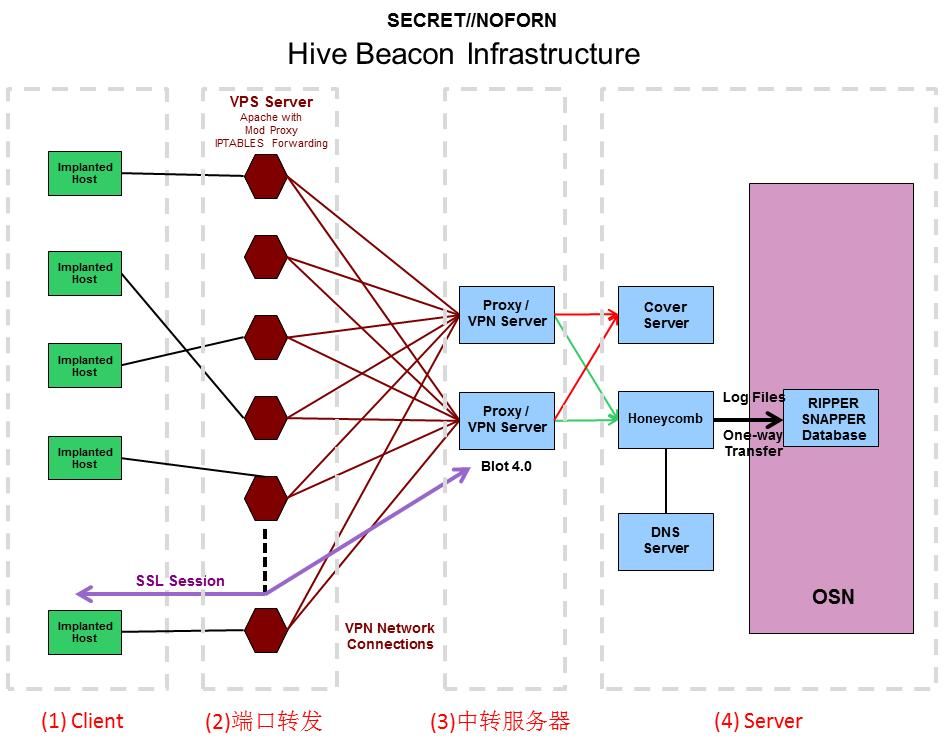
Port forwarding in CIA Hive Beacon Infrastructure uses Linux iptables
As shown in (2) in the figure below
Note:
For setting up a transit server, you can refer to the previous articles 'CIA Hive Beacon Infrastructure Replication 1 – Using Apache mod_rewrite for HTTP Traffic Distribution' and 'CIA Hive Beacon Infrastructure Replication 2 – Using Apache mod_rewrite for HTTPS Traffic Distribution'.
2. Establish a tunnel
Connect to the specified port of the internal network server
The client can connect directly to the transit server
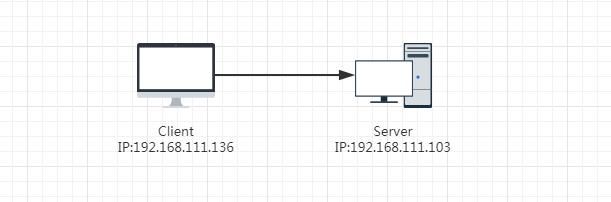
1. Test environment
Client: 192.168.111.136
Server: 192.168.111.103
Network connection as shown in the figure below
Test network connection using nc
Server:
nc -lvp 4444 |
Client:
nc -vv 192.168.111.103 4444 |
Client connection successful, as shown in the figure below

2. Port forwarding method on Windows systems
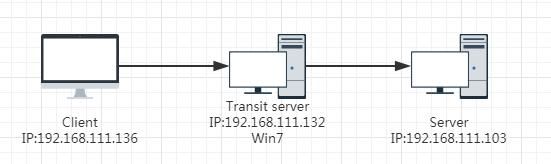
Transit server: 192.168.111.132
Network connection as shown in the figure below
1. Using netsh for port forwarding (requires administrator privileges)
(1) Add forwarding rule
netsh interface portproxy add v4tov4 listenaddress=192.168.111.132 listenport=7777 connectaddress=192.168.111.103 connectport=4444 |
(2) Add firewall inbound rule
netsh advfirewall firewall add rule name="transit test" protocol=TCP dir=in localport=7777 action=allow |
Note:
Default configuration allows outbound and blocks inbound communication, so only inbound rules need to be added here
Test network connection:
Server:
nc -lvp 4444 |
Client:
nc -vv 192.168.111.132 7777 |
Client connection successful
(3) View port forwarding rules
netsh interface portproxy show all |
(4) Clear port forwarding rules
netsh interface portproxy delete v4tov4 listenaddress=192.168.111.132 listenport=7777 |
(5) Clear firewall rules
netsh advfirewall firewall delete rule name="transit test" |
2. Using rinetd to implement port forwarding
Download address:
https://boutell.com/rinetd/http/rinetd.zip
Only the rinetd.exe from the compressed package is needed
(1) Add firewall rule for rinetd.exe (administrator privileges)
netsh advfirewall firewall add rule name="transit test2" dir=in program="c:\test\rinetd.exe" action=allow |
(2) Write forwarding rules
echo 0.0.0.0 7777 192.168.111.103 4444 > conf.txt |
(3) Start
rinetd.exe -c c:\test\conf.txt |
(4) Clear firewall rules (administrator privileges)
netsh advfirewall firewall delete rule name="transit test2" dir=in program="c:\test\rinetd.exe" |
3、Implement port forwarding using HTran
Note:
lcx has similar functionality
Source code originates from the internet, I have made a backup on GitHub, backup address:
https://raw.githubusercontent.com/3gstudent/test/master/HTran.cpp
(1) Add firewall rules for HTran.exe (administrator privileges)
netsh advfirewall firewall add rule name="transit test3" dir=in program="c:\test\HTran.exe" action=allow |
(2) Enable forwarding function
HTran.exe -tran 7777 192.168.111.103 4444 |
(3) Clear firewall rules (administrator privileges)
netsh advfirewall firewall delete rule name="transit test3" dir=in program="c:\test\HTran.exe" |
4. Using EarthWorm to achieve port forwarding
Download address:
https://github.com/rootkiter/EarthWorm
(1) Add firewall rule for ew_for_win_32.exe (administrator privileges)
netsh advfirewall firewall add rule name="transit test4" dir=in program="c:\test\ew_for_win_32.exe" action=allow |
(2) Enable forwarding function
ew_for_win_32.exe -s lcx_tran -l 7777 -f 192.168.111.103 -g 4444 |
(3) Clear firewall rules (administrator privileges)
netsh advfirewall firewall delete rule name="transit test4" dir=in program="c:\test\ew_for_win_32.exe" |
3. Common port forwarding methods in Linux (Ubuntu) systems
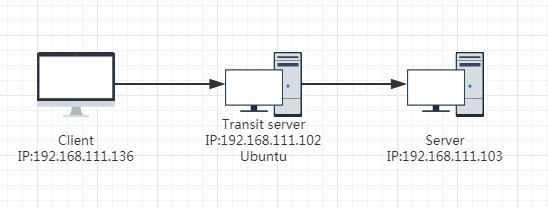
Transit server: 192.168.111.102
Network connection as shown in the figure below
1. Implementing Port Forwarding with iptables
(1) Enable forwarding functionality
echo 1 >/proc/sys/net/ipv4/ip_forward |
Note:
This command takes effect immediately but does not persist after reboot
(2) Add forwarding rules
iptables -t nat -A PREROUTING -p tcp -d 192.168.111.102 --dport 8888 -j DNAT --to-destination 192.168.111.103:4444 |
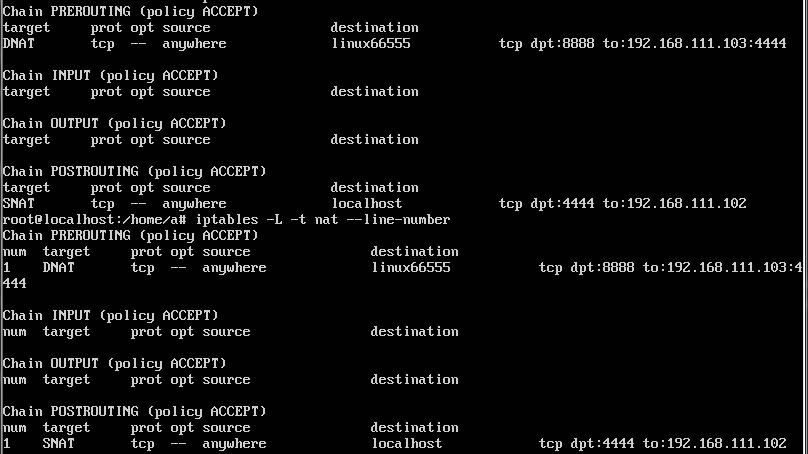
(3) View forwarding rules
iptables -L -t nat --line-number |
As shown in the figure below
Test network connectivity:
Server:
nc -lvp 4444 |
Client:
nc -vv 192.168.111.102 8888 |
Client connection successful
(4) Clear rules
iptables -F -t nat |
(5) Save rules
iptables-save > /etc/iptables.up.rules |
(6) Restore rules
iptables-restore < /etc/iptables.up.rules |
2. Using rinetd for port forwarding
(1) Compile and install
wget http://www.boutell.com/rinetd/http/rinetd.tar.gz |
(2) Write forwarding rules
echo 0.0.0.0 8888 192.168.111.103 4444 > /etc/rinetd.conf |
(3) Start
./rinetd.exe |
(4) Terminate process
pkill -9 rinetd |
3、Using HTran for port forwarding
Source code reference for Linux version HTran(lcx):
https://github.com/windworst/LCX
Requires recompilation with gcc
(1) Enable forwarding function
./lcx -tran 8888 192.168.111.103 4444 |
Note:
HTran(lcx) written in Go language, advantage is cross-platform, supporting Windows and Linux
Download address:
https://github.com/cw1997/NATBypass
4. Using EarthWorm to achieve port forwarding
Download address:
https://github.com/rootkiter/EarthWorm
Not open source
(1) Enable forwarding function
./ew_for_linux -s lcx_tran -l 8888 -f 192.168.111.103 -g 4444 |
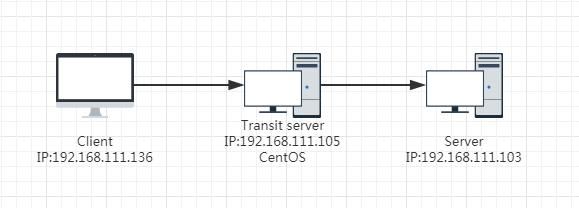
4. Common port forwarding methods under Linux system (CentOS)
Transit server: 192.168.111.105
Network connection as shown in the figure
1. Using iptables to achieve port forwarding
(1) Enable forwarding function
echo 1 >/proc/sys/net/ipv4/ip_forward |
Note:
This command takes effect immediately and will be lost after system reboot
(2) Install iptables
systemctl stop firewalld |
(3) Add forwarding rules
iptables -t nat -A PREROUTING -p tcp -d 192.168.111.105 --dport 8888 -j DNAT --to-destination 192.168.111.103:4444 |
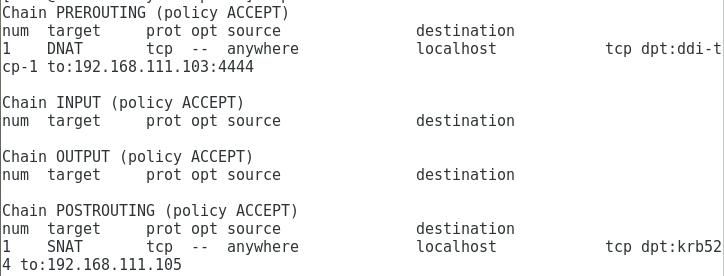
(4) View forwarding rules
iptables -L -t nat --line-number |
As shown in the figure below
Test network connection:
Server:
nc -lvp 4444 |
Client:
nc -vv 192.168.111.105 8888 |
Client connection successful
(4) Clear rules
iptables -F -t nat |
2. Use rinetd to implement port forwarding
Same as Ubuntu, omitted here
3. Use HTran to implement port forwarding
Same as Ubuntu, omitted here
4. Use EarthWorm to implement port forwarding
Same as Ubuntu, omitted here
0x03 Port Forwarding - Reverse Connection
---
0. Application Scenario
1. Establish a Tunnel
Connect to the specified port of the internal network server
Test environment as shown below
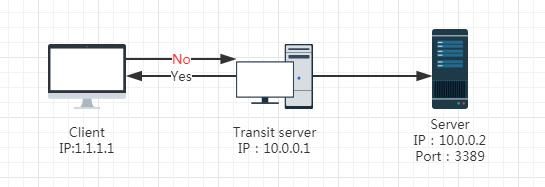
Already have Transit server permissions, want to access Server's port 3389
Client cannot connect to Transit server directly, but Transit server can connect to Client in reverse
iptables and rinetd are no longer applicable
1. Using HTran
Supports Windows and Linux
Client:
HTran -listen 1111 2222 |
Transit server:
HTran -slave 1.1.1.1 1111 10.0.0.2 3389 |
Client:
nc -vv 127.0.0.1 2222 |
2、Using EarthWorm
Supports Windows and Linux
Client:
ew -s lcx_listen -l 2222 -e 1111 |
Transit server:
ew -s lcx_slave -d 1.1.1.1 -e 1111 -f 10.0.0.2 -g 3389 |
Client:
nc -vv 127.0.0.1 2222 |
0x04 Forward Proxy
---
0、Application Scenario
1. Internal network scanning
Scanning multiple ports on the internal network
Client can forward connect to Transit server
The test environment is shown in the figure below
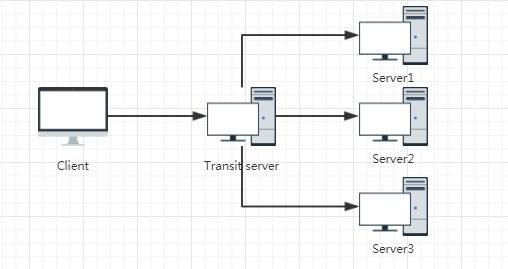
Scan the ports of Server1, Server2, and Server3
Socks4 proxy only supports TCP protocol, while Socks5 proxy supports both TCP and UDP protocols, making it more comprehensive. Therefore, this article only introduces the method of implementing Socks5 proxy.
1. Using HTran
It is rumored online that HTran2.4 supports Socks5 proxy, but I have not found the open-source code. This is noted here.
2. Using EarthWorm
Transit server:
ew –s ssocksd –l 8888 |
Client uses a proxy tool to connect to port 8888 of the Transit server
3. Using goproxy
A high-performance HTTP, HTTPS, WebSocket, TCP, UDP, Socks5, and SS proxy server implemented in Go, supporting forward proxy, reverse proxy, transparent proxy, intranet penetration, TCP/UDP port mapping, and SSH relay.
Download address:
https://github.com/snail007/goproxy/
Transit server:
proxy socks -t tcp -p "0.0.0.0:8888" |
Client connects to Transit server port 8888 using proxy tool
4. Implement using Go yourself
Install Go on Windows system:
https://golang.org/dl/
Install git:
http://git-scm.com/downloads
Install go-socks5:
go get github.com/armon/go-socks5 |
test.go:
package main |
Compile
go build test.go |
Client connects to Transit server's port 8888 using a proxy tool
5. Use reGeorg
Download address:
https://github.com/NoneNotNull/reGeorg
For web servers, supports (aspx|ashx|jsp|php)
Note:
On Windows, tools like sockscap64 can be used to connect to SOCKS proxies
On Linux, tools like proxychains can be used to connect to SOCKS proxies
0x05 Reverse Proxy
---
0. Application Scenarios
1. Internal Network Scanning
Scan multiple ports within the internal network
Test environment as shown below
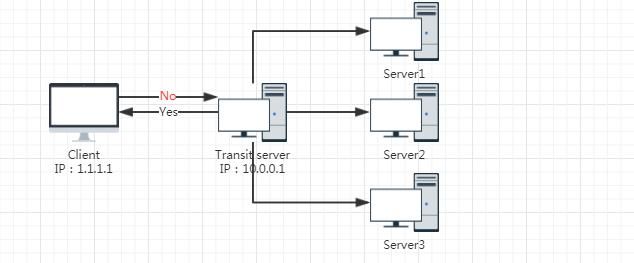
Client cannot connect directly to Transit server, but Transit server can connect reversely to Client
Scan ports on Server1, Server2, and Server3
1. Using EarthWorm
Client:
ew -s rcsocks -l 2222 -e 1111 |
Transit server:
ew -s rssocks -d 1.1.1.1 -e 1111 |
Connect to Client's port 2222 using proxy tools
2. Using rsocks
Download address:
https://github.com/brimstone/rsocks
Written in Go, supports Windows and Linux
Client:
rsocks -listen :1111 -socks 127.0.0.1:2222 |
Transit server:
rsocks -connect 1.1.1.1:1111 |
Connect to Client's port 2222 using proxy tools
0x06 Summary
---
This article organizes and summarizes common tools and methods for port forwarding and proxying, dividing them into two categories: forward and reverse connections. It introduces application scenarios and common tools for each category, serving as a reference for practical applications.


