
0x00 Preface
---
In domain penetration, we need to obtain the password policies of domain users before password brute-forcing to avoid locking out users during the attack.
From a defensive perspective, it is necessary to identify password brute-forcing attacks and implement defensive measures.
This article will introduce common methods for obtaining domain user password policies, along with detection methods for domain user password brute-forcing attacks.
0x01 Introduction
---
This article will cover the following topics:
- Methods for modifying domain user password policies
- Methods for obtaining domain user password policies from outside the domain
- Methods for obtaining domain user password policies from within the domain
- Detection methods
0x02 Basics
---
We need to focus on the following password policies:
- Maximum password age, indicating the expiration time of passwords, default is 42
- Minimum password length, indicating the minimum length of passwords, default is 7
- Account lockout duration, indicating the number of minutes a locked account remains locked before being automatically unlocked, default is 30
- Account lockout threshold, indicating the number of failed login attempts that cause a user account to be locked, default is 5
- Reset account lockout counter after, indicating the number of minutes that must elapse after a failed login attempt before the failed login attempt counter is reset to 0, default is 30
0x03 Method to modify domain user password policy
---
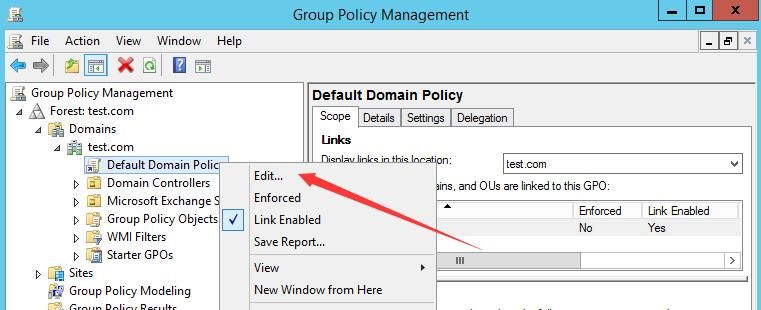
The domain user password policy is by default stored in the Default Domain Policy within the domain, with GUID {31B2F340-016D-11D2-945F-00C04FB984F9}
Open Group Policy Management on the domain controller, locate the current domain, select Default Domain Policy, right-click and choose Edit, as shown in the figure below
Navigate sequentially through Computer Configuration->Policies->Windows Settings->Security Settings->Account Policies, as shown in the figure below
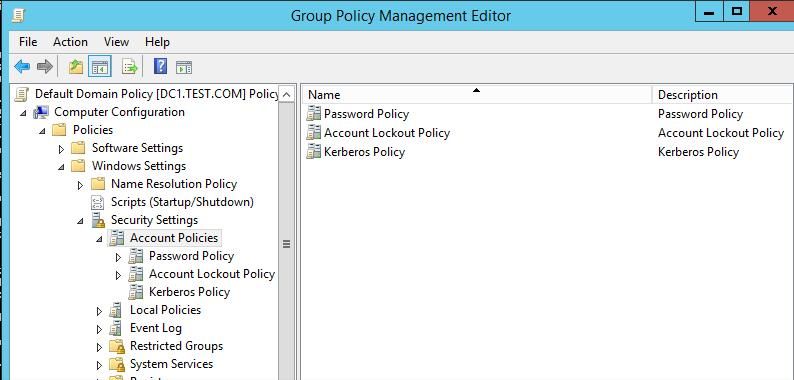
Modify the corresponding options as prompted
After modification, you can choose to update the group policy immediately to make it effective, enter the command line:
gpupdate |
0x04 Methods for Obtaining Domain User Password Policies from Outside the Domain
---
1. Using ldapsearch on Kali System to Obtain Domain User Password Policies
Test environment as shown below
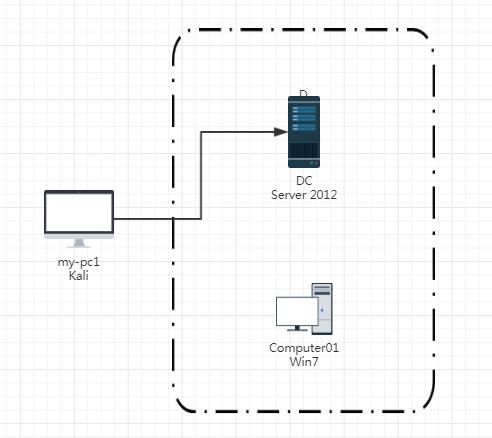
Prerequisite: We can access port 389 of the Domain Controller (DC) and have obtained the password of at least one ordinary domain user
In this test environment, we have obtained the password for the ordinary domain user testa: DomainUser123!
Connection command as follows:
ldapsearch -x -H ldap://192.168.1.1:389 -D "CN=testa,CN=Users,DC=test,DC=com" -w DomainUser123! -b "DC=test,DC=com" | grep replUpToDateVector -A 13 |
Parameter description:
-x Perform simple authentication
-H Server address
-D DN used to bind to the server
-w Password for binding DN
-b specifies the root node to query
Use the grep command to filter the output results; grep replUpToDateVector -A 13 is to display only items related to password policy
The output result is shown in the figure below
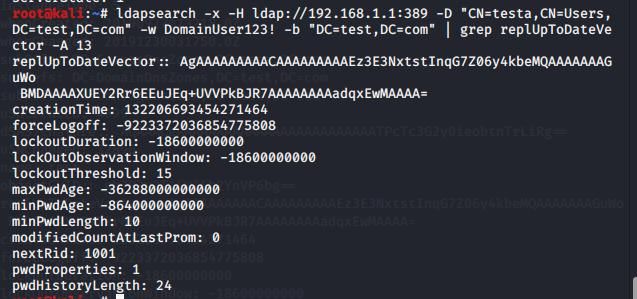
Includes the following required information:
- maxPwdAge: -36288000000000
- minPwdLength: 10
- lockoutDuration: -18600000000
- lockoutThreshold: 15
- lockOutObservationWindow: -18600000000
To convert to seconds, divide by 10000000
For example:
(1) maxPwdAge: -36288000000000
36288000000000/10000000=3628800s
3628800/86400=42d
maxPwdAge=42d
(2)lockoutDuration: -18600000000
-18600000000/10000000=1860s
1860/60=31m
lockoutDuration=31m
2. Retrieving Domain User Password Policy via PowerShell on Windows System
Test environment is shown in the figure below
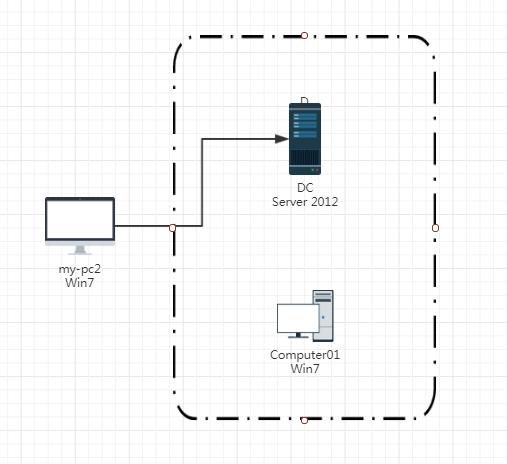
Prerequisite: We can access port 389 of the domain controller (DC), and we have obtained at least one regular domain user's password
In this test environment, we obtained the password for the regular domain user testa as DomainUser123!
The PowerShell module Active Directory is required here
There is no need to specifically install the PowerShell module Active Directory; it can be resolved by calling Microsoft.ActiveDirectory.Management.dll
Microsoft.ActiveDirectory.Management.dll is generated after installing the PowerShell module Active Directory. I have extracted it and uploaded it to GitHub:
An open-source project
Additionally, credential information is required, so the complete PowerShell command is as follows:
$uname="testa" |
The output result is as shown in the figure below
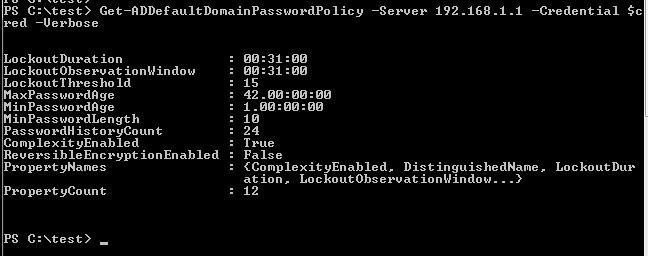
3. Windows system obtains domain user password policy via domain shared files
The test environment is the same as above
The domain user's password policy is stored in the default domain policy (Default Domain Policy) within the domain, with the guid {31B2F340-016D-11D2-945F-00C04FB984F9}
It can be viewed by accessing the domain shared folder \\SYSVOL
Prerequisite: Domain user credentials need to be provided
In this test environment, we obtained the password for the domain ordinary user testa as DomainUser123!
The general location is: \\
The location in the test environment is: \\192.168.1.1\SYSVOL\test.com\Policies\{31B2F340-016D-11D2-945F-00C04FB984F9}\MACHINE\Microsoft\Windows NT\SecEdit\GptTmpl.inf
The output result is as shown in the figure below
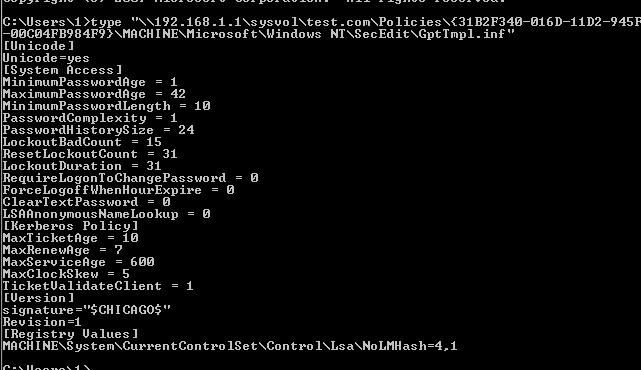
0x05 Methods for Obtaining Domain User Password Policies within a Domain
---
Prerequisite: Access to a host within the domain has been obtained
The test environment is as shown in the figure below
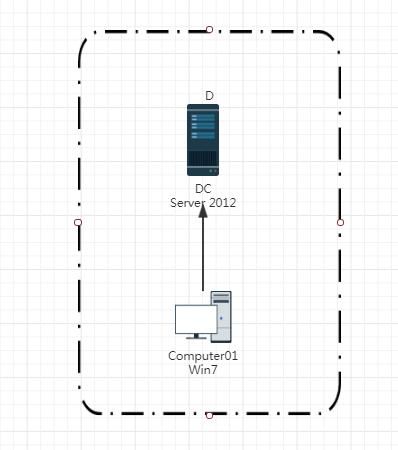
1. Obtaining Domain User Password Policies via PowerShell
import-module .\Microsoft.ActiveDirectory.Management.dll |
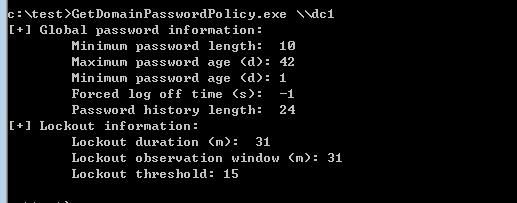
2. Obtaining Domain User Password Policies via C++
Using the API NetUserModalsGet to retrieve domain user password policies
Structure USER_MODALS_INFO_0 stores global password information
Structure USER_MODALS_INFO_3 stores lockout information
Reference materials:
https://docs.microsoft.com/en-us/windows/win32/api/lmaccess/nf-lmaccess-netusermodalsget?redirectedfrom=MSDN
Based on the code in the reference materials, added functionality to query user lockout information. The code has been uploaded to GitHub at the following address:
An open-source project
The code uses the structures USER_MODALS_INFO_0 and USER_MODALS_INFO_3 respectively to query user password policies
The output result is shown in the figure below
3. Obtain domain user password policies through domain shared files
The general location is: \\
The test environment location is: \\test.com\SYSVOL\test.com\Policies\{31B2F340-016D-11D2-945F-00C04FB984F9}\MACHINE\Microsoft\Windows NT\SecEdit\GptTmpl.inf
0x06 Detection Methods
---
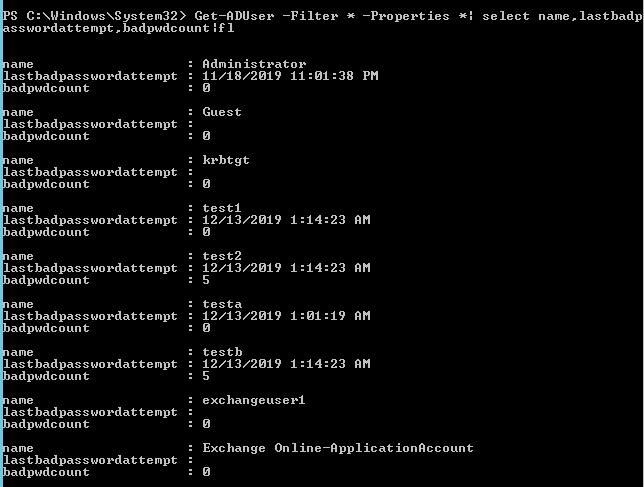
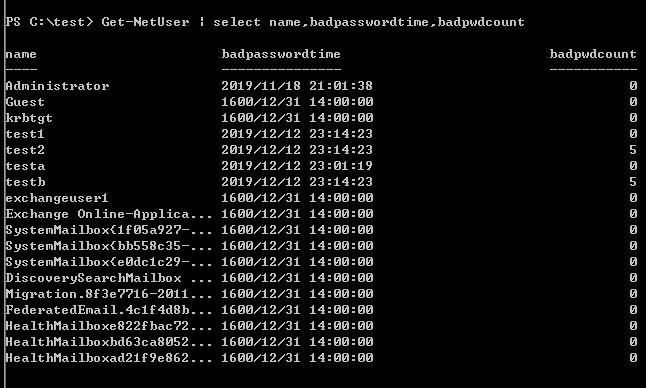
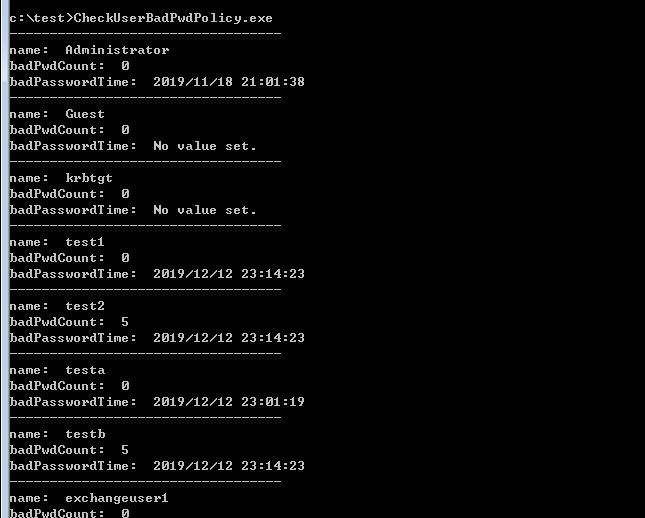
Domain user attributes include two useful pieces of information:
- badPwdCount, which records the number of incorrect password attempts for the user
- lastbadpasswordattempt, which records the last login time when an incorrect password was entered
During detection, we can query these two attributes to identify whether a password brute-force attack has occurred. The specific method is as follows:
1. Query directly on the domain controller
Powershell code is as follows:
Get-ADUser -Filter * -Properties *| select name,lastbadpasswordattempt,badpwdcount|fl |
The output result is shown in the figure below
2. On a host logged in by a regular domain user
(1) Using powerview
Get-NetUser | select name,badpasswordtime,badpwdcount |
The output result is shown in the figure below
(2) Using C++
An open-source project
The output result is shown in the figure below
3. On a Kali system outside the domain
(1) Using ldapsearch
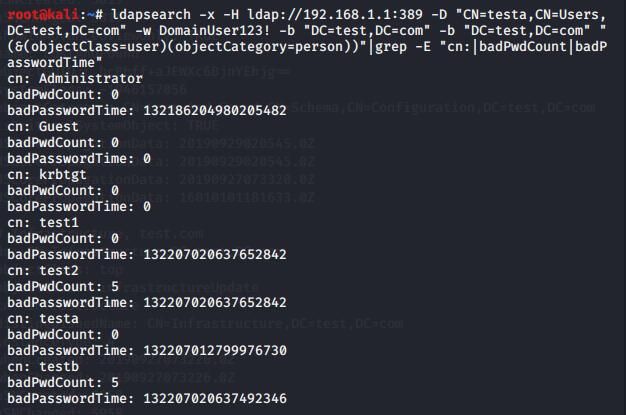
ldapsearch -x -H ldap://192.168.1.1:389 -D "CN=testa,CN=Users,DC=test,DC=com" -w DomainUser123! -b "DC=test,DC=com" -b "DC=test,DC=com" "(&(objectClass=user)(objectCategory=person))"|grep -E "cn:|badPwdCount|badPasswordTime" |
The output result is shown in the figure below
Note:
If the password is entered correctly, then badPwdCount will be cleared
0x07 Summary
---
This article lists common methods for obtaining domain user password policies and describes how to identify password brute-force behavior in various environments.


