
0x00 Preface
---
This article will introduce methods for Minio version detection, implement automation through Python, document development details, and provide open-source code.
0x01 Introduction
---
This article will cover the following:
- Implementation Approach
- Implementation Details
- Open-Source Code
0x02 Fundamentals
---
MinIO is a high-performance, distributed object storage system developed in Go. Minio can serve as a cloud storage solution for storing massive amounts of images, videos, and documents. Implemented in Go, the server can run on Windows, Linux, OS X, and FreeBSD, requiring only a standalone executable.
For Windows environment setup, refer to: https://min.io/docs/minio/windows/index.html
1. Download
Latest version: https://dl.min.io/server/minio/release/windows-amd64/minio.exe
Historical versions: https://dl.min.io/server/minio/release/windows-amd64/archive/
For historical versions, add .exe extension after download and run directly
2. Start the service
Command line parameters: minio.exe server C:\minio --console-address :9090
3. Web access
URL address: http://127.0.0.1:9090
Default username: minioadmin
Default password: minioadmin
0x03 Implementation Approach
---
Minio version detection requires logging into the web console
Access location: Health page, as shown below
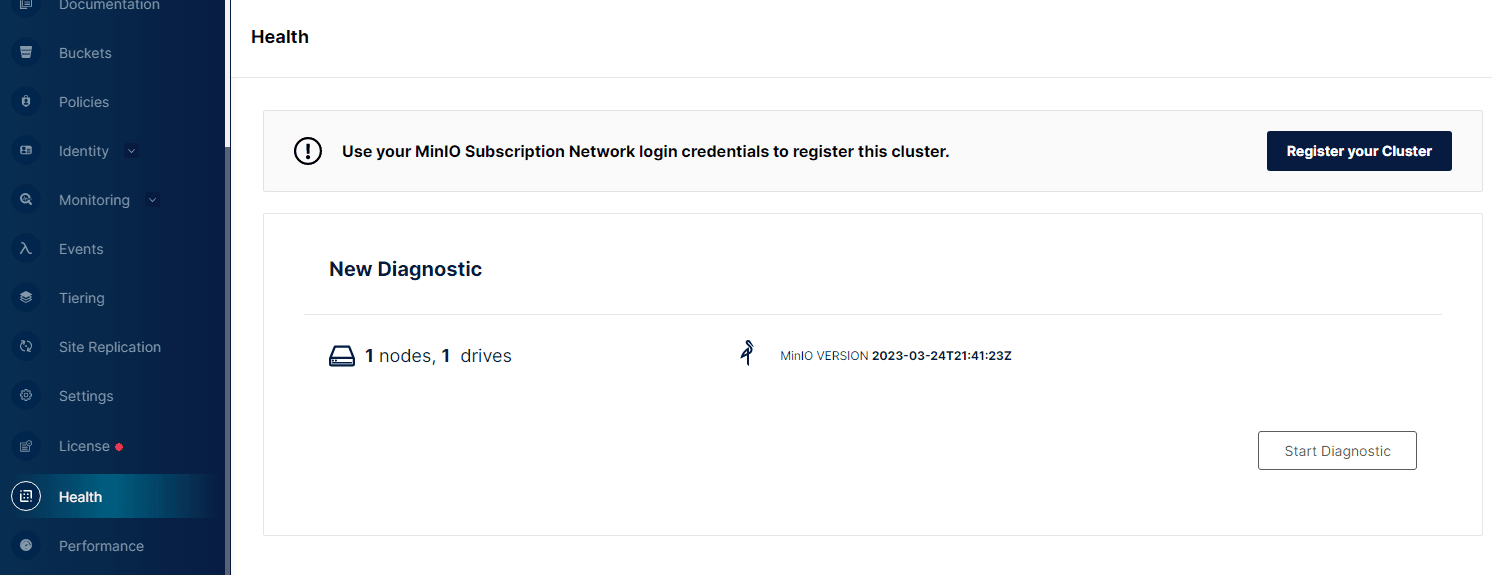
The page displays current version along with node and storage information
In terms of program implementation, we can analyze the authentication process by capturing packets. The specific details are as follows:
1. Login
Access URL: http://127.0.0.1:9090/api/v1/login
Authentication information is passed in JSON format, with the following specific content:
{"accessKey": "minioadmin","secretKey": "minioadmin"} |
After successful login, status code 204 is returned, and a Cookie: token=xxxx is added to the Header as a credential.
2. Read Version Information
Access URL: http://127.0.0.1:9090/api/v1/admin/info
Requires Cookie: token=xxxx as a credential.
The result is returned in JSON format, as shown in the figure below.
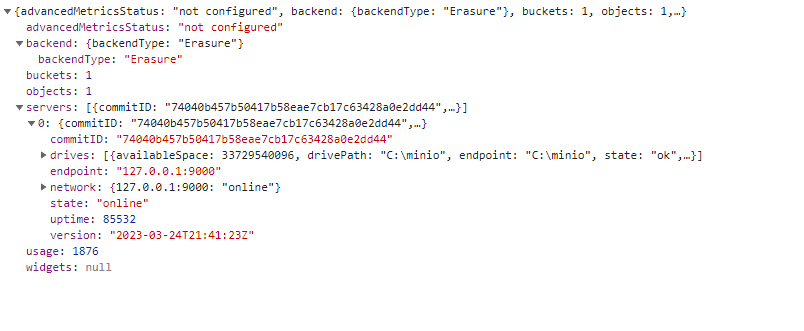
Additional: Obtain the latest version of Minio
Access URL: http://127.0.0.1:9090/api/v1/check-version
0x04 Implementation Details
---
1. Login
An issue to consider here: the default port has been modified.
When implementing automation with a program, port 9000 is typically used, but there are cases where the port has been changed to 9001, and a very small number of instances have the port modified to other uncommon ports.
If the port is incorrect, it will return status code 400, with a response content example:
|
Therefore, in program implementation, a check can be added here: when using the default port 9000, if specific conditions are returned, prompt that the port is incorrect, then try port 9001. If it fails again, prompt to modify the default port.
Complete example code:
def loginMinIO(url, username, password): |
2. Read version information
---
The returned result is in JSON format. Example result:
{"advancedMetricsStatus":"not configured","backend":{"backendType":"Erasure"},"servers":[{"commitID":"87cbd4126599ae825903230fdb32197204e42c22","drives":[{"availableSpace":33283801088,"drivePath":"C:\\minio","endpoint":"C:\\minio","state":"ok","totalSpace":64422408192,"usedSpace":31138607104,"uuid":"2d684591-69af-42c1-b940-ce7f4d711aa1"}],"endpoint":"127.0.0.1:9000","network":{"127.0.0.1:9000":"online"},"state":"online","uptime":214,"version":"2023-03-24T21:41:23Z"}],"widgets":null} |
There may be multiple servers, so traversal is required during parsing. Example code:
dictt = res.json()["servers"] |
0x05 Open Source Code
---
The complete implementation code has been uploaded to GitHub at the following address:
https://github.com/3gstudent/Homework-of-Python/blob/master/MinIO_GetVersion.py
The code supports the following two commands:
- getversion: used to obtain version information
- getinfo: used to obtain complete information
0x06 Summary
---
This article introduces the method for Minio version detection, details the development process using Python in a practical environment, and provides the open source code.


