
Penetration Basics: Fortigate Identification and Version Detection
0x00 Preface
Fortigate identification requires distinguishing between the management page and the VPN login page. Version detection involves extracting features based on page characteristics and matching precise versions using these features. This article will introduce methods to implement Fortigate identification and version detection using Python, along with open-source code.
0x01 Introduction
This article will cover the following content:
Implementation Ideas
Implementation Details
Open-Source Code
0x02 Implementation Ideas
1. Fortigate Identification
Can be distinguished by the redirected URL
Management page redirect URL: /login?redir=%2F
VPN login page redirect URL: /remote/login?lang=en
2. Version Detection
There exists a 32-bit hexadecimal string in the page source code that can be used as a feature for version identification; each version corresponds to a different 32-bit string
0x03 Implementation Details
1. Fortigate Identification
The method here is to directly access the IP and judge based on the page return result
(1) Management Page
A 32-bit hexadecimal string can be obtained from the return result
(2) VPN Login Page
The returned content is a redirect address; you need to parse the redirect address, reconstruct the URL, access it, and obtain a 32-bit hexadecimal string from the return result
Example of the returned redirect address content:
 Since the redirect URL is not fixed, you can extract the redirect URL via regex matching here. Example code:

Note:
When judging the version, you cannot use the allow_redirects=False parameter in the requests module to control redirection. The reason is as follows:
When using the requests module, if you use the allow_redirects=False parameter, redirection is only disabled when the return status code is 301 or 302. Here, Fortigate returns a status code of 200, so the allow_redirects=False parameter has no effect
2. Version Detection
During actual testing, different versions of Fortigate all return 32-bit hexadecimal characters, but their formats are different. To improve matching efficiency and reduce workload, we choose to directly match the 32-bit hexadecimal characters in regex matching here. The example code is as follows:

During actual testing, there are cases where the output of response.text is garbled
The process of researching solutions is as follows:
Output response.headers, sample code:

Return result:

Found the encoding format is x-gzip
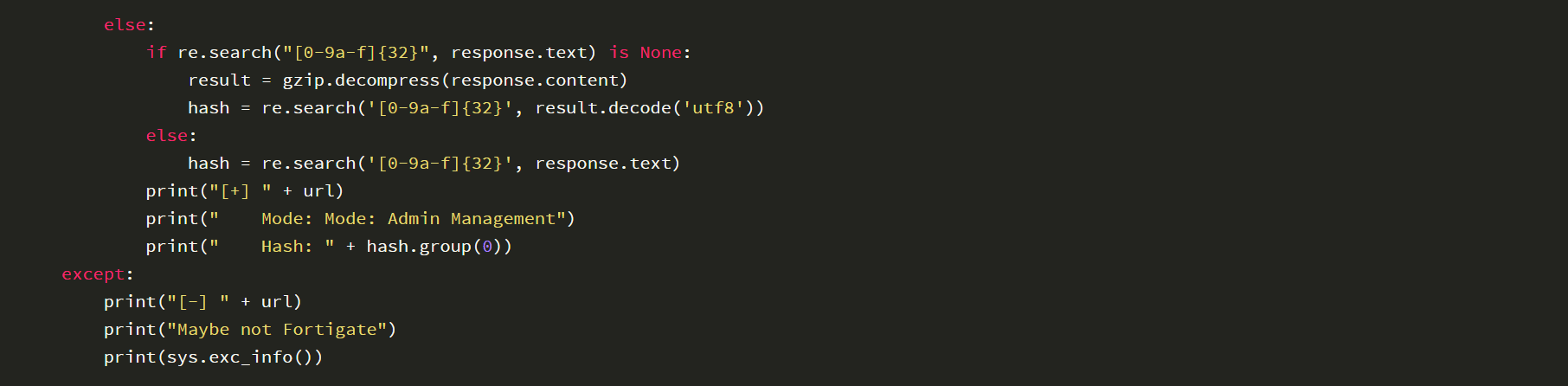
Therefore, we can perform an additional gzip decoding on response.text here to get the original data, the code is as follows:
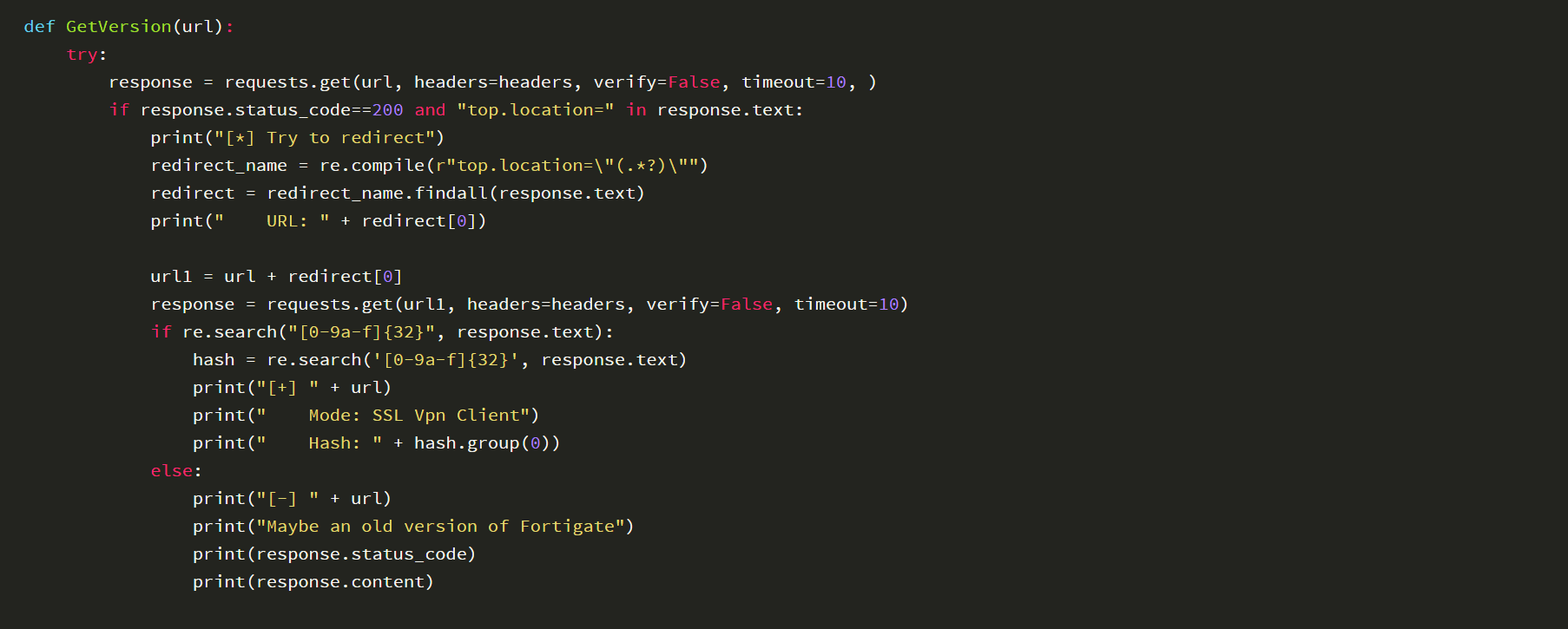
 The complete implementation code is as follows:
Note:
If you encounter the error ERR_SSL_VERSION_OR_CIPHER_MISMATCH when accessing the SSL VPN Client page via a browser, the program will return the following result:

Solution:
Just switch to Python2
0x04 Open Source Code
The complete implementation code has been uploaded to GitHub, the address is as follows:
https://github.com/3gstudent/Homework-of-Python/blob/master/Fortigate_GetVersion.py
The code supports distinguishing between management pages and VPN login pages, provides a VM version fingerprint database as an example, can automatically extract fingerprint features from the page, compare them with the fingerprint database, and identify the exact version.
0x05 Summary
This article introduces methods to implement Fortigate identification and version detection using Python, covers implementation details and open-source code, and serves as an excellent learning example.


