
0x00 Preface
---
This article will introduce methods for extracting credentials from the lsass.exe process in different environments based on personal experience, combining exploitation approaches and providing defense recommendations.
0x01 Introduction
---
This article will cover the following:
- Common methods for extracting credentials from the lsass.exe process
- Methods for extracting credentials when upload file size is restricted
- Methods for extracting credentials when download file size is restricted
0x02 Common Methods for Extracting Credentials from lsass.exe Process
---
1. Using mimikatz to directly extract credentials
Directly extract credentials from the memory of the lsass.exe process with the following command:
mimikatz.exe log "privilege::debug" "sekurlsa::logonPasswords full" exit |
This method is usually intercepted by security products.
2. Exporting credentials via the lsass.exe process dump file
(1) Obtain the lsass.exe process dump file
- procdump
Command as follows:
procdump64.exe -accepteula -ma lsass.exe lsass.dmp |
- C++ implementation
https://github.com/killswitch-GUI/minidump-lib
- PowerShell implementation
https://github.com/PowerShellMafia/PowerSploit/blob/master/Exfiltration/Out-Minidump.ps1
- C# implementation
https://github.com/GhostPack/SharpDump
- Using comsvcs.dll
Example parameters as follows:
rundll32 C:\windows\system32\comsvcs.dll, MiniDump 808 C:\test\lsass.dmp full |
Note:
For the method using comsvcs.dll, refer to the previous analysis article 'MiniDumpWriteDump via COM+ Services DLL' for exploitation testing.
The above methods are all based on obtaining the process's dmp file through the API MiniDumpWriteDump() in principle.
However, some security products have started to intercept this behavior, with the interception method as follows:
Through user-mode API hooking, modify the first 5 bytes of NtReadVirtualMemory() using a jump (JMP) command to point to another memory address.
Bypass approach:
Overwrite the modified first 5 bytes with the correct command or rewrite an NtReadVirtualMemory().
Reference materials:
https://medium.com/@fsx30/bypass-edrs-memory-protection-introduction-to-hooking-2efb21acffd6
Open-source tool:
https://github.com/outflanknl/Dumpert
If this method still fails, you can try using RPC to control lsass to load an SSP, injecting a dll into the lsass.exe process, and having the dll implement the dump functionality.
For using RPC to control lsass to load an SSP, refer to the open-source code by XPN:
https://gist.github.com/xpn/c7f6d15bf15750eae3ec349e7ec2380e
Analysis article on this: 'The Use of SSP in Mimikatz'
For implementing dump functionality via DLL, refer to the following code:
https://github.com/outflanknl/Dumpert/blob/master/Dumpert-DLL/Outflank-Dumpert-DLL/Dumpert.c
(2) Extracting credentials from dmp files
After successfully obtaining the lsass.exe process dmp file, credentials can be extracted using mimikatz with the following command:
mimikatz.exe log "sekurlsa::minidump lsass.dmp" "sekurlsa::logonPasswords full" exit |
0x03 Methods for extracting credentials when file upload size is restricted
---
If the actual testing environment imposes restrictions on uploaded file size, here is my solution: upload .cs files and utilize the default .Net environment installed in the testing environment to compile using csc.exe
To accommodate different testing environments, the code used should support .Net 3.5 and higher versions
1. Direct credential extraction using mimikatz implemented in C#
Casey Smith has already implemented loading mimikatz in C# files. The currently available reference code address:
https://github.com/re4lity/subTee-gits-backups/blob/master/PELoader.cs
It should be noted that the mimikatz version encapsulated in this code is mimikatz 2.0 alpha (x64) release "Kiwi en C" (Aug 17 2015 00:14:48)
This version produces incomplete results when executing the command sekurlsa::logonpasswords and cannot export hashes by default
Therefore, I replaced mimikatz with a newer version on this basis: mimikatz 2.1.1 (x64) built on Sep 25 2018 15:08:14
The method involves first compressing the new version of mimikatz.exe using Gzip, then converting it to base64 encoding, and finally modifying the content in the string KatzCompressed.
The C# code for generating the new string KatzCompressed content has been uploaded to GitHub at the following address:
An open-source project
It can be compiled using csc.exe and supports .NET 3.5 and higher versions.
After code execution, replace the string KatzCompressed with the content from the generated file base64.txt.
The original version of PELoader.cs used .Add(), which made it incompatible with .NET 3.5. This can be modified to support .NET 3.5.
The final modified PELoader.cs (upgraded mimikatz, supports .NET 3.5) has also been uploaded to GitHub at the following address:
An open-source project
It can be compiled using csc.exe and supports .NET 3.5 and higher versions.
Compilation command:
C:\Windows\Microsoft.NET\Framework64\v3.5\csc.exe PELoaderofMimikatz.cs /unsafe |
Command to export credentials:
PELoaderofMimikatz.exe log "privilege::debug" "sekurlsa::logonPasswords full" exit |
Note:
Simple modifications are required to pre-pass the command to be executed in the program. InstallUtil.exe can be used to export credentials, with the command as follows:
C:\Windows\Microsoft.NET\Framework64\v4.0.30319\InstallUtil.exe /logfile= /LogToConsole=false /U PELoaderofMimikatzAuto.exe |
Using this method, the .cs file can be uploaded to the target test environment and then compiled using the .Net framework available in the target test environment.
2. Using C# implemented code to obtain the dmp file of the lsass.exe process
There are many similar open-source codes available. I have made simple modifications based on SafetyKatz.
The modified code has been uploaded to GitHub, with the address as follows:
An open-source project
It can be compiled using csc.exe and supports .Net 3.5 and higher versions.
After code execution, the dmp file of the lsass.exe process is generated in the current path.
Once the dmp file is obtained, it can be downloaded locally and then used with mimikatz to export credentials.
0x04 Method for exporting credentials when download file length is restricted
---
If the actual test environment imposes restrictions on the length of downloaded files (sometimes the compressed dmp file of the lsass.exe process can be hundreds of MB),
The simplest solution here is to repackage mimikatz (removing unnecessary features to avoid detection) and export credentials from the lsass.exe process dmp file directly on the target test environment.
You can refer to SafetyKatz here:
https://github.com/GhostPack/SafetyKatz
SafetyKatz modifies and encapsulates mimikatz into a string, following Casey Smith's method of loading mimikatz in C# files, to achieve the following functions:
- Obtain the lsass.exe process dump file and save it to the temp directory
- Export credentials from the dump file
- Delete the dump file
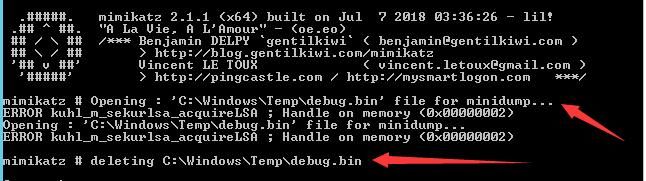
We can add the following code to SafetyKatz's source to restore the encapsulated exe:
FileStream fs = new FileStream(@"C:\test\1.exe", FileMode.Create); |
You can see that the encapsulated exe is a modified version of mimikatz, which by default executes some commands, as shown in the figure below
I made simple adjustments to SafetyKatz's code to support .Net 3.5 and higher versions
The modified code has been uploaded to GitHub at the following address:
An open-source project
Compilation command:
C:\Windows\Microsoft.NET\Framework64\v3.5\csc.exe SafetyKatz.cs /unsafe |
0x05 Defense Detection
---
The premise of exploitation is that the attacker has already obtained administrator privileges on the system. Obtaining the dmp file of the lsass.exe process ultimately calls NtReadVirtualMemory(), which can be monitored
0x06 Summary
---
This article introduces methods for extracting credentials from the lsass.exe process in different environments, combines exploitation ideas, and provides defense recommendations


