
0x00 Preface
---
Outlook Web Access, abbreviated as OWA, is the web interface for Exchange to send and receive emails, enabled by default for all mailbox users.
Typically, we use a browser to access OWA and read emails. However, from a penetration testing perspective, we need to achieve the same functionality via the command line.
Currently, I haven't seen suitable open-source code or reference materials, so I plan to write Python code based on my own understanding to implement the functions of reading emails and downloading attachments.
0x01 Introduction
---
This article will cover the following topics:
- Implementation Approach
- Implementation Details
- Issues to Note When Writing the Program
- Open-Source Code
- Usage Process
0x02 Implementation Approach
---
I haven't found any documentation introducing the OWA protocol format yet, so I can only implement it through packet capturing.
Here I use the built-in packet capturing tool in the Chrome browser. Press F12 in the Chrome interface and select Network.
0x03 Implementation Details
---
1. Login Operation
The accessed URL is https://
A POST request needs to be sent with the data format:
destination=https:// |
After successful login, the Cookie includes X-OWA-CANARY, which can be used as a judgment basis.
The actual login process sent three data packets in total, as shown in the figure below.
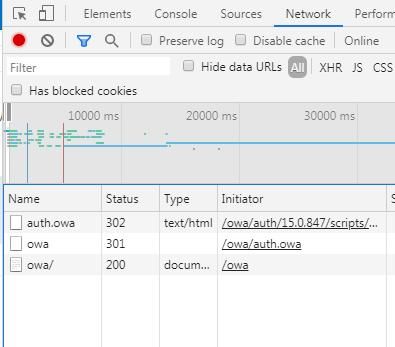
In program implementation, using Python's requests library does not require considering this detail.
The complete implementation code has been uploaded to GitHub, with the address as follows:
An open-source project
The code implements password verification
Note that OWA only supports plaintext password login, hash cannot be used
2. Access resources
Packet capture reveals that basically every operation follows this format:
- Send POST packet
- Set X-OWA-CANARY and Action in the Header
- X-OWA-CANARY can be obtained from the Cookie returned after successful login
- Cookie needs to be set
- POST packet data format is JSON
- Return result is also in JSON format
To read email content and download attachments, we need to implement the following operations programmatically:
(1) Read information of all emails in the folder
The accessed URL is https://
The corresponding Action is FindItem
POST packet data format:
{"__type":"FindItemJsonRequest:#Exchange","Header":{"__type":"JsonRequestHeaders:#Exchange","RequestServerVersion":"Exchange2013","TimeZoneContext":{"__type":"TimeZoneContext:#Exchange","TimeZoneDefinition":{"__type":"TimeZoneDefinitionType:#Exchange","Id":"SA Pacific Standard Time"}}},"Body":{"__type":"FindItemRequest:#Exchange","ItemShape":{"__type":"ItemResponseShape:#Exchange","BaseShape":"IdOnly"},"ParentFolderIds":[{"__type":"DistinguishedFolderId:#Exchange","Id":" |
The
As shown in the figure below
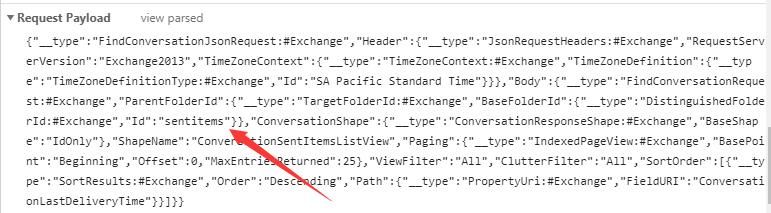
The POST request returns results in JSON format, including brief information for each email in the folder (such as subject, sender, send time, read status, and whether it contains attachments, but not the body content), which is essentially the same as the results returned by the EWS GetFolder operation
Here, the ConversationId corresponding to each email needs to be extracted for use as a parameter to read the email content
In terms of program implementation, we need to use the session object from requests to maintain the session state
The specific implementation code is as follows:
def ListFolder(url, username, password, folder, mode): |
The code will parse the returned JSON format and extract the ConversationId of each email.
(2) Read the content of a specified email
The accessed URL is https://
The corresponding Action is GetConversationItems
Data format of the POST packet:
{"__type":"GetConversationItemsJsonRequest:#Exchange","Header":{"__type":"JsonRequestHeaders:#Exchange","RequestServerVersion":"Exchange2013","TimeZoneContext":{"__type":"TimeZoneContext:#Exchange","TimeZoneDefinition":{"__type":"TimeZoneDefinitionType:#Exchange","Id":"SA Pacific Standard Time"}}},"Body":{"__type":"GetConversationItemsRequest:#Exchange","Conversations":[{"__type":"ConversationRequestType:#Exchange","ConversationId":{"__type":"ItemId:#Exchange","Id":""},"SyncState":""}],"ItemShape":{"__type":"ItemResponseShape:#Exchange","BaseShape":"IdOnly","FilterHtmlContent":1,"BlockExternalImagesIfSenderUntrusted":1,"AddBlankTargetToLinks":1,"ClientSupportsIrm":1,"InlineImageUrlTemplate":"data:image/gif;base64,R0lGODlhAQABAIAAAAAAAP///yH5BAEAAAEALAAAAAABAAEAAAIBTAA7","MaximumBodySize":2097152,"InlineImageUrlOnLoadTemplate":"InlineImageLoader.GetLoader().Load(this)","InlineImageCustomDataTemplate":" |
Where
Note here: The POST packet data format captured via the browser cannot be recognized by Python for false and true; false needs to be replaced with 0, and true with 1
The return result of the POST request is in JSON format, including the detailed content of the email
Here, the Id and ContentType corresponding to the email attachments need to be extracted for use as parameters in the attachment saving operation
The specific implementation code is as follows:
def ViewMail(url, username, password, ConversationId): |
The code will parse the JSON format of the returned result to extract the specific content of the email. If multiple attachments are included, it will output the Name, ContentType, and Id for each one.
(3) Download and save attachments
The accessed URL is https://
Here,
A GET request is used here. The returned result's header includes the attachment's file name, and the webpage content of the returned result is the attachment's content.
When saving attachments, pay attention to the saved format, distinguishing between text files and binary files.
If it is a text file, you can save the content of r.text.
If it is a binary file, you can save the content of r.content.
The specific implementation code is as follows:
def DownloadAttachment(url, username, password, Id, mode): |
The complete implementation code has been uploaded to GitHub at the following address:
An open-source project
Usage example:
(1) View emails in the Sent Items folder
python owaManage.py 192.168.1.1 test1 DomainUser123! ListFolder |
Specified folder: sentitems
Specified output result type: full
As shown in the figure below
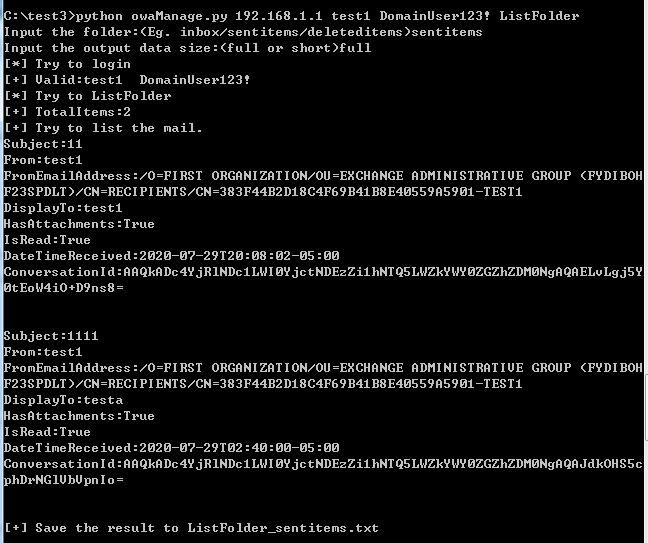
Result returns the total number of emails and information for each email. Here, the ConversationId corresponding to the email is obtained: AAQkADc4YjRlNDc1LWI0YjctNDEzZi1hNTQ5LWZkYWY0ZGZhZDM0NgAQAJdkOHS5cphDrNGlVbVpnIo=
(2) Read email content
python owaManage.py 192.168.1.1 test1 DomainUser123! ViewMail |
Specify the ConversationId corresponding to the email
As shown in the figure below
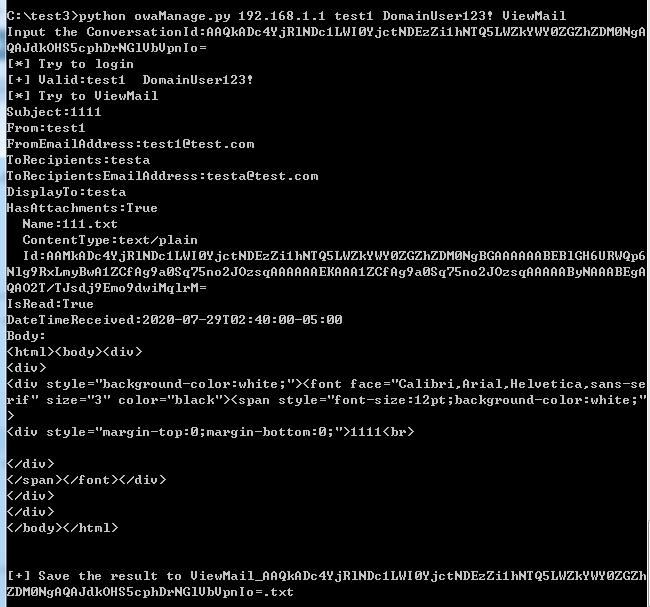
Result returns the specific content of the email. Here, the attachment 111.txt is obtained with the type text/plain and the corresponding Id: AAMkADc4YjRlNDc1LWI0YjctNDEzZi1hNTQ5LWZkYWY0ZGZhZDM0NgBGAAAAAABEBlGH6URWQp6Nlg9RxLmyBwA1ZCfAg9a0Sq75no2JOzsqAAAAAAEKAAA1ZCfAg9a0Sq75no2JOzsqAAAAAByNAAABEgAQAO2T/TJsdj9Emo9dwiMqlrM=
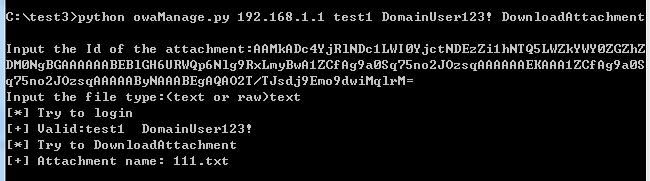
(3) Download attachment
python owaManage.py 192.168.1.1 test1 DomainUser123! DownloadAttachment |
Specify the Id corresponding to the attachment
Specify the save format as text
As shown in the figure below
0x04 Summary
---
This article introduces the implementation details of writing Python code to read Exchange emails through Outlook Web Access (OWA), documenting the development process.


