
0x00 Preface
---
SSH is a network protocol used for encrypted login between computers, commonly employed for remote access to Linux systems.
In penetration testing, it is often necessary to consider SSH password brute-forcing and log deletion.
This article will introduce some foundational aspects related to penetration testing, providing detection recommendations alongside exploitation methods.
0x01 Introduction
---
This article will cover the following topics:
- Program Implementation of SSH Password Authentication
- Deletion of SSH Logs
- Bypassing SSH Logs
- Defensive Detection
0x02 Program Implementation of SSH Password Authentication
---
1. Python Implementation
Using the third-party library paramiko, the usage is very simple
My code has been uploaded to GitHub, the address is as follows:
An open-source project
The code supports password login and certificate file login
2. C# Implementation
Using the third-party library SSH.NET, the address is as follows:
https://github.com/sshnet/SSH.NET
Download link for the compiled DLL:
https://github.com/sshnet/SSH.NET/releases/download/2016.1.0/SSH.NET-2016.1.0-bin.zip
Reference documentation:
https://github.com/sshnet/SSH.NET/releases/download/2016.1.0/SSH.NET-2016.1.0-help.chm
After referencing Renci.SshNet.dll in the program, the usage is also very simple
The following issues need to be noted when writing the program:
(1) Using certificate login
SSH.NET has specific requirements for certificate formats. The SSH.NET-2016.1.0-help.chm indicates it must be BEGIN RSA PRIVATE KEY, as shown in the figure below.
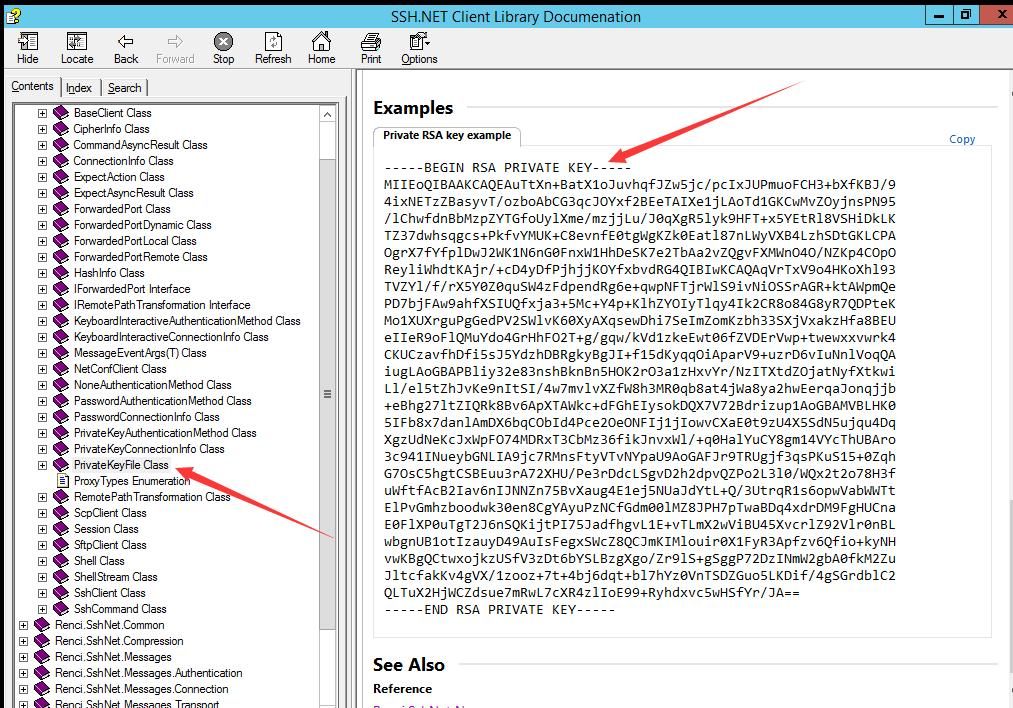
When using the command ssh-keygen -t rsa, the default generated key file is in a new format: BEGIN OPENSSH PRIVATE KEY, requiring a conversion.
Solution:
Use puttygen for conversion. Download link:
https://www.chiark.greenend.org.uk/~sgtatham/putty/latest.html
Select Load to import the key.
Export method:
Conversions->Export OpenSSH key
Therefore, in programming, it is necessary to first read the certificate file content and verify if the format is correct.
My code has been uploaded to GitHub at the following address:
An open-source project
The code requires the Renci.SshNet.dll corresponding to the .NET version and can be compiled using csc.exe. Example command:
C:\Windows\Microsoft.NET\Framework64\v4.0.30319\csc.exe SharpSSHCheck_SSH.NET.cs /r:Renci.SshNet.dll |
The code supports both password login and certificate file login.
0x03 SSH Log Deletion
---
Logs related to SSH login operations are located in the following positions:
- /var/log/btmp, records failed login attempts, query command: lastb
- /var/log/auth.log, records successfully authenticated users
- /var/log/secure, records security-related log information
- /var/log/lastlog, records user's last login information
- /var/log/wtmp, records current and past users who logged into the system, query command: last
- /var/run/utmp, records users currently logged into the system, query command: w
- ~/.bash_history, records commands executed from the beginning until the last login, query command: history
1. Viewing log content
For logs that cannot be viewed directly, use the strings command
Command example:
strings /var/log/wtmp |
2. Replacing IP addresses in logs
Using the sed command to replace a specified IP
Command example:
utmpdump /var/log/wtmp | sed "s/192.168.112.151/1.1.1.1/g" | utmpdump -r > /tmp/wtmp11 && mv /tmp/wtmp11 /var/log/wtmp |
Change 192.168.112.151 to 1.1.1.1
3. Delete specified lines from logs
Using the sed command to delete specified lines
sed -i '/May 1 23:17:39/d' /var/log/auth.log |
Delete lines starting with "May 1 23:17:39" in /var/log/auth.log
4. Evade administrator w command
Requires logtamper
Command example:
python logtamper.py -m 1 -u re4lity -i 192.168.0.188 |
Achieved by modifying the /var/run/utmp file
5. Clear login logs for a specified IP
Requires logtamper
Command example:
python logtamper.py -m 2 -u re4lity -i 192.168.0.188 |
Achieved by modifying the file /var/log/wtmp
6. Modify last login time and location
Requires the use of logtamper
Command example:
python logtamper.py -m 3 -u re4lity -i 192.168.0.188 -t tty1 -d 2014:05:28:10:11:12 |
Achieved by modifying the file /var/log/lastlog
7. Clear command history of the current session
Execute before exiting the session:
history -r |
0x04 Bypassing SSH Logging
---
If we use an SSH client (e.g., putty) for login, log cleanup needs to be considered, which is quite troublesome
Here is a method to bypass various logging mechanisms: use protocols such as sftp, rsync, scp for login (notty)
Here are two implementation methods:
The two SSH password authentication programs (Python and C#) introduced in 0x02 precisely utilize notty
I have added command execution functionality to the password authentication program, with the corresponding code addresses as follows:
Python implementation: an open-source project
C# implementation: an open-source project
Both codes support executing single commands and interactive shells
Select the interactive shell respectively and execute the following command to obtain the connection type:
ps -aux|grep sshd |
At this point, the connection type is notty, as shown in the figure below

Note:
If using putty for remote connection, the type at this point is pts/2, as shown in the figure below

Testing shows that using notty can bypass the following logs:
- /var/log/lastlog, which records the user's last login information
- /var/log/wtmp, records information about users who have logged in and previously logged into the system. Query command: last
- /var/run/utmp, records information about users currently logged into the system. Query command: w
- ~/.bash_history, records commands executed from the beginning up to the previous login. Query command: history
0x05 Defense Detection
---
Enhance SSH daemon, reference materials:
https://www.putorius.net/how-to-secure-ssh-daemon.html
Detection of notty connections:
- View failed login attempts, query command: lastb, file location: /var/log/btmp
- View authenticated users, file location: /var/log/auth.log
- View TCP connections, query command: netstat -vatn
0x06 Summary
---
This article introduces the basics of SSH in penetration testing (log deletion and log bypass), opensources 4 implementation codes (password verification and command execution), and provides detection recommendations based on exploitation methods.


