
0x00 Preface
---
MailEnable provides an end-to-end solution for delivering secure email and collaboration services. According to the official website: a recent independent survey reported MailEnable as the world's most popular Windows mail server platform.
For the MailEnable developer API, I only found documentation for the AJAX API on the official website. Therefore, this article will attempt to write Python scripts to access MailEnable mail, document the development details, and open-source the code.
0x01 Introduction
---
This article will cover the following:
- Environment Setup
- Development Details
- Open-source code MailEnableManage.py
0x02 Environment Setup
---
1. Installation
Before installation, IIS service and .NET 3.5 must be installed; otherwise, Web access cannot be configured properly.
MailEnable download address: http://www.mailenable.com/download.asp
2. Configuration
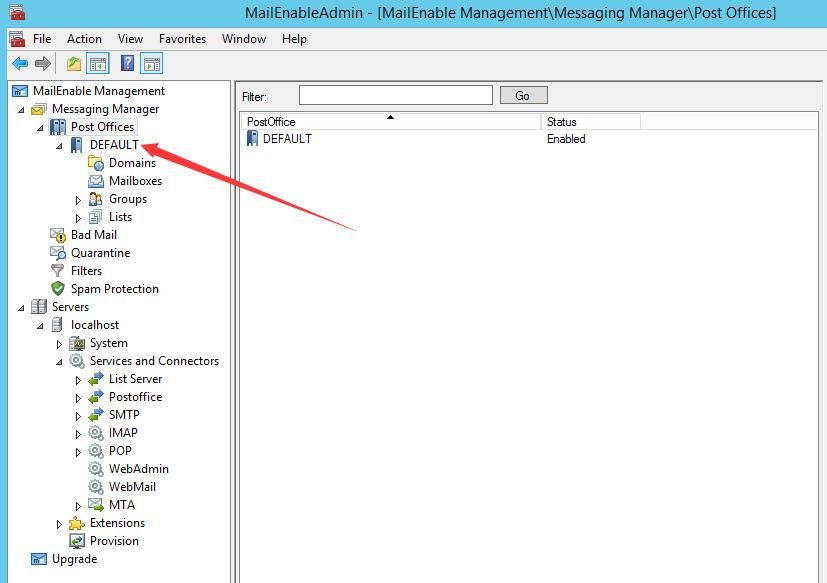
Start MailEnableAdmin.msc, configure mail server information under MailEnable Management->Messaging Manager->Post Offices
As shown below
Default login page:
http://mewebmail.localhost/mewebmail/Mondo/lang/sys/login.aspx
3. Enable Web Management Page
Reference:
http://www.mailenable.com/kb/content/article.asp?ID=ME020132
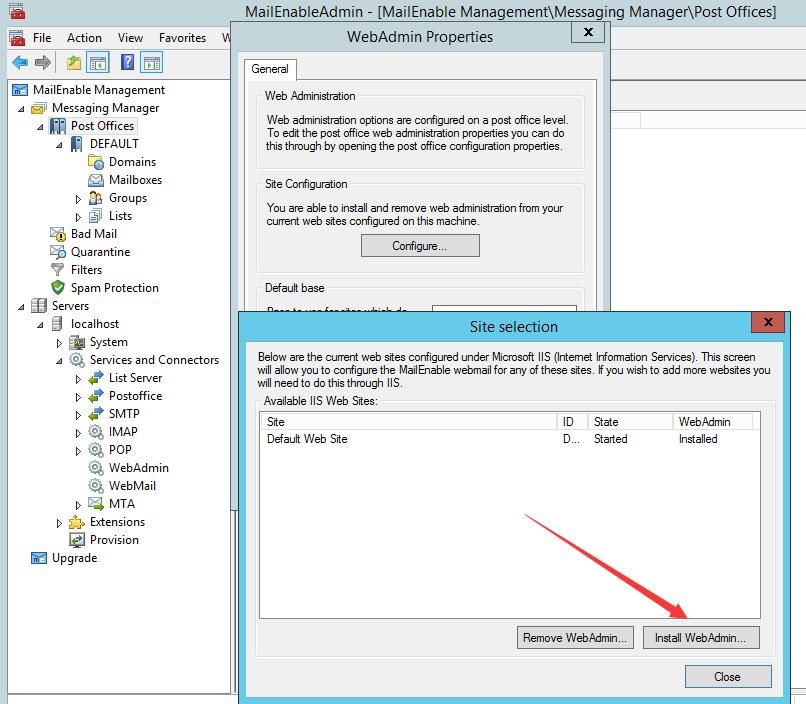
Start MailEnableAdmin.msc, select MailEnable Management->Servers->localhost->Services and Connectors->WebAdmin, right-click and choose Properties from the pop-up menu, select the Configure... button to install
As shown below
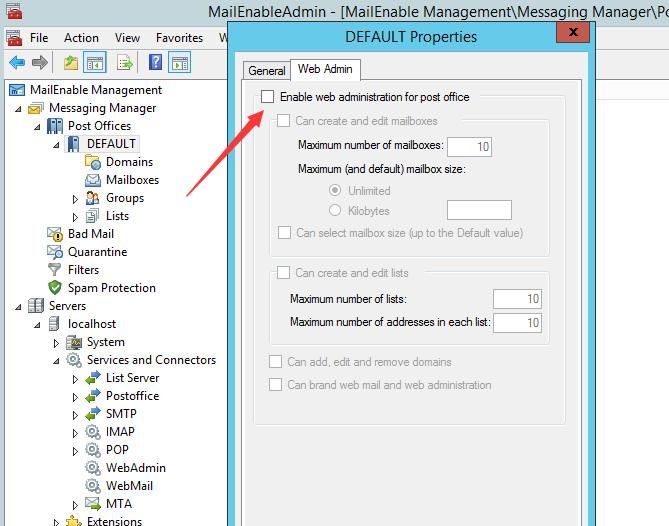
Start MailEnableAdmin.msc, under MailEnable Management->Messaging Manager->Post Offices, select the configured Post Office, right-click and choose Properties from the pop-up menu, switch to the Web Admin tab, enable web administration
As shown below
Select the specified user and modify the attributes to administrator
Default management page:
http://mewebmail.localhost/meadmin/Mondo/lang/sys/login.aspx
Note:
If the user's plaintext password is forgotten, you can check the Auth.tab file in the default installation path C:\Program Files (x86)\Mail Enable\Config, which stores the plaintext password for each mailbox user
0x03 Development Details
---
1. Version Determination
After testing multiple versions, the summarized version determination method is as follows:
Access the login page: http://
View the webpage source code, as shown in the figure below
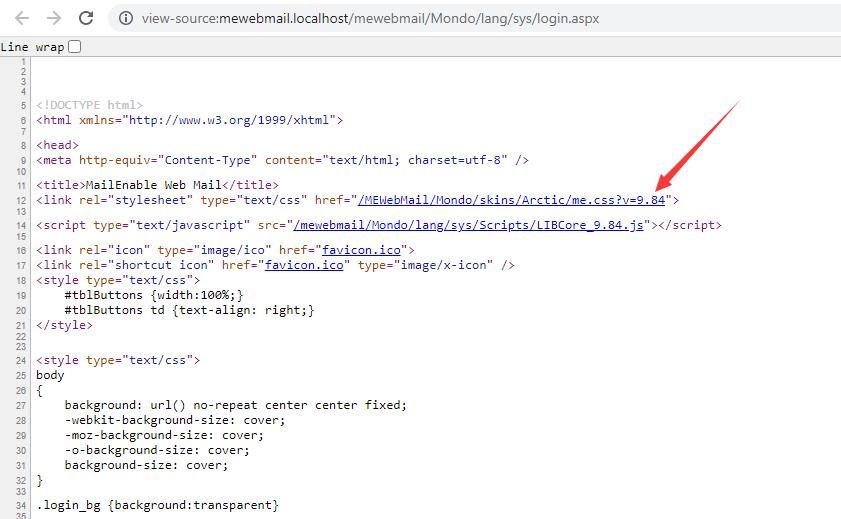
In , v=9.84 corresponds to the MailEnable version
In script implementation, I adopted the following method:
- Find the position of ?v=
- Extract a fixed-length string backward
- Use " as delimiter to obtain version number
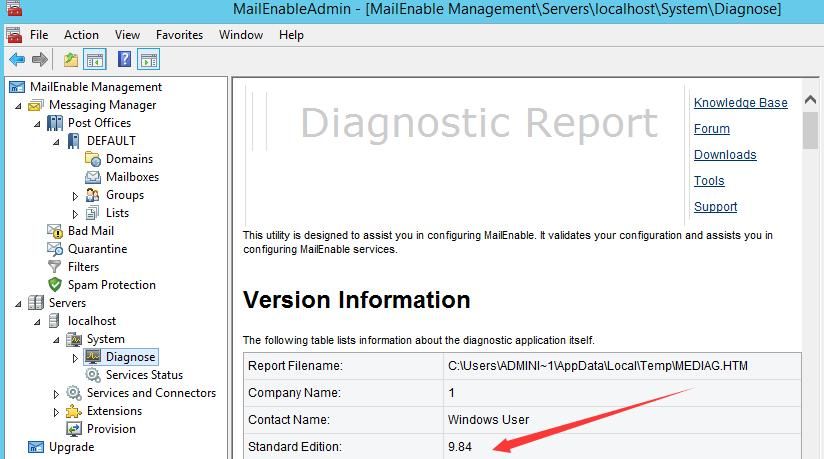
Supplement: Obtain version number via MailEnableAdmin.msc
Launch MailEnableAdmin.msc, select MailEnable Management->Servers->localhost->System->Diagnose
As shown below
Note: Version number list
http://www.mailenable.com/Premium-ReleaseNotes.txt
http://www.mailenable.com/Standard-ReleaseNotes.txt
2. User login
Access URL: /mewebmail/Mondo/Servlet/request.aspx
Required key parameters:
- txtUsername
- txtPassword
- loginParam
The result is returned in JSON format. If the login is successful, the value of bReportLoginFailure is False.
The corresponding Python code is as follows:
def Check(host, username, password): |
3. View email folders
Access URL: /MEWebMail/Mondo/Servlet/asyncrequest.aspx
Required key parameters:
- Folder, which can be specified as inbox/sent/drafts/deleted/junk
- ME_VALIDATIONTOKEN, needs to be obtained by accessing /mewebmail/Mondo/Servlet/request.aspx?Cmd=GET-MBX-OPTIONS&Scope=2, retrieved from the response
The response is in XML format, containing the number of all emails in the folder and brief content of each email. ID serves as the unique identifier for each email and is required as a parameter when reading emails
To improve efficiency, you can use xml.dom to parse XML.
Reference materials for parsing XML with xml.dom:
https://docs.python.org/3.8/library/xml.dom.minidom.html#xml.dom.minidom.parse
Python code for parsing XML with xml.dom and extracting TOTAL_ITEMS:
from xml.dom import minidom |
4. View emails
Access URL: /MEWebMail/Mondo/Servlet/request.aspx
Required key parameters:
- Folder, which can be specified as inbox/sent/drafts/deleted/junk
- ME_VALIDATIONTOKEN, obtained by accessing /mewebmail/Mondo/Servlet/request.aspx?Cmd=GET-MBX-OPTIONS&Scope=2 and retrieving from the response
- ID, obtained by sending a request to view the mailbox folder and retrieving from the response
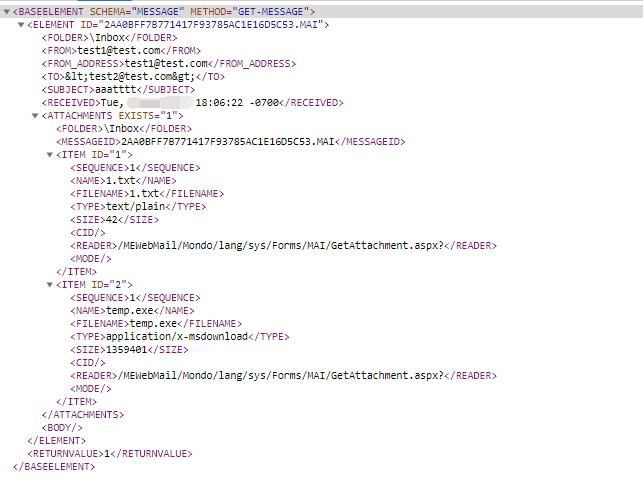
The result is returned in XML format, containing detailed email content. If attachments exist, the EXISTS attribute of ATTACHMENTS is set to 1; if no attachments exist, the EXISTS attribute is set to 0.
MESSAGEID serves as the identifier for attachments. If multiple attachments exist, they share the same MESSAGEID. FILENAME is the name of the attachment. MESSAGEID+FILENAME serves as the unique identifier for the attachment and must be used as a parameter when downloading attachments.
To improve efficiency, xml.dom can be used to parse XML.
An example of XML data is shown in the following figure.
Python code for parsing XML to extract email information is as follows:
DOMTree = minidom.parseString(r.text) |
5. Download Attachment
Access URL: /MEWebMail/Mondo/lang/sys/Forms/MAI/GetAttachment.aspx
Required key parameters:
- Folder, can be specified as inbox/sent/drafts/deleted/junk
- MessageID, obtained from the response of the view email request
- Filename, obtained from the response of the view email request
When saving attachments, distinguish between text format and binary format
0x04 Open Source Code
---
Complete code has been uploaded to GitHub, address as follows:
https://github.com/3gstudent/Homework-of-Python/blob/master/MailEnableManage.py
The code supports the following functions:
- GetVersion, version detection
- Check, login verification
- ListFolder, view folders, display email count in command line, save full content to file
- ViewMail, view emails, display email information in command line, save full content to file
- DownloadAttachment, download attachments
0x05 Summary
---
This article details the development of Python scripts for accessing MailEnable emails, with open-source code MailEnableManage.py, implementing version detection, login verification, folder viewing, email viewing, and email downloading functions


