
0x00 Preface
---
In Linux systems, user passwords are encrypted and stored in the /etc/shadow file. What are the encryption methods and cracking techniques for these passwords? This article attempts to organize this topic, introduce related foundational knowledge, test common methods, and help readers gain a more intuitive understanding.
0x01 Introduction
---
This article will cover the following topics:
- The storage format of user passwords in Linux
- Encryption methods for user passwords in Linux
- Common tools and methods for cracking user password hashes
0x02 Storage Format of User Passwords in Linux
---
Linux password information is stored in two files: /etc/passwd and /etc/shadow
/etc/passwd:
Viewable by regular user permissions
Save user information, each line represents a user, each line is divided into seven parts by a colon:
- Username
- Password, x indicates the password is stored in /etc/shadow
- UID, 0 represents root
- GID, indicates the group
- Description information, in order: Full Name, Room Number, Work Phone, Home Phone, and Other
- User home directory
- Default shell type
e.g.
test2:x:1001:1001:test2,11111,111111-11,222222-22,test:/home/test2:/bin/bash
- Username: test2
- Password stored in /etc/shadow
- UID is 1001
- GID is 1001
- Description information:
Full Name []: test2
Room Number []: 11111
Work Phone []: 111111-11
Home Phone []: 222222-22
Other []: test
- The user's home directory is /home/test2
- The default shell is /bin/bash
/etc/shadow:
Only root user privileges can view it
Stores encrypted passwords and related password information for users, each line represents a user, and each line is divided into nine parts by colons:
- Username
- Encrypted password
- Last password change time (total days since 1970.1.1)
- Minimum days between password changes, if 0, there is no restriction
- Maximum days between password changes, indicating how many days later the user's password will expire, if 99999, there is no restriction
- How many days in advance to warn the user that the password will expire
- How many days after password expiration to disable this user
- User expiration date (total days since 1970.1.1), if 0, the user is permanently available
- Reserved
Note:
Parameter description can be obtained via man shadow
eg.
test2:$6$C/vGzhVe$aKK6QGdhzTmYyxp8.E68gCBkPhlWQ4W7/OpCFQYV.qsCtKaV00bToWh286yy73jedg6i0qSlZkZqQy.wmiUdj0:17470:0:99999:7:::
- Username: test2
- Encrypted password: $6$C/vGzhVe$aKK6QGdhzTmYyxp8.E68gCBkPhlWQ4W7/OpCFQYV.qsCtKaV00bToWh286yy73jedg6i0qSlZkZqQy.wmiUdj0
- Last password change time (total days since 1970.1.1 is 17470)
- Minimum days between password changes: no restriction
- Maximum days between password changes: no restriction
- Warn the user 7 days in advance that the password will expire
- This user is permanently available
As shown in the example, the encrypted password has a fixed format:
$id$salt$encrypted
id indicates the encryption algorithm: 1 for MD5, 5 for SHA-256, 6 for SHA-512
salt refers to the cryptographic Salt, randomly generated by the system
encrypted represents the hash of the password
0x03 Common tools and methods for cracking user password hashes
---
Since Linux password encryption uses Salt, rainbow table attacks are ineffective; common methods are dictionary attacks and brute-force attacks
Common tools for dictionary and brute-force attacks:
1. John the Ripper
(1) Dictionary attack
Kali 2.0 includes John the Ripper
The dictionary file is located at /usr/share/john/password.lst
Using the password list included with John on Kali Linux. The path is /usr/share/john/password.lst
Performing a dictionary attack:
john --wordlist=/usr/share/john/password.lst ./shadow |
Note:
Other dictionaries can also be used
(2) Brute-force attack:
john ./shadow |
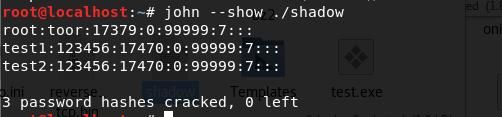
List cracked plaintext passwords:
john --show ./shadow |
Result as shown below
2. hashcat
Kali 2.0 includes hashcat
Dictionary file uses /usr/share/john/password.lst
Modify hash format: retain only $salt$encrypted
e.g.
Original hash:
test2:$6$C/vGzhVe$aKK6QGdhzTmYyxp8.E68gCBkPhlWQ4W7/OpCFQYV.qsCtKaV00bToWh286yy73jedg6i0qSlZkZqQy.wmiUdj0:17470:0:99999:7:::
Modified:
$6$C/vGzhVe$aKK6QGdhzTmYyxp8.E68gCBkPhlWQ4W7/OpCFQYV.qsCtKaV00bToWh286yy73jedg6i0qSlZkZqQy.wmiUdj0
(1) Dictionary Attack:
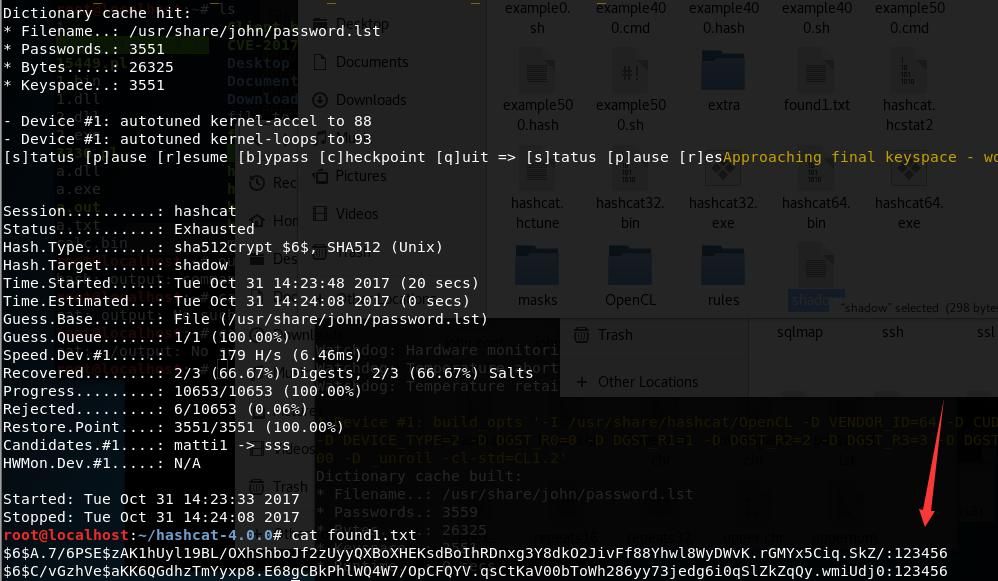
hashcat -m 1800 -o found1.txt --remove shadow /usr/share/john/password.lst |
Parameter Description:
-m: hash-type, 1800 corresponds to SHA-512
Detailed parameters can be found in the table: https://hashcat.net/wiki/doku.php?id=example_hashes
-o: output file
--remove: indicates the hash will be removed from the hash file after being cracked
shadow: represents the hash file
/usr/share/john/password.lst: represents the dictionary file
Successfully cracked 2 hashes, as shown in the figure below
(2) Brute Force Attack:
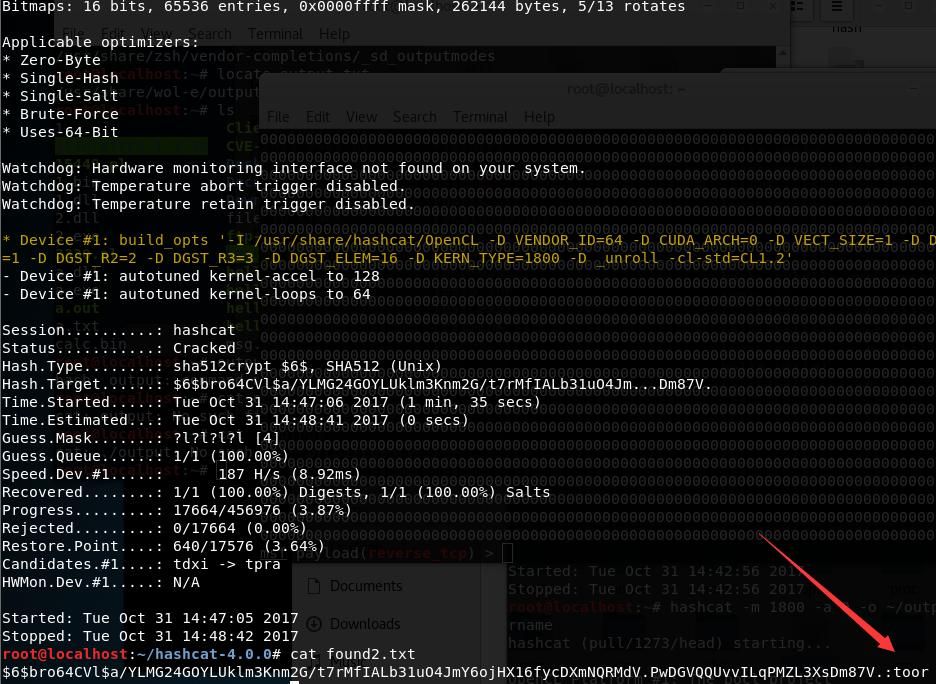
hashcat -m 1800 -a 3 -o found2.txt shadow ?l?l?l?l --force |
Parameter description:
-a: attack-mode, default is 0, 3 represents Brute-force, i.e., brute force attack
?l: represents lowercase letters, i.e., abcdefghijklmnopqrstuvwxyz, 4 ?l indicates the brute force attack length is 4
?u: represents uppercase letters, i.e., ABCDEFGHIJKLMNOPQRSTUVWXYZ
?h: represents lowercase hexadecimal characters, i.e., 0123456789
?H: represents uppercase hexadecimal characters, i.e., 0123456789abcdef
?s: represents special symbols, i.e., !"#$%&'()*+,-./:;<=>?@[\]^_`{|}~
?a: represents all characters, i.e., ?l?u?d?s
?b: represents hexadecimal, i.e., 0x00 - 0xff
Successfully brute-forced the hash, result as shown in the figure below
3、Online websites
1.https://hce.iteknical.com/
HCE distributed computing platform, requires points to use
2.http://www.cmd5.com/
Currently does not support SHA-512
4. mimipenguin
Download link:
https://github.com/huntergregal/mimipenguin
Similar to mimikatz in principle, extracts plaintext passwords from memory
0x04 Summary
---
This article introduced password storage formats in Linux and tested two common tools: John the Ripper and hashcat, using dictionary and brute-force cracking methods respectively.
As an article summarizing foundational knowledge, we aimed to be as concise and practical as possible. Reader feedback is welcome, and this content will continue to be refined in the future.


