
0x00 Preface
---
Recently, NSA penetration tools were exposed, including multiple Windows remote exploitation tools, which have a significant impact
This article will not specifically introduce the usage of these remote vulnerability tools, but from the defender's perspective, explain how to use these tools to better protect your own intranet
0x01 Introduction
---
This article will cover the following:
- FuzzBunch usage process
- Smbtouch feature introduction
- Writing a Python script to achieve batch detection of whether vulnerabilities exploitable via SMB and NBT protocols exist in the intranet
- Grasping intranet host information based on logs
The list of detected SMB and NBT remote privilege escalation vulnerabilities is as follows:
- ETERNALBLUE
- ETERNALCHAMPION
- ETERNALROMANCE
- ETERNALSYNERGY
Note:
In my opinion, the above four vulnerabilities are the most harmful, especially suitable for intranet workgroup environments
0x02 FuzzBunch
---
The FuzzBunch framework is similar to Metasploit, including various functions such as detection, attack, and exploitation (based on currently leaked information)
Download link:
https://github.com/fuzzbunch/fuzzbunch
Note:
FuzzBunch is extracted from https://github.com/x0rz/EQGRP_Lost_in_Translation
1. Configure the environment
Install Python 2.6, reference download link:
http://dl.nexiao.com/file.html?url=http%3A//b9.gpxz.net/201402/python-2_gpxz.6_gpxz.6_gpxz.rar
Install pywin32, reference download link:
https://sourceforge.net/projects/pywin32/files/pywin32/Build%20221/pywin32-221.win32-py2.6.exe/download
2. Add environment variable c:\python26
3. Execute fb.py to enter command line operation mode
Error
Reason:
The leaked data is missing the listeningposts folder
Solution:
Create a listeningposts folder under shadowbroker-master\windows\
Or modify fb.py, the modified file can be downloaded at the following link:
https://raw.githubusercontent.com/3gstudent/test/master/fb.py
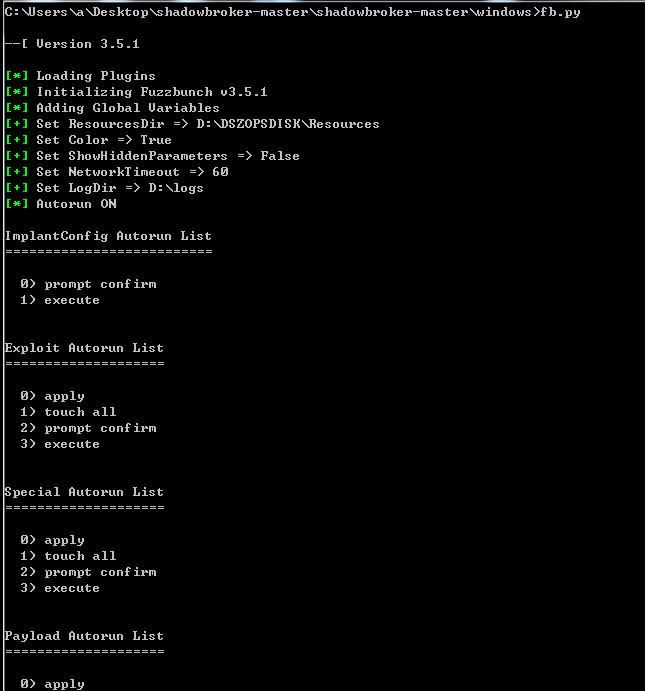
Execute fb.py again, success
As shown in the figure
Note:
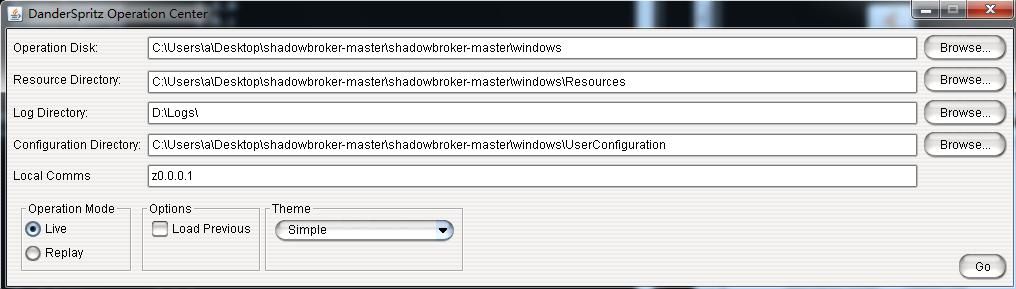
Execute start_lp.py to enter the GUI operation mode, as shown in the figure below, which will not be further elaborated here
4. Set the startup parameters as follows:
[?] Default Target IP Address [] : |
After entering the fb shell, type 'use' to get the list of supported plugins:
Plugin Category: Touch |
Plugins are divided into five major categories:
- Touch - Information detection, vulnerability testing
- ImplantConfig - Implant tools
- Exploit - Vulnerability exploitation
- Payload - Payload
- Special - Specialized
Each plugin corresponds to three files in the folder:
- .exe
- .fb
- .xml
For example, Eternalblue-2.2.0 under Special corresponds to:
- Eternalblue-2.2.0.exe
- Eternalblue-2.2.0.fb
- Eternalblue-2.2.0.0.xml
Viewing the file content reveals:
- The exe can run independently (provided the required dll files are found)
- The exe reads configuration parameters saved in the xml file (requires secondary modification)
That is to say, only the standalone exe and xml configuration file, along with necessary support files, are needed to execute the corresponding plugin, without fully installing the FuzzBunch framework
0x03 Smbtouch
---
Located under the Touch class, the file is in /windows/touches/, used to detect whether the target host contains SMB and NBT remote privilege escalation vulnerabilities, mainly testing the following four vulnerabilities:
- ETERNALBLUE
- ETERNALCHAMPION
- ETERNALROMANCE
- ETERNALSYNERGY
1. Command line testing
Execute fb.py to enter command line operation mode
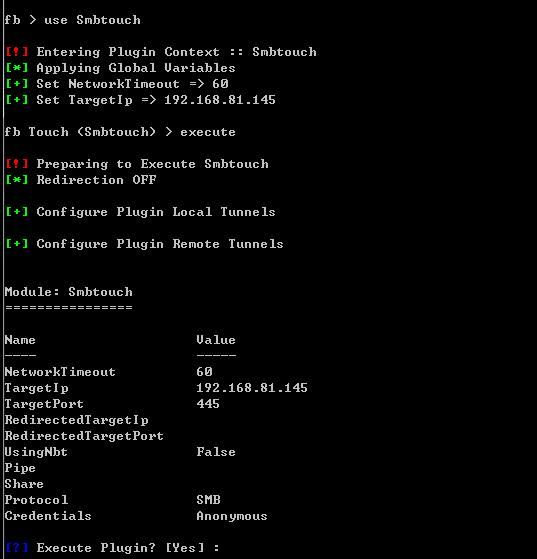
Set the scanning parameters and execute in sequence:
use Smbtouch
execute
as shown in the figure below
then execute the plugin, the echo is as shown below
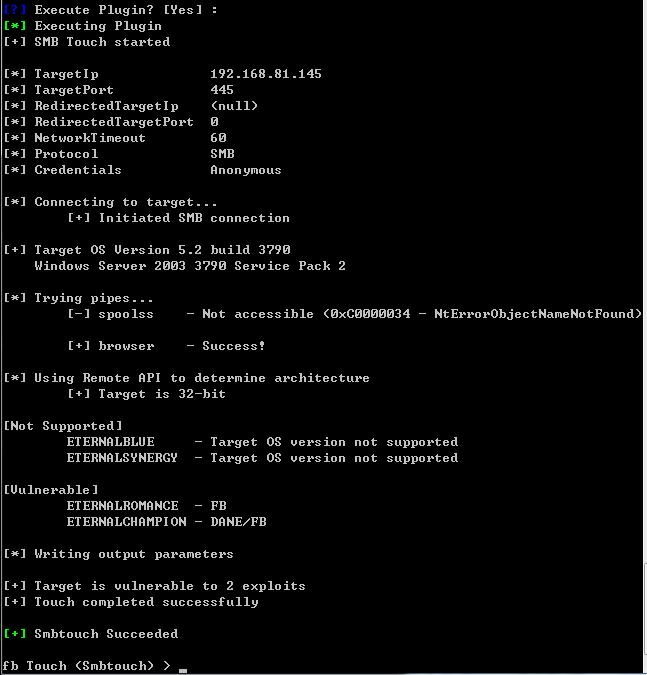
detection successful, obtained the following information:
System: Windows Server 2003 3790 Service Pack 2 x86
Available vulnerabilities:
- ETERNALROMANCE - FB
- ETERNALCHAMPION - DANE/FB
then use specific vulnerability attacks
Note:
The target host needs to have port 445 open; for testing environments, you can choose to disable the firewall or manually open port 445
The command line code to open port 445 is as follows:
netsh advfirewall firewall add rule name="445" protocol=TCP dir=in localport=445 action=allow
2. Execute the exe directly
Enter the folder shadowbroker-master\windows\touches and directly execute Smbtouch-1.1.1.exe
Prompt indicates missing dll, as shown in the figure
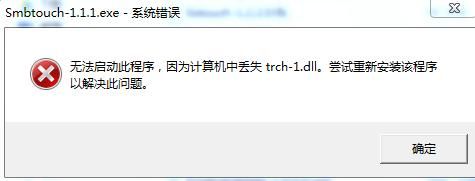
Find the missing dll in the folder shadowbroker-master\windows\lib\x86-Windows and complete it
Directly execute Smbtouch-1.1.1.exe, echo prompt:
TargetIp must have a value assigned.
So next, need to edit the Smbtouch-1.1.1.0.xml file
Need to add the following parameters:
- NetworkTimeout: 60
- TargetIp: 127.0.0.1
- TargetPort: 445
- Protocol: SMB
- Credentials: Anonymous
Refer to the XML file format, add the code
Note:
The file name is not the original Smbtouch-1.1.1.0.xml
The modified XML file can be referenced from:
An open-source project
Execute Smbtouch-1.1.1.exe again
The echo is as shown in the figure
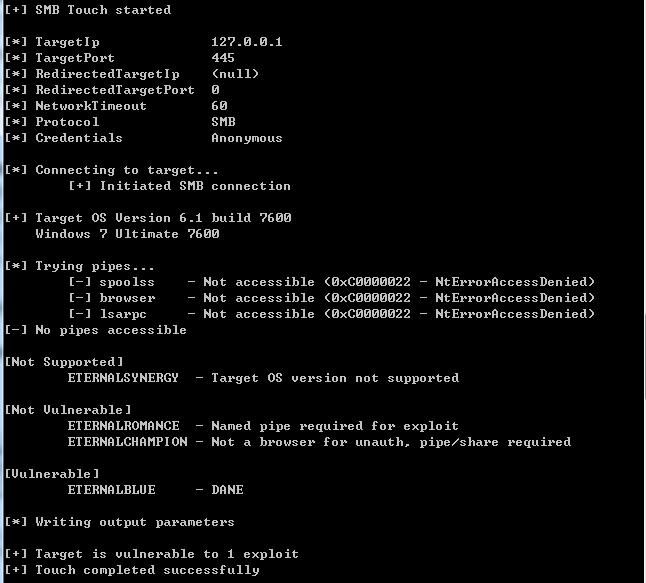
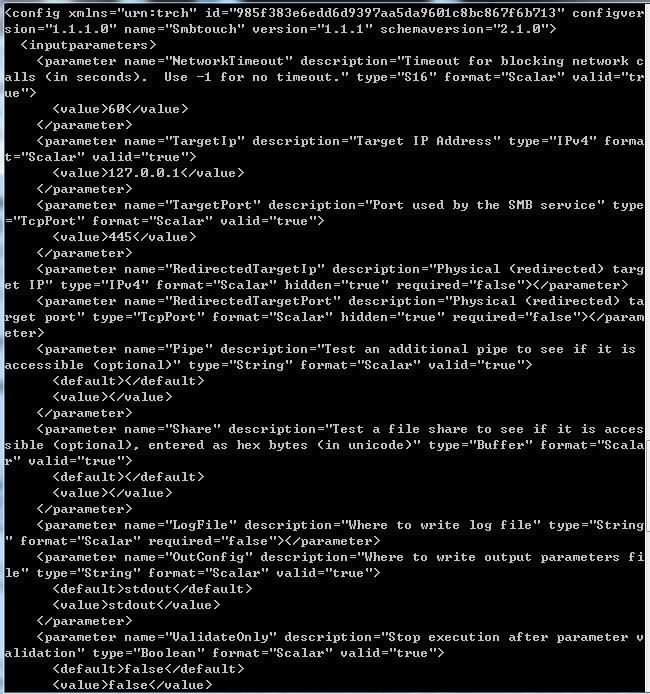
Successfully executed, and the XML file content is echoed
0x04 Smbtouch Scanner
---
Based on the above content, if you want to attempt scanning a specified network segment, you need to repeatedly modify the XML configuration file, then execute Smbtouch-1.1.1.exe for detection
Using Python to automatically implement the above operations, the following issues need to be considered:
- Execute Smbtouch-1.1.1.exe and obtain the echo
- Parse the echo content and remove redundant parts
- Parse range IP addresses
- Automatically read and write XML files
- Generate log files
- Improve efficiency with multithreading
Complete code can be referenced from:
An open-source project
Actual testing:
1. Set the scanning IP segment
As shown in the figure
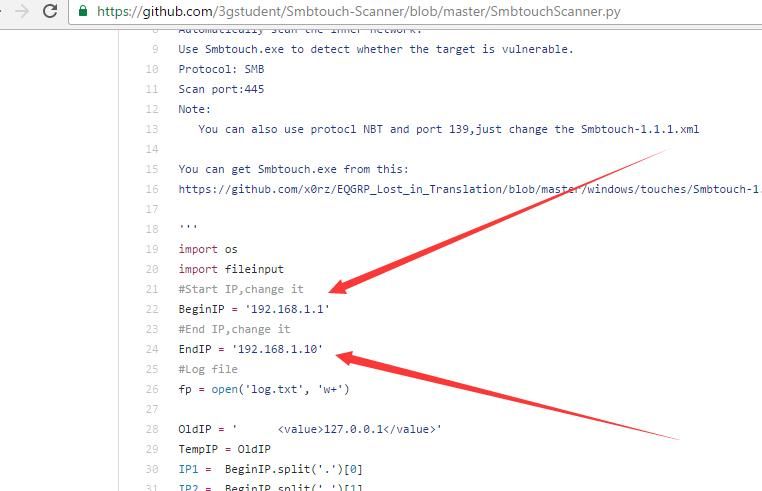
2. Execute SmbtouchScanner.py
Wait for the scan to complete, echo displays brief information
As shown in the figure

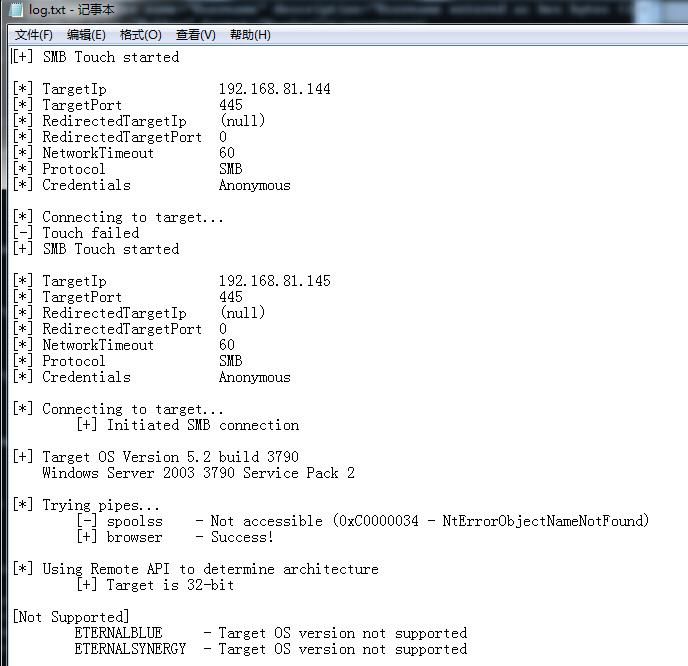
3. Generate log files in the same directory, displaying detailed information
Includes specific existing vulnerabilities, as shown in the figure
4. Supplement
Due to security reasons, this open-source code does not yet support multithreading
0x05 Defense Recommendations
---
For NSA's SMB and NBT remote privilege escalation vulnerabilities, it is recommended to upgrade system patches, enable the firewall, and restrict port 445
The command-line code to restrict port 445 is as follows:
netsh advfirewall firewall add rule name="445" protocol=TCP dir=in localport=445 action=block
At the same time, to ensure intranet security, SmbtouchScanner.py can be used to scan and detect the intranet
Note:
Currently, Smbtouch-1.1.1.exe has been detected and removed by antivirus software
0x06 Summary
---
This article introduces how to use Python to automatically detect vulnerabilities in internal networks that can be exploited via SMB and NBT protocols. Of course, the disclosed vulnerabilities are not limited to the four mentioned above, and the Touch plugin is not limited to Smbtouch.
Subsequent updates will be synchronized to GitHub: an open-source project.


