
0x00 Preface
---
This article originates from a covert connection test that simulates IE browser initiating network connections, which can bypass certain security products that block third-party programs from initiating network connections
There are many methods to simulate IE browser initiating network connections. Among them, using BHO to hijack IE browser has numerous advantages (open interface, simple and efficient, feature-rich, etc.). Therefore, this article will introduce the development of BHO and hijacking exploitation approaches
0x01 Introduction
---
This article will cover the following topics:
- Introduction to BHO
- Developing BHO
- Exploitation Approaches
- Practical Testing
- Defense
0x02 Introduction to BHO
---
BHO, short for Browser Helper Object
An industry standard introduced by Microsoft as an open interaction interface for third-party programmers with browsers
Functions of BHO:
- Capture browser behaviors, such as 'back', 'forward', 'current page', etc.
- Control browser behaviors, such as modifying or replacing browser toolbars, adding custom program buttons, etc.
BHO relies on the main browser window and shares the same lifecycle as the browser instance, meaning the BHO object runs when the browser page opens and ends when the page closes
Using BHO requires registration, which involves writing to the registry, located at HKEY_LOCAL_MACHINE\Software\Microsoft\Windows\CurrentVersion\Explorer\Browser Helper Objects\{GUID} and HKEY_CLASSES_ROOT\CLSID\{GUID}
0x03 Developing BHO
---
This section provides only a brief introduction
Development tools: VS2012
1. Generate DLL
New - Visual C++ - ATL
Add - Class - ATL - ATL Simple Object, set the abbreviation as HelloWorldBHO, select IObjectWithSite (IE object support)
Modify the following files:
- HelloWorldBHO.h
- HelloWorldBHO.cpp
- dllmain.cpp
- HelloWorld.rgs
Note:
For details, refer to http://blog.csdn.net/feier7501/article/details/11266345
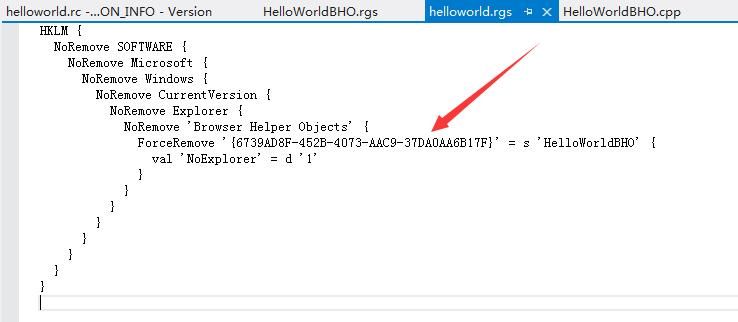
The GUID of the BHO is stored in helloworld.rgs, as shown in the figure below
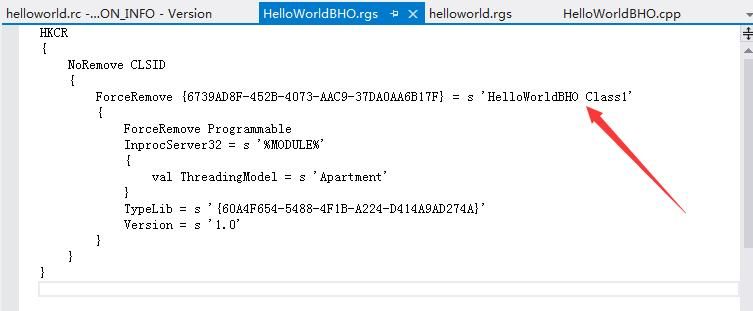
The name of the BHO is stored in HelloWorldBHO.rgs, as shown in the figure below
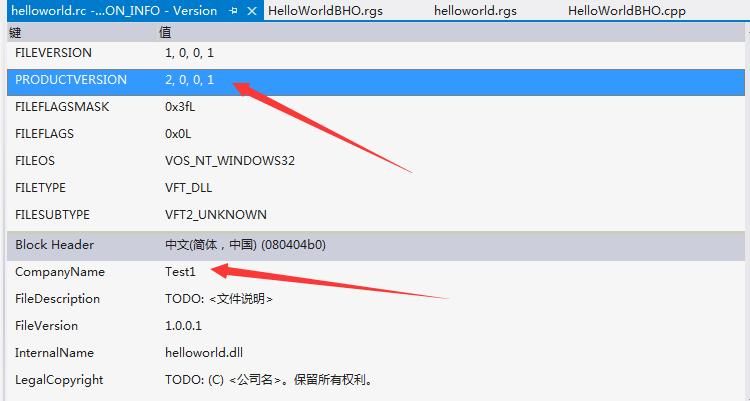
In helloworld.rc, CompanyName represents the publisher, and PRODUCTVERSION represents the version, as shown in the figure below
Note:
The three figures above correspond to the display information of the add-on below
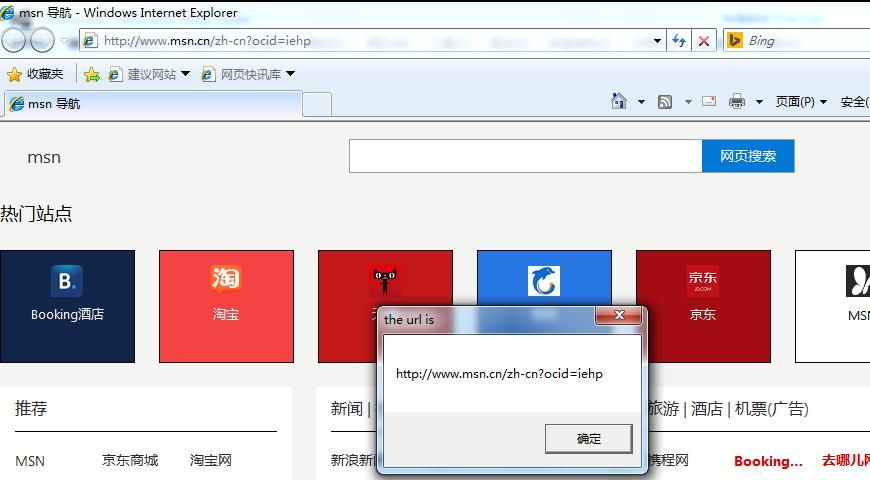
HelloWorldBHO.cpp stores the operations corresponding to different events in the IE browser. Here, only an example code is introduced (for detailed code, refer to the open-source project), which implements displaying the current URL in a pop-up box when the page finishes loading. The key code is as follows:
void STDMETHODCALLTYPE CHelloWorldBHO::OnDocumentComplete(IDispatch *pDisp, VARIANT *pvarURL) |
Compile to generate helloworld.dll
Note:
If VS2012 does not have administrator privileges, a registration failure prompt may appear during compilation. Manual registration can be performed subsequently.
2. Register DLL
Administrator privileges required, command as follows:
regsvr32 helloworld.dll /s |
Note:
/s parameter is used to suppress the success message box
Equivalent to writing to registry, located at HKEY_LOCAL_MACHINE\Software\Microsoft\Windows\CurrentVersion\Explorer\Browser Helper Objects\{GUID} and HKEY_CLASSES_ROOT\CLSID\{GUID}
Additional:
Uninstall DLL:
regsvr32 helloworld.dll /s /u |
Or delete corresponding registry keys
0x04 Actual Testing
---
Test system: Win 7 x86 IE8
Open IE browser, dialog box pops up displaying current URL, as shown below
View IE's add-ons, located under Tools > Manage Add-ons, to obtain add-on information, as shown in the figure below
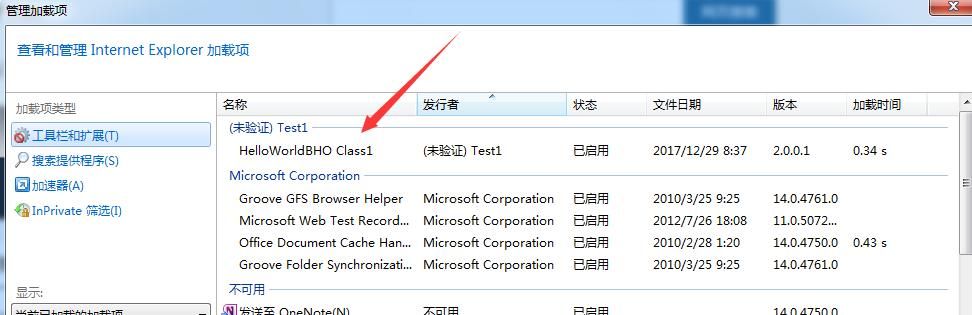
The name, publisher, and version can be specified via the previously mentioned helloworld.rgs, HelloWorldBHO.rgs, and helloworld.rc files, while the file date corresponds to the modification time of the dll
Since our self-generated dll lacks a Microsoft signature, it shows as unverified
0x05 Exploitation Ideas
---
1. Forge Microsoft signature, hide BHO
Add a Microsoft Authenticode signature to helloworld.dll, modify the registry to hijack the system's signature verification function, making the signature effective
Refer to the previous article: 'Authenticode Signature Forgery—Signature Forgery and Verification Hijacking for PE Files'
Requires a signature from Microsoft Corporation, which can be obtained from Office files, available path: C:\Program Files\Microsoft Office\Office14\URLREDIR.DLL
Use SigThief to add the signature, download address:
https://github.com/secretsquirrel/SigThief
Parameters:
sigthief.py -i "C:\Program Files\Microsoft Office\Office14\URLREDIR.DLL" -t helloworld.dll -o new.dll |
Generate new.dll
Modify registry to hijack signature verification function:
(Administrator privileges)
REG ADD "HKLM\SOFTWARE\Microsoft\Cryptography\OID\EncodingType 0\CryptSIPDllVerifyIndirectData\{C689AAB8-8E78-11D0-8C47-00C04FC295EE}" /v "Dll" /t REG_SZ /d "C:\Windows\System32\ntdll.dll" /f |
Register DLL, reopen IE, view add-ons, verification passed, as shown in the figure below
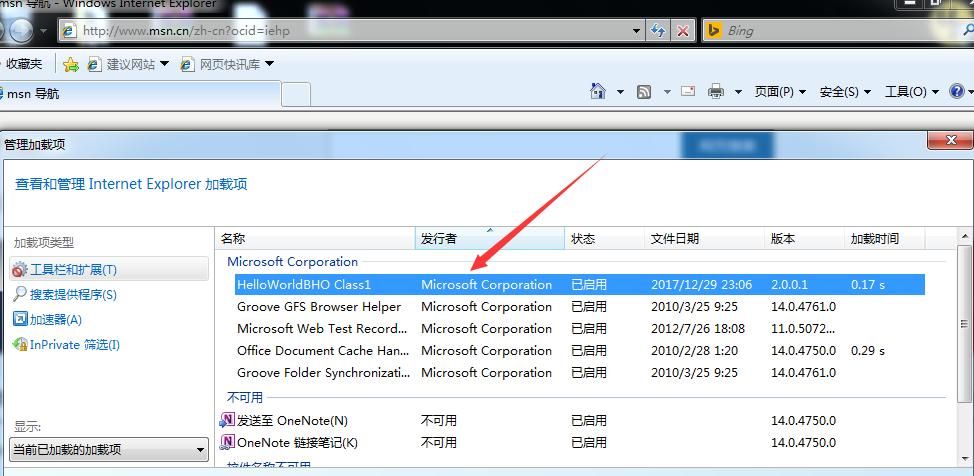
Note:
Modifying BHO information can further hide the BHO
2. Capture browser POST data to record plaintext passwords
Open-source code for capturing browser POST data is available on GitHub, reference address:
https://github.com/liigo/bho
Capture browser POST data before the BeforeNavigate2 event
In my own project, I directly referenced the key function: STDMETHODIMP CBhoApp::Invoke(DISPID dispidMember, REFIID riid, LCID lcid, WORD wFlags, DISPPARAMS *pDispParams, VARIANT *pvarResult, EXCEPINFO *pExcepInfo, UINT *puArgErr)
Add function declaration to implement logging functionality
Note:
GetTempPath retrieves the Temp directory of the current system; under IE permissions, the actual path is %Temp%\Low
The complete code has been open-sourced at the following address:
An open-source project
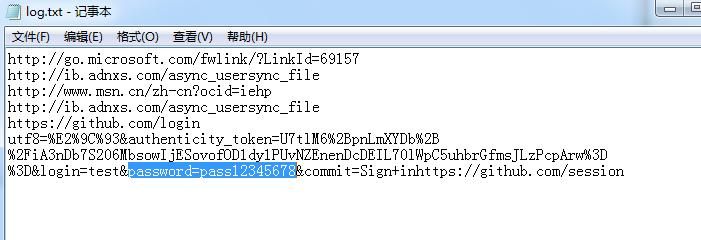
Capture browser POST data to obtain user-entered plaintext passwords, such as GitHub login credentials, as shown in the figure below
3. Download files
By downloading files in this manner, the firewall software's management interface shows the downloading program as the IE browser, achieving a certain level of concealment
4. Inject JavaScript into IE pages
Refer to the following open-source project for further modifications:
https://github.com/xiyiaoo/BHO
This article will not elaborate further
5. Supplementary notes
By default, BHO permissions are low, which imposes certain operational limitations. If higher permissions are obtained through other means, more exploitation methods become available
0x06 Defense and Detection
---
Defense:
The prerequisite for BHO exploitation is obtaining system administrator privileges
Detection:
- Check the add-ons in the IE browser
- Check the DLLs loaded by the IE process
0x07 Summary
---
This article introduces the development method of IE Browser Helper Objects (BHO), analyzes the exploitation ideas after obtaining system administrator privileges, and touches upon some exploitation techniques without going into full detail


