
0x00 Preface
---
GadgetToJScript can encapsulate .Net programs in js or vbs scripts. Compared to James Forshaw's open-source DotNetToJScript, it modifies the deserialization call chain to bypass AMSI and adds functionality to bypass .Net 4.8+ blocking of Assembly.Load.
This article documents research details, analyzes exploitation approaches, briefly modifies the original project for easier payload testing, and shares methods for integration with SILENTTRINITY.
0x01 Introduction
---
This article will cover the following:
- Code analysis and implementation logic of GadgetToJScript
- Modification methods for easier payload testing
- Exploitation analysis
- Methods for integration with SILENTTRINITY
0x02 Code Analysis and Implementation Logic of GadgetToJScript
---
1. Code Analysis
(1) templates folder
Contains templates for js, vbs, and hta
The template files are basically the same as DotNetToJScript, with the following differences:
- Added some .Net version checks, reading the registry HKLM\\SOFTWARE\\Microsoft\\.NETFramework\\v4.0.30319\\; if successful, the version is 4.0.30319, otherwise it's 2.0.50727
- Performed deserialization twice: the first time to disable ActivitySurrogateSelector type checking, used to bypass .Net 4.8+'s blocking of Assembly.Load functionality; the second time to load the .Net program
(2) Program.cs
Main program, replaces variables in the template, calculates length, and generates the final js, vbs, and hta scripts
(3) TestAssemblyLoader.cs
Payload is saved as a string, using CompileAssemblyFromSource for dynamic compilation, with the compilation result stored in memory (results.CompiledAssembly)
Key function: CompileAssemblyFromSource
Among them, the GenerateInMemory property defaults to true, meaning the compiled assembly is kept in memory and can be retrieved via the CompiledAssembly of the CompilerResults instance; if set to false, the compiled assembly can be saved to the local hard drive
Reference materials:
https://docs.microsoft.com/en-us/dotnet/api/system.codedom.compiler.codedomprovider.compileassemblyfromsource?view=netframework-4.8
(4) _ASurrogateGadgetGenerator.cs
Constructs a chain to map byte arrays to create instances of classes:
byte[] -> Assembly.Load -> Assembly -> Assembly.GetType -> Type[] -> Activator.CreateInstance -> Win! |
This code segment should be from: https://github.com/pwntester/ysoserial.net/blob/master/ysoserial/Generators/ActivitySurrogateSelectorGenerator.cs#L50
It can be understood that TestAssemblyLoader.cs implements saving the compilation result in memory (results.CompiledAssembly), and _ASurrogateGadgetGenerator.cs is used to read this memory and achieve the invocation of .Net programs.
(5)_DisableTypeCheckGadgetGenerator.cs
Used to bypass the functionality in .Net 4.8+ that blocks Assembly.Load.
For detailed information, refer to:
https://silentbreaksecurity.com/re-animating-activitysurrogateselector/
(6)_SurrogateSelector.cs
Creates a Surrogate class, which acts as a wrapper.
This code segment should be from: https://github.com/pwntester/ysoserial.net/blob/bb695b8162bdc1d191c32f6a234a8fff5665ab9b/ysoserial/Generators/ActivitySurrogateSelectorGenerator.cs#L15
2. Implementation Logic
- Execute TestAssemblyLoader.cs to dynamically compile the string-form Payload, with the compilation result saved in memory (results.CompiledAssembly).
- Execute _ASurrogateGadgetGenerator.cs to read the memory from step 1 and achieve the invocation of .Net programs.
- Execute _DisableTypeCheckGadgetGenerator.cs to bypass the functionality in .Net 4.8+ that blocks Assembly.Load.
- Execute Program.cs to replace two variables in the template file, calculate the length, and generate the final js, vbs, and hta scripts.
0x03 To facilitate testing of Payload modification methods
---
Check the file TestAssemblyLoader.cs, where the Payload is stored as a string, with partial content as follows:
string _testClass = @" |
When saving the Payload as a string, escape characters need to be considered, which affects the development efficiency of the Payload and is not very intuitive.
Here is one solution I propose: replace CompileAssemblyFromSource with CompileAssemblyFromFile.
This allows reading the Payload from a file, eliminating the need to consider escape characters.
My modified version has been uploaded to GitHub at the following address:
An open-source project
In my version, TestAssemblyLoader.cs has been modified, with the key code as follows:
CompilerResults results = provider.CompileAssemblyFromFile(parameters, "payload.txt"); |
Read the Payload from the fixed file payload.txt
To achieve the same functionality as the original project, the content of payload.txt is as follows:
using System; |
The payload appears more intuitive and is easier to develop
0x04 Exploitation Analysis
---
GadgetToJScript can be considered a further exploitation of James Forshaw's open-source DotNetToJScript. The added deserialization call chain does not require invoking d.DynamicInvoke(al.ToArray()).CreateInstance(entry_class), which can bypass detection of specific code by some antivirus software. It can be used as a template for further development.
For further utilization of the payload, it needs to be converted into C# format, which reminds me of SILENTTRINITY.
0x05 Method of Combining with SILENTTRINITY
---
Regarding SILENTTRINITY, I have previously analyzed it in my article "SILENTTRINITY Exploitation Analysis".
Note:
SILENTTRINITY is continuously being updated with more features, so the content of my article may no longer be accurate.
After setting up SILENTTRINITY, choose to generate a C# format stager with the following command:
stagers |
Extract the code from stager.cs, fill it into payload.txt. The final example code has been uploaded to GitHub, address as follows: an open-source project
Compile the modified GadgetToJScript, save payload.txt in the same directory. The command to generate the js script is as follows:
GadgetToJScript.exe -w js -o 1 |
Generate 1.js
After executing 1.js, SILENTTRINITY receives the online information, process name is wscript, as shown in the figure below
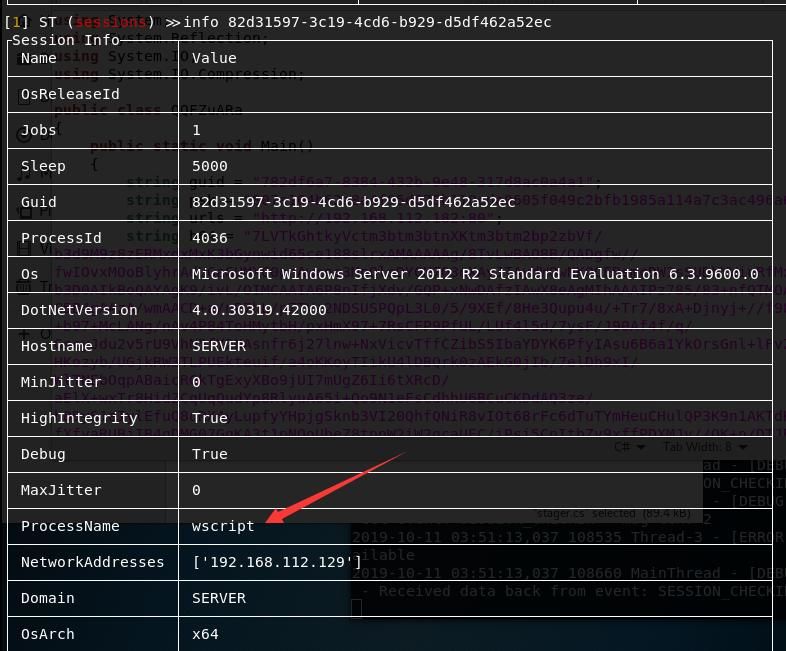
Test successful
0x06 Summary
---
This article introduces the code details and implementation process of GadgetToJScript, briefly modifies the original project for easier payload testing, analyzes exploitation ideas, and shares the method of combining with SILENTTRINITY


