
0x00 Preface
---
"Lateral Movement — SCM and DLL Hijacking Primer" introduced three DLLs (wlbsctrl.dll, TSMSISrv.dll, and TSVIPSrv.dll) that can achieve remote execution via SCM (Service Control Manager). This article will expand on the usage of these three DLLs, separately introducing methods for privilege escalation and backdoor exploitation.
Article link:
https://posts.specterops.io/lateral-movement-scm-and-dll-hijacking-primer-d2f61e8ab992
0x01 Introduction
---
This article will cover the following:
- Privilege escalation using wlbsctrl.dll
- Backdoor exploitation using TSMSISrv.dll and TSVIPSrv.dll
- Backdoor exploitation using MF.dll
0x03 Exploitation of wlbsctrl.dll
---
1. Usage from the original article
The IKEEXT (IKE and AuthIP IPsec Keying Modules) service loads wlbsctrl.dll during startup, but this DLL does not exist in the default Windows configuration. If we place our own DLL at this location, it will be loaded when the service starts.
POC:
https://github.com/djhohnstein/wlbsctrl_poc
Test system: Win7 x64
The DLL used here does not require specifying export functions, so we can directly use my previous test DLL:
An open-source project
Local execution method:
(Administrator privileges required)
copy calc_x64.dll C:\Windows\System32\wlbsctrl.dll |
Remote execution method:
copy calc_x64.dll \\TARGET\C$\Windows\System32\wlbsctrl.dll |
2. Privilege escalation implemented using wlbsctrl.dll
POC:
https://github.com/itm4n/Ikeext-Privesc
Implementation principle:
1. The IKEEXT (IKE and AuthIP IPsec Keying Modules) service loads wlbsctrl.dll upon startup, but does not specify an absolute path
Note:
When a program calls a DLL without specifying its full path, the system follows a fixed search order to locate the DLL
If SafeDllSearchMode is enabled, the program searches for the DLL file in the following order:
- The directory from which the application loaded
- The system directory
- The 16-bit system directory
- The Windows directory
- The current directory
- The directories that are listed in the PATH environment variable
If disabled, search for DLL files from the following locations:
- The directory from which the application loaded
- The current directory
- The system directory
- The 16-bit system directory
- The Windows directory
- The directories that are listed in the PATH environment variable
For detailed information, see:
https://msdn.microsoft.com/en-us/library/ms682586(VS.85).aspx
2. Under the default configuration of the Windows system, wlbsctrl.dll does not exist. If we can find a PATH environment variable that meets the conditions (writable with standard user permissions), we can achieve DLL hijacking and load our own DLL.
3. Standard user permissions can start the IKEEXT service as follows:
Generate the file rasphone.pbk:
[IKEEXT] |
Command line execution:
rasdial IKEEXT test test /PHONEBOOK:rasphone.pbk |
Note:
This vulnerability is very old and was publicly disclosed as early as October 9, 2012
https://www.immuniweb.com/advisory/HTB23108
0x04 Exploitation of TSMSISrv.dll and TSVIPSrv.dll
---
1. Usage in the original text
The SessionEnv (Remote Desktop Configuration) service loads C:\Windows\System32\TSMSISrv.dll and C:\Windows\System32\TSVIPSrv.dll upon startup, but these two DLLs do not exist under the default Windows system configuration. If we place our own DLL in this location, it will be loaded when the service starts
POC:
https://github.com/djhohnstein/TSMSISrv_poc
Test system: Win7 x64
POC added export functions StartComponent, StopComponent, OnSessionChange, and Refresh
In my test environment, the DLL does not require specifying export functions, so my previously tested DLL can be used directly:
An open-source project
Usage for local execution:
(Administrator privileges required)
copy calc_x64.dll C:\Windows\System32\TSMSISrv.dll |
Or
copy calc_x64.dll C:\Windows\System32\TSVIPSrv.dll |
Usage of remote execution:
copy calc_x64.dll \\TARGET\C$\Windows\System32\TSMSISrv.dll |
or
copy calc_x64.dll \\TARGET\C$\Windows\System32\TSVIPSrv.dll |
2. Backdoor implemented using TSMSISrv.dll and TSVIPSrv.dll
If the system has Remote Desktop functionality enabled (supporting remote connections to this computer), the SessionEnv (Remote Desktop Configuration) service will be started
If we write TSMSISrv.dll or TSVIPSrv.dll under C:\Windows\System32\, the DLL will be loaded when the service starts, achieving code execution
Application scenario:
Obtain remote access permissions to domain controller files but cannot execute commands remotely
Solution:
1. If the domain controller does not have Remote Desktop enabled, hijack the loading of fxsst.dll by Explorer.exe during system startup.
Write the file C:\Windows\fxsst.dll
2. If the domain controller has Remote Desktop enabled, the SessionEnv service will start during system startup, loading TSMSISrv.dll or TSVIPSrv.dll.
Write the file C:\Windows\System32\TSMSISrv.dll or C:\Windows\System32\TSMSISrv.dll
3. If the domain controller has Remote Desktop enabled, MF.dll will be loaded when a user initiates a Remote Desktop connection.
Actual Test:
Test Environment: Server 2012 R2 x64
Write the file C:\Windows\System32\MF.dll, command as follows:
copy calc_x64.dll C:\Windows\System32\MF.dll |
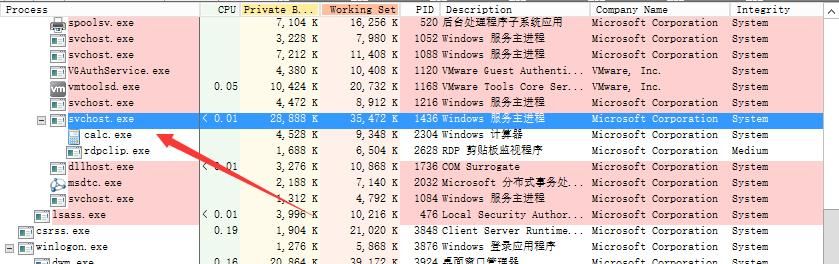
Wait for a user to connect via Remote Desktop. Upon successful connection, MF.dll is loaded, launching the calculator as shown in the figure below.
0x05 Summary
---
This article introduces three exploitation methods: privilege escalation via wlbsctrl.dll, a backdoor via TSMSISrv.dll/TSVIPSrv.dll, and a backdoor via MF.dll. Among these, MF.dll can be used to address the issue of gaining remote file access permissions on a domain controller but being unable to execute commands remotely.


