
0x00 Preface
---
In the previous article "Exchange Web Service (EWS) Development Guide 2 – SOAP XML message", the use of SOAP XML messages was introduced, demonstrating how to access Exchange resources using hash via Python.
When reading emails through SOAP XML messages, we often encounter the following issue: since each email corresponds to a raw XML file containing complete email information, manually analyzing emails consumes significant effort.
Therefore, this article will introduce an implementation method for a SOAP XML parser, developing a tool to automatically extract valuable email information and improve reading efficiency.
0x01 Introduction
---
This article will cover the following:
- Applicable Environment
- Design Approach
- Open-source Python Implementation Code
- Code Development Details
0x02 Design Approach
---
To read all emails in the inbox via SOAP XML messages, the following steps are required:
- Use the listmailofinbox command of ewsManage.py to obtain the ItemId and ChangeKey for each email
- Iteratively use the getmail command of ewsManage.py, passing in the ItemId and ChangeKey corresponding to each email
- Save the returned results as XML format files separately, with each XML file corresponding to one email
To ensure the versatility of the SOAP XML parser and its compatibility with different tools, the SOAP XML parser is designed with a file manager structure. Selecting an XML file will automatically trigger parsing, extract valuable information, and display it. The design follows these principles:
- The development language is Python, and to enhance convenience, only Python's standard libraries are used
- The file manager involves Python GUI development, using the standard GUI library Tkinter
- The SOAP (Simple Object Access Protocol) is essentially an XML protocol, and parsing uses the standard library xml.dom.minidom
Note:
If parsing XML files using string matching, escape characters must also be considered
0x03 Program Implementation
---
1. Implementation of the File Manager
Using Tkinter:
https://docs.python.org/3/library/tk.html
Secondary development can be based on the open-source file-manager-mask, with the following modifications:
- Remove the image display functionality
- Remove the text editing functionality
- Add XML file parsing functionality
2. XML File Parsing
Usage of xml.dom.minidom:
https://docs.python.org/3/library/xml.dom.minidom.html
The following content needs to be extracted here:
- Email subject
- Sender
- Recipient
- CC (Carbon Copy)
- Receipt time
- Attachment name
- Body content
In data extraction, there are the following different scenarios:
Note:
XML tags are case-sensitive
(1) Extracting node attributes
Example format of the response message:
Extract the attribute "ResponseClass" of the node "m:GetItemResponseMessage", the code is as follows:
from xml.dom import minidom |
(2) Directly extracting data between tag pairs
Example format of the email subject:
Example format of the body content:
Example format of received time:
To extract the content of node "t:Subject", the code is as follows:
from xml.dom import minidom |
Example format of sender:
|
Consider parent and child nodes here
Note:
There is usually only one sender, so no need to consider loop extraction
Extract the content of child node "t:Name" under parent node "t:Sender", code as follows:
from xml.dom import minidom |
(3) Loop extraction of data between tag pairs
Recipient format example:
|
Example format for CC recipients:
|
Attachment format example:
|
Here we need to consider parent nodes and sibling nodes
Extract the content of all child nodes "t:Name" under the parent node "t:ToRecipients", the code is as follows:
from xml.dom import minidom |
The above code skips the judgment of the node "t:Mailbox". If we add the judgment, the code is as follows:
from xml.dom import minidom |
After completing data extraction from the XML file, consider how to display the data in the file manager window
The insert function will be used here
Parameter description:
https://docs.python.org/3.8/library/tkinter.ttk.html?highlight=insert#tkinter.ttk.Notebook.insert
insert(pos, child, **kw) |
For the pos parameter, END represents insertion from the last line, while a number represents insertion from a specified line (e.g., 1.0 for the first line)
The complete code has been uploaded to GitHub at the following address:
An open-source project
The code supports the following features:
- File manager for viewing multiple files, allowing file switching via keyboard arrow keys
- XML file parsing, capable of automatically extracting valuable information from Exchange SOAP XML messages and flagging XML files that do not conform to the format
The running interface is shown in the figure below:
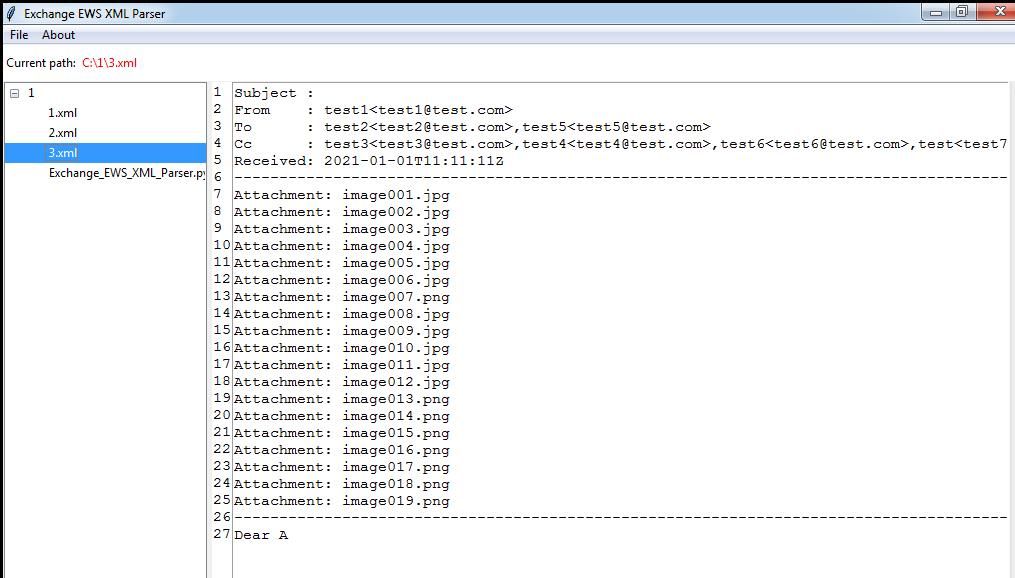
Subsequently, a complete Exchange GUI client program can be developed by integrating ewsManage.py to enable reading Exchange emails using hashes
0x04 Summary
---
This article introduces an implementation method for a SOAP XML parser, detailing the development of a tool to automatically extract email information from Exchange SOAP XML messages, including open-source Python implementation code and an analysis of code development specifics


