
0x00 Introduction
---
In the previous article "Exchange Web Service (EWS) Development Guide", the tool ewsManage was open-sourced, enabling access to Exchange resources.
This article will take a step further by utilizing SOAP XML messages to achieve access to Exchange resources using a hash.
0x01 Overview
---
This article will cover the following topics:
- Methods for accessing Exchange resources using a hash
- Usage of SOAP XML messages
- Open-source Python implementation code
- Code development details
0x02 Methods for Accessing Exchange Resources Using a Hash
---
The previous article "Penetration Techniques – Pass the Hash with Exchange Web Service" introduced the method of logging into EWS using a hash.
Based on previous research, this article will introduce methods for accessing Exchange resources after logging into EWS. Therefore, Python will continue to be chosen for program implementation, using EWS SOAP XML messages to access Exchange resources.
For the format of EWS SOAP XML messages, there are two methods for reference:
1. Search for information
https://docs.microsoft.com/en-us/exchange/client-developer/exchange-web-services/get-started-with-ews-client-applications
https://docs.microsoft.com/en-us/exchange/client-developer/web-service-reference/ews-xml-elements-in-exchange
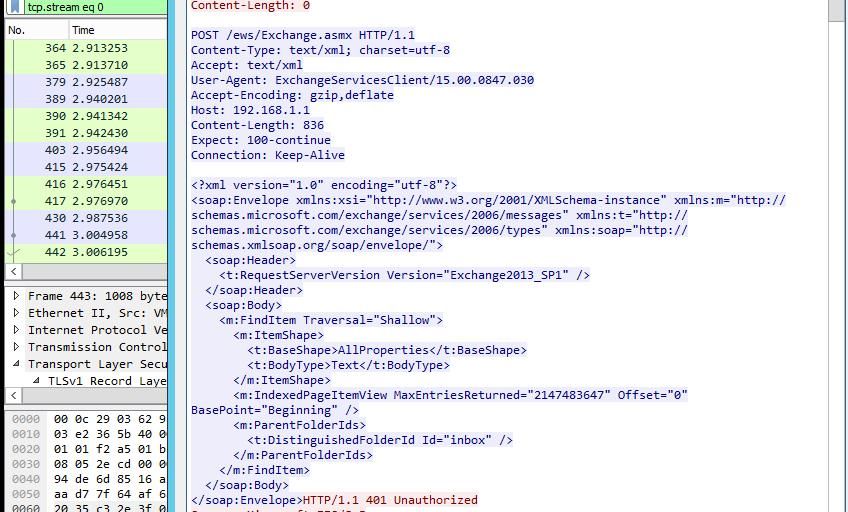
2. Packet capture analysis
Configure Wireshark to capture plaintext communication data on the Exchange Server
Use ewsManage to access Exchange resources
Capture communication data to obtain the EWS SOAP XML message format corresponding to different operations, as shown in the example below
0x03 Using SOAP XML messages
---
Compared to EWS Managed API, SOAP XML messages are more low-level and require consideration of more details.
1. View the number of emails in the inbox
XML format to send:
|
Return content format:
The response content reveals the total number of emails and unread emails in the inbox.
2. Retrieve inbox email information
XML format to send:
|
The returned content can obtain the subject, sender-recipient relationship, and whether attachments are present for all emails in the inbox, but cannot display the body content or attachment names.
The returned content can obtain the ItemId and ChangeKey corresponding to each email, thereby allowing access to the email content, attachment names, and Ids.
3. Obtain the specific content of a specified email
XML format sent:
|
Where {id} is the ItemId of the specified email, and {key} is the ChangeKey of the specified email
Detailed information of the email, including the body content, can be obtained from the response
4. Get the attachment names of the specified email
XML format to send:
|
where {id} is the ItemId corresponding to the specified email
Return content format:
The attachment name can be obtained from the returned content, but the attachment content cannot be retrieved.
The corresponding Id for each attachment can be obtained from the returned content, thereby allowing retrieval of the attachment type and content.
5. Obtain the content of the specified attachment
XML format to be sent:
|
where {id} is the Id corresponding to the specified attachment
Return content format:
The {xxxxxxx} is base64-encoded content, which can be decoded to obtain the attachment's content.
Note the attachment type: if it is text, it indicates a text type; otherwise, the attachment must be saved in binary format.
0x04 Open Source Python Implementation Code
---
The code has been open-sourced at the following address:
An open-source project
Implemented using Python. Impacket must be installed before running the script.
Installation method: pip install Impacket
Supports login with both plaintext and NTLM hash
Functionally, it is largely consistent with ewsManage
Supports the following features:
- View the number of emails in the inbox
- View the number of emails in the outbox
- View inbox email information
- View outbox email information
- View detailed information of a specified email
- View information of a specified attachment
- Save specified attachments
Usage example:
(1) Check the number of emails in the inbox (using plaintext login)
ewsManage.py 192.168.1.1 443 plaintext test.com user1 password1 getfolderofinbox |
(2) View email information in the inbox (using hash login)
ewsManage.py 192.168.1.1 443 ntlmhash test.com user1 c5a237b7e9d8e708d8436b6148a25fa1 listmailofinbox |
(3) View specific information of a specified email
View email information in the inbox:
ewsManage.py 192.168.1.1 443 plaintext test.com user1 password1 listmailofinbox |
Results are saved as listmailofinbox.xml, obtain the corresponding email's ItemId and ChangeKey from the file
View specific information of a specified email:
ewsManage.py 192.168.1.1 443 plaintext test.com user1 password1 getmail |
Then input the email's ItemId and ChangeKey
Final results are saved as getmail.xml
As shown in the figure below

(4) Save specified attachment
View email information in the inbox:
ewsManage.py 192.168.1.1 443 plaintext test.com user1 password1 listmailofinbox |
Result saved as listmailofinbox.xml, obtain the corresponding email's ItemId from it
View information of the specified attachment:
ewsManage.py 192.168.1.1 443 plaintext test.com user1 password1 getattachment |
Then enter the email's ItemId
Command line outputs attachment name
Result saved as getattachment.xml, obtain the corresponding attachment's Id from the file
As shown in the figure below

Save specified email:
ewsManage.py 192.168.1.1 443 plaintext test.com user1 password1 saveattachment |
Then enter the attachment's Id
Automatically save attachments, distinguishing whether they are in text format
Results saved as saveattachment.xml
As shown in the figure below

0x05 Summary
---
This article introduces the use of SOAP XML messages, the open-source code ewsManage.py, and implements access to Exchange resources using hashes


