
0x00 Preface
---
Exchange Web Service (EWS) provides an interface for accessing Exchange resources. Since I couldn't find suitable reference projects on GitHub, I systematically organized this topic and open-sourced an EWS implementation code named ewsManage to facilitate subsequent secondary development.
0x01 Introduction
---
This article will cover the following:
- Using EWS Managed API to access Exchange resources
- Using EWS SOAP XML messages to access Exchange resources
- Open-source code ewsManage
- Features of ewsManage
0x02 Introduction
---
Official documentation:
https://docs.microsoft.com/en-us/exchange/client-developer/exchange-server-development
Two methods to access Exchange resources:
- Using EWS Managed API
- Using EWS SOAP XML messages
Test environment:
- Exchange Server 2013 SP1
- user: [email protected]
- pwd: test123!
- url: https://test.com/ews/Exchange.asmx
- AutodiscoverUrl: [email protected]
0x03 Using EWS Managed API
---
Official documentation:
https://docs.microsoft.com/en-us/exchange/client-developer/exchange-web-services/get-started-with-ews-managed-api-client-applications
Here using EWS Managed API 2.0
Download link:
https://www.microsoft.com/en-us/download/details.aspx?id=35371
After installation, locate the files Microsoft.Exchange.WebServices.dll and Microsoft.Exchange.WebServices.xml in the folder
Note:
If you already have these two files, you do not need to install EwsManagedApi.msi. These files can be found in the later open-source project ewsManage
(1) C Sharp Implementation
Development environment: VS2015
Create a new project and reference the files:
Microsoft.Exchange.WebServices.dll and Microsoft.Exchange.WebServices.xml
C Sharp code example (list all email subjects in the inbox):
using System; |
(2)Powershell Implementation
Powershell code example (list titles of all emails in the inbox):
add-type @" |
Note:
Powershell also requires Microsoft.Exchange.WebServices.dll
Details to note in program development are as follows:
1. The Exchange Server certificate is untrusted
This causes the certificate to appear untrusted when accessing via IE, requiring a click on Continue to access normally, as shown in the figure below
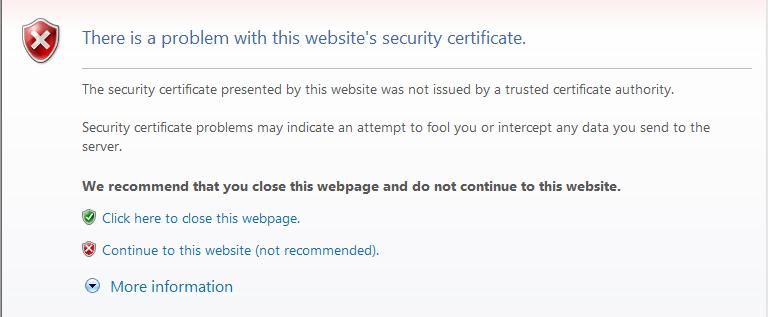
During program implementation, an error will occur with the following prompt:
The underlying connection was closed. Could not establish a secure SSL/TLS connection |
This issue can be avoided by adding a certificate trust policy:
using System.Net; |
2. Autodiscover Service
Used to simplify user configuration process. In terms of program implementation, it corresponds to ExchangeService.AutodiscoverUrl
Reference:
https://msdn.microsoft.com/en-us/library/office/dd634273(v=exchg.80).aspx
Input email address to automatically resolve the Exchange Server Url
Usage example:
ExchangeService service = new ExchangeService(ExchangeVersion.Exchange2013_SP1); |
Equivalent to
ExchangeService service = new ExchangeService(ExchangeVersion.Exchange2013_SP1); |
Note:
In actual use, if the Exchange Server disables the Autodiscover service, you can choose to specify the Url directly
3..NET Framework 4 and .NET Framework 3.5
.NET Framework 4 is the recommended development environment
Win7 system defaults to .NET Framework 3.5 and does not support .NET Framework 4
To support Win7, specify the project as .NET Framework 3.5, which does not affect the use of EWS Managed API
4. Reading the body property of emails in plain text
When reading the body property of emails (i.e., obtaining the email content), the default output format is HTML
To obtain the email content, change the output format to Text
Solution:
https://stackoverflow.com/questions/11243911/ews-body-plain-text
5. Specifying deep search when searching custom folders (traversing all folders, including deeper directories)
FindFoldersResults findResults = null; |
6. Dependency files are still required after compilation
The compiled program still requires the dependency file Microsoft.Exchange.WebServices.dll (in the same directory) during execution
0x04 Using EWS SOAP XML message
---
Official Documentation:
https://docs.microsoft.com/en-us/exchange/client-developer/exchange-web-services/get-started-with-ews-client-applications
EWS requests and responses use the SOAP (Simple Object Access Protocol) protocol
SOAP message format:
|
Corresponding EWS structure:
- Envelope element (required), serves as the identifier for SOAP messages
- Header element (optional), can be used to specify the Exchange Server version
- Body element (required), contains all call and response information
- Fault element (optional), containing error messages
C Sharp code example (sending email):
using System; |
The code reads the content of the file ems.xml and sends it, saving the result as out.xml
The content of ems.xml is for sending an email:
|
The returned content (out.xml) is shown in the figure below
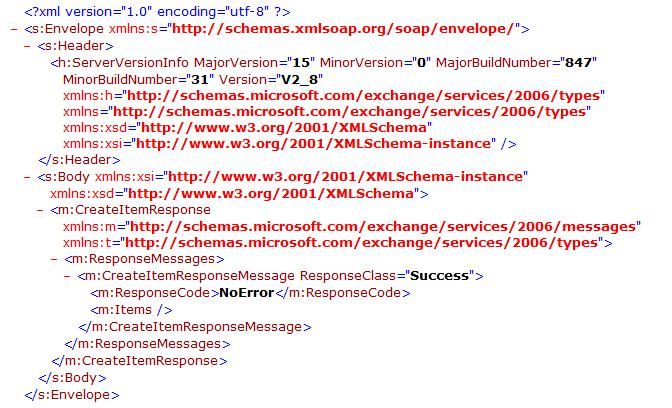
ResponseCode is NoError, indicating the operation was successful
Note:
The above code does not require dependency on the file Microsoft.Exchange.WebServices.dll
However, if you need to use the Autodiscover service, dependency on the file Microsoft.Exchange.WebServices.dll is still required
0x05 Open-source implementation code ewsManage
---
I have integrated the above two methods into a single project and added more practical features. Code download address:
An open-source project
Currently supports the following features:
- Supports EWS Managed API and EWS SOAP
- Supports logging into the mailbox using username/password or current credentials
- Supports ignoring untrusted certificates
- Lists emails in a specified location, including file names in attachments and email content
(Judges the length of email content; if it exceeds 100 characters, only the first 100 characters are displayed)
- Lists unread emails in a specified location, including file names in attachments and email content
(Judges the length of email content; if it exceeds 100 characters, only the first 100 characters are displayed)
- Lists custom folders in a specified location (traverses all subfolders)
- Views all emails under a custom folder
- Views unread emails under a custom folder
- Saves all emails in a specified location (in EML format)
- Saves attachments from a specified email (by ID)
- Add attachment to specified email (by ID)
- Delete attachment from specified email (by ID)
- Delete all attachments from specified email
- Search emails with specified keywords (common locations, search subject, attachment names, and email body)
- Delete specified email (by ID)
- View specific content of an email (by ID)
- Send email (using EWS SOAP)
- Read XML file and send commands via EWS SOAP
Supported locations for query and operation:
- Inbox
- Drafts
- Sent Items
- Deleted Items
- Outbox
- Junk Email
Usage example:
(1)
ewsManage.exe -CerValidation Yes -ExchangeVersion Exchange2013_SP1 -u test1 -p test123! -ewsPath https://test.com/ews/Exchange.asmx -Mode ListUnreadMail -Folder Inbox |
Using certificate validation, logging in via URL, viewing all unread emails in the inbox, outputting the following email information:
- Subject
- HasAttachments
- ItemId
- DateTimeCreated
- DateTimeReceived
- DateTimeSent
- DisplayCc:
- DisplayTo
- InReplyTo:
- Size
- MessageBody (if longer than 100 characters, only display the first 100 characters)
(2)
ewsManage.exe -CerValidation No -ExchangeVersion Exchange2013_SP1 -use the default credentials -AutodiscoverUrl [email protected] -Mode ListMail -Folder SentItems |
Ignore certificate validation, use current credentials for automatic login, invoke Autodiscover service, view information of all sent emails, output information categories same as (1)
Note:
Can be combined with mimikatz's Overpass-the-hash to achieve Exchange login via hash
(3)
ewsManage.exe -CerValidation No -ExchangeVersion Exchange2013_SP1 -u test1 -p test123! -ewsPath https://test.com/ews/Exchange.asmx -Mode ListFolder -Folder Inbox |
Ignore certificate validation, use URL login, view information of all custom folders in the inbox, output the following information:
- DisplayName
- Id
- TotalCount (number of emails in this custom folder)
(4)
ewsManage.exe -CerValidation No -ExchangeVersion Exchange2013_SP1 -u test1 -p test123! -ewsPath https://test.com/ews/Exchange.asmx -Mode ListMailofFolder -Id AAMaADFlMjRjMdM2LTgxZTUtNGRmZC05ZDQyLTMzNDFlMzBmZWY1NwAzAAAAAAAR9UOK286vT6HjUgukBQGmAQBHzR2O8KNmTcffGwlY0A76AAAAADfqAAA= |
View all emails in the specified custom folder (filtered by Id), output information categories same as (1)
(5)
ewsManage.exe -CerValidation No -ExchangeVersion Exchange2013_SP1 -u test1 -p test123! -ewsPath https://test.com/ews/Exchange.asmx -Mode ExportMail -Folder Inbox |
Save all emails in the Inbox as eml files
(6)
ewsManage.exe -CerValidation No -ExchangeVersion Exchange2013_SP1 -u test1 -p test123! -ewsPath https://test.com/ews/Exchange.asmx -Mode SaveAttachment -Id AAMzADFlMjRjMzM3LTgxZTUzNGRmZC25ZDQyLTMaNDFlMzBwZWY1NwBGAAAAAAAR8UOK236vT6HjUnujBQGmBwBHzR1O8KNmTrjfGwlY0A56AAAAAAEKAABHzR1O8KNmTrjfGzlY2A75AAAAABxFAAA= |
Save attachments from the specified email (filtered by Id), output path is the current directory
(7)
ewsManage.exe -CerValidation No -ExchangeVersion Exchange2013_SP1 -u test1 -p test123! -ewsPath https://test.com/ews/Exchange.asmx -Mode AddAttachment -Id AAMzADFlMjRjMzM3LTgxZTUzNGRmZC25ZDQyLTMaNDFlMzBwZWY1NwBGAAAAAAAR8UOK236vT6HjUnujBQGmBwBHzR1O8KNmTrjfGwlY0A56AAAAAAEKAABHzR1O8KNmTrjfGzlY2A75AAAAABxFAAA= -AttachmentFile 1.txt |
Add an attachment to the specified email (filtered by Id), attachment name is 1.txt
(8)
ewsManage.exe -CerValidation No -ExchangeVersion Exchange2013_SP1 -u test1 -p test123! -ewsPath https://test.com/ews/Exchange.asmx -Mode DeleteAttachment -Id AAMzADFlMjRjMzM3LTgxZTUzNGRmZC25ZDQyLTMaNDFlMzBwZWY1NwBGAAAAAAAR8UOK236vT6HjUnujBQGmBwBHzR1O8KNmTrjfGwlY0A56AAAAAAEKAABHzR1O8KNmTrjfGzlY2A75AAAAABxFAAA= -AttachmentFile 1.txt |
Delete a specific attachment from the specified email (filtered by Id), attachment name is 1.txt
(9)
ewsManage.exe -CerValidation No -ExchangeVersion Exchange2013_SP1 -u test1 -p test123! -ewsPath https://test.com/ews/Exchange.asmx -Mode ClearAllAttachment -Id AAMzADFlMjRjMzM3LTgxZTUzNGRmZC25ZDQyLTMaNDFlMzBwZWY1NwBGAAAAAAAR8UOK236vT6HjUnujBQGmBwBHzR1O8KNmTrjfGwlY0A56AAAAAAEKAABHzR1O8KNmTrjfGzlY2A75AAAAABxFAAA= |
Delete all attachments from the specified email (filtered by Id)
(10)
ewsManage.exe -CerValidation No -ExchangeVersion Exchange2013_SP1 -u test1 -p test123! -ewsPath https://test.com/ews/Exchange.asmx -Mode SearchMail -String vpn |
Search for emails with the specified keyword 'vpn'
Folder location:
- Inbox
- Drafts
- Sent Items
- Deleted Items
- Outbox
- Junk Email
Email location:
- Subject
- Attachment Name
- Email Body
(11)
ewsManage.exe -CerValidation No -ExchangeVersion Exchange2013_SP1 -u test1 -p test123! -ewsPath https://test.com/ews/Exchange.asmx -Mode DeleteMail -Id AAMzADFlMjRjMzM3LTgxZTUzNGRmZC25ZDQyLTMaNDFlMzBwZWY1NwBGAAAAAAAR8UOK236vT6HjUnujBQGmBwBHzR1O8KNmTrjfGwlY0A56AAAAAAEKAABHzR1O8KNmTrjfGzlY2A75AAAAABxFAAA= |
Completely delete specified email (filtered by Id)
(12)
ewsManage.exe -CerValidation No -ExchangeVersion Exchange2013_SP1 -u test1 -p test123! -ewsPath https://test.com/ews/Exchange.asmx -Mode ViewMail -Id AAMzADFlMjRjMzM3LTgxZTUzNGRmZC25ZDQyLTMaNDFlMzBwZWY1NwBGAAAAAAAR8UOK236vT6HjUnujBQGmBwBHzR1O8KNmTrjfGwlY0A56AAAAAAEKAABHzR1O8KNmTrjfGzlY2A75AAAAABxFAAA= |
View specific content of an email (specified ID), including complete body content
(13)
ewsManage.exe -CerValidation No -ExchangeVersion Exchange2013_SP1 -u test1 -p test123! -ewsPath https://test.com/ews/Exchange.asmx -Mode ReadXML -Path ews.xml |
Read commands from ews.xml file and send via EWS SOAP
0x06 Summary
---
This article introduces two methods for accessing Exchange resources, and the open-source project ewsManage, facilitating subsequent secondary development.


