
0x00 Preface
---
In the previous article 'Domain Penetration - Local Administrator Password Solution', we analyzed the exploitation of LAPS. The greatest advantage of using LAPS is that it ensures each domain host has a different password, which is regularly changed.
So, if LAPS is not configured within the domain, how can the local administrator passwords of domain hosts be set in bulk? What exploitable aspects exist in this process?
This article will introduce how to recover passwords stored in Group Policy using SYSVOL, analyze the technical details, and finally provide defense recommendations.
0x01 Introduction
---
This article will cover the following topics:
- Introduction to the domain shared folder \\SYSVOL
- Methods for domain administrators to modify local administrator passwords of domain hosts in bulk
- Exploitable aspects in Group Policy
- Practical testing
- Defense recommendations
0x02 Introduction to the Domain Shared Folder \\SYSVOL
---
Within a domain, there exists a default shared path:
\\
All hosts within the domain can access it, storing Group Policy-related data, including login script configuration files, etc.
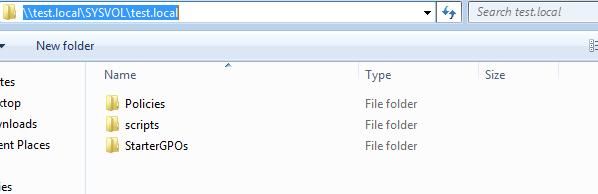
For example, if the test host's domain is test.local, the shared folder \\test.local\SYSVOL\test.local can be accessed, as shown in the figure below.
0x03 Method for Domain Administrators to Batch Modify Local Administrator Passwords on Domain Hosts
---
1. Testing Server 2003 System
For Server 2003, to batch modify local administrator passwords on domain hosts, it is often done by configuring Group Policy to execute a VBS script.
Here is a VBS script for changing passwords (implementation methods may vary), with the code as follows:
strComputer = "." |
The biggest drawback of this implementation is that the modified password is stored in plaintext in the VBS script.
And this VBS script is usually saved in the shared folder \\SYSVOL.
This creates a potential risk:
Any domain user can read the VBS script, thereby obtaining the plaintext password stored in the script.
2. Testing Server 2008 System
For Server 2008, a new feature was added, allowing the use of Group Policy Preferences to configure group policies for batch modification of local administrator passwords. The specific method is as follows:
Start - Administrative Tools - Group Policy Management
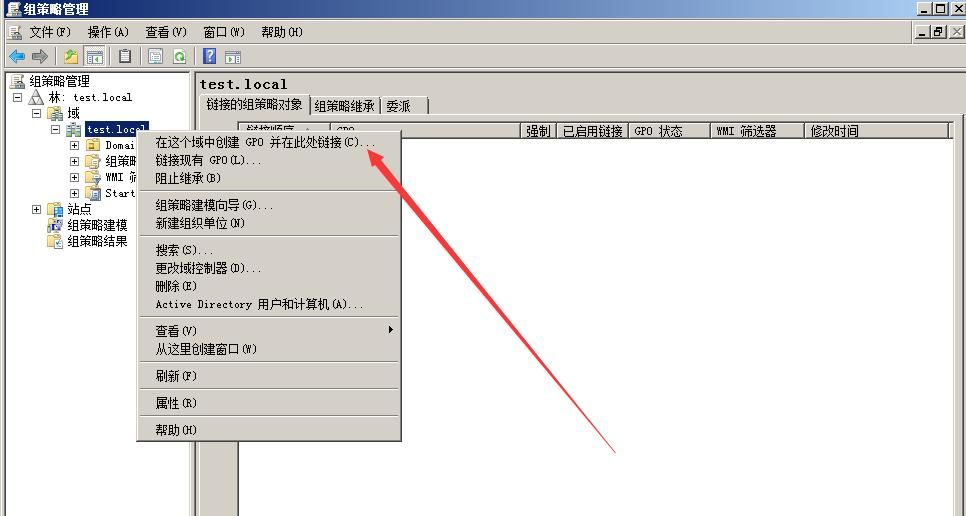
Select the domain test.local, right-click, and choose 'Create a GPO in this domain, and Link it here', as shown in the figure below.
Set the name as test6
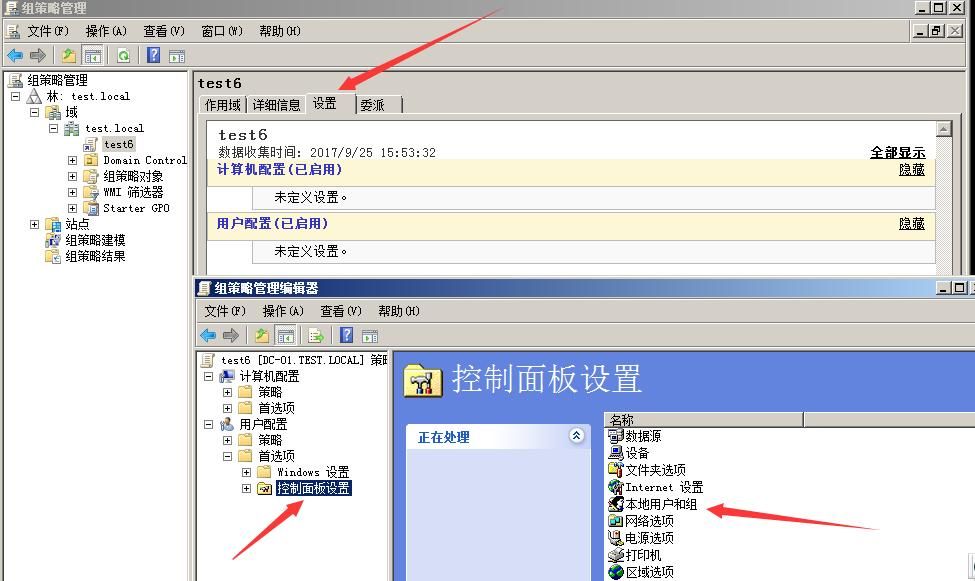
test6 - Settings - Right-click - Edit - User Configuration - Preferences - Control Panel Settings - Local Users and Groups, as shown in the figure below.
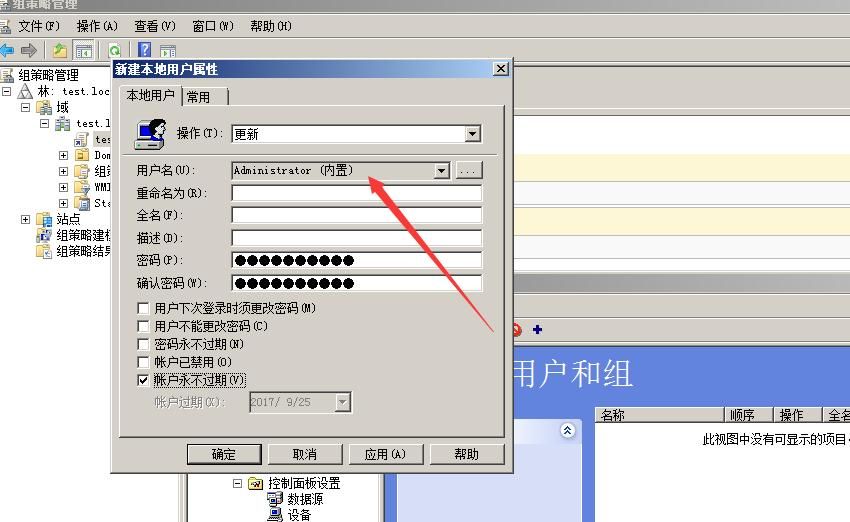
Update, administrator (built-in), set password, as shown in the figure below.
Delegation, set permissions.
In the details section, you can see that the policy corresponds to ID {E6424F10-C44B-4C45-8527-740189CBF60E}
As shown in the figure below
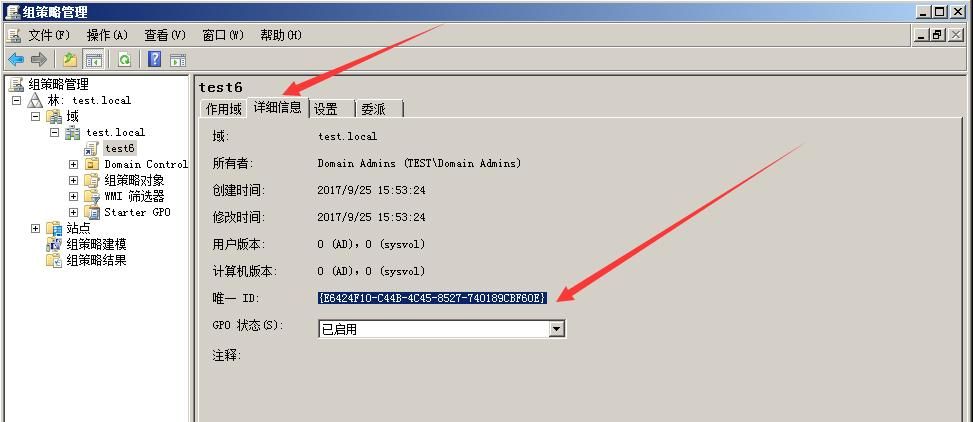
At this point, the Group Policy configuration is complete. Domain hosts will apply this policy upon re-login
In the shared folder \\SYSVOL, you can see the folder corresponding to the Group Policy ID, as shown below
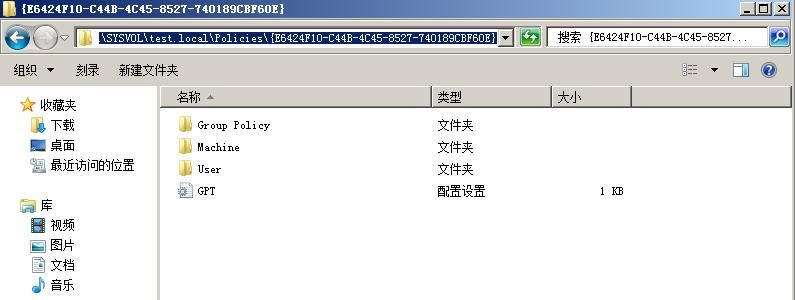
Since we just modified the Control Panel under user configuration, we can find the configuration file Groups.xml in the corresponding folder. The specific path is as follows:
\\test.local\SYSVOL\test.local\Policies\{E6424F10-C44B-4C45-8527-740189CBF60E}\User\Preferences\Groups
The content of Groups.xml is as follows:
|
As shown in the figure below
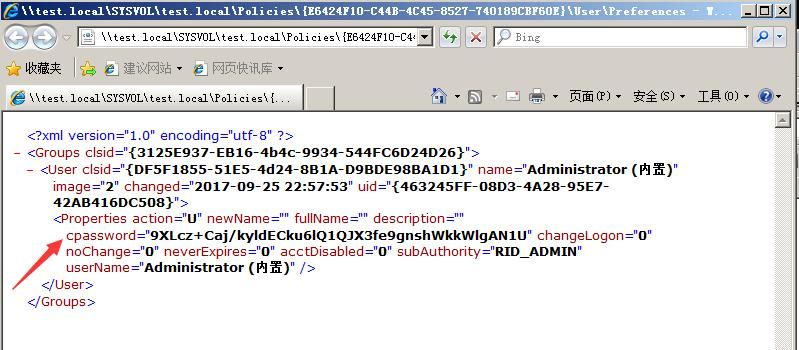
Notably, the cpassword item stores the encrypted content "9XLcz+Caj/kyldECku6lQ1QJX3fe9gnshWkkWlgAN1U"
The encryption method is AES 256. Although AES 256 is currently difficult to crack, Microsoft has chosen to publicly disclose the private key for this AES 256 encryption. The address is as follows:
https://msdn.microsoft.com/en-us/library/cc422924.aspx
With this private key, we can restore the plaintext
The restoration method can use the PowerShell script open-sourced by Chris Campbell @obscuresec. The address is as follows:
https://raw.githubusercontent.com/PowerShellMafia/PowerSploit/master/Exfiltration/Get-GPPPassword.ps1
This script can be executed on a domain host, automatically querying files in the shared folder \SYSVOL and restoring all plaintext passwords
Test as shown in the figure below
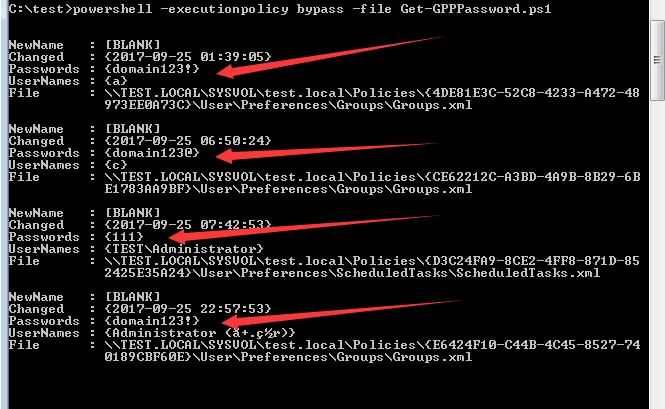
Of course, just to decrypt cpassword="9XLcz+Caj/kyldECku6lQ1QJX3fe9gnshWkkWlgAN1U", we can simplify the functionality of the above PowerShell script
The simplified code is as follows:
function Get-DecryptedCpassword { |
The decrypted plaintext password is domain123!, as shown in the figure below

0x04 Exploitable Areas in Group Policy
---
Exploitable areas in Group Policy are not limited to the location for modifying administrator passwords, but also include the following:
Services\Services.xml
- http://msdn.microsoft.com/en-us/library/cc980070(v=prot.13)
ScheduledTasks\ScheduledTasks.xml
- http://msdn.microsoft.com/en-us/library/cc422920(v=prot.13)
- http://msdn.microsoft.com/en-us/library/dd341350(v=prot.13)
- http://msdn.microsoft.com/en-us/library/dd304114(v=prot.13)
Printers\Printers.xml
- http://msdn.microsoft.com/en-us/library/cc422918(v=prot.13)
Drives\Drives.xml
- http://msdn.microsoft.com/en-us/library/cc704598(v=prot.13)
DataSources\DataSources.xml
- http://msdn.microsoft.com/en-us/library/cc422926(v=prot.13)
Note:
Location referenced from https://webcache.googleusercontent.com/search?q=cache:MUNO5X9hSwUJ:rewtdance.blogspot.com/2012/06/exploiting-windows-2008-group-policy.html+&cd=6&hl=en&ct=clnk&gl=us
However, the above location is not absolute; during configuration, it is necessary to enter the username and password in the Group Policy, and the corresponding Groups.xml will contain the cpassword attribute, which can then be used to restore the plaintext password
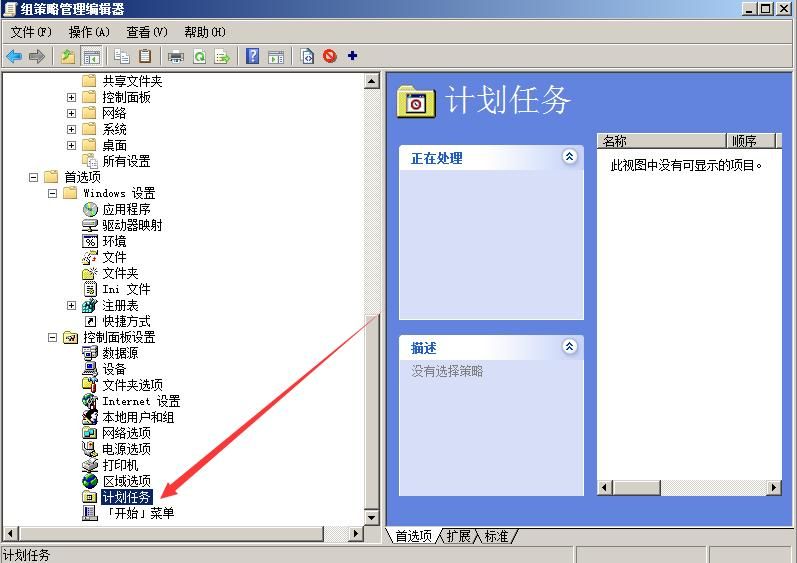
Take scheduled tasks as an example, corresponding to ScheduledTasks.xml
The Group Policy configuration location is: User Configuration - Preferences - Control Panel Settings - Scheduled Tasks
As shown in the figure below
When creating a new task, it is necessary to select 'Run as' and enter the username and password, as shown in the figure below
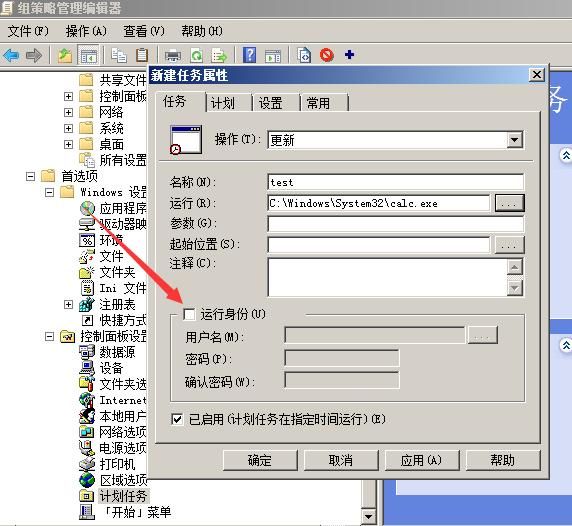
Otherwise, it will not contain the cpassword attribute, as shown in the figure below
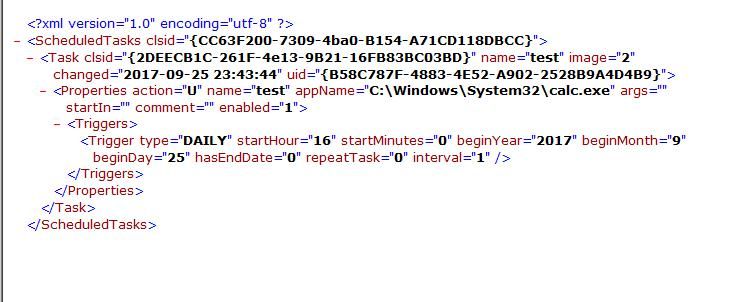
Now enter a test password (the password is testsuccess!, fake), as shown in the figure below
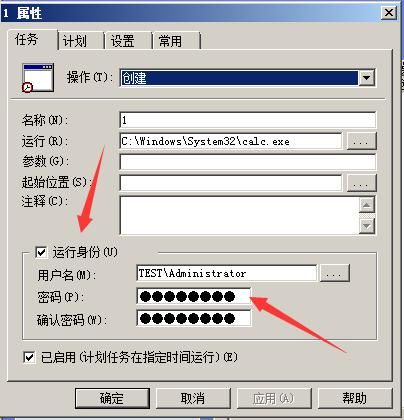
The corresponding ScheduledTasks.xml will also contain the cpassword attribute, as shown in the figure below
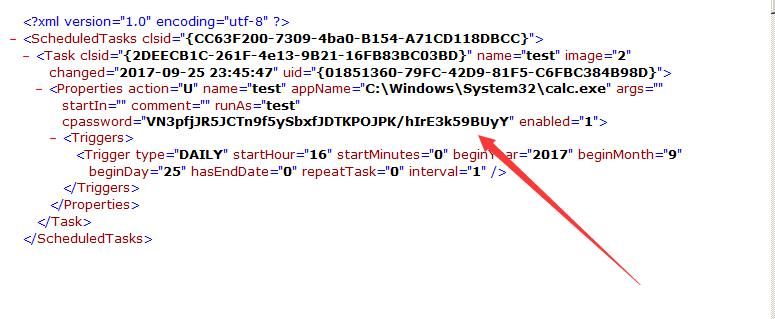
Use PowerShell to decrypt it and restore the password as testsuccess!
Thus, it is concluded that:
When domain administrators use Group Policy to manage domain hosts in bulk, if a password needs to be entered during the configuration of the Group Policy, that password will be saved to the shared folder \\SYSVOL, which is accessible by all domain users by default. Although encrypted, it can be easily decrypted.
This creates a security risk. In practice, domain administrators often use domain administrator passwords in Group Policy, making the passwords in Group Policy configuration files easily obtainable and leading to privilege escalation.
To address this, Microsoft released patch KB2962486, available for download at:
https://technet.microsoft.com/library/security/ms14-025
After applying the patch, usernames and passwords can no longer be set in Group Policy, as shown in the following images:
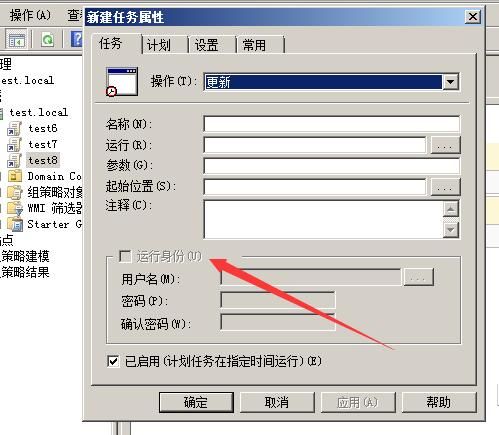
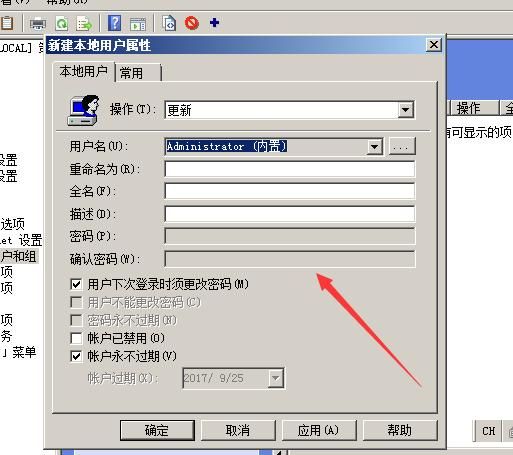
Of course, the XML files in the shared folder \\SYSVOL will no longer contain the cpassword attribute.
Note:
XML files will still synchronize with Group Policy.
0x05 Defense
---
Based on the attack methods, the following defense options are available:
1. Use LAPS to manage local administrator accounts on domain hosts in bulk.
2. Install patch KB2962486 on domain controllers
3. Do not use domain controller passwords in Group Policy
4. Set access permissions for the shared folder \\SYSVOL
5. Use PsPasswd to batch modify local administrator passwords of hosts in the domain
0x06 Summary
---
This article explains how to recover passwords stored in Group Policy using SYSVOL and provides defense recommendations. If an attacker obtains the local administrator password of a domain user, it can be used by default for remote login within the domain.


