
0x00 Preface
---
Covenant is a .NET-developed C2 (command and control) framework that utilizes the .NET Core development environment, supporting not only Linux, macOS, and Windows but also Docker containers.
Its most distinctive feature is support for dynamic compilation, enabling the upload of input C# code to the C2 Server, obtaining the compiled file, and loading it from memory using Assembly.Load().
This article solely introduces the details of Covenant and analyzes its characteristics from a technical research perspective.
0x01 Introduction
---
This article will cover the following:
- Covenant Startup Methods
- Covenant Feature Introduction
- Covenant Advantages
- Covenant Detection
0x02 Covenant Startup Methods
---
1. Windows System
Requires installation of corresponding versions of .NET Core, ASP.NET Core, and SDK
Testing shows Covenant requires .NET Core 2.2.0, ASP.NET Core 2.2.0, and SDK 2.2.101; other versions will cause errors
Download links:
https://dotnet.microsoft.com/download/thank-you/dotnet-sdk-2.2.101-windows-x64-installer
https://dotnet.microsoft.com/download/thank-you/dotnet-runtime-2.2.0-windows-x64-installer
https://dotnet.microsoft.com/download/thank-you/dotnet-runtime-2.2.0-windows-x64-asp.net-core-runtime-installer
Install Git for Windows
https://github.com/git-for-windows/git/releases/download/v2.23.0.windows.1/Git-2.23.0-64-bit.exe
Download and launch:
git clone --recurse-submodules https://github.com/cobbr/Covenant |
Access https://localhost:7443 to enter the control panel; user registration is required for first-time use
Multiple users can be registered here to enable team collaboration
Note:
Elite is a command-line program for interacting with the Covenant server, which is currently temporarily deprecated. Address:
https://github.com/cobbr/Elite
0x03 Introduction to Covenant Features
---
For the features supported by Covenant, refer to:
https://github.com/cobbr/Covenant/wiki
Here, only the parts considered more important are introduced
1. Listeners
Only HTTP protocol is supported, allowing specification of URLs and communication message formats
Select Listeners->Profiles, which includes two default configuration templates, as shown in the figure below
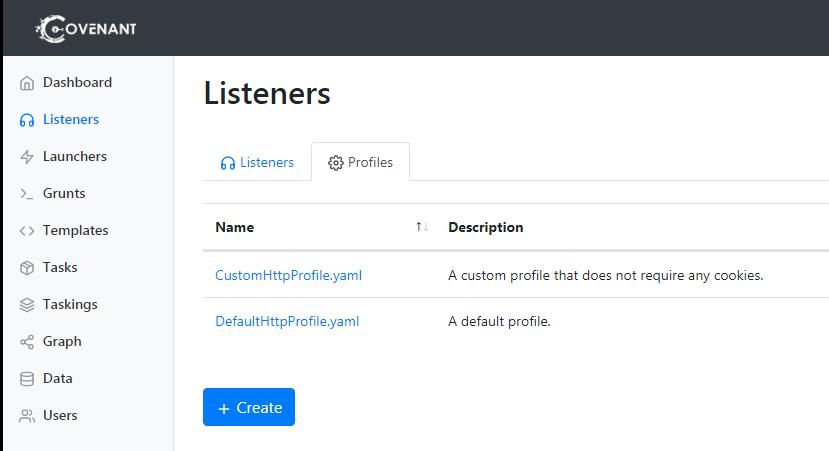
Multiple HttpUrls can be set in the configuration template; Grunt will randomly select from HttpUrls when connecting back
Note:
Grunt is used for deployment to targets as the controlled endpoint
Both HttpRequest and HttpResponse content can be specified
Configuration template corresponds to source file location: .\Covenant\Covenant\Data\Profiles
2. Launchers
Used to launch Grunt, including the following 9 launch methods:
(1) Binary
.NET assembly, formatted as exe file
(2) PowerShell
Launch Grunt via PowerShell in command line
Store .NET assembly in array, load in memory via Assembly.Load()
Code example:
[Reflection.Assembly]::Load(Data).EntryPoint.Invoke(0,$a.ToArray()) |
(3) MSBuild
Launch Grunt via msbuild in command line
Launch command example:
C:\Windows\Microsoft.NET\Framework\v4.0.30319\msbuild.exe GruntStager.xml |
Save the .NET assembly in an array and load it in memory via Assembly.Load()
Code example:
System.Reflection.Assembly.Load(oms.ToArray()).EntryPoint.Invoke(0, new object[] { new string[]{ } }); |
For usage of msbuild, refer to the previous article 'Use MSBuild To Do More'
(4) InstallUtil
Launch Grunt via InstallUtil from the command line
Note:
A bug occurred during my testing here, generating a file named GruntStager.xml containing the base64-encrypted .NET assembly
Based on my understanding of InstallUtil's usage, a .cs file should be generated here
Check the Covenant source code, the template generation source location: .\Covenant\Covenant\Models\Launchers\InstallUtilLauncher.cs
Corresponding link:
https://github.com/cobbr/Covenant/blob/master/Covenant/Models/Launchers/InstallUtilLauncher.cs
The template includes the content of the .cs file, as shown in the figure below
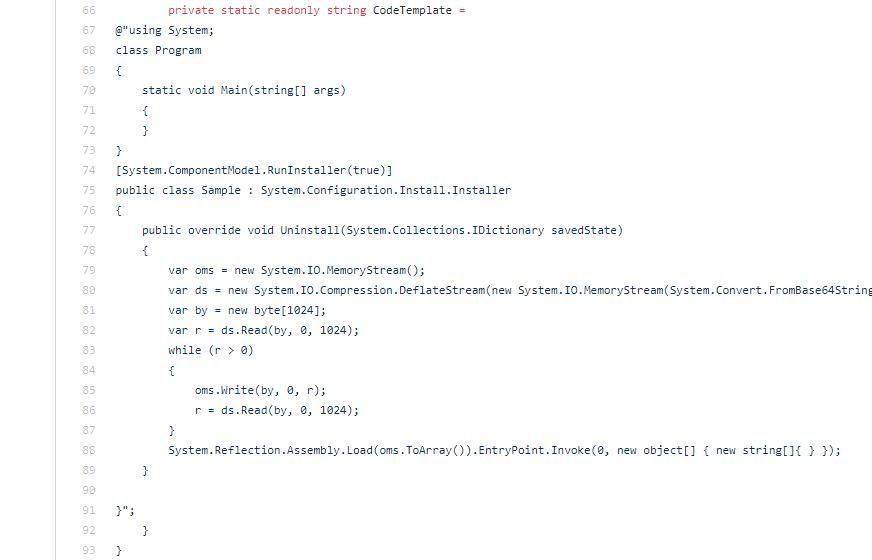
Here you can save the content of CodeTemplate as a .cs file, replace "{{GRUNT_IL_BYTE_STRING}}" with a base64-encrypted .NET assembly, and finally save it as test.cs
Example startup command:
C:\Windows\Microsoft.NET\Framework64\v4.0.30319\csc.exe /unsafe /out::file.dll test.cs |
(5) Wmic
Example startup command:
wmic os get /format:"file.xsl" |
Note:
Covenant indicates here that this method may not work on Windows 10 and Windows Server 2016
Save the .NET assembly in an array and load it in memory via the DotNetToJScript method
Code example:
var o = delegate.DynamicInvoke(array.ToArray()).CreateInstance('Grunt.GruntStager'); |
For usage of Wmic, refer to the previous article 'Analysis and Utilization of Calling XSL Files via Wmic'
(6) Regsvr32
Example startup command:
regsvr32 /u /s /i:file.sct scrobj.dll |
Note:
Covenant notes here that this method may not work on Windows 10 and Windows Server 2016
Save the .NET assembly in an array and load it in memory via the DotNetToJScript method
For usage of Regsvr32, refer to the previous article "Use SCT to Bypass Application Whitelisting Protection"
(7) Mshta
Start command example:
mshta file.hta |
Note:
Covenant notes here that this method may not work on Windows 10 and Windows Server 2016
Save the .NET assembly in an array and load it in memory via the DotNetToJScript method
For usage of Mshta, refer to the previous article "Penetration Techniques - Multiple Methods for Downloading Files from GitHub"
(8) Cscript
Start command example:
cscript file.js |
DotNetToJScript is utilized here, other content remains the same as above
(9) Wscript
Start command example:
wscript file.js |
DotNetToJScript is utilized here, other content remains the same as above
All 9 startup methods above can choose from the following two templates:
(1) GruntHTTP
Communicates with C2 server using HTTP protocol
After execution, establishes reverse connection to C2 server
The following parameters can be set:
- ValidateCert
- UseCertPinning
- Delay
- JitterPercent
- ConnectAttempts
- KillDate
- DotNetFrameworkVersion
(2)GruntSMB
Uses named pipes, does not communicate directly with the C2 server, but communicates between various Grunts
After execution, creates a named pipe on the local machine, which can be remotely connected to by other Grunts
Here is an additional configuration parameter:
SMBPipeName |
Usage example:
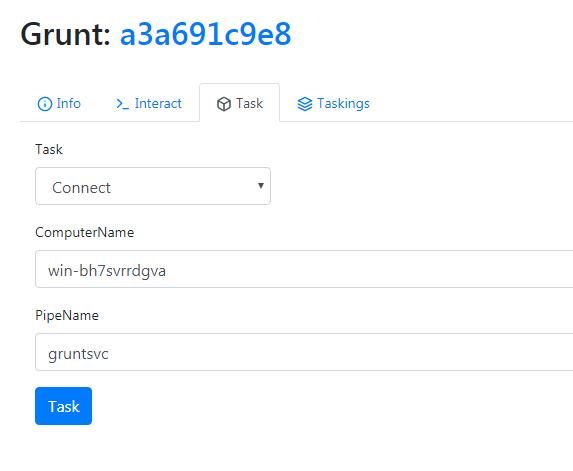
GruntSMB is for internal network use and can be activated by other Grunts. Activation method:
Grunt:
As shown in the figure below
3.Grunts
List of all Grunts, control commands can be sent to Grunts
(1)Info
Basic information about Grunt
(2) Interact
Command-line control interface
(3) Task
Features supported by Grunt, with multiple built-in open-source tools:
- Rubeus
- Seatbelt
- SharpDPAPI
- SharpDump
- SharpSploit
- SharpUp
- SharpWMI
(4) Taskings
Record the execution status of each command
4. Templates
Grunt's template files, which by default include GruntHTTP and GruntSMB
Here you can modify template files or add new ones
5.Tasks
Task template files, as features supported by Grunt, include multiple built-in open-source tools:
- Rubeus
- Seatbelt
- SharpDPAPI
- SharpDump
- SharpSploit
- SharpUp
- SharpWMI
Here you can modify template files or add new ones
6.Taskings
Records all command execution statuses of Grunts
7.Graph
Graphical page displaying the connection relationships between Grunt and Listener
8.Data
Display valuable information obtained from Grunt
9.Users
Manage logged-in users for team collaboration
0x04 Advantages of Covenant
---
1.C2 Server supports multiple platforms
C2 Server supports not only Linux, macOS, and Windows but also Docker containers
2.High scalability
Customizable communication protocols, startup methods, and functionalities
3.Extended functionalities can be executed directly in memory
Through dynamic compilation, the C2 Server can dynamically compile code and send it to the target, then load it from memory using Assembly.Load()
4.Supports intranet communication with unified traffic egress
Communication between controlled endpoints within the intranet is conducted via named pipes, unifying traffic egress and hiding communication channels
5. Facilitates team collaboration
Supports multiple users, enabling resource sharing
0x05 Covenant Detection
---
1. Detecting .NET assembly execution
Because it requires the Rosyln C# compiler, it references the Microsoft.CodeAnalysis assembly
Here, you can attempt to collect .NET events from specified processes, reference script:
https://gist.github.com/cobbr/1bab9e175ebbc6ff93cc5875c69ecc50
2. Detecting named pipe usage
Detecting traffic from remote connections via named pipes
Remote connections via named pipes generate logs with Event ID 18, reference address:
https://github.com/hunters-forge/OSSEM/blob/master/data_dictionaries/windows/sysmon/event-18.md
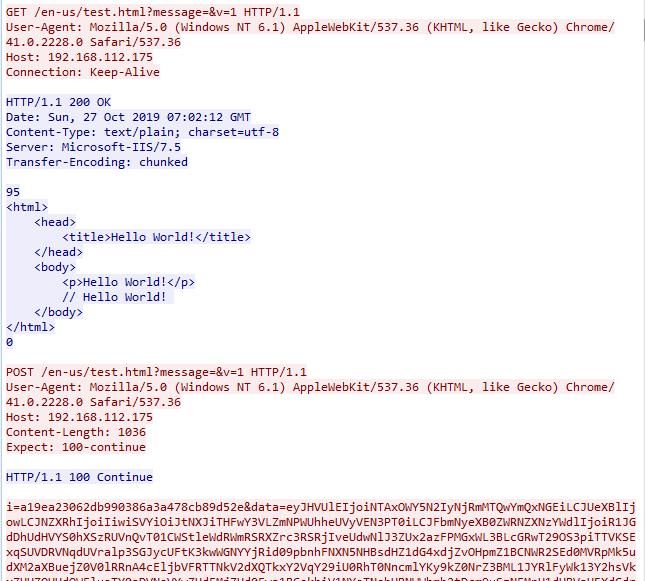
3. HTTP communication traffic
The default communication template has identifiable characteristics, as shown in the image below
0x06 Summary
---
This article details Covenant, analyzes its features, and highlights its high scalability, making it very convenient for secondary development.


